Cost Allocation Bill
Baixar
Modo Foco
Tamanho da Fonte
Cost Allocation Bill Overview
Cost allocation means users' redistribution of fees or costs of cloud resources in their bills based on their own management or analysis needs. A cost allocation bill is a bill with finer granularity after redistribution.
Tencent Cloud achieves cost allocation by setting cost allocation units and cost allocation tags. For the setting of cost allocation units and cost allocation tags, see the documentation of Cost Allocation Units and Cost Allocation Tags.
Cost Allocation Bill Feature Description
Cost allocation bills contain detailed expense breakdowns of all cost allocation units, clearly displaying each department or project's cloud resource usage and cost proportion. Through cost allocation bills, enterprises can more accurately understand the cloud resource consumption of each department or project, thereby enabling better budgeting and cost control. You can select the billing period, statistical dimension, and statistical cycle of cost allocation bills as needed to view them.
Cost allocation results are summarized across four dimensions: Overview, Product, Resource, and Component. The statistical period supports monthly and daily dimensions.
It supports viewing collected cost, shared cost, and total cost separately.
It supports viewing the cost proportion, MoM, and trends of cost changes.
Note:
If the user's activation date is after the 3rd, the cost allocation billing data is available for data queries from the activation month. If the user's activation date is before the 3rd, the cost allocation billing data is available for data queries from the month before the activation month.
Cost allocation bills are issued on a T+1 basis and can be checked after 9 AM daily for the previous day's data. Monthly bills are issued on the 2nd of the following month. It is recommended to check the previous month's cost allocation bills after 9 AM on the 4th.
Cost allocation units and collection rules are saved monthly. Modifications to the current month's cost allocation units and rules must be completed by the 3rd day of the following month. After the 3rd, the previous month's billing data will no longer be updated.
Operation Steps
1. Log in to the Billing Center console.
2. In the left sidebar, choose Cost Allocation Management > Cost Allocation Bill.
3. Select the data scope to query: period, statistical dimension, and statistical period.
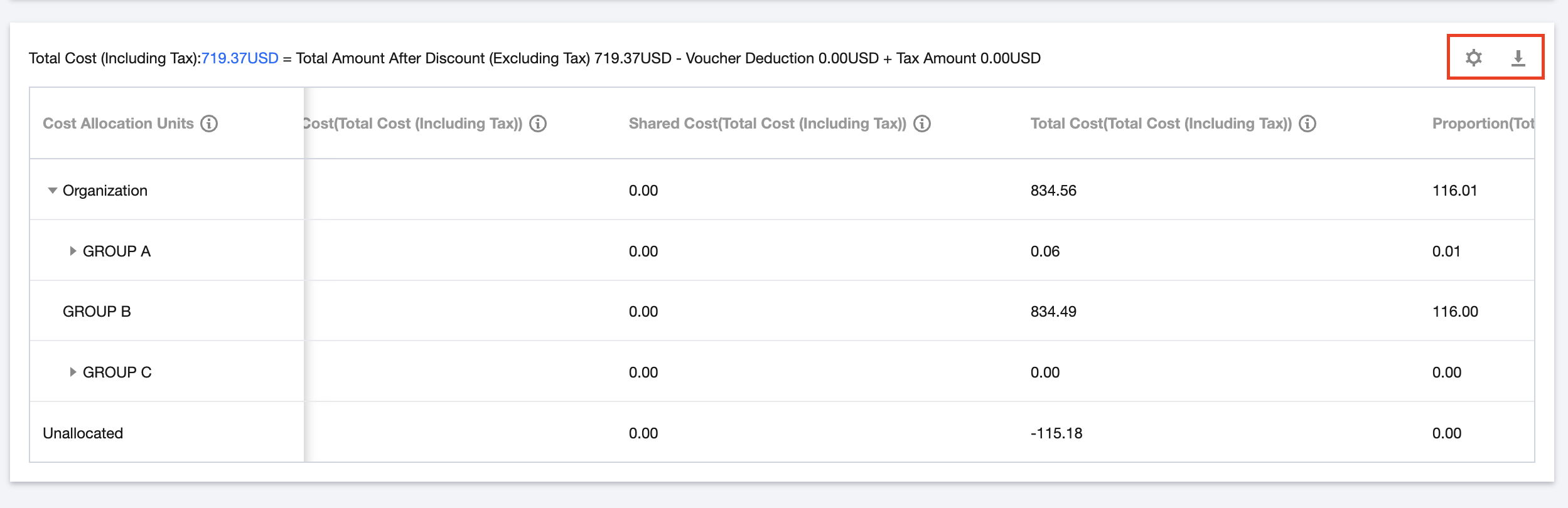
4. Click the Custom Field Settings button, select the fields you want to view, deselect the fields you do not want to view, and then click Save.
5. Click the Export button and go to the export record page to download the file.
Field Description
Chinese name of the field | Field Description |
Cost Allocation Units | Organizational unit name set by the customer for cost allocation |
Date | The settlement date |
Cost Allocation Type | Cost source type:allocated, collected, unallocated |
Collected Cost(Total Amount After Discount (Excluding Tax)) | The total amount after discount (excluding tax) directly collected to the cost allocation unit based on collection rules |
Shared Cost(Total Amount After Discount (Excluding Tax)) | The total amount after discount (excluding tax) shared to the cost allocation unit based on sharing rules |
Total Cost(Total Amount After Discount (Excluding Tax)) | Total Cost (Total Amount After Discount (Excluding Tax)) = Collected Cost (Total Amount After Discount (Excluding Tax)) + Shared Cost (Total Amount After Discount (Excluding Tax)) |
Collected Cost(Voucher) | Resource voucher pay directly collected to cost allocation units based on collecting rules |
Shared Cost(Voucher) | Resource voucher pay allocated to cost allocation units based on allocation rules |
Total Cost (Voucher) | Total cost allocation unit cost, Collected Cost(Voucher)+Shared Cost(Voucher) |
Collected Cost(Tax Amount) | The tax amount directly collected to the cost allocation unit based on collection rules |
Shared Cost(Tax Amount) | The tax amount shared to the cost allocation unit based on sharing rules |
Total Cost(Tax Amount) | Total Cost (Tax Amount) = Collected Cost (Tax Amount) + Shared Cost (Tax Amount) |
Collected Cost(Total Cost (Including Tax)) | Cash expenditure (including tax) directly collected to cost allocation units based on collecting rules |
Shared Cost(Total Cost (Including Tax)) | Cash expenditure (including tax) allocated to cost allocation units based on sharing rules |
Total Cost (Total Cost (Including Tax)) | Cost allocation unit cash expenditure (including tax), Collected Cost(Total Cost (Including Tax))+Shared Cost(Total Cost (Including Tax)) |
Proportion(Total Cost (Including Tax)) | Total Cost of This Cost Allocation Unit (Cash Expenditure (Including Tax))/Total Cost(Total Cost (Including Tax)) |
MoM(Total Cost (Including Tax)) | [This month's total cost of the cost allocation unit (Total Cost (Including Tax)) - Last month's total cost of the cost allocation unit (Total Cost (Including Tax)] / Last month's total cost of the cost allocation unit (Total Cost (Including Tax)) * 100% |
Trends | Changes in expenses over the past six months |
Payer Account ID | The account ID of a payer, which is the unique identifier of a Tencent Cloud user |
Owner Account ID | The account ID of an actual resource user |
Operator Account ID | The account ID of an operator (the ID or role ID of the resource account activated by pre-paid resource ordering or pay-as-you-go operation) |
Product Name | The name of a Tencent Cloud product purchased by the user, such as CVM |
Subproduct name | The subcategory of a Tencent Cloud product purchased by the user, such as CVM – Standard S1 |
Billing Mode | The billing mode, which can be yearly/monthly subscription or pay-as-you-go |
Project Name | The project to which a resource belongs, which is user-designated. If a resource has not been assigned to a project, it will automatically belong to the default project |
Region | The region to which a resource belongs, such as South China (Guangzhou) |
Availability Zone | The availability zone to which a resource belongs, such as Guangzhou Zone 3 |
Instance ID | The object ID of a billed resource, such as a CVM instance ID. This object ID may vary due to the various types of resources across different products |
Instance Name | User-defined name for resources in the console. If not set, it defaults to empty |
Instance Type | The instance type of a product or service purchased, which can be resource package, RI, SP, or spot instance. Other instance types are displayed as "-" by default |
Transaction Type | Detailed transaction type |
Transaction ID | The ID of a settlement bill |
Transaction Time | The settlement cost deduction time |
Usage Start Time | The time at which product or service usage starts |
Usage End Time | The time at which product or service usage ends |
Configuration Description | The name and usage of each component under the corresponding resource (total usage if the component is billed by cumulative usage) |
Component Configuration | Information on resource allocation specifications |
Component Type | The component type of a product or service purchased |
Component Name | The specific component of a product or service purchased |
Component List Price | The listed unit price of a component. If a customer has applied for a fixed preferential price or contract price, this will be displayed as "-" |
Component Contracted Price | The contracted unit price of a component. Component contracted price = List price x Discount |
Component Price Measurement Unit | The unit of measurement for a component price, which is composed of USD, usage unit, and duration unit |
Component Usage | The actually settled usage of a component. Component usage = Raw usage - Deducted usage (including packages) |
Component Usage Unit | The unit of measurement for component usage |
Usage Duration | The resource usage duration. Usage duration = Raw usage duration - Deducted duration (including packages) |
Duration Unit | The unit of measurement for usage duration |
Additional Attribute | Displays descriptive information other than price attribute and component configuration, such as the models that can be deducted by reserved instances and the resource ID (serialid) of products before they are split |
Original Cost (USD) | Original cost of a component = Component List price x Component Usage x Usage duration. If a customer has applied for a fixed preferential price or contract price, or is in a refund scenario, this will be displayed as "-" |
RI Deduction (Duration) | The usage duration deducted by RI |
RI Deduction (Cost)(USD) | The amount deducted from the original cost by RI |
SP Deduction | The savings plan deduction amount |
SP Deduction Rate | The discount multiplier applicable to the component based on the remaining commitment of the savings plan |
SP Deduction (Cost) (USD) | SP deduction (cost) = Cost deduction by SP / SP deduction rate |
Discount Multiplier | The discount multiplier applied to the cost of the resource. If a customer has applied for a fixed preferential price or contract price, or is in a refund scenario, this will be displayed as "-" |
Blended Discount Multiplier | The final discount multiplier that is applied after combining multiple discount types. Blended discount multiplier = Total amount after discount / Original cost |
Currency | The currency used for the settlement of a component |
Total Amount After Discount (Excluding Tax) | Total Amount After Discount (Excluding Tax) = [Original Cost - RI Deduction (Cost) - SP Deduction (Cost)] * Discount Multiplier |
Voucher Deduction (USD) | The voucher deduction amount (such as promo vouchers and cash vouchers) |
Amount Before Tax | The pre-tax amount after vouchers are deducted |
Tax Rate | Tax Rate |
Tax Amount | Tax Amount |
Total Cost (Including Tax) | Total resource cost (including tax) after discount, which is Original Cost x Discount Multiplier x (1 + Tax Rate), or Component Unit Price x Component Usage x Usage Duration x (1 + Tax Rate) |
Tag Key 1-N | All tags bound to a resource |
Tag Key: xxx | Tags bound to the resource. For details, see Cost Allocation Tag |
Order ID | The ID of a yearly/monthly subscription order |
Associated Transaction Document ID | The ID of the document associated with a transaction, such as the original purchase order corresponding to a refund order |
Price Attribute | A set of attributes which will determine the price of a component, apart from unit price and usage duration |
Original Usage/duration | The original usage of components before package deduction (can only be displayed for TRTC, TEM, TCCC, and products in the cloud dedicated zone) |
Deducted Usage/Duration (including resource packages) | Component usage deducted by resource packages. (Currently only TRTC, Tencent Cloud Elastic Microservice, Tencent Cloud Call Center, and CDZ products are displayed) |
Calculation Description | Detailed calculation explanation for billing and settlement of special transaction types, such as refunds and configuration adjustment |
Billing Rule | Official website links for detailed billing rules of each product |
Product Code | The code corresponding to the Product Name field |
Subproduct Code | The code corresponding to the Subproduct Name field |
Component Type Code | The code corresponding to the Component Type field |
Component Code | The code corresponding to the Component Name field |
Bill Month | It is used to record the bill month, such as 2024-01 |
Region ID | The ID corresponding to the Region field |
Availability Zone ID | The ID corresponding to the Availability Zone field |
Discount Object | The discount object for the current consumption item, such as Official website discount, User discount, and Event discount |
Discount Type | The discount type for the current consumption item, such as discount or contract price |
Discount Content | Supplementary description of the Discount Type, such as 20% business discount which indicates that the Discount Type is Discount and the Discount Content is 0.8 |
Ajuda e Suporte
Esta página foi útil?
Você também pode entrar em contato com a Equipe de vendas ou Enviar um tíquete em caso de ajuda.
comentários