(CLS) supports two pay-as-you-go (postpaid) billing modes, and you can choose one based on your business needs.
Note:
If you want to know how much it will cost for an expected resource usage, you can use the Price Calculator to estimate costs and export the estimation list.
Billing is itemized by actual feature usage, with no free storage period. Billable items include write traffic, index traffic, log storage usage, index storage usage, and other dimensions.
Users who need precise control over product features and prefer to pay based on actual usage of individual items.
For example, control the index traffic volume and costs by controlling the proportion of log fields for which indexing is enabled.
Billing is based on the volume of reported raw logs (uncompressed), with a 30-day free storage period. Billable items are few and calculation is simple, eliminating the need to focus on technical details such as log indexing.
Only log topics are supported (metric topics are not supported).
After logs are reported, full-text search is required. Users do not want to focus on technical details such as log indexing and expect to calculate product costs simply.
Currently, it is supported only for customers in the allowlist.
Note:
For pay-as-you-go (postpaid) billing, usage is measured by the minute, and bills are settled, deducted, and generated on a daily basis.
The "bill by raw log volume" mode is currently available only to customers on the allowlist. This mode can be switched to the "bill by feature usage" mode, but the reverse switch is not supported.
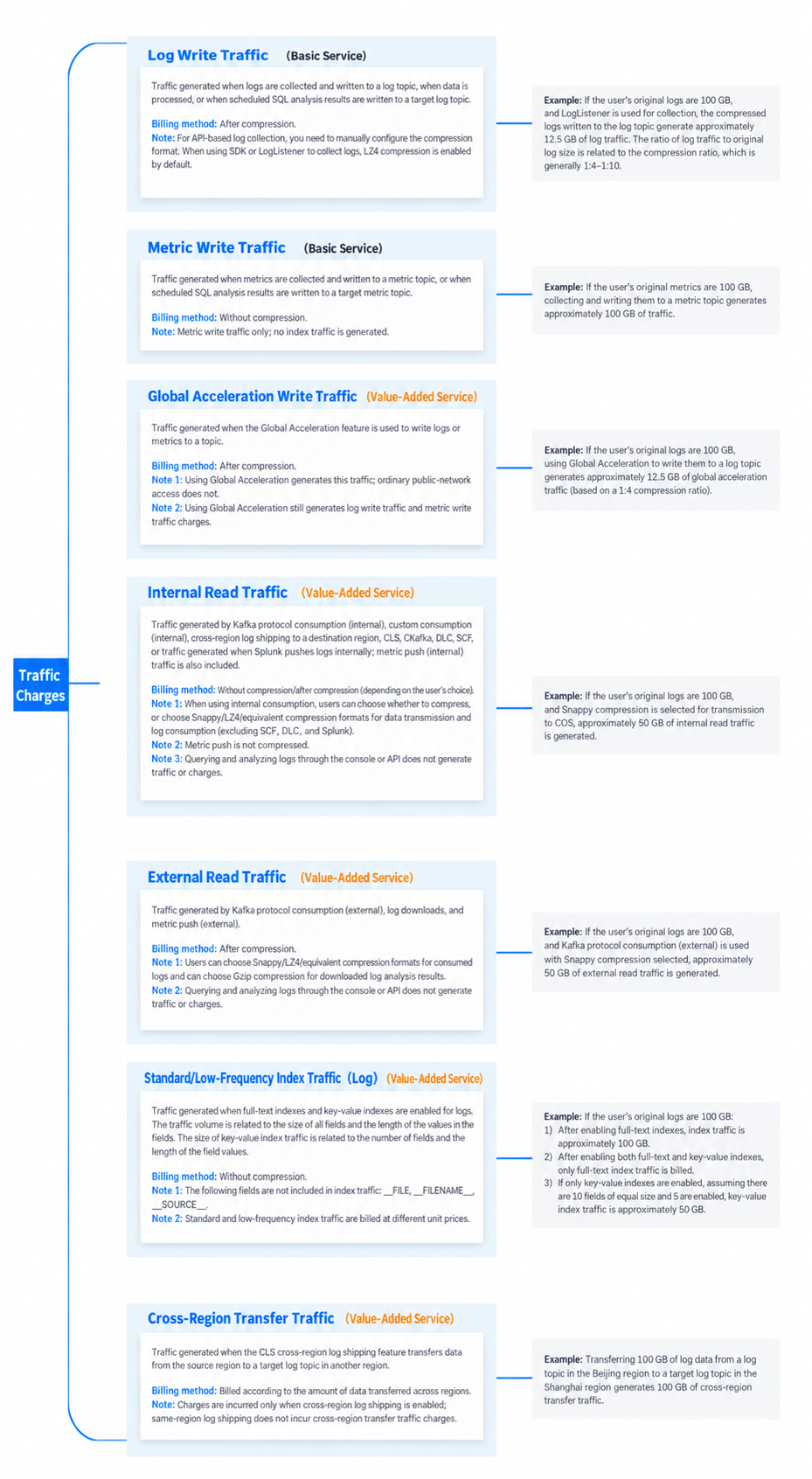
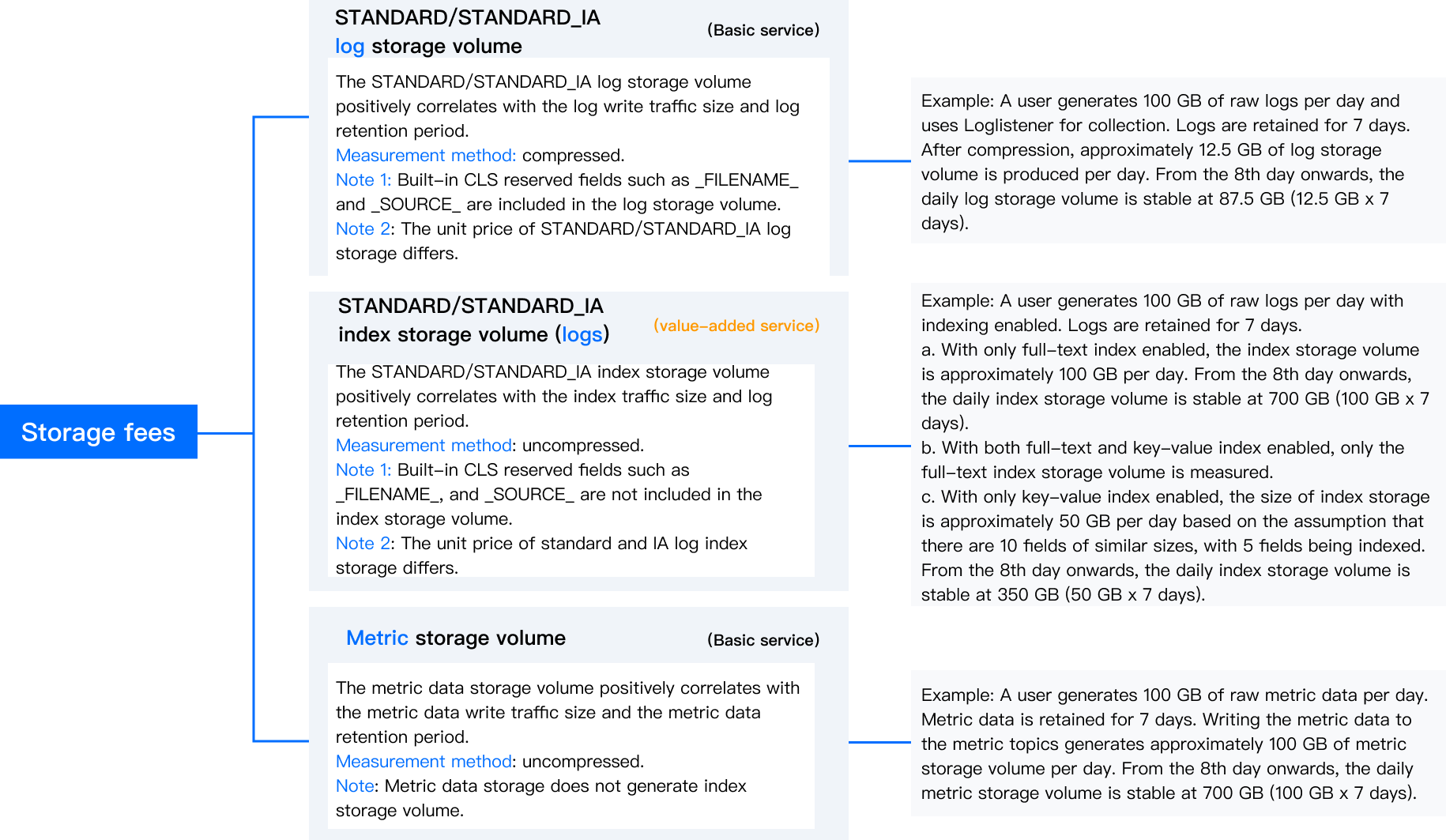
Billable items include four types: traffic fees, storage fees, data processing fees, and other fees. See the table below for details. Among them, index traffic fees, log storage fees, and index storage fees are related to the log storage type. For more information, see Storage Type Overview.
Billable Item
Overview Diagram
Category
Billing item
Description
Example
Log write traffic (basic service)
Definition: Traffic generated when logs are collected and written to a log topic, when data is processed, or when scheduled SQL analysis results are written to a target log topic.
Billing method: After compression.
Note: For API‑based log collection, you need to manually configure the compression format. When using SDK or LogListener to collect logs, LZ4 compression is enabled by default.
If the user's original logs are 100 GB, and LogListener is used for collection, the compressed logs written to the log topic generate approximately 12.5 GB of log traffic. The ratio of log traffic to original log size is related to the compression ratio, which is generally 1:4‑1:10.
Metric write traffic (basic service)
Definition: Traffic generated when metrics are collected and written to a metric topic, or when scheduled SQL analysis results are written to a target metric topic.
Billing method: Without compression.
Note: Metric write traffic only; no index traffic is generated.
If the user's original metrics are 100 GB, collecting and writing them to a metric topic generates approximately 100 GB of traffic.
Global acceleration write traffic (value-added service)
Definition: Traffic generated when the Global Acceleration feature is used to write logs or metrics to a topic.
Billing method: After compression.
Note 1: Using Global Acceleration generates this traffic; ordinary public‑network access does not.
Note 2: Log write traffic and metric write traffic costs still occur when using the global acceleration feature.
If the user's original logs are 100 GB, using Global Acceleration to write them to a log topic generates approximately 12.5 GB of global acceleration traffic (based on a 1:4 compression ratio).
Internal read traffic (value-added service)
Definition:
Private network consumption: Traffic generated by Kafka protocol consumption and custom consumption.
Log delivery: Traffic generated by Splunk accessed over the private network when logs are delivered to Tencent Cloud COS, CKafka, DLC, or SCF in the same region.
Traffic generated by metric delivery over the private network.
Billing method: Without compression/after compression (depending on the user's choice).
Note 1: For log delivery and consumption, users can choose not to compress logs, or deliver and consume logs in a compressed format such as Snappy/LZ4, except when logs are delivered to SCF, DLC, or Splunk.
Note 2: Metric delivery is uncompressed.
Note 3: Searching and analyzing logs through the console or APIs does not generate read traffic or incur fees.
If the user's original logs are 100 GB, and Snappy compression is selected for transmission to COS, approximately 50 GB of internal read traffic is generated.
External read traffic (value-added service
Definition: Traffic generated by Kafka protocol consumption (external), log downloads, and metric push (external).
Billing method: Without compression/after compression (depending on the user's choice).
Note 1: Users can choose Snappy/LZ4(equivalent) compression formats for consumed logs and can choose Gzip compression for downloaded log analysis results.
Note 2: Log download defaults to Gzip compression format.
Note 3: Searching and analyzing logs through the console or APIs does not generate read traffic or incur fees.
If the user's original logs are 100 GB, and Kafka protocol consumption (external) is used with Snappy compression selected, approximately 50 GB of external read traffic is generated.
Log standard/low-frequency index traffic (value-added service)
Definition: Traffic generated when full‑text indexes and key‑value indexes are enabled for logs. The traffic volume is related to the size of all fields and the length of the values in the fields. The size of key‑value index traffic is related to the number of fields and the length of the field values.
Billing method: Without compression.
Note 1: CLS built-in reserved fields such as __FILENAME__ and __SOURCE__ are not counted as index traffic.
Note 2: Standard and low‑frequency index traffic are billed at different unit prices.
If the user's original logs are 100 GB.
1. After enabling full‑text indexes, index traffic is approximately 100 GB.
2. After enabling both full‑text and key‑value indexes, only full‑text index traffic is billed.
3. If only key‑value index is enabled, assuming there are 10 fields of equal size and 5 are enabled, key‑value index traffic is approximately 50 GB.
Cross-region transfer traffic (value-added service)
Definition: Traffic generated when you use the delivery to CLS (cross-account and cross-region delivery for log topics) feature to transfer log data from the source region to a target log topic in another region.
Metering method: Billed according to the amount of data transferred across regions.
Note: This billing item is generated only for cross-region delivery. No cross-region traffic transfer fees are incurred for delivery within the same region.
Deliver 100 GB of log data from the log topic in the Beijing region to the Shanghai region, generating 100 GB of cross-region transfer traffic.
Definition: The STANDARD/STANDARD_IA log storage volume positively correlates with the log write traffic size and log retention period.
Measurement method: compressed.
Note 1: Built‑in CLS reserved fields such as __FILENAME__ and __SOURCE__ are included in the log storage volume.
The unit price of STANDARD/STANDARD_IA log storage differs.
A user generates 100 GB of raw logs per day and uses LogListener for collection. Logs are retained for 7 days. After compression, approximately 12.5 GB of log storage volume is produced per day. From the 8th day onwards, the daily log storage volume is stable at 87.5 GB (12.5 GB × 7 days).
STANDARD/STANDARD_IA index storage volume (logs) (value‑added service)
Definition: The STANDARD/STANDARD_IA index storage volume positively correlates with the index traffic size and log retention period.
Measurement method: uncompressed.
Note 1: Built‑in CLS reserved fields such as __FILENAME__ and __SOURCE__ are not included in the index storage volume.
Note 2: The unit price of standard and IA log index storage differs.
A user generates 100 GB of raw logs per day with indexing enabled. Logs are retained for 7 days.
1. If only the full-text index is enabled, the index storage volume is approximately 100GB per day. From the 8th day onwards, the daily index storage volume stabilizes at 100GB*7=700GB.
2. When both full-text and key-value indexing are enabled, only the full-text index storage volume is metered.
3. If only key-value indexing is enabled, and assuming there are 10 fields of similar size with 5 of them enabled, the index storage volume is approximately 50GB/day. From the 8th day onwards, the daily index storage volume stabilizes at 50GB*7 days=350GB.
Metric storage volume (Basic service)
Definition: The metric data storage volume positively correlates with the metric data write traffic size and the metric data retention period.
Billing method: uncompressed.
Note: Metric storage does not generate index storage volume.
A user generates 100 GB of raw metric data per day. Metric data is retained for 7 days. Writing the metric data to the metric topics generates approximately 100 GB of metric storage volume per day. From the 8th day onwards, the daily metric storage volume is stable at 700 GB (100 GB × 7 days).
Data Processing fees
Data processing volume (value-added service)
Definition: The size of data processing volume is equivalent to the write traffic to the source log topic (after decompression).
Billing method: uncompressed.
Note: CLS built-in reserved fields such as __FILENAME__ and __SOURCE__ are not counted as data processing volume.
A user's raw logs of a size of 100 GB undergo data processing, generating 100 GB of data processing volume.
Other fees
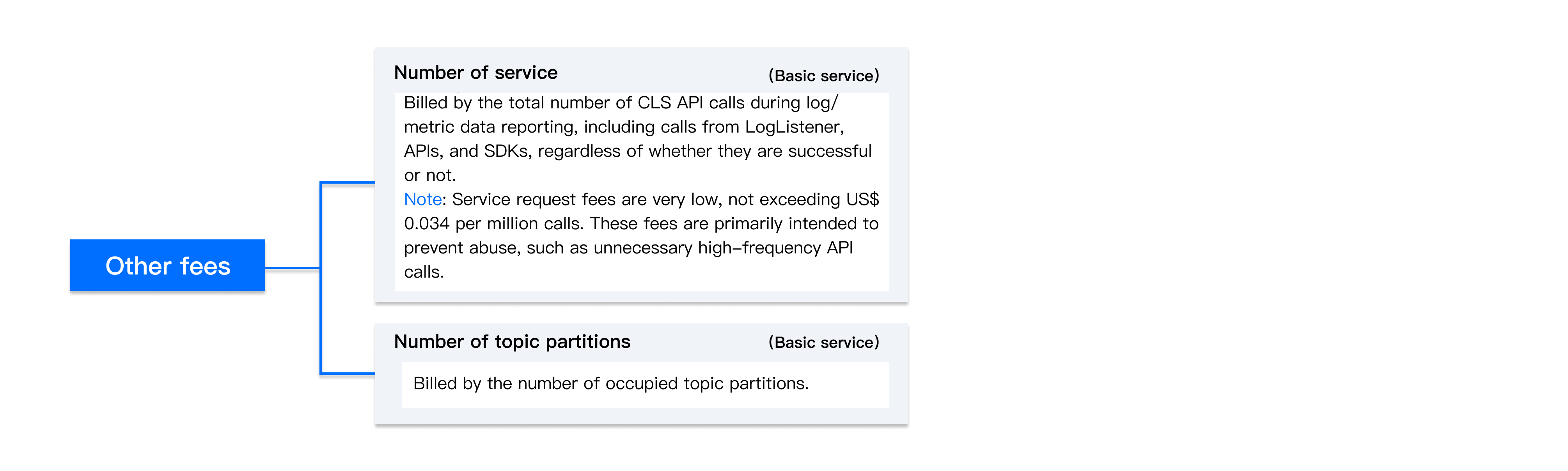
Number of service requests (basic service)
Definition: Billed by the total number of CLS API calls during log/metric data reporting, including calls from LogListener, APIs, and SDKs, regardless of whether they are successful or not.
Note: Service request fees are very low and are mainly intended to prevent abuse, such as meaningless high-concurrency API calls.
None
Number of topic partitions (basic service)
Definition: Billed by the number of occupied topic partitions.
None
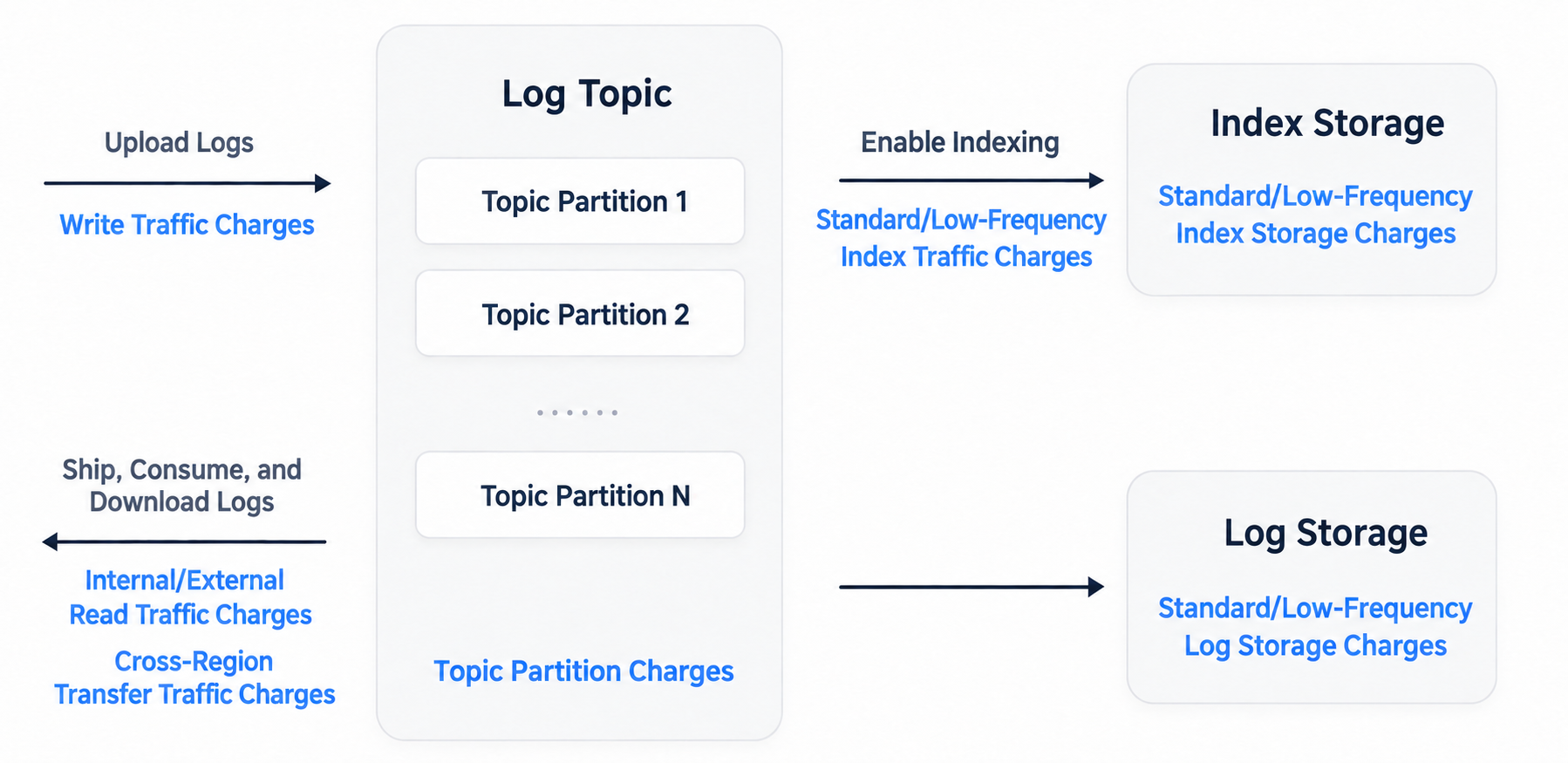
After logs are reported to a log topic and indexing is enabled (indexing must be enabled to query logs), common billable items are shown in the following figure:
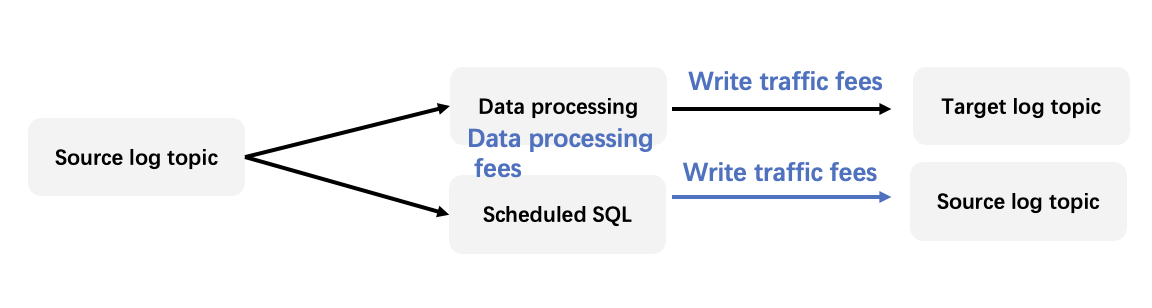
When log processing, such as data transformation (ETL) and scheduled SQL analysis (OLAP), is performed, the following billable items are also generated:
Billing by Raw Log Volume
Billable items include two types: basic service billable items and value-added service billable items. See the table below for details. Among them, raw log volume fees and storage volume fees are related to the log storage type. For more information, see Storage Type Overview.
Category
Billing item
Description
Example
Basic service billable item
Raw log volume (standard/infrequent access)
Definition: The log volume generated when logs are written to log topics through log collection, or when data transformation and scheduled SQL analysis tasks write to target log topics. No storage fees are incurred within 30 days after logs are written.
Billing method: uncompressed.
Note: CLS built-in reserved fields (such as __FILENAME__ and __SOURCE__) are not included, while metadata (TAG) fields and user-defined fields are included.
The raw logs are 100 GB. After the raw logs are collected by using LogListener and written to a log topic, approximately 100 GB of raw log volume is generated.
Value-added service billable item
Log storage volume (standard/infrequent access)
Definition: Storage fees are incurred for the excess portion when the log storage period exceeds 30 days. The size of STANDARD/STANDARD_IA log storage is positively correlated with the log write traffic and the log retention period.
Measurement method: compressed.
Users generate 100 GB of raw logs every day. The logs are collected by using LogListener and stored for 40 days. After being compressed, the logs are written to a log topic, generating approximately 12.5 GB of log storage every day. From the 40th day onwards, the daily log storage volume stabilizes at 12.5 GB*(40-30) days = 125 GB.
Log index storage volume (standard/infrequent access)
Definition: Storage fees are incurred for the excess portion when the log storage period exceeds 30 days. The size of STANDARD/STANDARD_IA index storage is positively correlated with the index traffic and the log retention period.
Billing method: uncompressed.
The raw logs are 100 GB/day. Indexing is enabled, and logs are stored for 40 days.
1. If only the full-text index is enabled, the index storage volume is approximately 100GB/day. From the 40th day onwards, the daily index storage volume stabilizes at 100GB*(40-30)=1000GB.
2. When both full-text and key-value indexing are enabled, only the full-text index storage volume is metered.
3. If only key-value indexing is enabled, and assuming there are 10 fields of similar size with 5 of them enabled, the index storage volume is approximately 50GB/day. From the 40th day onwards, the daily index storage volume stabilizes at 50GB*(40-30) days=500GB.
Global acceleration write traffic
Definition: Traffic generated by using the global acceleration feature to write logs into log topics.
Measurement method: compressed.
Note 1: This traffic is generated only when the global acceleration feature is used, and regular public network access does not generate it.
Note 2: Raw log volume fees are still incurred when the global acceleration feature is used.
The raw logs are 100 GB. After being compressed, the logs are written to a log topic by using global acceleration, generating approximately 12.5 GB of global acceleration write traffic. The compression ratio generally ranges from 1:4 to 1:10.
Public network read traffic
Definition: Traffic generated by Kafka protocol consumption (public network consumption) and log download.
Measurement method: uncompressed/compressed (depends on the compression format chosen by the user).
Note 1: Users can choose to consume logs without compression or in Snappy/LZ4 compressed format.
Note 2: Log download defaults to Gzip compression format.
Note 3: Searching and analyzing logs through the console or APIs does not generate read traffic or incur fees.
The raw logs are 100 GB. After the raw logs are consumed by using the Kafka protocol over the public network, and the Snappy compression format is selected, approximately 50 GB of public network read traffic is generated.
Data processing volume
Note: Built-in reserved fields in CLS such as _FILENAME_ and _SOURCE_ are not included in the data processing volume.
Billing method: uncompressed.
Note: CLS built-in reserved fields such as __FILENAME__ and __SOURCE__ are not counted as data processing volume.
A user's raw logs of a size of 100 GB undergo data processing, generating 100 GB of data processing volume.
Cross-region transfer traffic
Definition: Traffic generated when you use the delivery to CLS (cross-account and cross-region delivery for log topics) feature to transfer log data from the source region to a target log topic in another region.
Metering method: metered based on the actual volume of data transferred across regions.
Note 1: This billing item is generated only for cross-region delivery. No cross-region traffic transfer fees are incurred for delivery within the same region.
Deliver 100 GB of log data from the log topic in the Beijing region to the Shanghai region, generating 100 GB of cross-region transfer traffic.
Detailed Calculation Rules for Billable Items
1. The measurement method for storage volume adopts the averaging method. The storage volume of a specified point is collected every hour of a day, and then the average of 24-hour values is calculated as the storage volume of the day.
2. Log and metric data will be stored based on a retention period set by a user. Storage fees will no longer be calculated after the data expires. The expired data volume is deducted at the first full hour after the end of the retention period.
For example, if the retention period is set to 3 days and logs are uploaded at 12:15 on June 15, the valid retention period is from 12:15 on June 15 to 12:15 on June 18. The storage occupied by expired data will be deducted at 13:00 on June 18.
Modify retention period (extend): After the retention period is extended, CLS will retain valid data within the current retention period for a longer time. For example, if the retention period is extended from 7 days to 15 days at 12:30 on June 15, data generated after 12:00 on June 8 will not be deleted at 13:00 on June 15. Instead, it will be retained until 13:00 on June 23.
Modify retention period (shorten): After the retention period is shortened, CLS will retain valid data within the current retention period for a shorter time. For example, if the retention period is shortened from 15 days to 7 days at 12:30 on June 15, data generated between 12:00 on June 1 and 13:00 on June 8 will be deleted at 13:00 on June 15.
Note:
It is not recommended to modify the retention period frequently. Modify it at most once a day.
3. The number of topic partitions is the instantaneous value at 24:00 of the current day.
4. The raw log volume, read/write traffic, index traffic, cross-region transfer traffic, and data processing volume are the cumulative values of the current day.