Rule Management
Download
Focus Mode
Font Size
Rule management is used to centrally maintain preset rules and custom rules, configure execution actions, and support browsing by ATT&CK phase.
Accessing Rule Management
1. Log in to the CSC console.
2. In the left sidebar, select
Alarm Center.
3. Click
Policy management in the upper-right corner, and then select the rule management tab.
Viewing Rules
1. On the rule management tab, you can view the rule list. In a multi-account scenario, you can switch accounts to view rules.
2. The left sidebar displays the number of rules by system/custom rule type and by ATT&CK phase. Click a type or phase to filter rules.
3. You can search for and filter rules by keyword, including rule name, rule ID, and rule content.
4. You can refresh the list, customize column display, and export rule data.
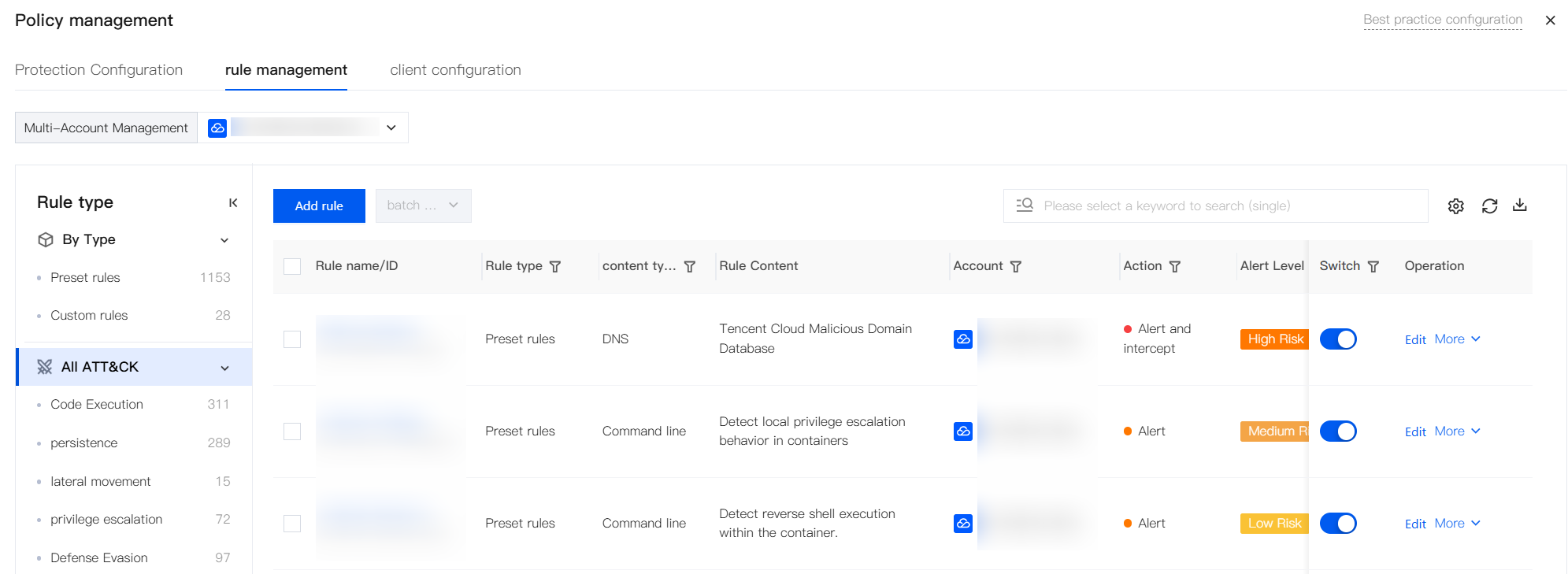
Field description:
Rule name/ID: the rule name and rule ID.
Rule type: preset rules and custom rules.
Content type: MD5 File, command line, DNS, inbound IP, outbound IP, custom file, and process network.
Rule content: the rule logic description or feature description.
Account: the account to which the rule belongs in a multi-account scenario.
Action: Alert,Alert and intercept,Allow.
Alert Level: High, Medium, Low, Informational, and None.
Switch: enable or disable the rule.
Operation: Edit,More (Copy).
Note:
Multi-account scenario: Group administrators can batch modify actions/switches, copy a single rule across accounts, or select multiple accounts when creating a rule (after the rule is saved, the rule is split into multiple rules by account).
Adding Rules
1. On the rule management tab, click Add rules.
2. Fill in the basic information, effective assets, and rule content, configure advanced settings (container configuration) as needed, and then click Save.
Note:
Each user can add up to 1,000 custom rules.
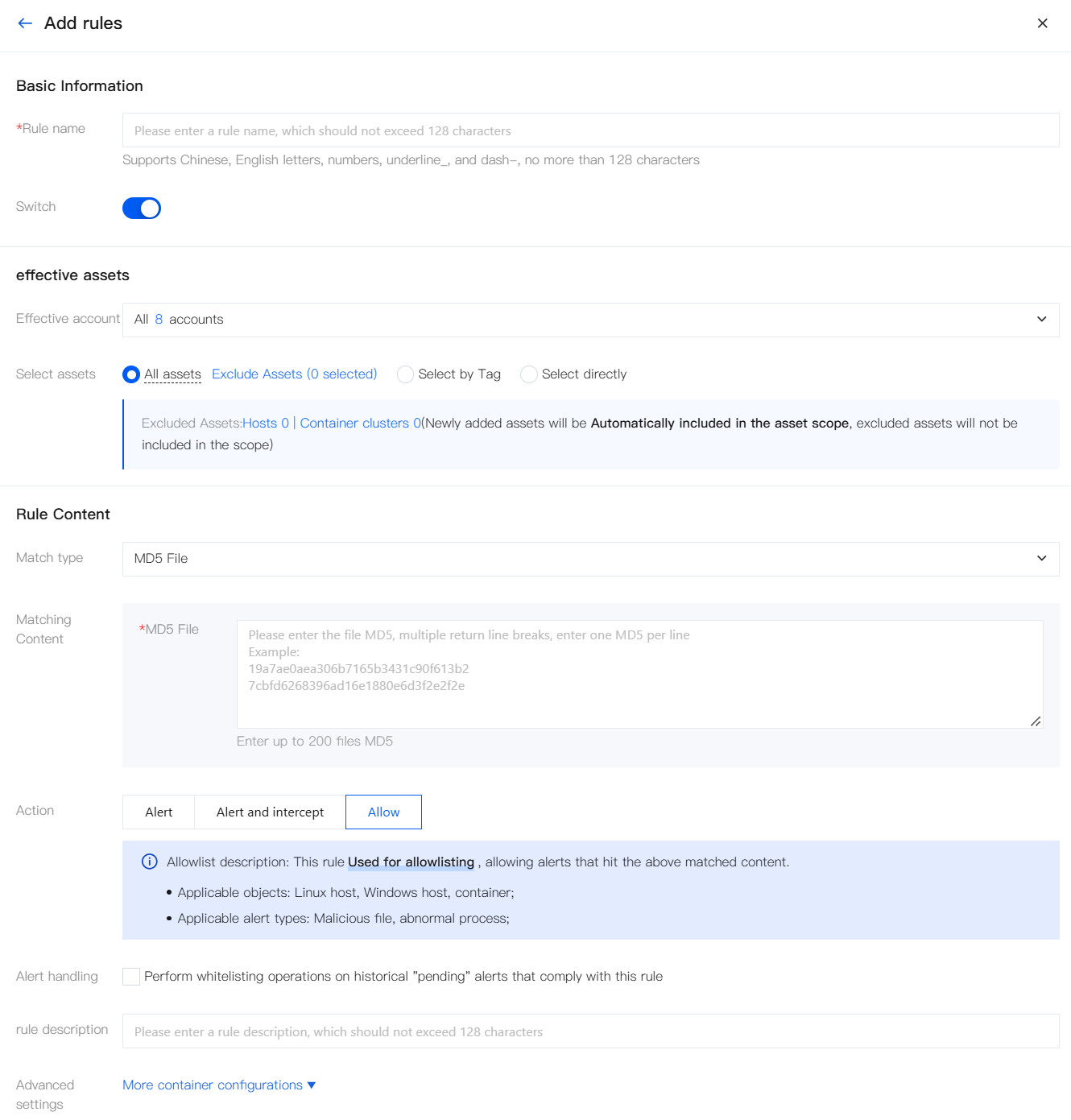
Configuration Category | Configuration Item | Description |
Basic Information | Rule Name | Required. No more than 128 characters. Supports Chinese, English, digits, underscores, and hyphens. |
| Switch. | Enable or disable this rule. |
effective assets | Effective account | Select the account scope for which the rule takes effect (multi-account scenario). Note: Select multiple accounts, and the rule will be automatically split into multiple rules by account upon saving. |
| Select assets | Select the host scope for which the rule takes effect: All assets (Exclude Assets),Select by Tag,Select directly |
| Select Container Clusters | Select the container cluster scope for which the rule takes effect. Note: Container activation is divided into two levels: first select a cluster, and then use the "Advanced Configuration" described below to filter images within the selected cluster as needed. |
Rule Content | Match Type | Optional:
MD5 File, command line, DNS, inbound IP, outbound IP, Custom File, process network, and File operation. |
| Matching content. | |
| Action | Alert,Alert and intercept,Allow. |
| Alert Level | Required only when the action is set to Alert/Alert and intercept: high-risk, medium-risk, low-risk, and notification. |
| ATT&CK Stage | Configurable only when the action is set to Alert/Alert and intercept. |
| rule description | Optional. No more than 128 characters. |
Advanced settings | More container configurations | Based on the container clusters selected for the effective assets, further filter out the effective scope (for example, match by image conditions or directly select images). If no cluster is selected, the advanced configuration does not take effect. For details, see Advanced Configuration (More container configurations). |
Setting Match Content
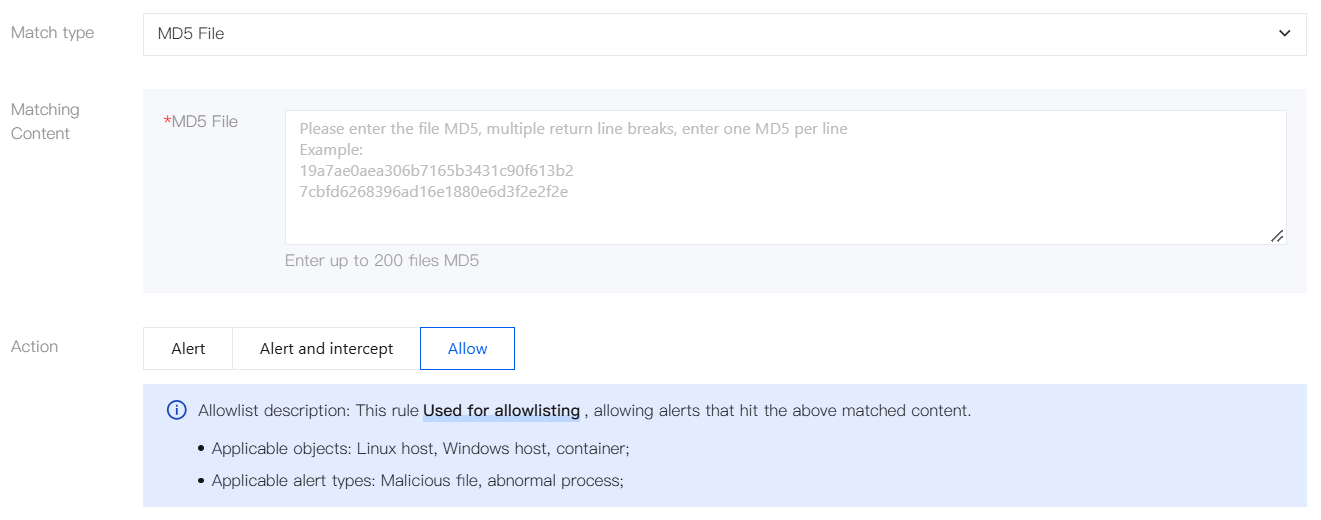
Match Type: MD5 File
The matching content consists of one
MD5 File per line, with a maximum of 200 entries.
Match Type: Command Line
Configure the matching content by process conditions. You can add multiple lines:
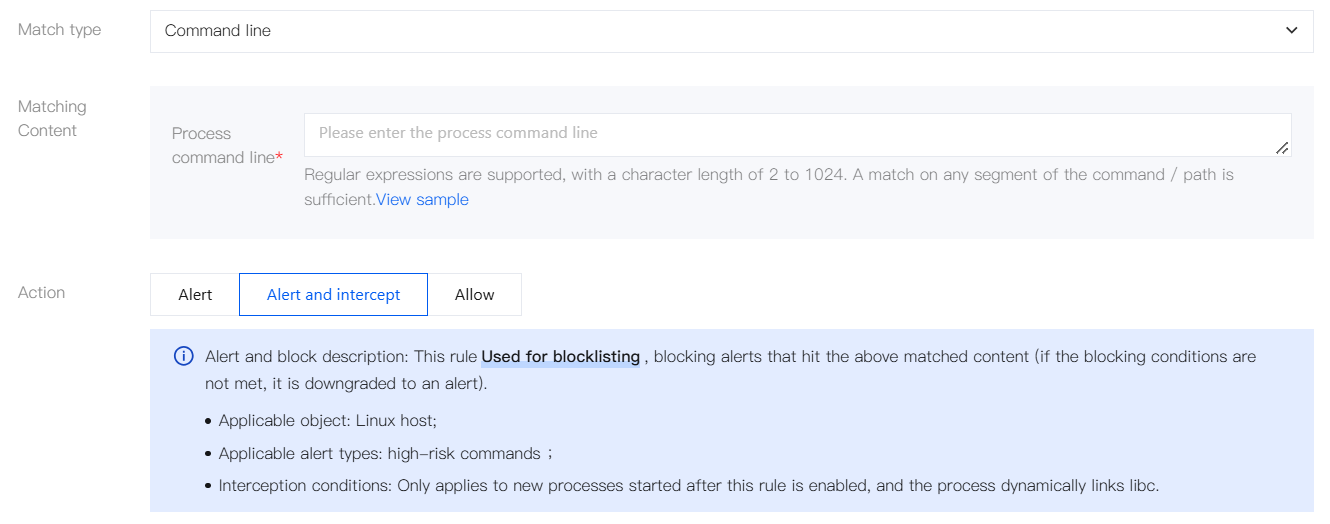
Configuration Item | Description |
Process type | Process, parent process, and ancestor process |
Process file path | Process executable file path |
Process command line | Process command line; enter the regular expression of the final executed command. CWPP cannot identify alias commands. |
Note:
Different process conditions are connected by an AND relationship.
Match Type: DNS
For Match Content, enter domain details: enter a domain name / wildcard domain (such as
www.12345.com or *.tencent.com; URLs are not supported). Separate multiple entries with line breaks, with a maximum of 100 entries.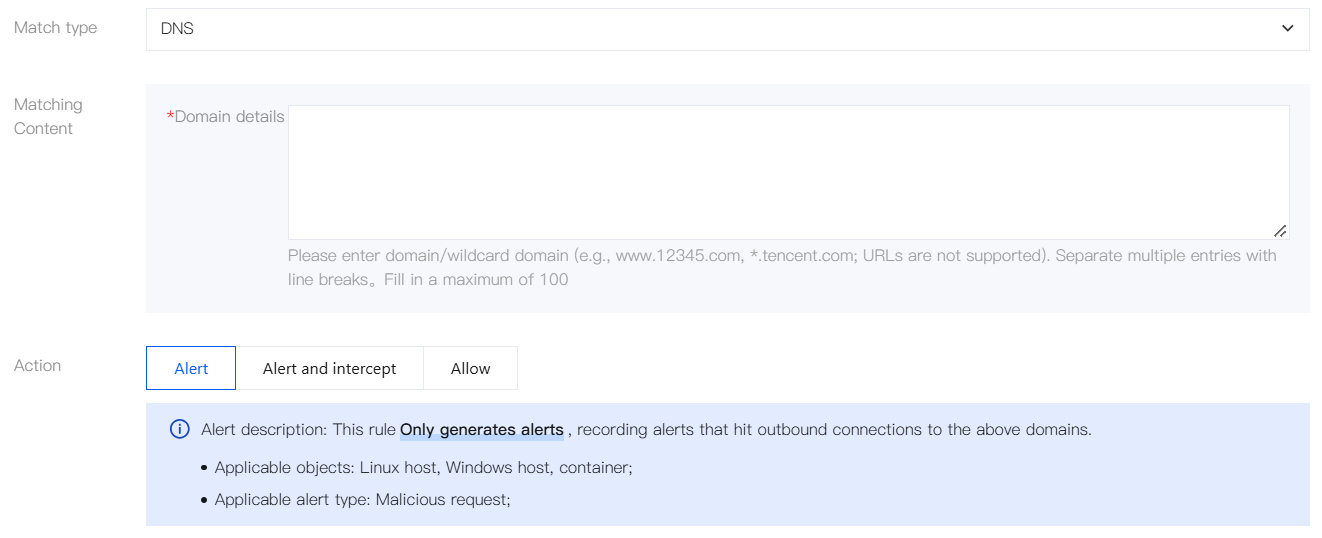
Execution Action | Description |
Alert | When a host attempts to connect to a domain name within the rule scope, an alarm record is generated. |
Alert and intercept | Interception rules take effect only for IP address/domain name/wildcard domain requests initiated by newly started processes. Note: Currently, interception is supported only on Linux systems and not on Windows. |
Allow | When a host attempts to connect to a domain name within the rule scope, no alarm or interception is generated. |
Match Type: inbound IP
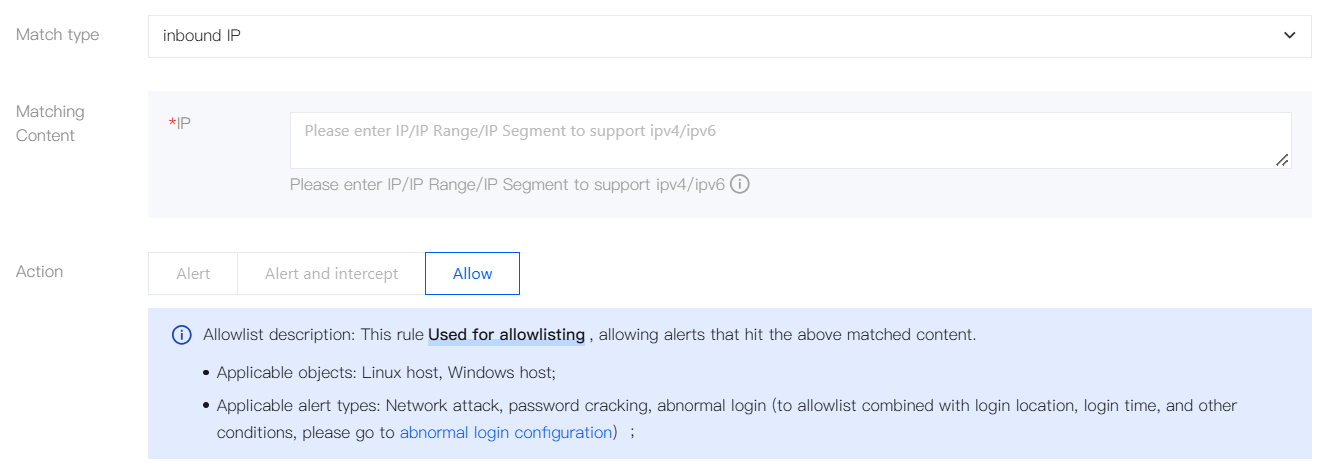
For Match Content, enter an IP address / IP address range / IP address segment. Both IPv4 / IPv6 are supported.
Note:
IP address example: 1.1.1.1
IP address range example: 1.1.1.1-1.1.1.10
IP address segment example: 172.168.34.1/20
You can add multiple IP address/IP address ranges at the same time, separated by line breaks. A maximum of 100 IP addresses can be entered.
Match Type: Outbound IP
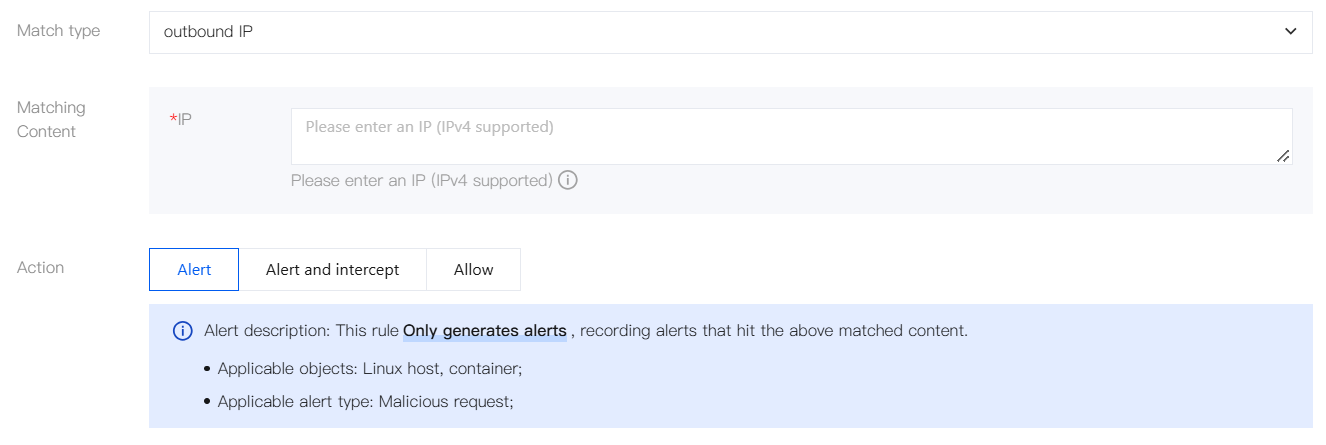
For Match Content, enter an IP address. Only IPv4 is supported.
Note:
IP address example: 1.1.1.1
You can add multiple IP addresses at the same time, separated by line breaks. A maximum of 100 IP addresses can be entered.
Match Type: Custom File
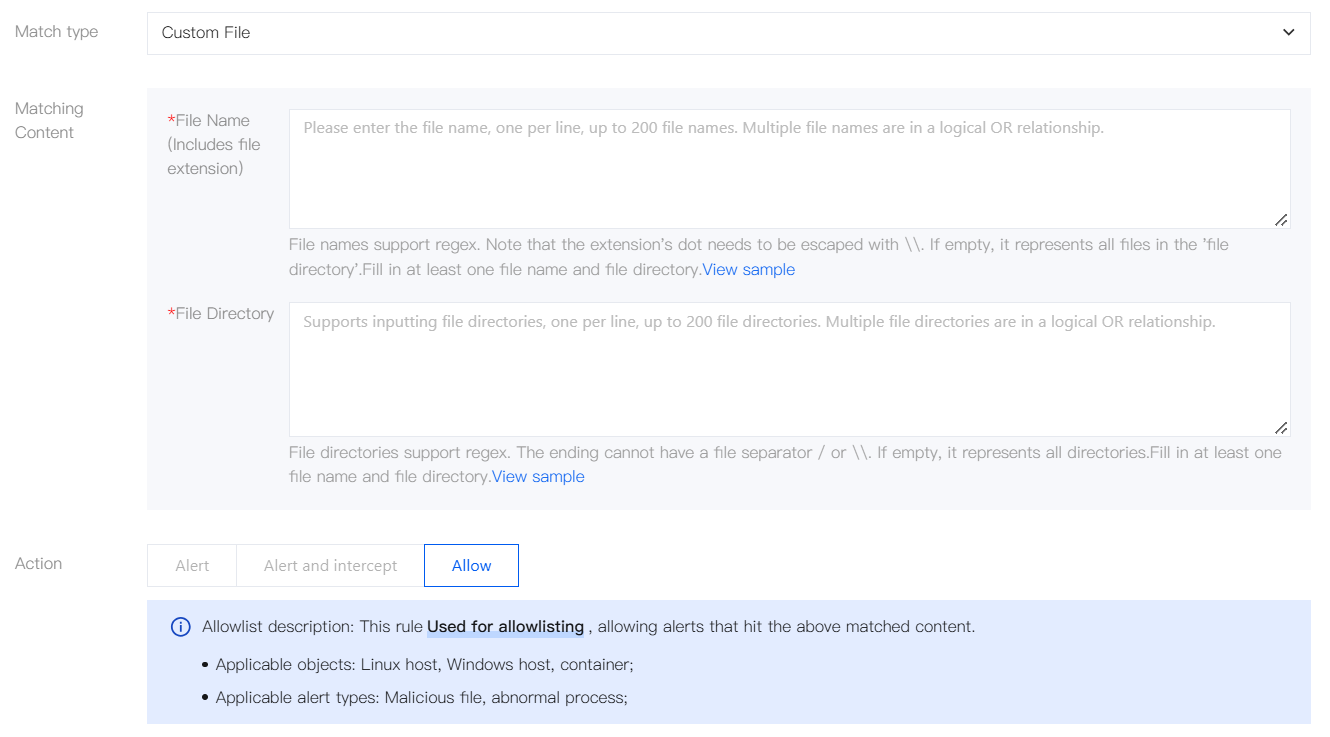
For Match Content, enter a file name or file directory (at least one is required). Both support regular expressions, with one entry per line and a maximum of 200 entries each.
Configuration Item | Description | Regex Example |
File Name (Including File Extension) | Match by File Name Note: The . in the extension must be escaped with \\. For example, ^app\\.log$ represents the file name app.log. | ^app.log$: represents file names such as app.log, app1log, and appalog (where . is not escaped and represents any single character).^app\\.log$: represents the file name app.log (where . is escaped and matches only the dot character itself)..*\\.log$: represents file names such as foo.log, bar.log, and foo_bar.log.^app\\..*: represents file names such as app.log, app.txt, and app.1.^app\\.log\\.\\d+$: represents file names such as app.log.0, app.log.1, and app.log.999. |
File directory | Match by Directory Path Note: The end of the path cannot end with / or \\. | ^/tmp: represents the /tmp/ directory.^/app/.*/log: represents directories such as /app/foo/log/ and /app/foo/bar/log/.^/app/log/\\d+: represents directories such as /app/log/0/, /app/log/1/, and /app/log/999/.^D:\\\\data\\\\.*: represents directories such as D:\\data\\, D:\\data\\foo\\, and D:\\data\\foo\\bar\\. |
Match Type: Process Network
Configure the matching content by process and network conditions:
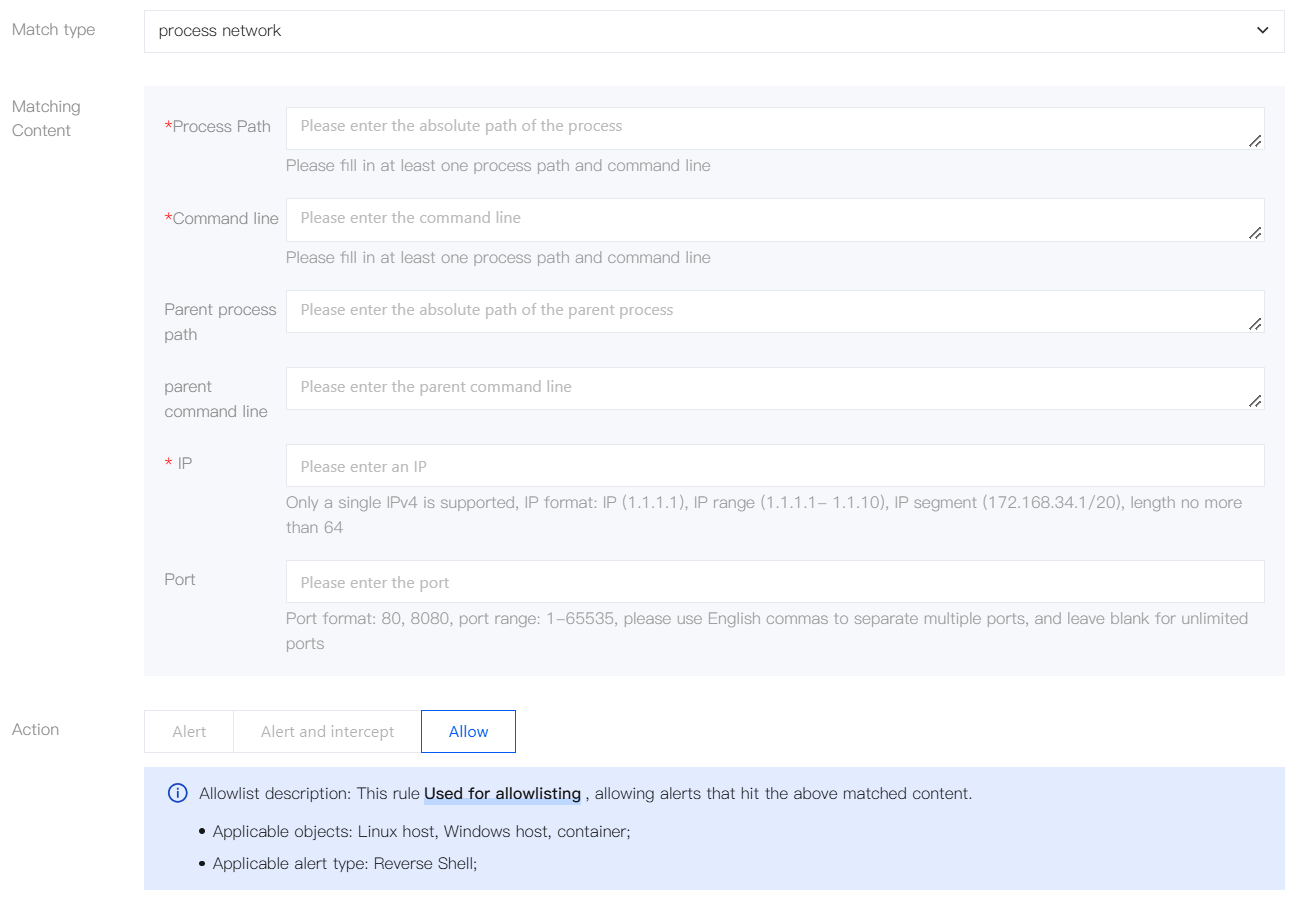
Configuration Item | Description |
Process path. | Process absolute path. Specify at least one of this parameter and Command Line. |
Command line. | Process command line. Specify at least one of this parameter and Process Path. |
Parent process path. | Optional. Parent process absolute path. |
Parent command line. | Optional. Parent process command line. |
IP | Required. Only a single IPv4 address is supported. The format can be an IP address (for example, 1.1.1.1), an IP address range (for example, 1.1.1.1-1.1.1.10), or an IP address segment (for example, 172.168.34.1/20). The length cannot exceed 64 characters. |
Port | Optional. The format is 80,8080, with a range from 1 to 65535. Separate multiple ports with commas. Leave this field empty if no port restriction is required. |
Match Type: File operation
Configure the matching content by process and file actions:
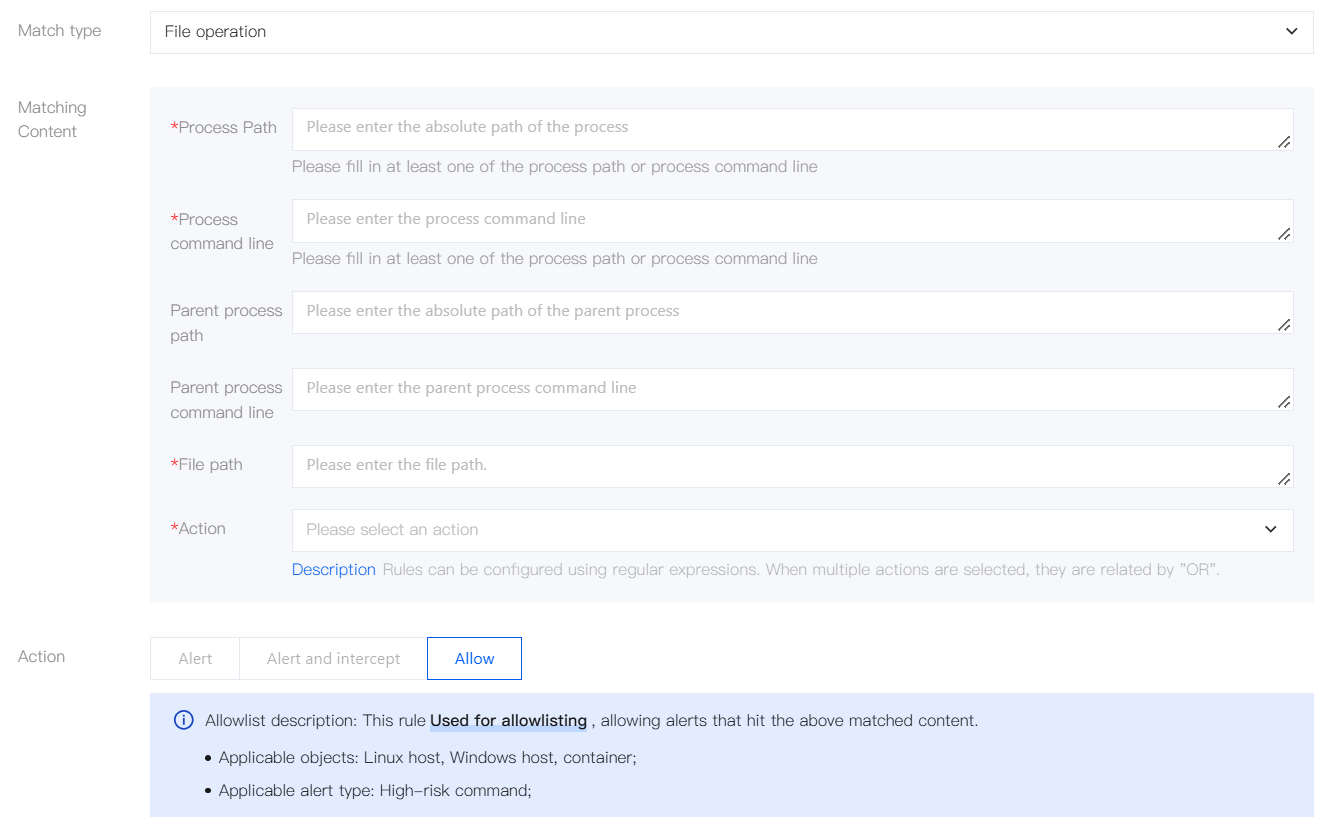
Configuration Item | Description |
Process path. | Process absolute path. Specify at least one of this parameter and Process Command Line. |
Process command line | Specify at least one of this parameter and Process Path. |
Parent process path. | Optional. Parent process absolute path. |
Parent process command line. | Optional |
File path. | Required |
Action | Required. Regular expressions are supported. When multiple actions are selected, the relationship between them is OR. |
Advanced Configuration (Container Configuration)
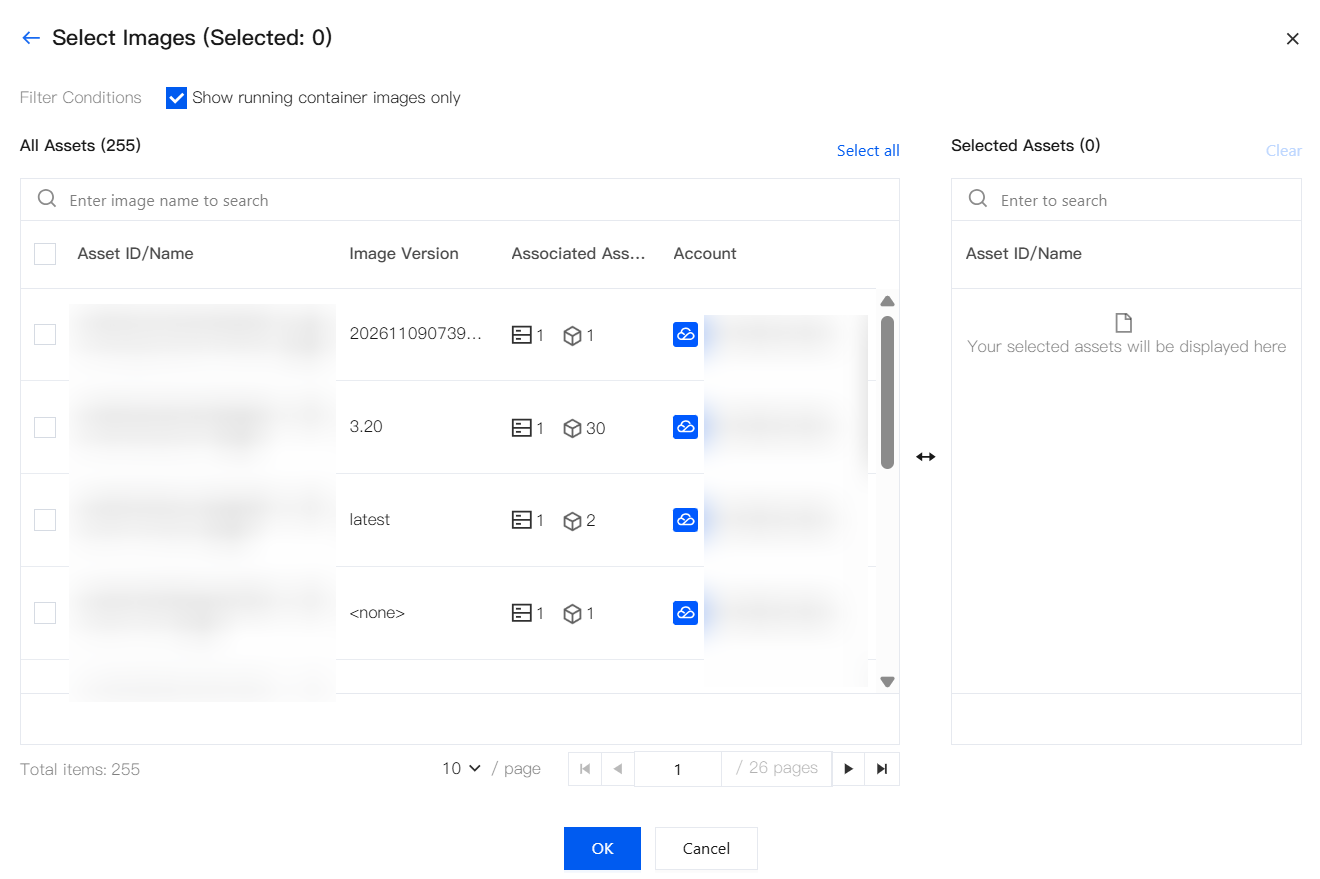
You can expand the container configuration. If a container cluster is selected in the effective assets, matching is performed based on the following conditions. If only host assets are selected, the container configuration does not take effect. The configuration method supports Condition match or
Select directly.
Condition match
Match dynamically by image attributes. You can add multiple conditions:
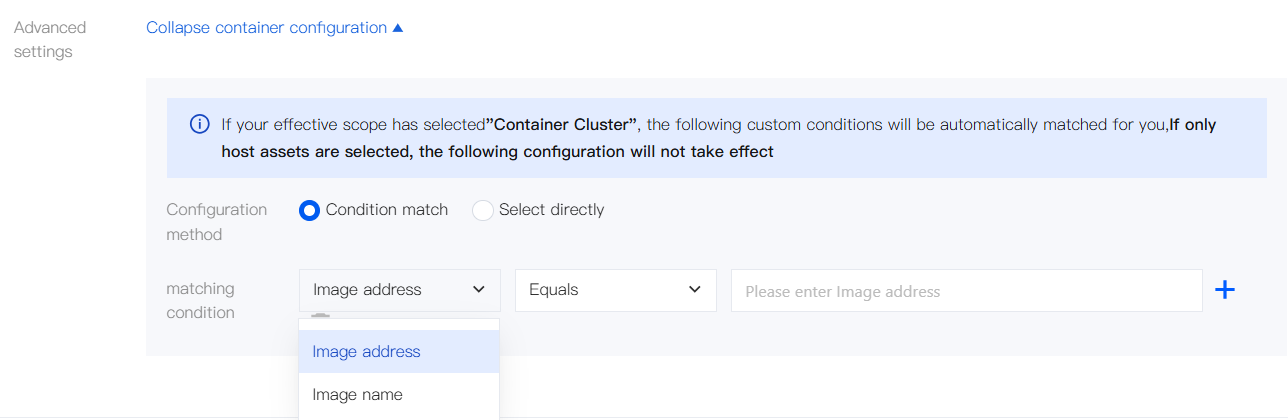
Configuration Item | Description |
matching condition | Image address and image name |
Operator | Equals, does not equal, starts with, does not start with, ends with, does not end with, contains, does not contain |
Value | Enter the corresponding content based on the selected attribute. |
Select directly
Open the image selection panel, select the target images from the asset list, and then click OK.
Editing a Rule
1. Locate the target rule in the rule list, and then click Edit.
2. After modifying the editable fields, click Save.
Rule Type | Editable Scope |
Preset rules | Switch, effective assets, execution actions, and more (match content is generally not editable and is subject to the console) |
Custom rule | Rule name, match type/content, execution action, Alert Level, ATT&CK stage, effective assets, switch, and more |
Copying a Rule
Used to quickly create a new rule based on an existing one, avoiding repeated input. It supports copying both preset rules and custom rules.
1. Locate the target rule in the rule list, and then click More > Copy (preset rules/custom rules)/
Copy to other accounts (custom rules).
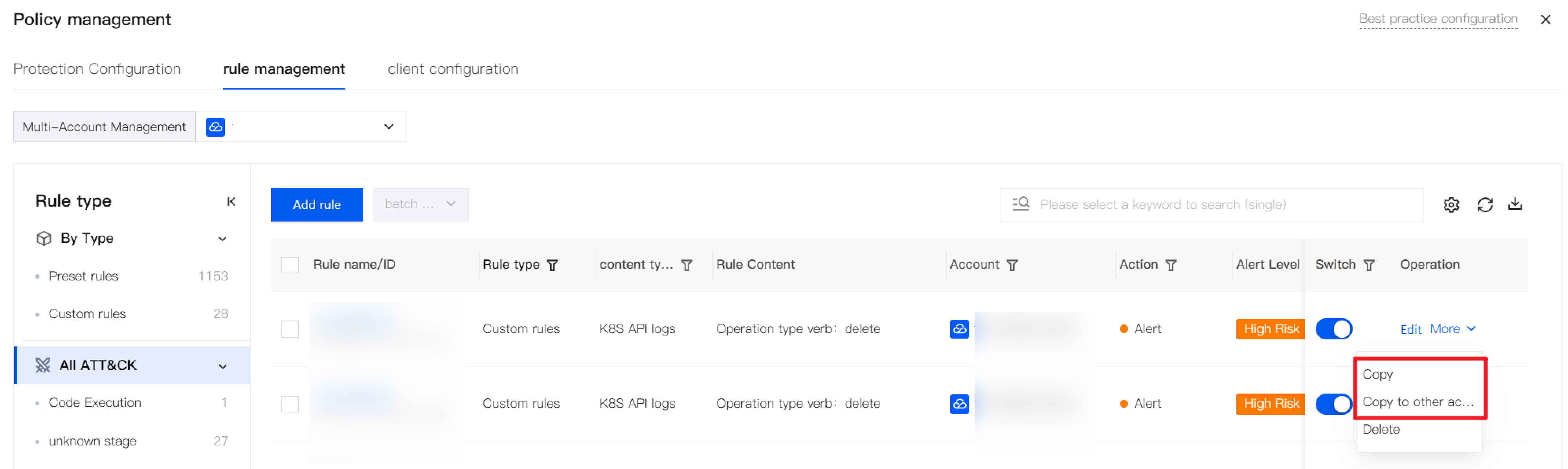
2. The page opens as an Add Rule dialog box and carries over the fields and switch states from the original rule. Modify the name, matching content, execution actions, and effective assets as needed, and then click Save.
3. Typical use scenarios are as follows:
Scenario | Description |
Rapid derivation within the same account | Fine-tune match conditions or actions based on a similar rule, and then save the result as a new rule. |
Cross-account replication | In a multi-account scenario, copy the rule to other accounts to ensure unified enforcement across the entire organization. |
Performing Batch Operations
Used to adjust the switches and execution actions of multiple rules at once, or to delete custom rules.
1. Select one or more rules in the rule list, and then click Batch Processing.
2. Select the batch operation type and confirm as prompted.
Batch enable: Enable the selected rules in batches.
Batch disable: Disable the selected rules in batches.
Batch modify: Modify execution actions in batches.
Batch delete: Delete the selected rules in batches. Only custom rules can be deleted. Deleted rules cannot be recovered. Please operate with caution.
3. Typical use scenarios are as follows:
Scenario | Description |
Quick switchover between daily/important period guarantee | Before the important period guarantee, enable related rules in batches, or change stable rules without false alarms from "Alert" to "Alert and intercept"; after the guarantee ends, disable temporary rules in batches or change the execution action back to "Alert". |
Quick adjustment across multiple accounts | Quickly start, stop, modify, or delete rules of some member accounts in batches. |
Multi-Account Management
When the multi-account management feature is used (group administrator scenario), alarm policies support unified Ops across accounts. The multi-account management capabilities of rule management are as follows:
Rules are displayed in a flat list: The rule list displays the associated account of each rule and supports filtering by account.
Batch operations: Supports batch modification of execution actions and switches.
Single-rule cross-account copy: Copy one rule to multiple accounts in batches.
Add multi-account rule: When creating a rule, select to apply it to multiple accounts. When the rule is saved, the rule is automatically split into multiple rules because data is isolated for each account, and therefore one rule is generated for each account.
Export with account: The export fields of the rule list include the associated account.
Supplementary Description
Configuration Effective Note
The following describes how configurations take effect for policy management (rule management and protection configuration), rather than the steps for configuring individual items.
Item | Description |
Effective time | Takes effect approximately 3-5 minutes after the policy is created or modified. |
Rule priority | When content conflicts occur in the same scenario: allow > Alert and intercept > Alert; adding to the allowlist overrides the interception effect in the same scenario. |
Container vs. host | When the same host matches both a cluster (container) policy and a host policy, only the cluster policy is executed, and the host policy is not stacked. |
Dynamically effective assets | If effective assets are selected based on the following rules: Select by tag: The effective objects are automatically synchronized after asset tags are added or removed. Select by advanced configuration (container configuration): Match by image criteria/
Select directly on the selected cluster. |
Interception compatibility | When the client resource configuration is set to special environments such as business-first mode, interception may be automatically stopped and only alarms are generated. To enforce interception, contact us. |
Note:
Tuning notes (noise reduction and false negative prevention):
Block first, observe, and then block: When creating a blocking rule, use Alarm to observe first, and then change it to Alert and intercept after confirmation.
Prioritize exact match: Prioritize the use of configuration rules such as MD5, specific IP addresses, and exact commands.
Avoid duplicate allowlisting: Before adding a rule to the allowlist, check whether an identical allow rule already exists.
Note the priority: The allowlist takes precedence over blocking/alarming. Before adding a rule to the allowlist, confirm that real attacks will not be allowed through.
Coexistence with CWPP Configuration
When CWPP customers switch to CSC, existing hosts may receive policies configured by both products simultaneously. In this case, the policies take effect according to the following rules:
Rule Type | Behavior |
Allowlist | Allowlists are merged as a union; the allowlist delivered by any product takes effect. |
Blocklist | Merged and delivered to hosts, alarms/interceptions/logs are generated only on the product side with authorization. The authorizations of the two products are mutually exclusive, so no duplicate alarms occur. |
Troubleshooting Missing Alarms or Interception Failures
If rules or protection are configured but the expected results are not achieved, check whether the following items are configured correctly:
1. Whether the client is in business-first mode (which may aggregate, deduplicate, and filter out alarms, and limit blocking; for details, see Client Management).
2. Whether the corresponding enhanced log collection is enabled (for details, see Client Management).
3. Whether the corresponding protection configuration item is enabled (for details, see Protection Configuration).
4. Whether the corresponding rule mode is selected for AI-Link.
Help and Support
Was this page helpful?
You can also Contact sales or Submit a Ticket for help.
Help us improve! Rate your documentation experience in 5 mins.
Feedback