tencent cloud

CloudAudit

Product Introduction
Overview
Strengths
Features
Scenarios
CloudAudit-Enabled Services and APIs
Purchase Guide
Getting Started
Operation Guide
Viewing Event Details in Operation Record
Shipping Log with Tracking Set
Set up cross-account log delivery for group accounts
Sensitive Operation API List
API Documentation
History
Introduction
API Category
Calling Method
CloudAudit APIs
Data Types
Error Codes
PHP SDK Documentation
Creating CloudAudit
Enabling Log Collection
Updating CloudAudit
Disabling Log Collection
Fetching Bucket List of COS
Fetching CloudAudit List
Obtaining CloudAudit Info
Deleting CloudAudit
Searching Operation Logs
FAQs
Contact Us
Glossary
DocumentationCloudAuditOperation GuideSet up cross-account log delivery for group accounts

Set up cross-account log delivery for group accounts

PDF
Focus Mode
Font Size
Last updated: 2026-01-08 14:03:54

Scenarios

This article introduces how to use the tracking set in the CloudAudit console to set up cross-account log delivery for group accounts. After the feature is enabled, the tracking set will ship logs of members under the group account to the delivery location you have set.

Prerequisites

The group organization has been created. For details, see Creating Organization.

Operation Steps

1. Log in to the CloudAudit Console, then select Tracking Set in the left sidebar.
2. Refer to Shipping Log with Tracking Set to create and configure a tracking set.
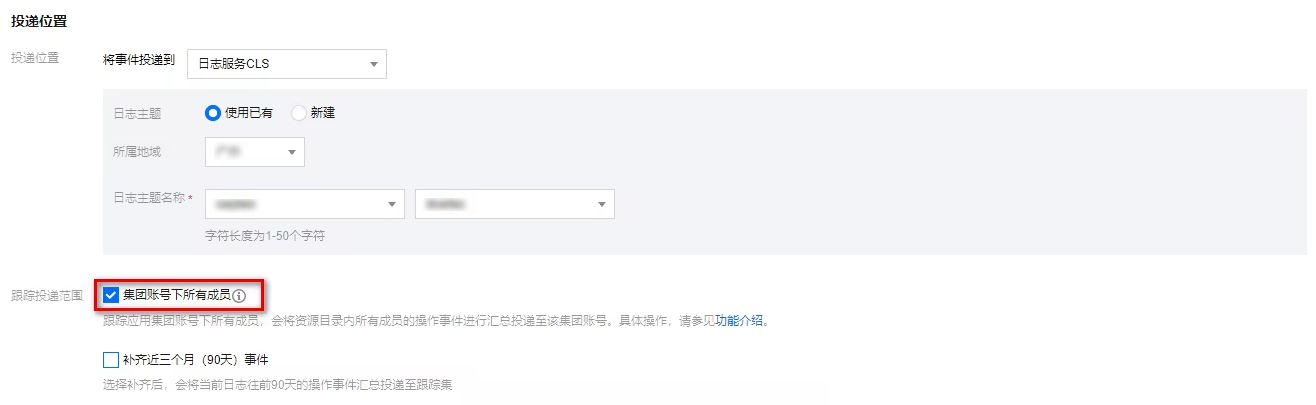
3. In the delivery location configuration, check all members under the group account. As shown below:


4. Click Save to enable cross-account delivery feature. The tracking set will deliver logs of all members under the group account to the delivery location you have set.
Note:
After a group organization creates a tracking set and delivers logs, member account log information can only be seen in the delivered Cloud Log Service (CLS) or Cloud Object Storage (COS). Operation records cannot show logs across different accounts.
When a group organization adds/removes members, it will normally/stop shipping operation logs generated by members after 20 minutes.

Help and Support

Was this page helpful?

Help us improve! Rate your documentation experience in 5 mins.

Feedback