tencent cloud

Tencent Effect SDK

Release Notes and Announcements
Release Notes
Tencent Effect SDK V3.5 Version Released
Tencent Effects SDK V3.0 Version Related API and Material Changes
Product Introduction
Overview
Features
Basic Concepts
Strengths
Use Cases
Purchase Guide
Pricing Overview
Purchase Guide
Payment Overdue and Refund
Tutorial
Demos
Free Trial License
Licenses
Adding and Renewing a License (Mobile)
Adding and Renewing a License (Desktop)
Adding and Renewing a License (Web)
FAQs
SDK Download
Features
SDK Download
Version History
SDK Integration Guide(No UI)
General Integration of Tencent Effect
Integrating Capabilities
SDK Integration Guide(Including UI)
General Integration of Tencent Effect
Integrating Tencent Effect into MLVB SDK
Integrating Tencent Effect into TRTC SDK
Integrating Tencent Effect into UGSV SDK
Virtual Avatars
API Documentation
iOS
Android
Flutter
Web
Feature Guide
Reducing SDK Size
SDK Integration Issue Troubleshooting
Performance Fine-Tuning
Effect Fine-Tuning
Material Usage
Effect Parameters
Recommended Parameters in Beautification Scenarios
UGSV Enterprise Edition Migration Guide
Integrating Tencent Effect for Third-Party Publishers (Flutter)
Integrating Beauty AR Web into Mini Programs
Tencent Effect Studio Usage
Beauty AR Web
Overview
Quick Start
SDK Integration
Parameters and APIs
Console Guide
Demos
Preset Effect List
Practical Tutorial
FAQs
FAQs
General
Technical
License
Legacy Documentation
Recommended Parameters in Beautification Scenarios
Beauty Parameters Table
One-Minute Integration of TRTC
One-Minute Integration of Live Streaming
TE SDK Policy
Privacy Policy
Data Processing And Security Agreement
Contact Us

Effect Issue Troubleshooting

PDF
Focus Mode
Font Size
Last updated: 2024-09-13 15:11:04

1. What to do if noise appears in the image?

If you are in a low-light environment and noise appears in the image, you can enable the noise reduction attribute.

2. What to do if the segmentation effect is not very good?

When the background segmentation effect is used, it is recommended not to have a too complex background. The background color and clothing color should not be too similar. Otherwise, the segmentation effect will be reduced.

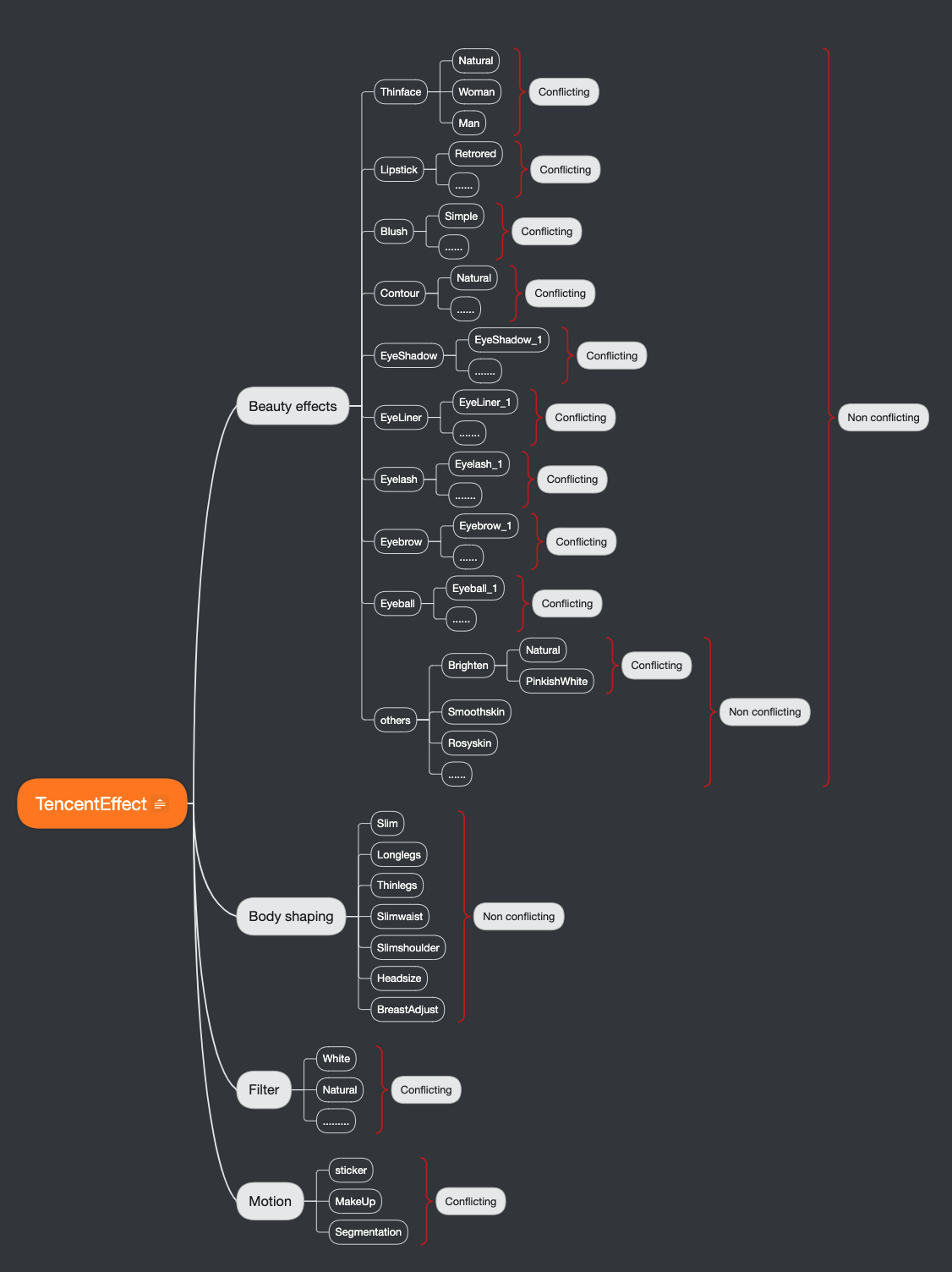
3. What is the relationship between beauty makeup materials and beauty filter?


4. What to do if using a certain beauty filter has no effect?

This could be a license permission issue or a parameter issue (for example, the path issue with filters and animation effects). It is recommended to check the property parameters.

5. What to do if the edges of the screen are blurry after the beauty filter is applied?


This situation occurs because the face slimming effect is on (face slimming effect leads to the stretching of pixels around the face). If the face is too close to the edge of the screen, there's more stretching at the edge. This can be handled by cropping the edge of the screen. For the cropping method, refer to the demo.

6. What to do if the face has no effect in horizontal screen mode?

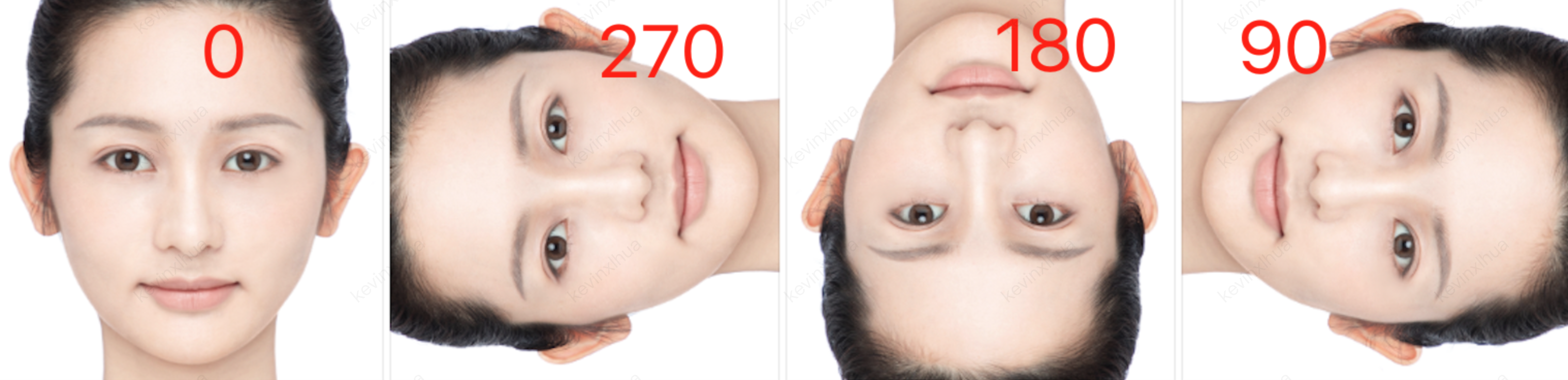
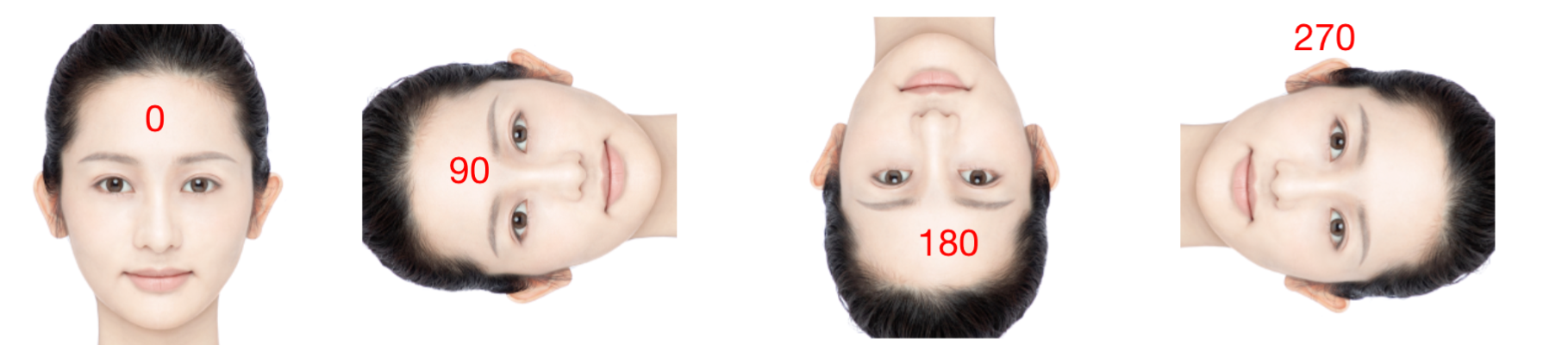
Check the direction of the face in the screen and set the corresponding offset angle.
Android
iOS
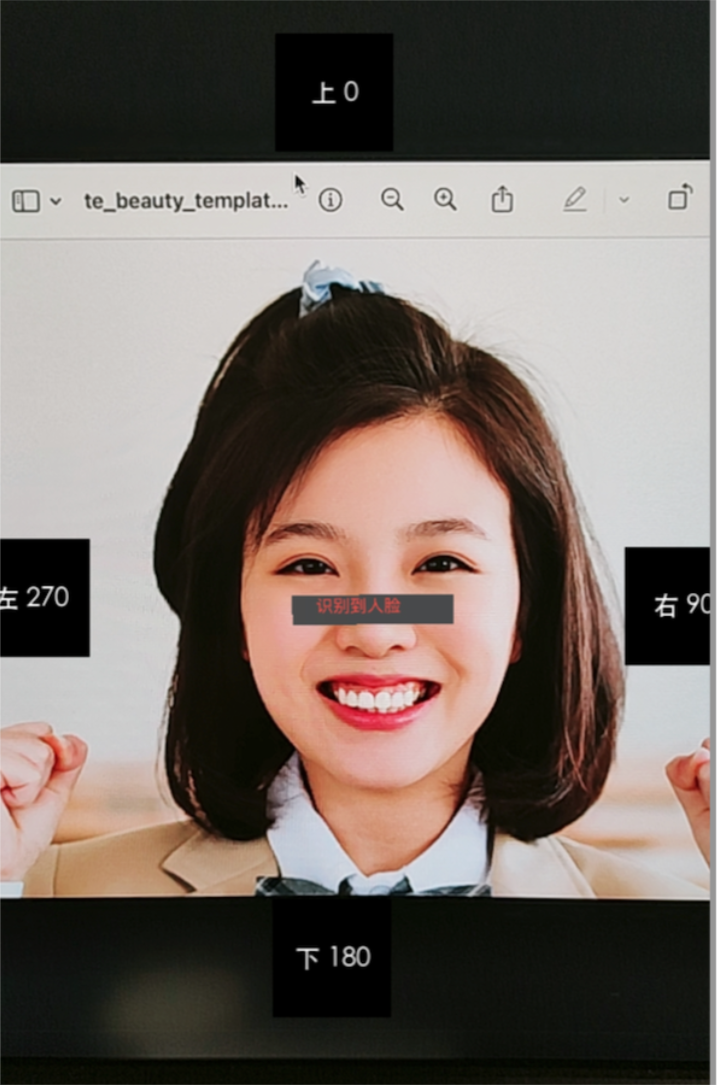
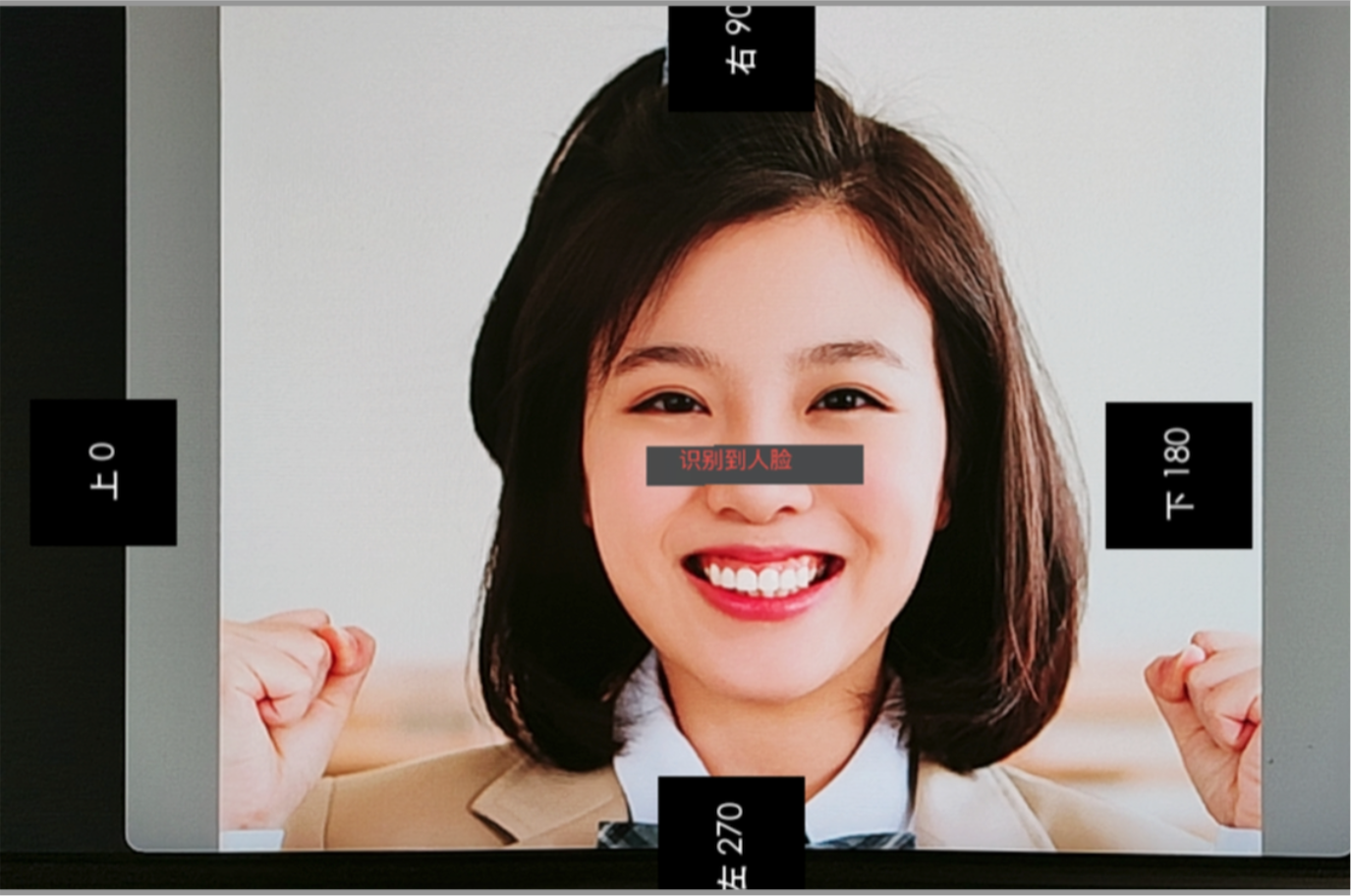
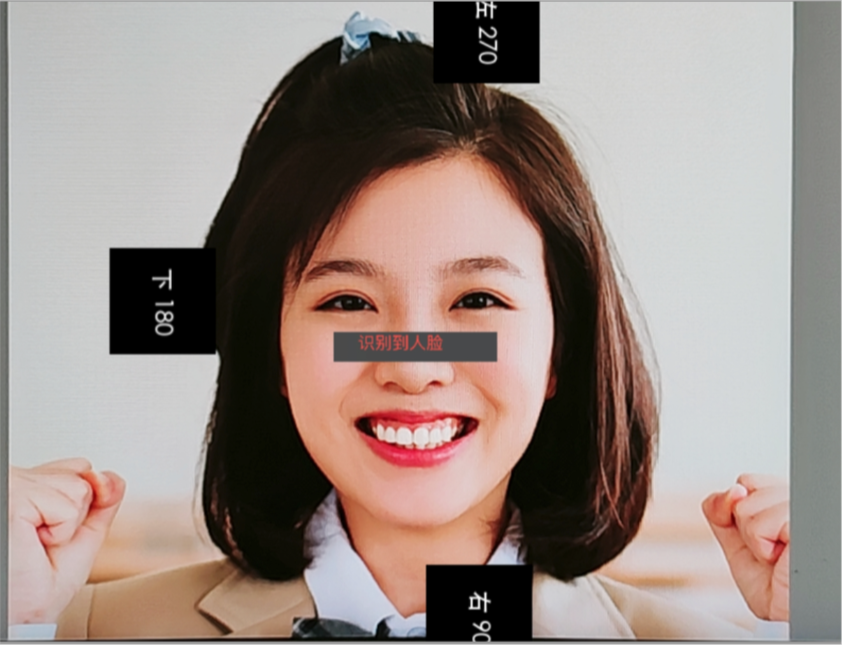
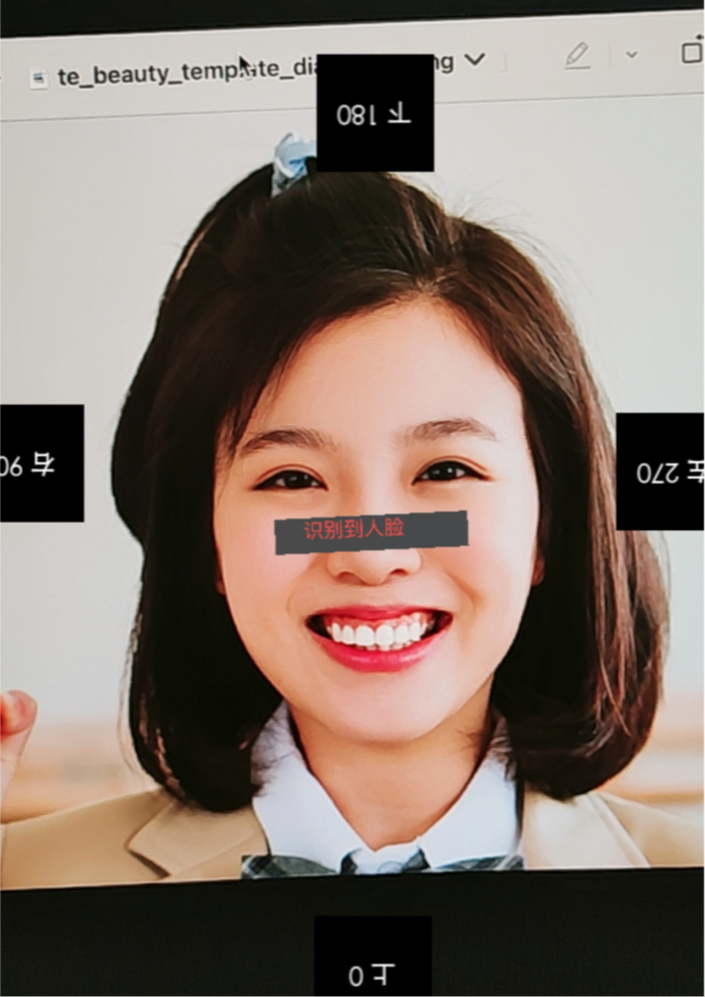
1. In Android, you can use the readTexture method to retrieve the current screen, check the direction of the face, and set the corresponding angle according to the picture below.
public static Bitmap readTexture(int texture, int width, int height) { int[] frame = new int[1]; GLES20.glGenFramebuffers(1, frame, 0); GLES20.glBindFramebuffer(GLES20.GL_FRAMEBUFFER, frame[0]); GLES20.glFramebufferTexture2D(GLES20.GL_FRAMEBUFFER, GLES20.GL_COLOR_ATTACHMENT0, GLES20.GL_TEXTURE_2D, texture, 0); byte[] data = new byte[width * height * 4]; ByteBuffer buffer = ByteBuffer.wrap(data); GLES20.glPixelStorei(GLES20.GL_PACK_ALIGNMENT, GLES20.GL_TRUE); GLES20.glReadPixels(0, 0, width, height, GLES20.GL_RGBA, GLES20.GL_UNSIGNED_BYTE, buffer); Bitmap bitmap = Bitmap.createBitmap(width, height, Bitmap.Config.ARGB_8888); bitmap.copyPixelsFromBuffer(buffer); GLES20.glBindFramebuffer(GLES20.GL_FRAMEBUFFER, 0); GLES20.glDeleteFramebuffers(1, frame, 0); return bitmap; }
2. Call the setImageOrientation method in Android.


1. In iOS, you can use the readTexture method to retrieve the current screen, check the direction of the face, and set the corresponding angle according to the picture below.

#import <OpenGLES/ES2/gl.h>
-(void)readTexture:(int)textureId width:(int)width height:(int)height{
glBindTexture(GL_TEXTURE_2D, textureId);
GLuint framebuffer;
glGenFramebuffers(1, &framebuffer);
glBindFramebuffer(GL_FRAMEBUFFER, framebuffer);
glFramebufferTexture2D(GL_FRAMEBUFFER, GL_COLOR_ATTACHMENT0, GL_TEXTURE_2D, textureId, 0);
GLenum status = glCheckFramebufferStatus(GL_FRAMEBUFFER);
if (status != GL_FRAMEBUFFER_COMPLETE) {
NSLog(@"Framebuffer is not complete.");
}
GLubyte *pixels = (GLubyte *)malloc(width * height * 4 * sizeof(GLubyte));
glReadPixels(0, 0, width, height, GL_RGBA, GL_UNSIGNED_BYTE, pixels);
glBindFramebuffer(GL_FRAMEBUFFER, 0);
glDeleteFramebuffers(1, &framebuffer);
CVPixelBufferRef pixelBuffer = NULL;
CVPixelBufferCreateWithBytes(NULL, width, height, kCVPixelFormatType_32BGRA, pixels, width * 4, NULL, NULL, NULL, &pixelBuffer);
free(pixels);
CVPixelBufferRelease(pixelBuffer);
}
2. Call the setImageOrientation method in iOS.


Help and Support

Was this page helpful?

Help us improve! Rate your documentation experience in 5 mins.

Feedback