Light Makeup is a new feature introduced in version V3.9.0 of the Tencent Effect SDK. A set of Light Makeup can include these makeup items: filter, lipstick, blush, sculpted, eyeshadow, eyeliner, mascara, eyebrows, colored contact lenses, double eyelids, eye bags. Essentially, Light Makeup is the same capability as the SDK's existing "single-point makeup", which can be understood as a combination of multiple single-point makeup items.
Compared to the previous "complete makeup effects", Light Makeup has better performance and can overlay well with other effects.
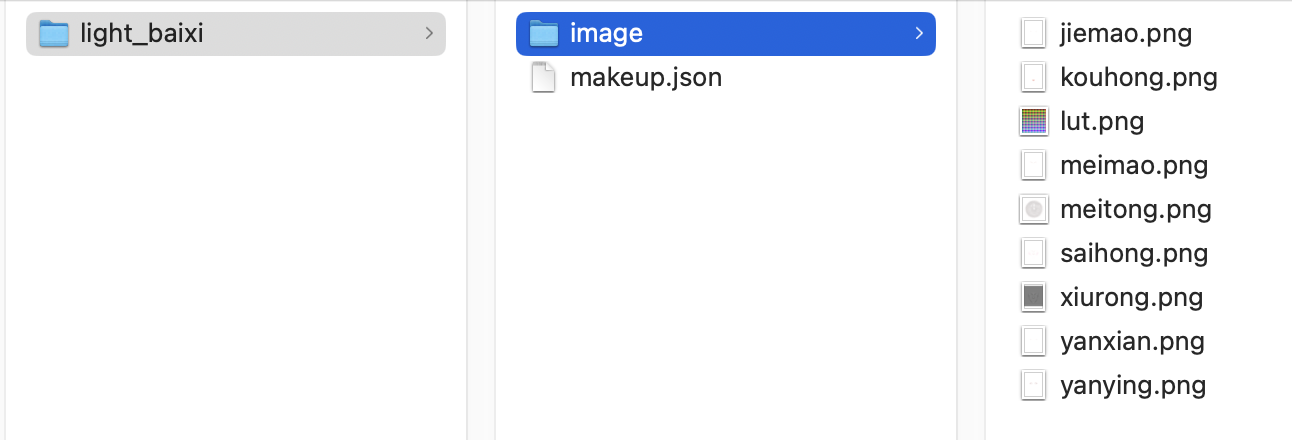
A set of Light Makeup material includes several makeup images and a json configuration file. For example, the configuration of the "light_baixi" Light Makeup is as follows:
How to use light makeup
Please call the setEffect interface of the SDK to use light makeup:
effectName is EFFECT_LIGHT_MAKEUP.
effectValue is the makeup intensity, ranging from 0 to 100.
resourcePath is the path to the light makeup material, i.e., path/to/your_light_makeup.
extraInfo is optional. If you only want to modify the filter strength in light makeup without changing the makeup intensity, add a key-value pair in extraInfo, where the key is "makeupLutStrength" and the value is the filter strength, ranging from 0 to 100. Note that the value is also in string format.
Precautions
1. The relationship between light makeup and single-point makeup
Light makeup is essentially a collection of single-point makeup, so the latter settings will overwrite the former ones, as follows:
Scenario 1: If several single-point makeups are set first, and then a set of light makeup is applied, the light makeup effect will overwrite the single-point makeup effect.
Scenario 2: If a set of light makeup is applied first (assuming it includes lipstick, eyeshadow, eyebrows, etc.), and then a single-point makeup (e.g., lipstick) is set, the final effect will be: the newly set lipstick + the eyeshadow in the light makeup + the eyebrows in the light makeup.
For scenario 2, our demo handles it by clearing light makeup when setting single-point makeup. You can choose whether to clear light makeup based on your actual product situation.
2. Overlay relationship between light makeup and other effects
Light makeup can be overlaid with any other effects, including: beauty filter, aesthetic shape, body shaping, stickers, virtual background, camera movement effects, etc.
3. Relationship between light makeup and "stylish makeup" in sticker effects
Before V3.9.0, our full makeup was "stylish makeup," which is essentially an effect that cannot be overlaid with other effects, or the overlay does not meet expectations. However, light makeup can be overlaid with any other effects, including stylish makeup (though it is not recommended). In demos from V3.9.0 and later, we placed the experience entry for "stylish makeup" together with 2d stickers and 3d stickers.