Overview
Download
Focus Mode
Font Size
What Is ALB?
Application Load Balancer (ALB) is a layer-7 (application layer) load balancing service designed specifically for traffic distribution and routing management for application protocols such as HTTP, HTTPS, and QUIC. It operates at layer 7, the application layer, of the Open Systems Interconnection (OSI) model. This enables it to parse the content of protocols such as HTTP/HTTPS/QUIC and intelligently distribute traffic to different backend services based on request characteristics such as the domain name, path, and Header.
ALB is a next-generation load balancing solution designed for modern application architectures. It is particularly well-suited for cloud-native scenarios such as microservices, containerization, and Serverless, as well as for business systems that require fine-grained management of HTTP traffic.
Features
Layer-7 advanced routing: This feature supports advanced routing rules based on the HTTP content. It can forward requests based on conditions such as the domain name, URL path, HTTP Header, Query String, and HTTP request method.
High availability and auto scaling: This feature supports cross-availability zone (AZ) deployment to eliminate single point of failures (SPOFs). Performance is automatically scaled out based on business traffic, enabling smooth handling of sudden traffic peaks.
Security protection: This feature supports security groups and access control lists (ACLs), integrates with Web Application Firewall (WAF), and provides Anti-DDoS protection and end-to-end HTTPS encryption (with TLS 1.3 supported).
Health check: This feature automatically detects the running status of real servers and isolates unhealthy nodes in real time, helping ensure business stability.
Multi-protocol support: This feature provides comprehensive support for common protocols such as HTTP/1.1, HTTP/2, HTTP/3, QUIC, gRPC, WebSocket, and SSE.
Cloud-native integration: This feature deeply integrates with components such as Tencent Kubernetes Engine (TKE) and Auto Scaling (AS), and can be used as a Kubernetes Ingress controller.
Components
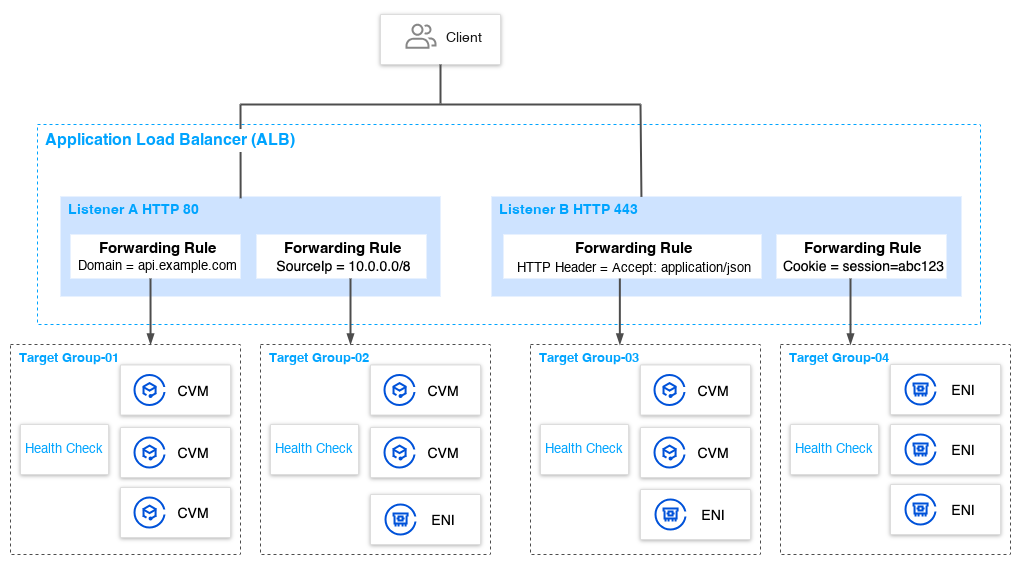
ALB consists of the following core components:
ALB Instance
An ALB instance is the entity that provides layer-7 load balancing services, serving as the entry point and traffic aggregation point for the entire system.
Network Type: Public and private networks are included. A public network instance provides public network services via Elastic IP (EIP).
A public network instance is bound to an EIP to provide services directly to the Internet.
A private network instance provides services only within a virtual private cloud (VPC), making it suitable for interconnecting internal systems.
AZ Deployment: It is recommended that you select subnets from at least 2 different AZs, which helps maintain service availability in the event of a single AZ failure.
Capacity Specification: Performance metrics for a single virtual IP address (VIP) are listed below and cannot be adjusted.
Metric Name | Maximum Specification |
QPS | 500,000 |
CPS | 200,000 per second |
Maximum Number of Concurrent Connections | 5,000,000 |
Outbound Bandwidth | 25Gbps |
Inbound Bandwidth | 25Gbps |
Note:
The public network bandwidth of a public ALB instance equals the sum of the bandwidth of all EIPs under the instance. By default, the public network bandwidth of a single EIP is 200 Mbps. If an ALB instance is deployed in 2 AZs (2 EIPs are used), the bandwidth cap for the ALB instance is 400 Mbps.
The data comes from Tencent's internal experimental test results in 2026.
Listener
A listener is the smallest business unit of an ALB instance. It is used to check client connection requests and configure forwarding policies.
The main configuration items include the following:
Configuration Item | Description |
Protocol Type | Select an appropriate listener protocol based on your business requirements, such as HTTP/HTTPS. |
Listening Port | Select a port within the range of 1–65535. Ports for listeners within the same instance must be unique. |
Forwarding Rule | Use a forwarding rule to define request matching conditions and target actions. |
SSL Settings | Complete settings such as certificate selection, cipher suite configuration, and protocol version selection. |
Forwarding Rule
A forwarding rule defines how to route requests with different characteristics to different backend services.
Condition Type:
Domain name
Path
HTTP Header
Query String
HTTP request method
Cookie
SourceIP
Action Type:
Forwarding
Redirecting
Returning a fixed response
Rewriting
Writing a header
Deleting a header
Priority Mechanism: Rules are evaluated in descending order of priorities, and the first rule that matches takes effect. If no rule matches, traffic is forwarded based on the listener's default rule.
Target Group
A target group is a logical collection of real servers, used for centralized management and scheduling of traffic.
Target Type: Use a Cloud Virtual Machine (CVM) instance or an elastic network interface (ENI).
Health Check: Configure an independent health check policy from the target group dimension.
Balancing Method: Use the weighted round robin (WRR) or weighted least connections (WLC) method.
Health Check
The health check mechanism is used to monitor the backend service availability in real time, ensuring that traffic is distributed to healthy backend services as much as possible.
Parameter | Description | Default Value |
Protocol Check | TCP / HTTP / HTTPS | TCP |
Check Port | Port used for health checks | Service port |
Response Timeout Period | Maximum wait time for a response | 2 seconds |
Check Interval | Time interval between 2 checks | 5 seconds |
Unhealthy Threshold | Number of consecutive failures to determine an abnormal status | 3 times |
Healthy Threshold | Number of consecutive successes to determine a healthy status | 3 times |
Definitions
Term | Description |
ALB | A load balancing entity that operates at layer 7 (the application layer). It is responsible for receiving and distributing application-layer traffic. |
Listener | A logical unit that configures protocols, ports, and forwarding rules. It is responsible for handling client connection requests. |
Forwarding Rule | A policy for defining request matching conditions and corresponding actions to achieve fine-grained routing. |
Target Group Dimension | A logical collection of real servers serving as the destination for traffic forwarding. |
RS | A server instance that actually processes business requests, such as CVMs and containers. |
Health Check | A mechanism that automatically probes the availability of real servers. |
Service Domain Name | The domain name provided by an ALB instance for load balancing services, serving as the unified entry point exposed externally. It can be resolved to multiple VIPs. Warning: This domain name cannot be accessed directly and is only used as the target address for CNAME resolution. |
VIP | The service address of an ALB instance, with 1 VIP per AZ. |
ALCU | A performance capacity unit used to measure the resource consumption and billing of ALB. |
How It Works
Basic Process
1. DNS resolution: Clients access the business system via domain names. On the platform side, it is recommended that you resolve your custom domain name to the service domain name provided by the platform side by using the CNAME method on your DNS platform. The service domain name is then resolved by the platform side to the VIP of the ALB.
2. Request arrival: The ALB receives requests on the designated port and parses the complete HTTP content (the method, URL, Header, and so on).
3. Rule matching: Forwarding rules are evaluated in order of priorities. Request characteristics are extracted and compared one by one. The first rule that fully matches is activated and executed.
4. Traffic distribution: The target group is determined based on the rule action. A load balancing algorithm (for example, WRR) is used to select a healthy real server from the target group, and the request is forwarded.
5. Response returning: The real server processes the request and returns a response. The ALB then forwards the response back to the client.
It is recommended that you deploy real server instances for a load balancer across multiple AZs. If an AZ becomes unavailable, the load balancer routes traffic to healthy instances in other AZs, thereby avoiding service interruptions caused by AZ failures.
Request Route Selection
A client request accesses the service via a domain name. Before the request is sent to a load balancer, the DNS server resolves the load balancing domain name and returns the load balancing IP address, to which the request is forwarded, to the client. When the request is received by the load balancing listener, it is distributed to real servers by using various load balancing algorithms.
Health Check Mechanism
ALB periodically sends detection requests (TCP connections or HTTP requests) to backend services, determines node statuses based on the responses, and routes traffic only to instances that are running normally as much as possible. When a load balancer detects an unhealthy instance, it stops routing traffic to that instance, and resumes routing traffic to it after it detects that the instance is running normally again.
Cross-AZ Deployment
When you create an ALB instance, select subnets from at least 2 different AZs to achieve cross-AZ disaster recovery.
When a single AZ fails, services can still be provided normally from the other AZs.
Traffic is automatically distributed across multiple regions, enhancing the overall throughput capacity.
Disaster recovery requirements for enterprise-grade businesses are met.
Related Services
Attention:
The data in the official documentation comes from Tencent's internal experimental test results in 2026. The tests are based on specific environments, conditions, and time ranges, and reflect only the corresponding test scenarios. Actual results may vary depending on business scenarios, configurations, and usage conditions. No further statements are provided separately.
As a core component of the Tencent Cloud network ecosystem, ALB can be used in conjunction with the following products:
Compute:
CVM: It serves as a real server for ALB, hosting business applications.
TKE: It integrates with ALB via an Ingress controller to manage container traffic.
AS: Instances created by AS are automatically registered to ALB target groups and scaled on demand.
Network and Security:
VPC: ALB is deployed within a VPC, which helps ensure network security.
Security group and ACL: A security group is a virtual firewall that controls business traffic via custom access rules. An ACL rule is an optional security layer at the subnet level that controls inbound and outbound data flows at the protocol and port granularity for refined traffic control.
WAF: It is integrated into ALB to defend against attacks such as SQL injection and cross‑site scripting (XSS) attacks.
Anti-DDoS Pro: It provides enhanced DDoS scrubbing capabilities for public ALB.
SSL Certificates: It applies for and manages certificates for HTTPS listeners.
DNS: It resolves domain names to a VIP or CNAME record of ALB.
Global Accelerator 2.0 (GA2.0): It provides cross-border and low-latency access capabilities for ALB.
Ops and Monitoring:
Tencent Cloud Observability Platform (TCOP): It monitors key ALB metrics such as the queries per second (QPS), latency, and status code.
Cloud Access Management (CAM): It helps you securely and conveniently manage access to Tencent Cloud services and resources.
Cloud Log Service (CLS): It collects and analyzes ALB access logs.
Help and Support
Was this page helpful?
You can also Contact sales or Submit a Ticket for help.
Help us improve! Rate your documentation experience in 5 mins.
Feedback