Overview
Download
Focus Mode
Font Size
Scenarios
This document describes the overview page of the ISS console, including the page module description and network billing mode switching.
Prerequisites
When logging in for the first time, new users must create a service preset role and grant the required product permissions. After completing this operation, they can use the product.
Page Introduction
After logging in to the ISS console, you go to the overview page by default. The overview page displays data across dimensions such as devices, alarms, billing methods, and usage, helping you understand the overall business status.
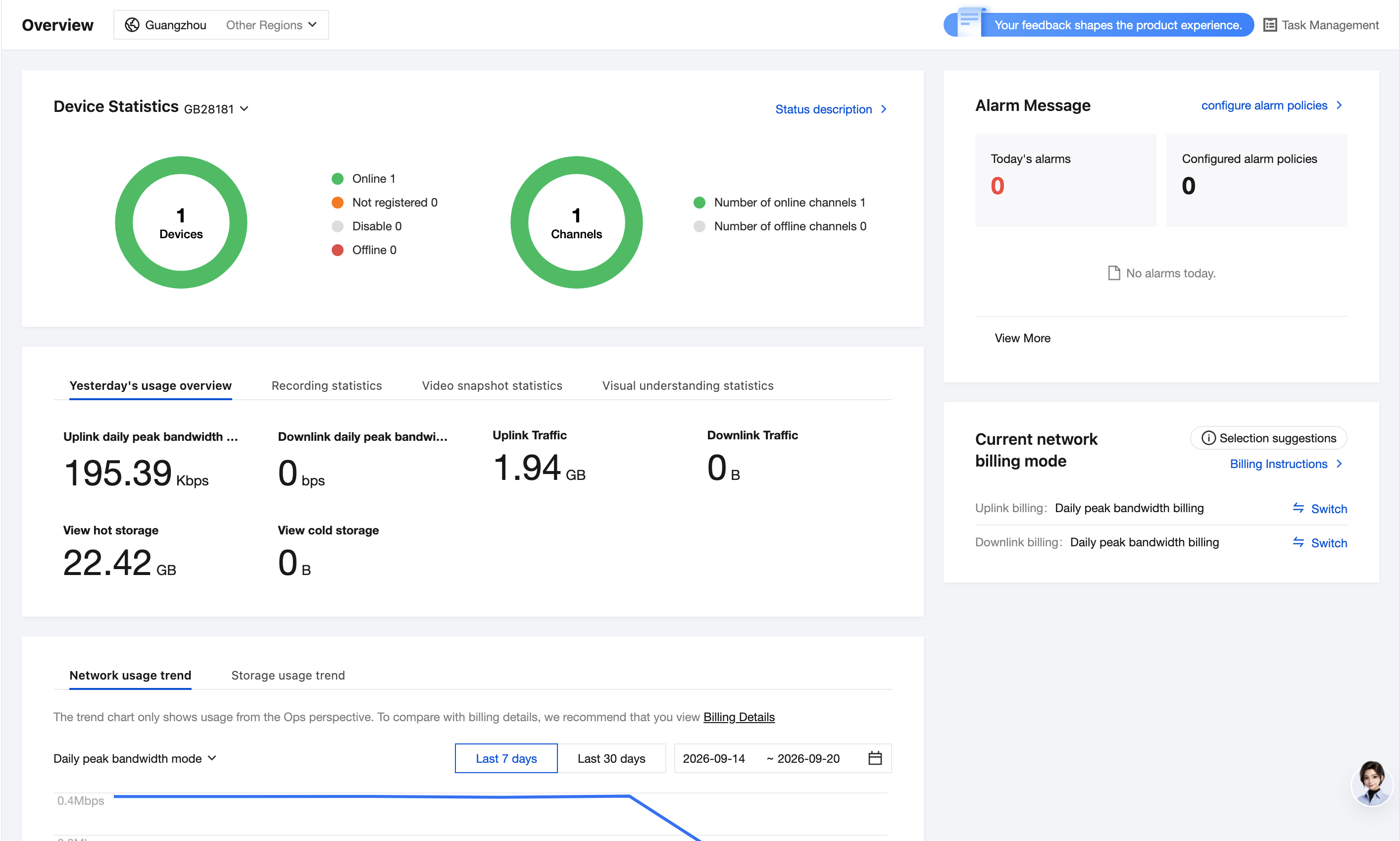
The page consists of the following modules:
Module | Description |
Device statistics | Displays device and channel statistics for the specified access protocol in the current region. |
Alarm Message | Displays the number of today's alarms and the number of configured alarm policies. |
Usage statistics | Displays yesterday's usage overview, recording statistics, video snapshot statistics, and visual understanding statistics in tabs. |
Current network billing mode | Displays the billing method for current upstream and downstream network traffic and supports switching. |
Device Statistics
Display the statistics of devices and channels under the specified access protocol in the current region:
Total Devices: displays the total number of devices and the number of devices in each status, including online, unregistered, disabled, and offline.
Total Channels: displays the total number of channels and the number of channels in each status, including online and offline.
You can switch regions at the top of the page and switch the access protocol (such as GB28181) from the dropdown list in the upper-left corner of the device statistics card. Click Status Description in the upper-right corner of the card to view detailed descriptions of each status. For more information, see "Device Status Description" below.
Alarm information
Display alarm-related data:
Today's Alarms: the number of alarms generated on the current day.
Configured Alarm Policies: the number of currently configured alarm policies.
Click Configure Alarm Policy in the upper-right corner to go to the alarm policy configuration page. Click View More to view historical alarm messages.
Usage statistics
At the bottom of the page, various statistics are displayed in tabs, including Yesterday's Usage Overview, Recording Statistics, Video Snapshot Statistics, and Visual Understanding Statistics. You can switch between tabs to view the corresponding data.
Current Network Billing Mode
Displays the current billing method for uplink and downlink network traffic (such as daily peak bandwidth billing). Click Switch to the right of the billing method to change the billing method for the corresponding direction. For switching rules, see "Network Billing Method Switch" below.
Note:
Click Selection Suggestions to view billing method selection suggestions. Click Billing Instructions to view detailed instructions on network billing.
Device Status Explanation
A device refers to an abstract entity that you create in our service, which can correspond to your physical terminal device, such as an IPC/NVR. A channel is the physical location on a device where signals are input, specifically referring to a video channel here.
Note:
Due to network or device-side issues, the device status on the platform may not be accurate in real time.
RTMP devices and channels are strongly bound. If a device is online, its channels must be online, and vice versa. After an RTMP device is created, the default number of channels is 1.
Type | Status | Description |
Device | Unregistered | You created a device on our platform but did not configure it on the device side, so the device has not been successfully registered yet. |
Device | Online. | You completed the configuration on the device side, and the device has now been successfully registered to our platform. |
Device | Offline. | Unexpected events (such as power outages/network disconnections) cause the device to lose all contact with the platform, including the registration status and data streams. |
Device | Disabled. | When the device is disabled, we will interrupt device registration and pull streaming, but retain the device configuration information. |
Channel | Online. | Conditions for stream transmission are met. |
Channel | Offline. | Conditions for stream transmission are not met. |
Switching Network Billing Modes
In the Current Network Billing Method section on the right side of the Overview page, click Switch next to the uplink or downlink billing method based on your business needs.
Note:
Applicable to postpaid (daily settlement) pay-as-you-go billing.
The uplink and downlink network billing methods can each be switched only once per day, and the change takes effect at 00:00 (midnight), applying to the following day.
Help and Support
Was this page helpful?
You can also Contact sales or Submit a Ticket for help.
Help us improve! Rate your documentation experience in 5 mins.
Feedback