Recycle Bin Feature Overview
Unduh
Mode fokus
Ukuran font
Overview
The metadata acceleration bucket recycle bin feature of Tencent Cloud Object Storage (COS) provides an important layer of protection against accidental deletion for data in buckets. After you enable this feature, deleted files are not permanently removed. Instead, they are moved to a temporary storage directory for retention, where you can restore and manage them. This effectively reduces the risk of data loss and improves data management efficiency.
The recycle bin feature of metadata acceleration buckets provides two working modes to accommodate different user habits: HDFS recycle bin mode and native recycle bin mode, meeting the data security management requirements of different business architectures such as big data and AI training.
Note:
Feature support: The recycle bin feature described in this document is supported only by metadata acceleration buckets. The recycle bin feature and configuration process of standard COS buckets are completely different from those of metadata acceleration buckets.
Versioning: Note that metadata acceleration buckets do not support the versioning feature. Their recycle bin mechanism is a completely independent data protection method rather than one based on multiple versions.
Storage fees: After you enable the recycle bin, deleted data is temporarily retained in the recycle bin. During the data retention period, storage fees are incurred normally.
Feature Strengths
Preventing accidental deletion: Providing a buffer period for data deletion operations and intercepting accidental deletion operations is an important part of building a data security defense line.
Flexible restoration: Users can easily locate and restore deleted files or directories within the retention period.
Multi-ecosystem compatibility: Provides HDFS standard compatibility mode and native optimization mode to adapt to different technology stacks and user habits.
Automatic cleanup: The system automatically cleans up expired data based on the retention period configured by users, requiring no manual intervention and simplifying Ops management.
How It Works
After the recycle bin feature is enabled, the system automatically processes deleted data in the background. Its internal working principles vary depending on the mode you select, as described below:
HDFS Recycle Bin Mode
This mode is designed to be fully compatible with the recycle bin behavior of the Apache Hadoop Distributed File System (HDFS), allowing users who migrate to and use HDFS ecosystem tools to transition seamlessly.
Recycle bin directory: The system automatically maintains the /user/<username>/.Trash/ directory structure in the bucket as the recycle bin path.
Daily rotation: Each day, the Current directory under the recycle bin .Trash directory is automatically renamed to a directory named with the current date (for example, 20260101), and a new Current directory is created to receive files deleted on that day.
Automatic cleanup: A background process periodically scans these date-named directories and automatically deletes directories and their contents that exceed the retention period, based on the date in the directory name and the retention period you configure in the console.
Note:
The features related to the HDFS recycle bin mode require collaboration between the client (that is, Hadoop FileSystem Shell or other big data components) and the server (that is, the metadata acceleration bucket) to be completed. The client side must ensure the following:
To enable the recycle bin feature, you generally need to configure fs.trash.interval in core-site.xml to a value greater than 0.
The deletion action does not actually delete files. Instead, files are renamed to the /user/<username>/.Trash/Current directory.
Native Recycle Bin Mode
This mode is a native recycle bin solution designed by Tencent Cloud COS for metadata acceleration buckets, and it aligns more closely with the usage logic of object storage.
Recycle bin directory: After it is enabled, the system automatically creates a dedicated recycle bin directory in the root directory of your file system. The directory name usually consists of the first 8 characters of the request ID and the _trash suffix, such as /a1b2c3d4_trash.
Delete operation: When a delete operation occurs, files or directories are not removed immediately. Instead, they are actually renamed to a subdirectory named with the current date under the recycle bin directory, with a millisecond-level timestamp appended. For example:
/a1b2c3d4_trash/20260101/data/file1.log_1698765432000.Automatic cleanup: Similar to the HDFS mode, a backend service periodically and automatically cleans up expired data based on the names of the date subdirectories and the retention period you configure.
Note:
Whether a delete operation is initiated by a user or triggered internally (such as lifecycle deletion), files are moved to the recycle bin directory.
Prerequisites
Before using the recycle bin feature, ensure that the following preparations are complete:
Operation Steps
Enabling the Recycle Bin Feature
You can enable the recycle bin feature for a metadata acceleration bucket through the COS console. The detailed steps are as follows:
1. Log in to the COS console.
2. In the left sidebar, click Bucket List to go to the bucket list page.
3. Click the metadata acceleration bucket for which you want to enable the recycle bin to go to the bucket details page.
4. In the left sidebar, choose Basic Configuration > Recycle Bin Management to go to the recycle bin management page. By default, the recycle bin is disabled at this point.
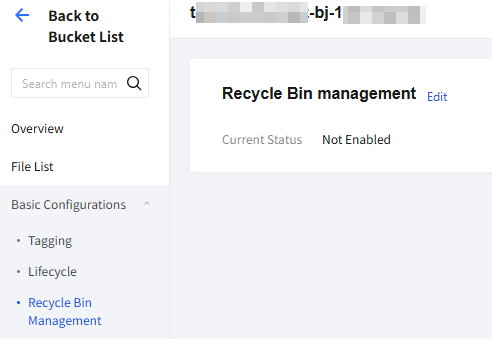
5. Click the Edit button in the upper-right corner, enable the recycle bin switch, and select the recycle bin mode you need.
HDFS recycle bin: Compatible with the recycle bin behavior of the Apache Hadoop HDFS ecosystem, with the recycle bin path at
/user/*/.Trash. This mode is suitable for users who use Hadoop FileSystem Shell or other big data components.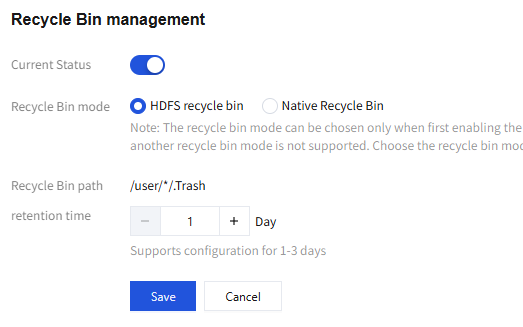
Native Recycle bin: A native solution designed by Tencent Cloud COS for metadata acceleration buckets, with the recycle bin path automatically generated by the system. This mode aligns more closely with the usage logic of object storage.
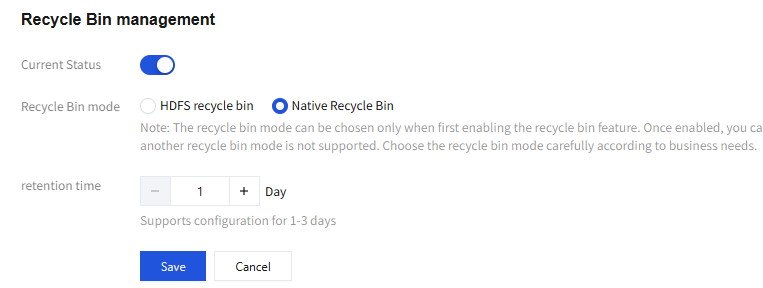
6. Set the retention period (configurable from 1 to 3 days), confirm the information, and click Save to enable the recycle bin feature for the bucket.
Note:
The two recycle bin modes cannot coexist. You can select only one recycle bin mode for a bucket.
The recycle bin mode can be selected only when you enable the recycle bin feature for the first time. After the recycle bin feature is enabled, you can only disable or re-enable it, and you cannot switch to another recycle bin mode. Select the recycle bin mode that suits your business needs carefully.
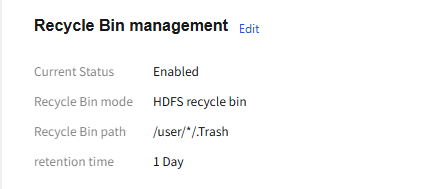
After the recycle bin is enabled successfully, the recycle bin management page displays the current recycle bin configuration, including the recycle bin mode, recycle bin path, and retention period.
Managing and Restoring Files
After enabling the recycle bin, you can view deleted files in the recycle bin path and restore accidentally deleted files as needed.
1. Locate the file or directory that you want to restore in the recycle bin path.
2. Move the file or directory back to its original directory by using the
hdfs fs -mv command to restore the data to its original path.Example:
Restore files in HDFS recycle bin mode
hadoop fs -mv ofs://mountpoint/user/hadoop/.Trash/Current/data/file.txt ofs://mountpoint/data/file.txt
Command description:
Path Section | Description | Replacement Required or Not |
ofs://mountpoint | Mount point address of your metadata acceleration bucket, in the format ofs://<mount point name> | Replace it with your actual mount point name. |
/user/hadoop | Directory corresponding to the username that submits the deletion operation | Replace it with the actual username (for example, /user/root). |
/.Trash/Current | Fixed directory path of the recycle bin | Fixed value, no modification required. |
/data/file.txt | Original path of the deleted file relative to the file system root directory | Replace it with the actual file path. |
Restore files in native recycle bin mode
hadoop fs -mv ofs://mountpoint/a1b2c3d4_trash/20260101/data/file.txt_1698765432000 ofs://mountpoint/data/file.txt
Command description:
Path Section | Description | Replacement Required or Not |
ofs://mountpoint | Mount point address of your metadata acceleration bucket | Replace it with your actual mount point name. |
/a1b2c3d4_trash | Name of the recycle bin directory automatically generated by the system (consisting of the first 8 characters of the request ID + _trash) | Replace it with the actual recycle bin directory name in your bucket. |
/20260101 | Date when the file was deleted (format: YYYYMMDD) | Replace it with the actual deletion date of the file. |
/data/file.txt_1698765432000 | Original file path + millisecond timestamp suffix | Replace it with the actual file path in the recycle bin. |
/data/file.txt (Target path) | Target path to restore to | Replace it with the actual path where you want to restore the file. |
Bantuan dan Dukungan
Apakah halaman ini membantu?
Anda juga dapat Menghubungi Penjualan atau Mengirimkan Tiket untuk meminta bantuan.
masukan