tencent cloud

TDSQL for MySQL

Announcements
Alarm Upgrade
Product Introduction
Overview
Strengths
Use Cases
Regions and AZs
InnoDB engine
Purchase Guide
Billing Overview (InnoDB)
Product Pricing (InnoDB)
Purchase and Upgrade
Refund
Payment Overdue
Backup Space Billing
Getting Started
InnoDB Engine
Operation Guide(InnoDB)
Instance Management
Disaster Recovery Read-Only Instance
Changing Networks
Account Management
Security Management
Slow Query Analysis
Backup and Rollback
Data Migration
Database Audit
Practical Tutorial
Import from Standalone Instance to TDSQL Instance
Import Between TDSQL Instances
Selection of TDSQL Instance and Shard Configuration
Security White Paper
Platform Security Design
Tenant Security Features
Development Guide
InnoDB
API Documentation
History
Introduction
API Category
Security Group APIs
Other APIs
Making API Requests
TDSQL APIs
Data Types
Error Codes
FAQs
InnoDB
General References
Performance Comparison Data for Strong Sync
Glossary
Contact Us

Resetting Account Password

PDF
フォーカスモード
フォントサイズ
最終更新日: 2024-01-06 17:33:30

Overview

If you forgot your database account password or need to modify it while using TDSQL for MySQL, you can reset it in the console.
Note:
We recommended that you regularly reset the password at least once every three months for the sake of data security.

Directions

1. Log in to the TDSQL console. In the instance list, click an instance ID or Manage in the Operation column to enter the instance management page.
2. On the instance management page, select Account Management tab, find the account for which to reset the password, and select More > Reset Password.


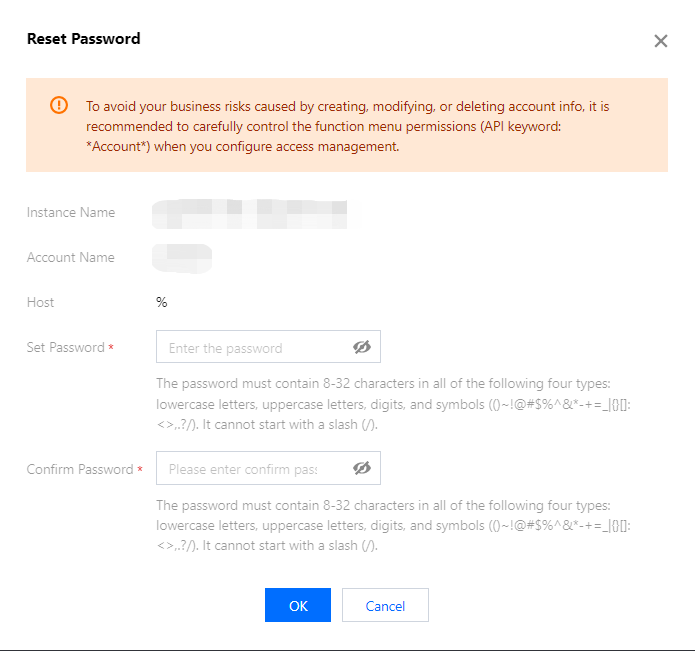
3. In the pop-up window, enter the New Password and Confirm Password and click OK.
Note:
To avoid the risks caused by creating, modifying, and deleting account information, we recommend that you configure access management, and reset the password with caution.

API Name
Description
Resets account password


ヘルプとサポート

この記事はお役に立ちましたか?

フィードバック