Conversion from Pay-As-You-Go to Yearly/Monthly Subscription
ダウンロード
フォーカスモード
フォントサイズ
Use Cases
When a pay-as-you-go instance has been running stably and long-term usage is confirmed, we recommend that you switch it to the yearly/monthly subscription billing mode. This operation can effectively optimize long-term running costs and ensure the stability of business resources.
Cost optimization: The yearly/monthly subscription billing mode offers significant discounts compared with pay-as-you-go, and long-term use can considerably reduce your cloud service expenses.
Budget stability: Lock in resource costs through prepayment to avoid expense changes caused by business traffic fluctuations, making budget management clearer.
Conversion Rule
Rule | Description |
Billing Rules | Pay-as-you-go settlement: When a conversion to yearly/monthly subscription is performed, the system will automatically settle all pay-as-you-go fees incurred before the conversion from your account balance. The billing duration is precise to the second, and if it is less than one minute, it is calculated based on the actual number of seconds. Yearly/monthly subscription billing: When converting to a yearly/monthly subscription instance, you must pay in advance for the entire billing cycle (such as one month or one year) of the selected specifications before the billing mode change can take effect. If the payment is not made or is unsuccessful, an incomplete order will appear in your Order Center. Before the payment is completed, the billing mode of the instance cannot be repeatedly switched. Before the payment is completed, if the instance configuration changes (for example, scale-up: adjusting specifications/nodes/shards), the new order amount will not match the instance, and the unpaid order will be prohibited from payment. You need to cancel the current unpaid order in the Order Center before performing a new conversion operation. After the payment is successful, the billing mode is switched to yearly/monthly subscription, and fees will be charged immediately based on the yearly/monthly subscription billing mode. Auto-renewal: When converting from pay-as-you-go to yearly/monthly subscription, you can enable auto-renewal. After expiration, fees will be automatically deducted from your Tencent Cloud account on a monthly basis. If you do not enable auto-renewal during the conversion, you can enable monthly auto-renewal after the conversion. Pay attention to the instance expiration time and renew it in time to avoid service interruption. Yearly/monthly subscription refunds: For cloud databases whose billing mode is switched from pay-as-you-go to yearly/monthly subscription, five-day no-reason refunds are not supported. Standard self-service refunds are supported. The system will deduct the fees for the used duration (full months are deducted as full months, and for partial months, the used duration is calculated based on the pay-as-you-go unit price, accurate to the second) and refund the remaining value proportionally. For details, see Instance Refund (Yearly/Monthly Subscription). |
Cannot directly switch back to pay-as-you-go. | After an instance is switched from pay-as-you-go to yearly/monthly subscription billing, it cannot be directly switched back to pay-as-you-go. If you need to use pay-as-you-go again, you must first return the yearly/monthly subscription instance and then purchase a new pay-as-you-go instance as needed. |
Upgrade Time | After the billing mode is switched and payment is successful, the new yearly/monthly subscription billing mode takes effect immediately. The start time of the new billing cycle is the moment when you successfully complete the payment and receive system confirmation. |
No Impact on Services | During the conversion from pay-as-you-go to yearly/monthly subscription, business access is not affected, so you can use the service with confidence. |
Prerequisites
The TencentDB for MongoDB instance is running normally.
The instance billing mode is pay-as-you-go.
Operation Steps
1. Log in to the TencentDB for MongoDB console.
2. In the left sidebar, choose MongoDB > Replica Set Instance or Shard Instance. The operations for replica set instances and sharded cluster instances are similar.
3. Select a region at the top of the instance list page.
4. In the instance list, locate the pay-as-you-go instance to be switched to a yearly/monthly subscription instance.
5. In the Operation column, select Pay-as-You-Go to Monthly Subscription from the More dropdown list.
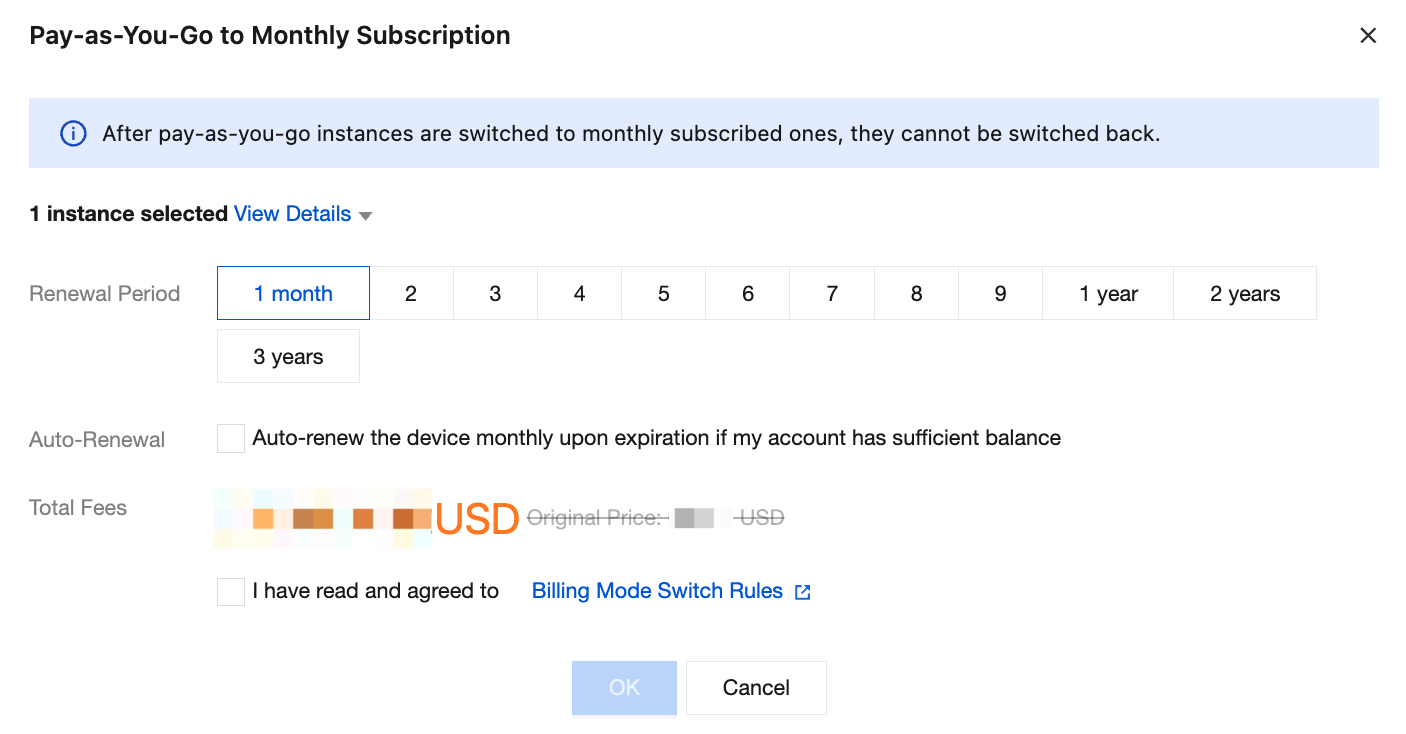
6. In the dialog box that appears, select the renewal duration and whether to enable auto-renewal.
7. Confirm the Total Fees, read the billing mode switch rules, select I have read and agreed to, and click OK.
Note:
Pay-as-you-go fees will be settled, and prepaid yearly/monthly subscription fees will also be involved.
8. After successful payment, you are returned to the instance list. The instance status changes to Billing Mode Switching. When the instance status changes to Running, the instance can be used normally.
Note:
Bills for a newly purchased pay-as-you-go instance are generated only on the hour. Therefore, if you switch the billing mode immediately after purchasing a pay-as-you-go instance, wait until the next hour for the switch to take effect.
フィードバック