Client Use Bottleneck due to Large Number of Small Files or Parallel Requests
下载
聚焦模式
字号
Background
Cloud File Storage (CFS) supports both NFS v3.0 and NFS v4.0. NFS v3.0 is compatible with Windows clients while NFS v4.0 provides file locking and other features.
Symptom
In cases that involve a large number of small files or mixed use of large and small files, problems may occur when you mount a CFS file system onto a Tencent Kubernetes Engine (TKE) or Cloud Virtual Machine (CVM) client using NFS v4.0. After an application runs on the client for a period of time, you may find the client load remains high and keeps accumulating. In addition, business data may be slow to read or stop responding, but the CPU utilization of the business process is not very high.
Cause
The above problems occur mainly due to the NFS v4.0 limitation as described below. If the client uses NFS v4.0 to read and write a lot of files at the same time, the large number of concurrent OPEN/CLOSE requests may result in a bottleneck on the client because the OPEN/CLOSE operations are serialized in NFS v4.0. See below for details:
There is a limitation to the Linux NFS4.0 client implementation that an "open_owner" is mapped to a userid. This results in a bottleneck if one user opens and closes a lot of files in a short period of time. Each OPEN / CLOSE operation has to wait for a sequence id, which essentially serializes each OPEN / CLOSE request. If an NFS server's response time for OPEN / CLOSE requests increases due to some secondary load or complication, this NFS4 client limitation can become pronounced, and in some cases, cause an unresponsive machine.
The NFS4.1 protocol addresses the limitation of serialization of OPENs per open_owner. For more information, see RFC 5661 Section 9.10.
Solution
If your application involves a massive number of small files, or many files to operate concurrently, it is recommended that you mount file systems onto your client using NFS v3.0 to avoid high client load. The following describes how to do so.
Mount method for a CVM client
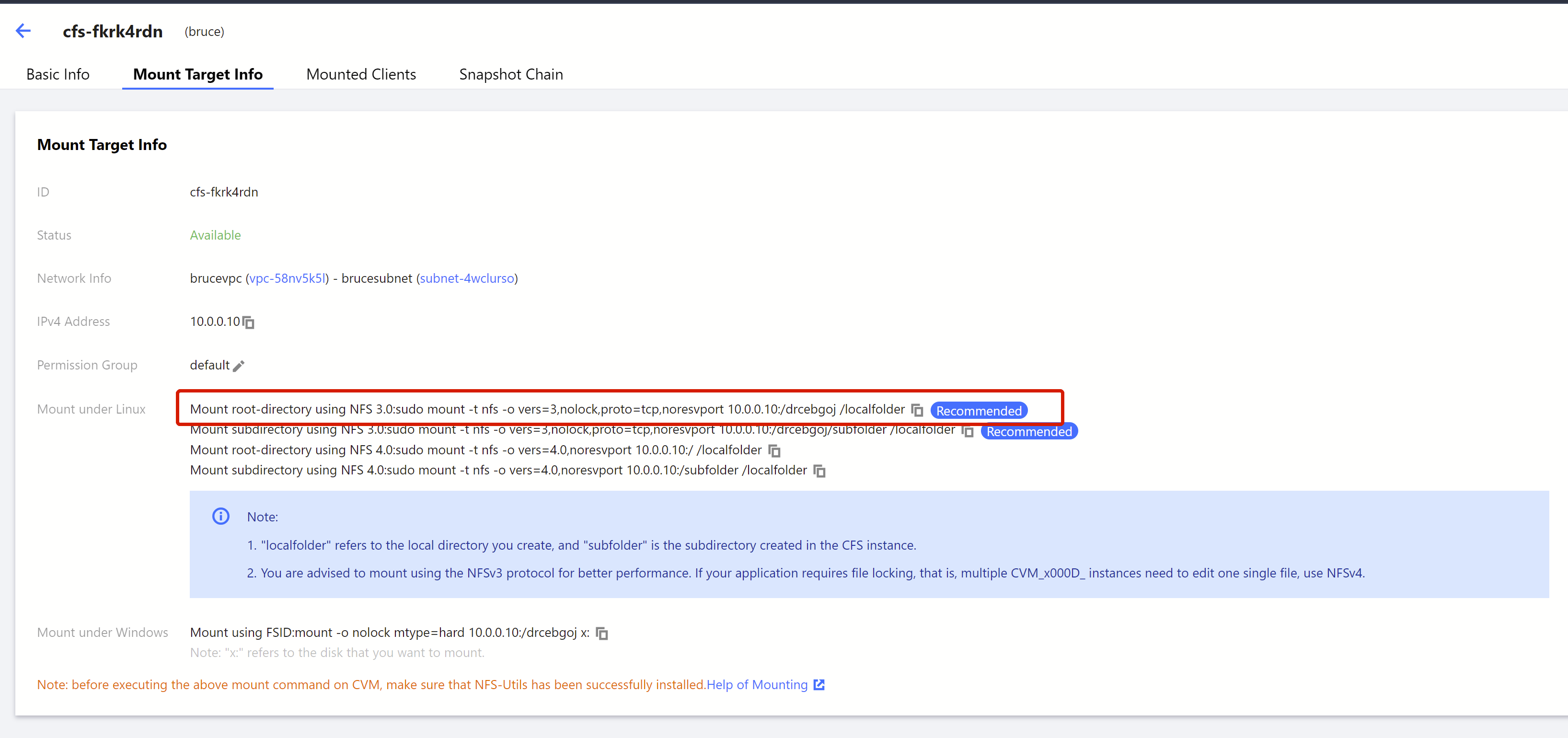
Open the CFS console, and click the name of the file system to mount. Select the Mount Target Info tab, and find the NFS v3.0 mount command. Then, use this command to mount the file system.
Mount method for a TKE client
You can mount file systems onto a TKE client through PVs/PVCs using NFS v3.0. The example configuration is as shown below:
apiVersion: v1kind: PersistentVolumemetadata:name: cfs-test-pvspec:accessModes:- ReadWriteManycapacity:storage: 9000GimountOptions:- vers=3- nolock- proto=tcp- noatime- nodiratime- noexec- hard- rsize=524288- wsize=524288nfs:path: /[cfs-id]/[mount-path]/server: [cfs-server-ip]persistentVolumeReclaimPolicy: RetainstorageClassName: cfs-test-pvvolumeMode: Filesystem---apiVersion: v1kind: PersistentVolumeClaimmetadata:name: cfs-test-pvcnamespace: defaultspec:accessModes:- ReadWriteManyresources:requests:storage: 9000GistorageClassName: cfs-test-pvvolumeMode: FilesystemvolumeName: cfs-test-pv
文档反馈