Unbinding Tags
다운로드
포커스 모드
폰트 크기
Overview
You can unbind a tag from a resource in the console.
Note:
Unbinding a tag will only remove the tag from a resource. It will not delete the tag.
Prerequisites
You have created a tag and bound it to a resource. For detailed instructions, please see Creating Tags and Tagging Resources.
Directions
1. Log in to the Tag console.
2. Click Tag List on the left sidebar.
3. Find the key-value pair you created and click the number in the Count of Resources column to view the tagged resources.

4. On the View Resources page, Click Detach Tags in the Operation column.
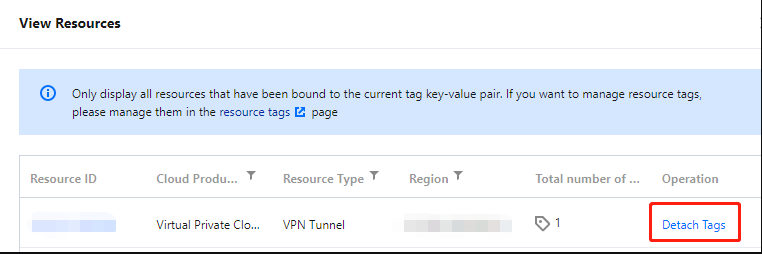
5. In the dialog box that pops up, click OK to unbind the tag.
피드백