Data Identification
Baixar
Modo Foco
Tamanho da Fonte
This document describes the operations related to the data identification capability of Data Security Audit.
Prerequisites
Operation Steps
Enabling Data Identification
1. Log in to the TencentDB for SQL Server console.
2. Select DSAudit in the left sidebar.
3. Locate the target instance in the instance list, and click Data Identification in its operation column.

4. In the pop-up, complete the following configurations and click Confirm.
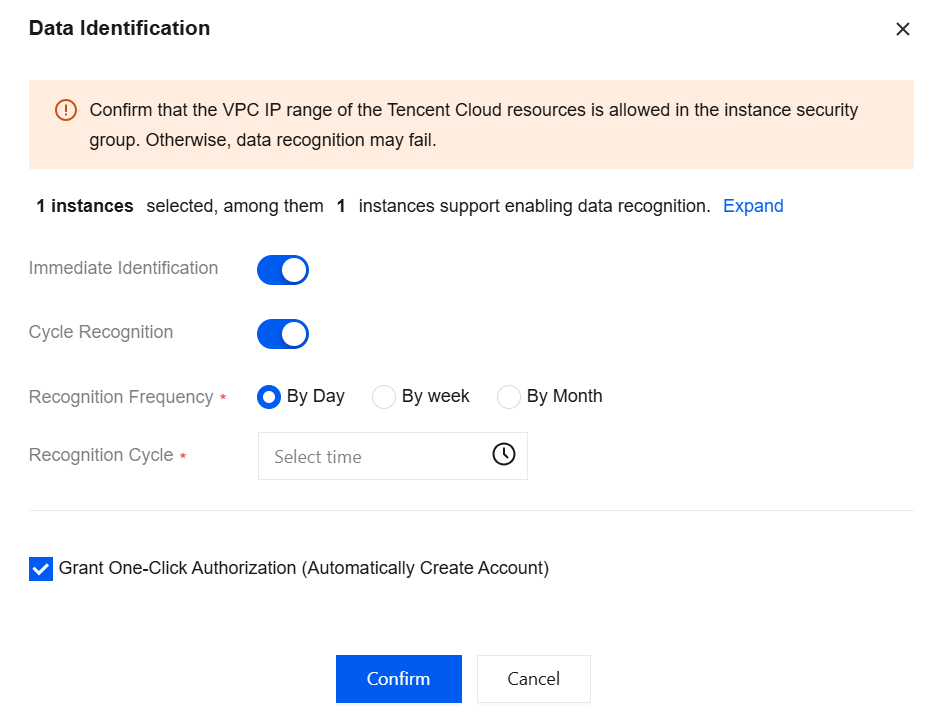
Parameter | Description |
Immediate Identification | When you enable Immediate Recognition, data recognition is performed on the selected instance immediately after you click OK. When Immediate Recognition is disabled, you need to enable Scheduled Recognition and configure it. Otherwise, data recognition cannot be enabled. |
Cycle Recognition | If you want to perform data recognition on instances on a regular basis, you can enable Scheduled Recognition and configure the following settings. Recognition Frequency and Recognition Cycle By Day: When the identification frequency is set to Daily, you can specify a time of day (accurate to the second) for the identification cycle. By week: When the identification frequency is set to Weekly, you can specify a time (accurate to the second) on any day from Monday to Sunday for the identification cycle. By Month: When the identification frequency is set to Monthly, you can specify a time (accurate to the second) on a day of the month for the identification cycle. |
Data Identification Configuration
1. Log in to the TencentDB for SQL Server console.
2. Select DSAudit in the left sidebar.
3. Locate the instance with data identification enabled in the instance list, and click Details under its Data Identification field.
4. In the pop-up sidebar, click Manual Identification.
5. In the pop-up, you can reconfigure data identification.
Viewing Data Identification Details
1. Log in to the TencentDB for SQL Server console.
2. Select DSAudit in the left sidebar.
3. Locate the instance with data identification enabled in the instance list, and click Details under its Data Identification field.
4. In the pop-up sidebar, you can query information such as identified data categories and data items.
Ajuda e Suporte
Esta página foi útil?
Você também pode entrar em contato com a Equipe de vendas ou Enviar um tíquete em caso de ajuda.
comentários