Codex
下载
聚焦模式
字号
Codex 是由 OpenAI 开发的新一代 AI 智能编程助手,基于 GPT 架构打造的强大代码生成引擎。Codex 通过深度学习技术,能够理解自然语言并转换为高质量代码,支持 Python、JavaScript、Java 等多种编程语言。本文介绍如何在 Codex 中配置与使用腾讯云大模型 Token Plan 企业版。
前置条件
在开始配置前,确保您已完成以下准备工作:
1. 订阅 Token Plan 企业版套餐。
3. 获取 API Key。
安装 Codex
由于 Token Plan 套餐暂不兼容 Responses 协议,请您选择支持 Chat 版本的 Codex 进行安装。
版本要求(必读):
Token Plan 仅兼容 Chat/Completions API,而新版 Codex 改用 Responses API,不再支持前者。如需在 Codex 中使用 Token Plan,请安装 0.80.0 及以下旧版本,详情可查阅 Codex 官方文档。
在终端中执行以下命令安装 Codex。
npm install -g @openai/codex@0.80.0
在终端中执行以下命令,若输出版本号,则表示安装成功。
codex --version
配置 Token Plan 企业版
完整复制以下内容并粘贴到 Codex 配置文件
~/.codex/config.toml 中。1. 找到 Codex 的配置文件,配置文件路径如下,配置文件不存在时新建即可。
macOS/Linux:
~/.codex/config.toml。Windows:
C:\\Users\\<用户名>\\.codex\\config.toml。2. 复制以下内容粘贴到 config.toml 配置文件中,根据所购买的套餐和开通地域选择对应配置,并将
$model_id 替换为所需的 Model ID。完整模型列表请参见 专业套餐可用模型 和 轻享套餐可用模型。model_provider = "Enterprise_Token_Plan"model = "$model_id"[model_providers.Enterprise_Token_Plan]name = "Enterprise Token Plan"base_url = "https://tokenhub.tencentcloudmaas.com/plan/v3"env_key = "Enterprise_Token_Plan_API_KEY"wire_api = "chat"
model_provider = "Enterprise_Token_Plan"model = "$model_id"[model_providers.Enterprise_Token_Plan]name = "Enterprise Token Plan"base_url = "https://tokenhub-intl.tencentcloudmaas.com/plan/v3"env_key = "Enterprise_Token_Plan_API_KEY"wire_api = "chat"
配置环境变量
在命令行中将 Enterprise_Token_Plan_API_KEY 环境变量设置为您的 API Key。
在终端中执行以下命令,查看默认 Shell 类型。
echo $SHELL
根据 Shell 类型设置环境变量,命令如下:
echo 'export Enterprise_Token_Plan_API_KEY="USER_API_KEY"' >> ~/.zshrc#配置生效source ~/.zshrc
echo 'export Enterprise_Token_Plan_API_KEY="USER_API_KEY"' >> ~/.bash_profile#配置生效source ~/.bash_profile
# 用您的 API Key 替换 USER_API_KEYsetx Enterprise_Token_Plan_API_KEY "USER_API_KEY"#新开 CMD 窗口检查是否生效echo %Enterprise_Token_Plan_API_KEY%
# 用您的 API Key 替换 USER_API_KEY[Environment]::SetEnvironmentVariable("TP_ENT_API_KEY", "USER_API_KEY", [EnvironmentVariableTarget]::User)#新开一个窗口验证是否生效echo $env:TP_ENT_API_KEY
使用 Codex
1. 在终端执行如下命令并回车,启动 Codex 工具。
codex
2. 选择 Skip 跳过。
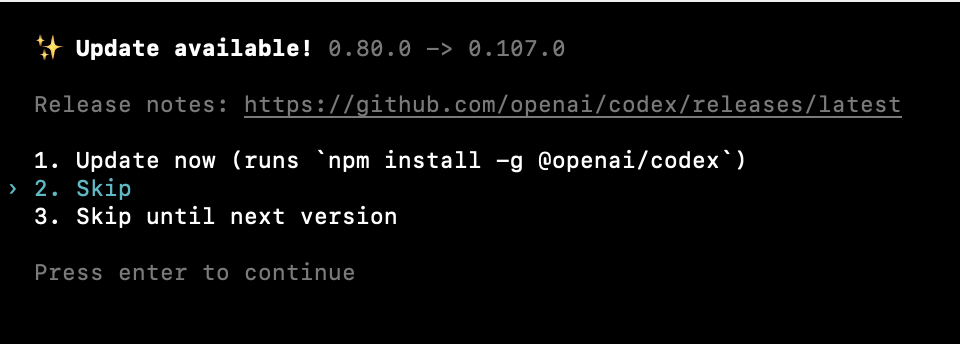
3. 您可以输入问题或指令,开始对话。
文档反馈