直播间信息
下载
聚焦模式
字号
组件概述
主播间信息组件主要提供以下功能,展示直播间信息,展示主播信息,展示观看者和主播之间的关系,并允许观看者关注主播,取消关注,以及查看主播的粉丝数量等功能。
说明:
直播间信息组件 | 点击组件后,展示直播间信息详情面板 | 集成后效果展示 |
 | 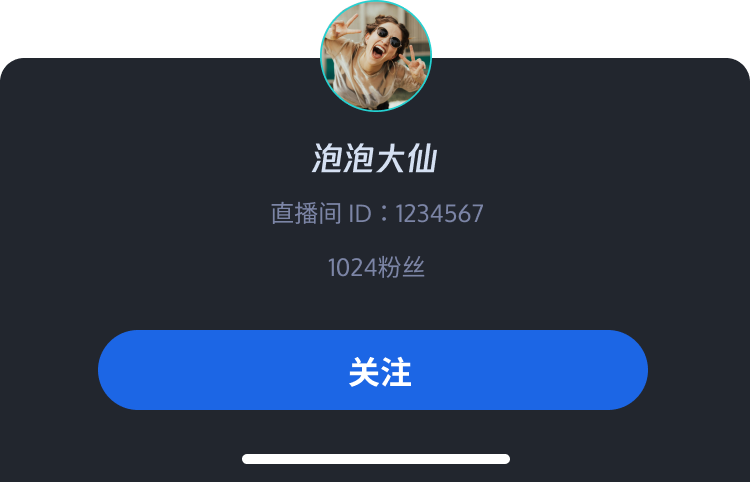 | 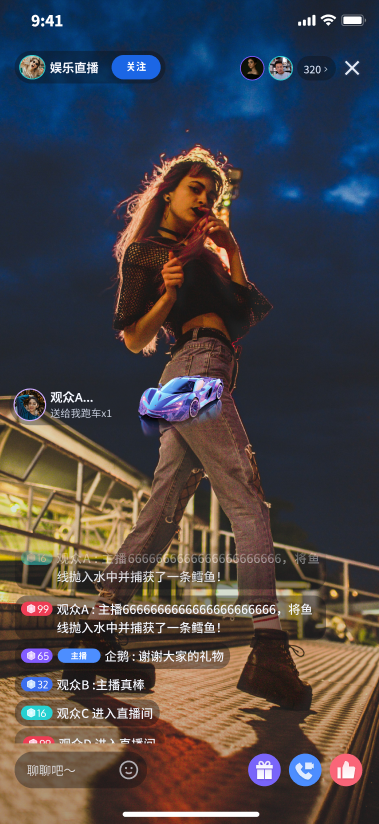 |
组件接入
一、下载 TUILiveKit 组件
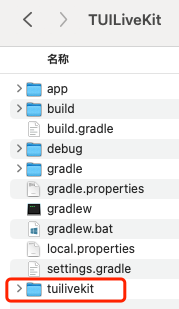
二、工程配置
1. 在工程根目录下的
settings.gradle.kts (或settings.gradle)文件中添加 jitpack 仓库地址:中添加 jitpack 仓库依赖(下载播放礼物 svg 动画的三方库 SVGAPlayer):dependencyResolutionManagement {repositoriesMode.set(RepositoriesMode.FAIL_ON_PROJECT_REPOS)repositories {google()mavenCentral()// 添加 jitpack 仓库地址maven { url = uri("https://jitpack.io") }}}
dependencyResolutionManagement {repositoriesMode.set(RepositoriesMode.FAIL_ON_PROJECT_REPOS)repositories {google()mavenCentral()// 添加 jitpack 仓库地址maven { url 'https://jitpack.io' }}}
2. 在工程根目录的
settings.gradle.kts (或settings.gradle)文件中增加如下代码,它的作用是将您下载的 tuilivekit 组件导入到您当前的项目中:include(":tuilivekit")
include ':tuilivekit'
3. 在 app 目录下找到
build.gradle.kts(或build.gradle)文件,并在其中增加如下代码,它的作用是声明当前 app 对新加入的 tuilivekit 组件的依赖:api(project(":tuilivekit"))
api project(':tuilivekit')
说明:
TUILiveKit 工程内部已经默认依赖:
TRTC SDK、IM SDK、tuiroomengine 以及公共库 tuicore,不需要开发者单独配置。如需进行版本升级,则修改tuilivekit/build.gradle文件即可。4. 由于我们在 SDK 内部使用了Java 的反射特性,需要将 SDK 中的部分类加入不混淆名单,因此需要您在
proguard-rules.pro文件中添加如下代码:-keep class com.tencent.** { *; }-keep class com.trtc.uikit.livekit.livestreamcore.** { *; }-keep class com.trtc.uikit.livekit.component.gift.store.model.** { *; }-keep class com.squareup.wire.** { *; }-keep class com.opensource.svgaplayer.proto.** { *; }-keep class com.tcmediax.** { *; }-keep class com.tencent.** { *; }-keep class com.tencent.xmagic.** { *; }-keep class androidx.exifinterface.** {*;}-keep class com.google.gson.** { *;}# Tencent Effect SDK - beauty-keep class com.tencent.xmagic.** { *;}-keep class org.light.** { *;}-keep class org.libpag.** { *;}-keep class org.extra.** { *;}-keep class com.gyailib.**{ *;}-keep class com.tencent.cloud.iai.lib.** { *;}-keep class com.tencent.beacon.** { *;}-keep class com.tencent.qimei.** { *;}-keep class androidx.exifinterface.** { *;}
5. 在 app目录下找到
AndroidManifest.xml 文件,在 application 节点中添加 tools:replace="android:allowBackup"和android:allowBackup="false",覆盖组件内的设置,使用自己的设置。// app/src/main/AndroidManifest.xml<application...// 添加如下配置覆盖 依赖的 sdk 中的配置android:allowBackup="false"tools:replace="android:allowBackup">
使用 CocoaPods 导入组件,导入组件具体骤如下:
1. 您需要在GitHub上下载
LiveInfo和Common文件夹到本地。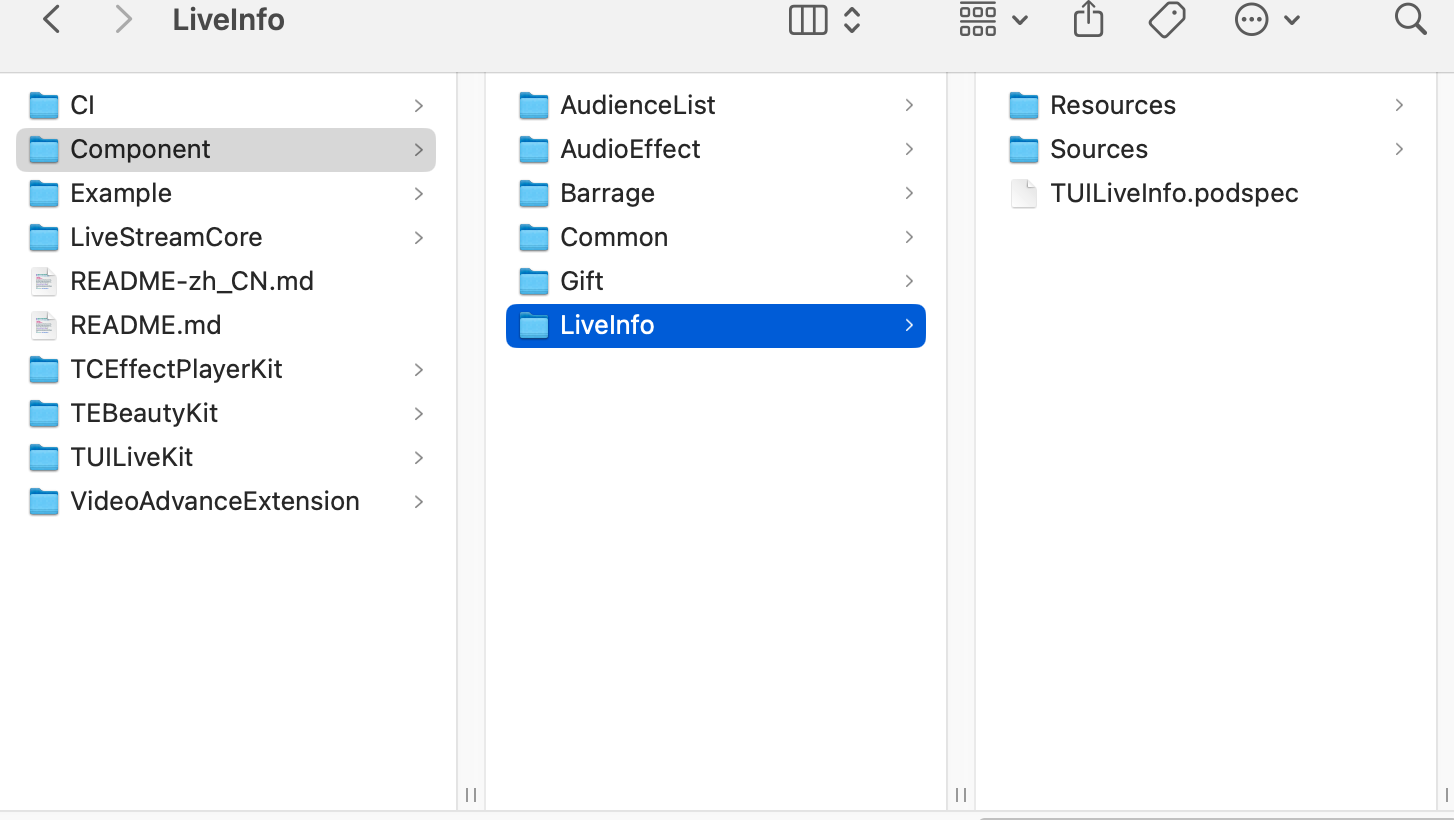
2. 请在您的
Podfile 文件中添加 pod 'TUILiveInfo' 和pod 'TUILiveResources'依赖。target 'xxxx' do......pod 'TUILiveResources', :path => '../Component/Common/TUILiveResources.podspec'//路径是您的Podfile文件与TUILiveResources.podspec文件之间的相对路径pod 'TUILiveInfo', :path => '../Component/LiveInfo/TUILiveInfo.podspec'//路径是您的Podfile文件与TUILiveInfo.podspec文件之间的相对路径end
如果您没有
Podfile 文件,首先终端cd 到xxxx.xcodeproj目录,然后通过以下命令创建:pod init
3. 在终端中,首先
cd到Podfile目录下,然后执行以下命令,安装组件。pod install
4. 您在接入和使用过程中遇到的任何问题,欢迎给我们 反馈。
1. 在您项目中的 lib 目录下创建名为 livekit_component 的目录,并将 github 上 livekit/lib 目录下的 common 目录 和 component/live_info 目录 拷贝到您创建的 livekit_component目录下。
2. 调整import目录,将导入路径调整为自己工程内的相对路径
组件使用
说明:
由于在直播间内才会获取到直播间信息。所以使用直播间信息组件时,需要注意使用时机,在进直播间成功之后再使用该组件。
创建组件
您有两种创建直播间信息组件的方式,具体如下:
1. 在代码中创建:
LiveInfoView liveInfoView = new LiveInfoView(getContext());
2. 在 xml 中定义:
<com.trtc.uikit.livekit.component.roominfo.LiveInfoViewandroid:id="@+id/rl_room_info"android:layout_width="150dp"android:layout_height="wrap_content"android:layout_marginStart="16dp"app:layout_constraintStart_toStartOf="parent"app:layout_constraintTop_toTopOf="parent"/>
import TUILiveInfolet enableFollowFeature = true //是否开启关注功能lazy var liveInfoView = LiveInfoView(enableFollow: enableFollowFeature)// ...此处将liveInfoView添加到您的父视图上并调整布局
说明:
此操作需要在进房成功之后执行,您需要在进房成功后将
enterRoomSuccessNotifier.value 置为 true。final enterRoomSuccessNotifier = ValueNotifer(false);// change enterRoomSuccessNotifier.value to true after enter room successValueListenableBuilder(valueListenable: enterRoomSuccessNotifier,builder: (context, enterRoomSuccess, _) {return Visibility(visible: enterRoomSuccess,child: LiveInfoWidget(roomId: 'replace with your roomId',),);}),
组件初始化
您在进房成功之后,可以调用
LiveInfoView 的 init 方法,让组件绑定数据和事件。说明:
此操作需要在进房成功之后执行,进房成功的回调中会给你返回 TUIRoomDefine.RoomInfo 对象。
liveInfoView.init(roomInfo);
您在进房成功之后,可以调用
LiveInfoView 的 initialize 方法,让组件绑定数据和事件。说明:
此操作需要在进房成功之后执行,进房成功的回调中会给你返回 TUIRoomInfo 对象。
liveInfoView.initialize(roomInfo: roomInfo)
文档反馈