弹幕(React Native)
下载
聚焦模式
字号
本篇文档旨在指导 React Native 开发者如何使用
AtomicXCore 框架中的 BarrageState 模块,为您的直播应用快速集成功能丰富、性能卓越的弹幕系统。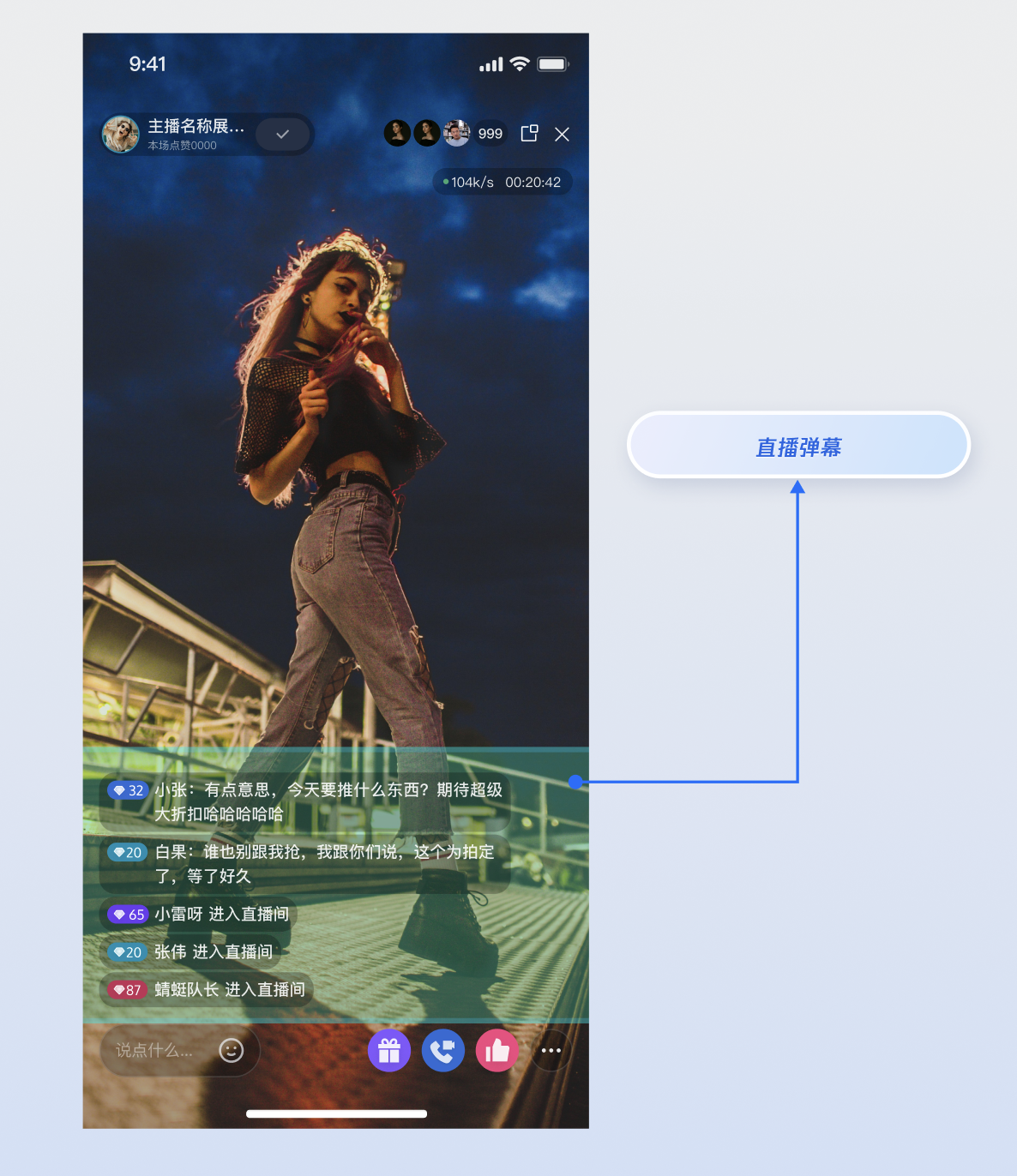
核心功能
BarrageState 为您的直播应用提供了一套完整的弹幕解决方案,核心功能包括:接收并展示直播间弹幕消息。
发送文本弹幕与观众互动。
发送自定义业务弹幕,以支持礼物、点赞等复杂场景。
在本地消息列表中插入系统提示(例如,“欢迎 XX 进入直播间”)。
实现步骤
步骤1:组件集成
视频直播:请参考 快速接入 集成 AtomicXCore,完成接入。
语聊房:请参考 快速接入 集成 AtomicXCore,完成接入。
步骤2:初始化并监听弹幕
获取一个与当前直播间
liveID 绑定的 BarrageState 实例,并且监听 messageList 来接收最新的全量弹幕消息列表。import { useEffect } from 'react';import { useBarrageState } from 'react-native-tuikit-atomic-x/lib/module/atomic-x/state/BarrageState';// 通过 liveID 获取 BarrageState 的实例const { messageList } = useBarrageState(liveID);// 监听 messageList 的实时变更,用于驱动 UI 更新useEffect(() => {console.log(messageList);}, [messageList]);
步骤3:发送文本弹幕
调用
sendTextMessage 方法向直播间内的所有用户广播一条纯文本消息。import { useBarrageState } from 'react-native-tuikit-atomic-x/lib/module/atomic-x/state/BarrageState';// 通过 liveID 获取 BarrageState 的实例const { sendTextMessage } = useBarrageState(liveID);const sendMessage = () => {sendTextMessage({liveID: liveID, // 当前直播间的 liveIDtext: 'xxx', // 您想要发送的弹幕onSuccess: () => {console.log('弹幕发送成功');},onError: (error) => {console.log('弹幕发送失败', error);},});};
接口参数
参数 | 类型 | 描述 |
liveID | string | 当前直播间的 liveID。 |
text | string | 要发送的文本内容。 |
onSuccess | Function | 发送成功的回调。 |
onError | Function | 发送失败的回调。 |
步骤4:发送自定义弹幕
发送一条包含自定义业务逻辑的消息,例如礼物、点赞或游戏化互动指令。这条消息对其他客户端来说是透明的,需要业务层自行解析。
import { useBarrageState } from 'react-native-tuikit-atomic-x/lib/module/atomic-x/state/BarrageState';// 通过 liveID 获取 BarrageState 的实例const { sendCustomMessage } = useBarrageState(liveID);// 发送一条自定义弹幕,例如用于发送礼物const sendGiftMessage = (giftID, giftCount) => {// 1. 定义一个能识别业务的 IDconst businessID = 'live_gift';// 2. 将业务数据编码为 JSON 字符串const giftData = { gift_id: giftID, gift_count: giftCount };// 3. 调用核心 API 发送自定义消息sendCustomMessage({liveID: liveID, // 当前直播间的 liveIDbusinessID,data: JSON.stringify(giftData),onSuccess: () => {console.log('礼物消息发送成功');},onError: (error) => {console.log('礼物消息发送失败', error);},});};
接口参数
参数 | 类型 | 描述 |
liveID | string | 当前直播间的 liveID。 |
businessID | string | 业务唯一标识符,例如 "live_gift",用于接收端区分不同的自定义消息。 |
data | string | 业务数据,通常为 JSON 格式的字符串。 |
onSuccess | Function | 发送成功的回调。 |
onError | Function | 发送失败的回调。 |
步骤5:在本地插入提示消息
在本地消息列表中插入一条消息,该消息不会发送到直播间的其他用户,仅当前客户端可见。适用于显示系统欢迎、警告或操作提示等信息。
import { useBarrageState } from 'react-native-tuikit-atomic-x/lib/module/atomic-x/state/BarrageState';// 通过 liveID 获取 BarrageState 的实例const { appendLocalTip } = useBarrageState(liveID);const showWelcomeMessage = (user) => {appendLocalTip({liveID: liveID, // 当前直播间的 liveIDmessage: {textContent: `欢迎 ${user.userName} 进入直播间!`,sender: {userID: user.userID || '',userName: user.userName || '',avatarURL: user.avatarURL || '',},messageType: 0,sequence: Math.floor(Date.now() / 1000),timestampInSecond: Math.floor(Date.now() / 1000),liveID: liveID,},onSuccess: () => {console.log('插入本地消息成功');},onError: (error) => {console.log('插入本地消息失败', error);},});};
接口参数
参数 | 类型 | 描述 |
liveID | string | 当前语聊房的 liveID。 |
message | object | 要在本地插入的消息对象。SDK 会将此消息对象追加到 BarrageState 的 messageList 中。 |
onSuccess | Function | 添加本地消息成功的回调。 |
onError | Function | 添加本地消息失败的回调。 |
步骤6:管理用户发言(禁言与解禁)
作为主播或管理员,您可以对直播间内的用户发言权限进行管理,维护健康的社区氛围。
禁止/解禁单个用户发言
通过
LiveAudienceState 中的 disableSendMessage 接口来实现对指定用户的禁言或解禁。此状态会被持久化,即使用户重新进入直播间,禁言状态依然有效。import { useLiveAudienceState } from 'react-native-tuikit-atomic-x/lib/module/atomic-x/state/LiveAudienceState';// 通过 liveID 获取 LiveAudienceState 的实例const { disableSendMessage } = useLiveAudienceState(liveID);// 定义要操作的用户 ID 和禁言状态const userIdToMute = 'user_id_to_be_muted'; // 想要操作的用户 userIDconst shouldDisable = true; // true 为禁言, false 为解禁// 调用接口执行操作const toggleMuteUser = () => {disableSendMessage({liveID: liveID, // 当前直播间 liveIDuserID: userIdToMute,isDisable: shouldDisable,onSuccess: () => {console.log(`${shouldDisable ? '禁言' : '解禁'}用户 ${userIdToMute} 成功`);},onError: (error) => {console.log('操作失败', error);},});};
接口参数
参数 | 类型 | 描述 |
liveID | string | 当前语聊房的 liveID。 |
userID | string | 想要操作的用户 userID。 |
isDisable | boolean | 是否禁言用户。 |
onSuccess | Function | 禁言成功的回调。 |
onError | Function | 禁言失败的回调。 |
开启/关闭全体禁言
要对直播间内所有用户(通常不包括主播自己)进行禁言,您需要通过
LiveListState 的 updateLiveInfo 更新直播间信息来实现。import { useLiveListState } from 'react-native-tuikit-atomic-x/lib/module/atomic-x/state/LiveListState';import { LiveInfoModifyFlag } from 'react-native-tuikit-atomic-x/lib/module/atomic-x/state/LiveListState/types';// 1. 获取 LiveListState 的实例const { updateLiveInfo, currentLive } = useLiveListState();// 2. 获取当前直播间信息,并修改全体禁言状态const isCurrentlyMuted = currentLive?.isMessageDisable || false;// 3. 调用更新接口,并指定修改的标志位const toggleMuteAll = () => {updateLiveInfo({liveInfo: { liveID: currentLive?.liveID, isMessageDisable: !isCurrentlyMuted },modifyFlagList: [LiveInfoModifyFlag.IS_MESSAGE_DISABLE],onSuccess: () => {console.log(`${!isCurrentlyMuted ? '全体禁言' : '取消禁言'}成功`);},onError: (error) => {console.log('操作失败', error);},});};
接口参数
参数 | 类型 | 描述 |
liveInfo | object | liveID 是必填项,其余为需要更新的直播状态。 |
modifyFlagList | LiveInfoModifyFlag[] | 需要更新的直播信息标记位数组。 |
onSuccess | Function | 更新直播信息成功的回调。 |
onError | Function | 更新直播信息失败的回调。 |
功能进阶:高并发场景下的性能优化
当您使用
BarrageState 构建弹幕功能后,本章将指导您如何处理更复杂的业务场景,确保它能在真实、复杂的高并发直播场景下,依然为用户提供流畅、稳定的体验。本章将围绕两个核心业务场景,为您提供明确的优化方案和代码示例。场景一:应对热门直播间的“弹幕风暴”
场景描述
在一场热门活动中,直播间涌入大量观众,弹幕以每秒数十条的频率刷新。
技术挑战
SDK 会以极高频率返回完整的弹幕列表。如果每次都更新完整的消息列表,主线程会被密集的 UI 布局和渲染操作阻塞,导致界面卡顿。
优化方案:批处理与流量削峰 (Batch Processing & Debouncing)
不必响应每一次的数据更新,而是设定一个时间阈值(例如300毫秒)。只在距离上次 UI 刷新超过这个阈值后,才执行下一次刷新操作。极大提升流畅度。
代码示例
import { useEffect, useRef, useState } from 'react';import { useBarrageState } from 'react-native-tuikit-atomic-x/lib/module/atomic-x/state/BarrageState';// 通过 liveID 获取 BarrageState 的实例const { messageList } = useBarrageState(liveID);// UI 展示数据const [displayMessageList, setDisplayMessageList] = useState([]);// ===== 节流配置 =====const THROTTLE_INTERVAL = 300; // 300毫秒节流阈值const latestMessageListRef = useRef([]);const throttleTimerRef = useRef(null);const lastFlushTimeRef = useRef(0);useEffect(() => {if (!messageList) return;// 缓存最新的完整列表(不触发渲染)latestMessageListRef.current = messageList;const now = Date.now();const timeSinceLastFlush = now - lastFlushTimeRef.current;// 如果距离上次刷新已经超过阈值,立即执行刷新if (timeSinceLastFlush >= THROTTLE_INTERVAL) {setDisplayMessageList([...latestMessageListRef.current]);lastFlushTimeRef.current = now;} else if (!throttleTimerRef.current) {// 只有没有定时器时才设,避免设置多个定时器const remainingTime = THROTTLE_INTERVAL - timeSinceLastFlush;throttleTimerRef.current = setTimeout(() => {setDisplayMessageList([...latestMessageListRef.current]);lastFlushTimeRef.current = Date.now();throttleTimerRef.current = null;}, remainingTime);}// 300ms 内的中间更新会被跳过,定时器到期时用最新数据刷新}, [messageList]);// 组件卸载时清理定时器useEffect(() => {return () => {if (throttleTimerRef.current) {clearTimeout(throttleTimerRef.current);}};}, []);// 使用 displayMessageList 驱动 UI 渲染// <FlatList data={displayMessageList} ... />
场景二:保障长时间直播的内存稳定性
场景描述
您的应用需要支持数小时乃至全天候的“不间断直播”,例如游戏直播或慢直播。在此期间,App 必须保持稳定运行,不能因为长时间运行而意外退出。
技术挑战
SDK 返回的全量
messageList 会在长时间直播中无限增长,即使 UI 层做了节流,数据层持有的这个巨大数组也会持续占用内存,最终导致应用闪退。优化方案:固定容量的循环数组 (Circular Buffer)
只让您自己的数据源(DataSource)持有有限数量的消息。无论 SDK 返回的全量列表有多大,您的应用只截取其中最新的部分用于显示。
代码示例
在接收到
SDK 的全量列表后,只取最新的500条(或您定义的其他数量)来更新 UI。import { useEffect, useState } from 'react';import { useBarrageState } from 'react-native-tuikit-atomic-x/lib/module/atomic-x/state/BarrageState';// 通过 liveID 获取 BarrageState 的实例const { messageList } = useBarrageState(liveID);// UI 展示数据const [displayMessageList, setDisplayMessageList] = useState([]);// ===== 消息窗口配置(只保留最新N条消息)=====const MAX_MESSAGES_COUNT = 500;// 裁剪消息列表:只保留最新的 MAX_MESSAGES_COUNT 条消息const trimMessageList = (messages) => {if (messages.length > MAX_MESSAGES_COUNT) {console.warn(`[BarrageList] 消息数量超过限制 ${MAX_MESSAGES_COUNT},已删除 ${messages.length - MAX_MESSAGES_COUNT} 条最早消息`);return messages.slice(messages.length - MAX_MESSAGES_COUNT);}return messages;};// 监听 messageList 变化,裁剪后更新 UIuseEffect(() => {if (!messageList) return;setDisplayMessageList(trimMessageList([...messageList]));}, [messageList]);// 使用 displayMessageList 驱动 UI 渲染// <FlatList data={displayMessageList} ... />
API 文档
常见问题
除了基础的文本弹幕,我们还希望实现“彩色弹幕”、“礼物弹幕”等更丰富的样式,该如何实现?
这是通过自定义消息
sendCustomMessage 来实现的。BarrageState 不会限制您的业务想象力。实现思路
1. 定义数据结构: 与您的客户端和服务器团队共同定义好自定义消息的 JSON 结构。例如,一条彩色弹幕可以这样定义:
{ "type": "colored_text", "text": "这是一条彩色弹幕!", "color": "#FF5733" }
2. 发送端: 在发送时,将这个 JSON 结构转换为字符串,并通过
sendCustomMessage 的 data 参数发送出去。businessID 可以设置为一个能代表您业务的唯一标识,例如 "barrage_style_v1"。3. 接收端: 在接收到弹幕消息后,检查其
messageType 是否为 'CUSTOM' 以及 businessID 是否匹配。如果匹配,则解析 data 字符串(通常是解析 JSON),根据解析出的数据(例如 color、text)来渲染您的自定义 UI 样式。为什么我调用了 sendTextMessage,但是在消息列表中看不到我发送的消息?
请按以下步骤排查:
1. 检查 onSuccess,onError 回调:
sendTextMessage 方法有成功和失败回调。请检查回调返回的结果是成功还是失败。如果失败,错误信息会明确指出问题所在(例如“您已被禁言”、“网络错误”等)。2. 确认订阅时机:确保您对
barrageState 的订阅发生在该 liveID 对应的直播开始之后。如果在加入直播房间之前就开始监听,可能会错过部分消息。3. 检查 liveID:确认您在创建
BarrageState 实例、加入直播房间、以及发送消息时使用的 liveID 完全一致,包括大小写。4. 网络问题:检查设备当前的网络连接是否正常。消息发送依赖于网络。
新观众进入直播间时,如何让他们看到加入前的历史弹幕消息?
AtomicXCore 支持拉取历史弹幕消息,但这需要您在服务端控制台进行一项简单的配置。配置完成后,SDK 会自动处理后续的一切,您无需编写额外的代码。步骤1:在 Live 控制台进行配置
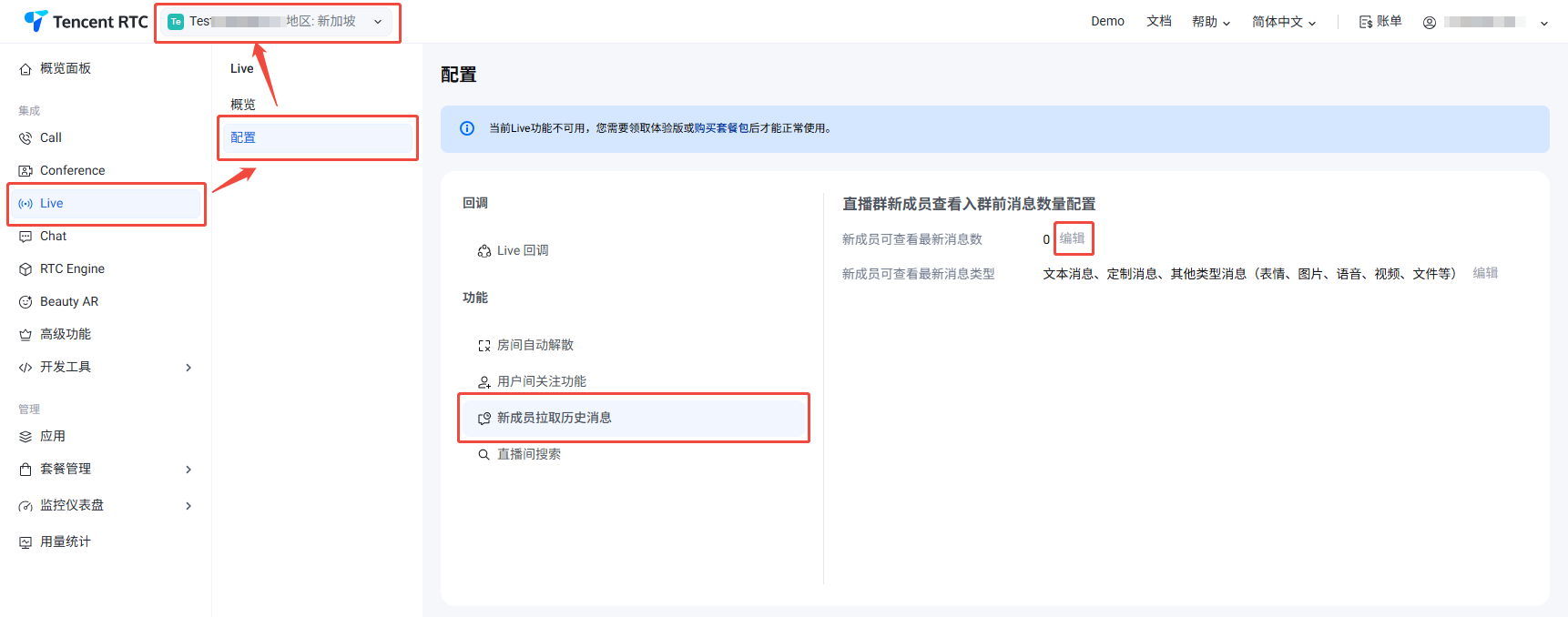
1. 登录 控制台 > Live > 配置,在顶部选择目标应用。
2. 在 Live 配置页选择新成员拉取历史消息,修改新成员可查看最新消息数,最大支持 50 条。
步骤2:客户端无感获取
完成上述配置后,您的客户端代码无需做任何改动。
当新用户加入直播间时,
AtomicXCore 底层会自动拉取配置的历史消息数量。这些历史消息会和实时消息一样,通过 BarrageState的订阅通道推送到 UI 层。应用会像接收实时弹幕一样,自然地接收并展示这些历史弹幕。
文档反馈