礼物(React Native)
下载
聚焦模式
字号
GiftState 是 AtomicXCore 中专门负责管理直播间礼物功能的模块。通过它,您可以为您的直播应用构建一套完整的礼物系统,实现丰富的营收和互动场景。礼物面板 | 弹幕礼物 | 全屏礼物 |
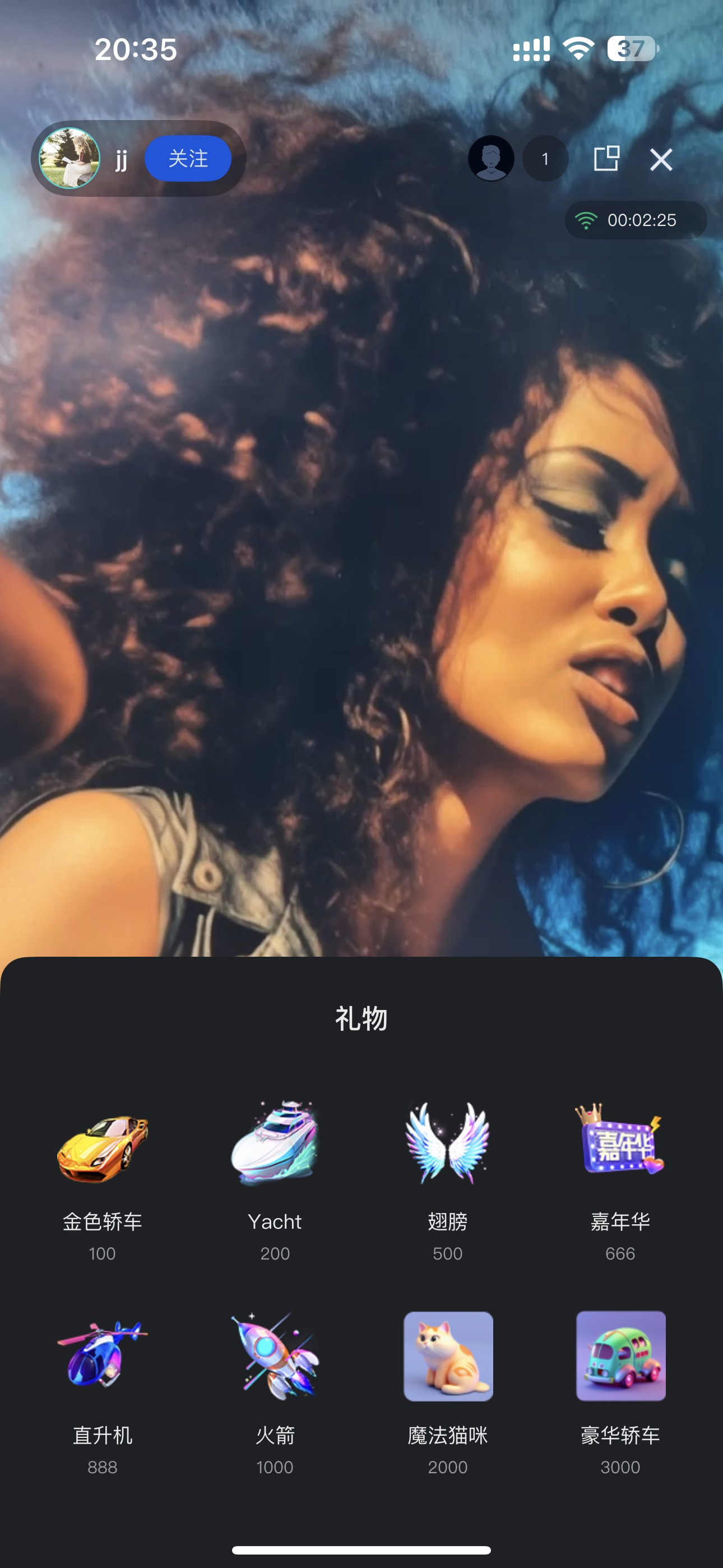 | 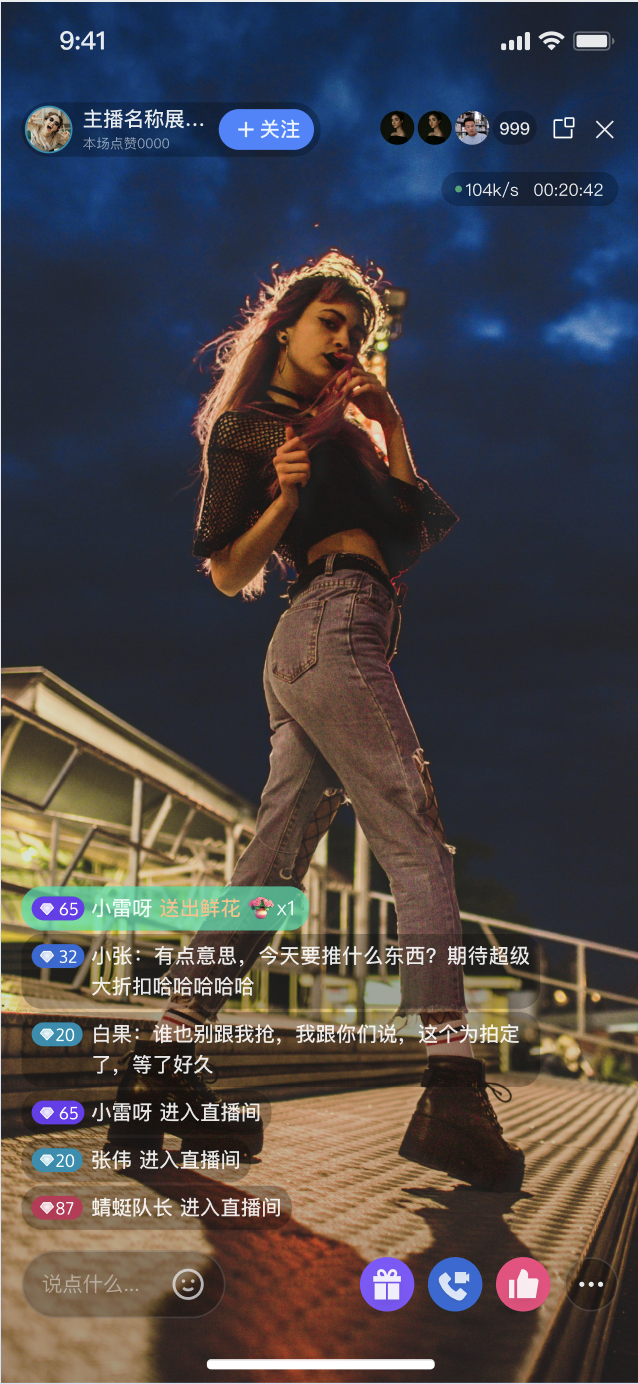 |  |
核心功能
拉取礼物列表:从服务端拉取礼物面板所需的数据,包括礼物分类和礼物详情。
发送礼物:观众可以向主播发送选定的礼物,并附带数量。
礼物事件广播:实时接收房间内发生的礼物赠送事件,用于展示礼物动画和弹幕通知。
实现步骤
步骤1:集成组件
说明:
视频直播:请参考 快速接入 集成 AtomicXCore,完成接入。
语聊房:请参考 快速接入 集成 AtomicXCore,完成接入。
步骤2:初始化并监听礼物事件
获取
GiftState 实例,并设置订阅者以接收礼物事件和礼物列表更新。实现方式:
1. 获取实例:使用
useGiftState(liveID) 获取与当前直播间绑定的 GiftState 实例。2. 订阅事件:使用
addGiftListener 以订阅 onReceiveGift 事件。3. 监听状态:监听响应式数据
usableGifts 礼物列表,来驱动 UI 更新。代码示例:
import { useEffect } from 'react';import { useGiftState } from 'react-native-tuikit-atomic-x/lib/module/atomic-x/state/GiftState';// 通过 liveID 获取 GiftState 的实例const { addGiftListener, removeGiftListener, usableGifts } = useGiftState(liveID);useEffect(() => {const onReceiveGift = (event) => {const gift = JSON.parse(event.gift);const sender = JSON.parse(event.sender);console.log('收到礼物', gift, '发送者', sender);// 在此进行礼物的处理逻辑,例如 svga 格式的礼物进行播放,其他格式的进行弹窗提示};addGiftListener('onReceiveGift', onReceiveGift);return () => {removeGiftListener('onReceiveGift', onReceiveGift);};}, []);// 监听 usableGifts 的实时变更,用于驱动 UI 变更useEffect(() => {console.log(usableGifts);}, [usableGifts]);
礼物列表结构体参数
GiftCategory 参数说明参数 | 类型 | 描述 |
categoryID | string | 礼物分类的唯一 ID。 |
name | string | 礼物分类的显示名称。 |
desc | string | 礼物分类的描述信息。 |
extensionInfo | Record<string: string> | 扩展信息字段。 |
giftList | [string] | 该分类下包含的 Gift 礼物对象数组。 |
Gift 参数说明参数 | 类型 | 描述 |
giftID | string | 礼物的唯一 ID。 |
name | string | 礼物的显示名称。 |
desc | string | 礼物的描述信息。 |
iconURL | string | 礼物图标 URL。 |
resourceURL | string | 礼物动画资源 URL。 |
level | number | 礼物等级。 |
coins | number | 礼物价格。 |
extensionInfo | Record<string: string> | 扩展信息字段。 |
步骤3:拉取礼物列表
调用
refreshUsableGifts 方法,从服务端拉取礼物列表。实现方式:
1. 调用接口:在合适的时机(例如页面加载时)调用
refreshUsableGifts 接口。2. 处理回调:可选地处理
onSuccess、onError 回调以获知拉取结果。3. 接收数据:拉取成功后,通过步骤2中对
usableGifts 的监听,自动接收到更新后的 usableGifts 列表。代码示例:
import { useEffect } from 'react';import { useGiftState } from 'react-native-tuikit-atomic-x/lib/module/atomic-x/state/GiftState';// 通过 liveID 获取 GiftState 的实例const { refreshUsableGifts } = useGiftState(liveID);useEffect(() => {refreshUsableGifts({liveID: liveID, // 当前直播间的 liveIDonSuccess: () => {console.log('礼物列表拉取成功');// 成功后,state 响应式数据会自动更新},onError: (error) => {console.log('礼物列表拉取失败', error);},});}, []);
步骤4:发送礼物
当用户在礼物面板选择一个礼物并点击发送时,调用
sendGift 接口将礼物发送出去。实现方式:
1. 获取参数:从 UI 获取用户选择的
giftID 和发送数量 count。2. 调用接口:调用
sendGift 接口。3. 处理回调:在
onError 回调中处理发送失败的情况(例如余额不足提示);发送成功后的 UI 更新(动画、弹幕)应由 onReceiveGift 事件驱动。代码示例:
import { useGiftState } from 'react-native-tuikit-atomic-x/lib/module/atomic-x/state/GiftState';// 通过 liveID 获取 GiftState 的实例const { sendGift } = useGiftState(liveID);// 用户发送一个礼物(函数重命名,并接收 giftID 作为参数)const handleSendGift = (giftID) => {sendGift({liveID: liveID, // 当前直播间 liveIDgiftID: giftID,count: 1,onSuccess: () => {console.log(`礼物 ${giftID} 发送成功`);},onError: (error) => {console.log('礼物发送失败', error);},});};
sendGift 接口参数
参数名 | 类型 | 描述 |
liveID | string | 当前直播间的 liveID。 |
giftID | string | 要发送的礼物的唯一 ID。 |
count | number | 发送的数量。 |
onSuccess | Function | 发送成功的回调。 |
onError | Function | 发送失败的回调。 |
功能进阶
GiftState 的功能高度依赖于您的业务后台服务。本章将指导您如何通过服务端配置和客户端实现,构建功能丰富、体验卓越的礼物互动系统。礼物素材配置
您需要自定义直播间可用的礼物种类、分类、名称、图标、价格以及动画效果,以满足运营需求和品牌特色。
实现方式
1. 服务端配置:使用 LiveKit 服务端 REST API 管理礼物信息、分类、多语言等。请参考 礼物配置指引文档。
2. 客户端拉取:在客户端调用
refreshUsableGifts 获取配置数据。3. UI 展示:使用拉取到的
[GiftCategory] 数据填充礼物面板。配置时序图

涉及 REST API 接口一览
计费与送礼扣费流程
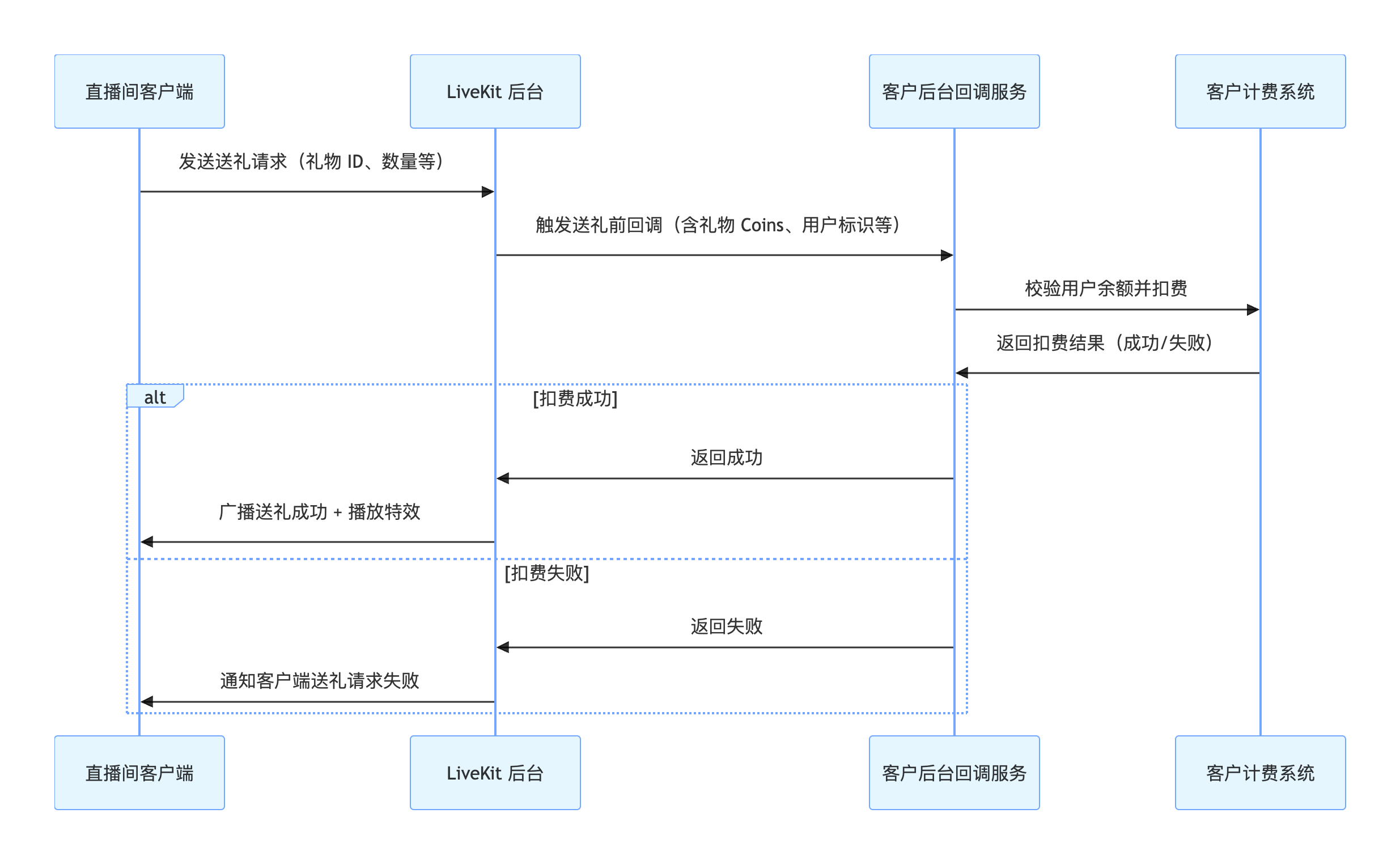
当观众赠送礼物时,需要确保其账户余额充足,并完成实际的扣费操作,然后才能触发礼物特效的播放和广播。
实现方式
1. 后台配置回调:在 LiveKit 后台配置您的自建计费系统的回调 URL。参考 回调配置文档。
2. 客户端发送:客户端调用
sendGift。3. 后台交互:LiveKit 后台调用您的回调 URL,您的计费系统执行扣费并返回结果。
4. 结果同步:扣费成功,AtomicXCore 广播
onReceiveGift 事件。扣费失败,sendGift 的 onError 收到错误。调用流程图
涉及 REST API 接口一览
接口 | 说明 | 请求示例 |
回调配置 > 发送礼物之前回调 | 客户后台可以通过该回调决定是否通过送礼前校验等场景。 |
实现全屏礼物动画播放
当直播间有用户(包括自己)发送了“火箭”、“嘉年华”等豪华礼物时,全屏播放一个酷炫的礼物动画(例如 SVGA 动画),营造热烈的氛围。
AtomicXCore 本身包含 SVGA 礼物动画播放器,您可以按以下指引集成。方案实现:使用 SVGAAnimationView
1. 监听礼物事件:使用
addGiftListener 以订阅 onReceiveGift 事件。2. 解析并播放:当收到
onReceiveGift 事件时,检查 gift.resourceURL 是否有效且指向一个 SVGA 文件。如果是,则将 gift.resourceURL 传给 SVGAAnimationView 进行播放代码示例
import { useEffect, useRef, useState } from 'react';import { useGiftState } from 'react-native-tuikit-atomic-x/lib/module/atomic-x/state/GiftState';import { SVGAAnimationView } from 'react-native-tuikit-atomic-x/lib/module/components/SVGAAnimationView';// 通过 liveID 获取 GiftState 的实例const { addGiftListener, removeGiftListener } = useGiftState(liveID);const svgaRef = useRef(null);const [showSVGA, setShowSVGA] = useState(false);useEffect(() => {const onReceiveGift = (event) => {const gift = JSON.parse(event.gift);if (gift.resourceURL) {setShowSVGA(true);setTimeout(() => {svgaRef.current?.startAnimation(gift.resourceURL);}, 100);}};addGiftListener('onReceiveGift', onReceiveGift);return () => {removeGiftListener('onReceiveGift', onReceiveGift);};}, []);// JSX 中添加全屏 SVGA 播放层{showSVGA ? (<SVGAAnimationViewref={svgaRef}style={{ position: 'absolute', top: 0, left: 0, right: 0, bottom: 0 }}onFinished={() => setShowSVGA(false)}/>) : null}
在弹幕区展示礼物赠送消息
当有用户发送礼物时,不仅播放动画,同时在公屏弹幕区域显示一条系统消息,例如:“【观众昵称】送出了【礼物名称】x【数量】”,让所有观众都能看到。
实现方式
1. 监听事件: 使用
addGiftListener 以订阅 onReceiveGift 事件。2. 获取弹幕 State:使用
useBarrageState(liveID) 获取与当前房间绑定的实例。3. 拼接消息:创建一条消息结构体,设置
textContent 为拼接好的字符串(例如 “[sender.userName] 送出了 [gift.name] ”)。4. 本地插入:调用
barrageState 的 appendLocalTip(message: giftTip) 将消息插入本地列表。代码示例
import { useEffect } from 'react';import { useGiftState } from 'react-native-tuikit-atomic-x/lib/module/atomic-x/state/GiftState';import { useBarrageState } from 'react-native-tuikit-atomic-x/lib/module/atomic-x/state/BarrageState';// 通过 liveID 获取 GiftState 的实例const { addGiftListener, removeGiftListener } = useGiftState(liveID);// 通过 liveID 获取 BarrageState 的实例const { appendLocalTip } = useBarrageState(liveID);useEffect(() => {const onReceiveGift = (event) => {const gift = JSON.parse(event.gift);const sender = JSON.parse(event.sender);console.log('收到礼物', gift, '发送者', sender);appendLocalTip({liveID: liveID, // 当前直播间 liveIDmessage: {textContent: `${sender.userName || sender.userID} 送出了 ${gift.name || gift.giftID}`,sender: {userID: sender.userID || '',userName: sender.userName || '',avatarURL: sender.avatarURL || '',},messageType: 0,sequence: Math.floor(Date.now() / 1000),timestampInSecond: Math.floor(Date.now() / 1000),liveID: liveID,},onSuccess: () => {},onError: (error) => {console.log('插入礼物弹幕失败:', error);},});};addGiftListener('onReceiveGift', onReceiveGift);return () => {removeGiftListener('onReceiveGift', onReceiveGift);};}, []);
API 文档
常见问题
GiftState 的礼物列表是空的,我该怎么办?
您必须主动调用
refreshUsableGifts()来从您的业务后台拉取礼物列表。这些礼物数据需要在您的业务后台通过服务端 REST API 进行配置。如何实现礼物的多语言展示(例如中文、英文)?
GiftState 提供了 setLanguage(language: string) 接口。您可以在 refreshUsableGifts 之前调用此方法,传入目标语言代码(例如 "en" 或 "zh-CN")。服务端会根据此语言代码,返回对应语言的礼物名称和描述。我调用 sendGift 发送了礼物,礼物动画为什么重复播放了两次?
onReceiveGift 事件是对房间内所有成员的广播(包括发送者自己)。如果您在 sendGift 的 onSuccess 成功回调里执行了一次 UI 操作,同时又在 onReceiveGift 订阅中执行了相同的 UI 操作,就会造成重复。实践教程:UI 的更新(例如播放动画、弹幕提示)只在
onReceiveGift 事件的订阅中处理。sendGift 的 onError 回调仅用于处理发送失败的逻辑(例如提示用户“发送失败”或“余额不足”)。礼物扣费逻辑在哪里实现?
礼物扣费逻辑完全由您的自建计费系统负责。
AtomicXCore 通过后台回调机制与您的计费系统对接。客户端调用 sendGift 触发回调,您的后台服务完成扣费后,将结果返回给 AtomicXCore 后台,从而决定礼物事件是否广播。送礼通知会被禁言或频控拦截吗?
不会。送礼通知(
onReceiveGift 事件)不受禁言或消息频控影响,确保可靠投递。礼物动画播放卡顿怎么办?
请检查您的 SVGA 文件大小,基础播放器建议不要超过 10MB。如果文件过大或动画复杂,您可以考虑集成 TUILiveKit 提供的高级特效播放器,以获得更优的性能表现。
文档反馈