Access Process Description
Download
Focus Mode
Font Size
This document describes the overall integration process for OCR Card Recognition (Mobile SDK).
Note:
Card Recognition (Mobile SDK) provides the document OCR recognition capability, which corresponds to the backend service cam_access_server. It does not include liveness detection or face comparison. If your business also requires "liveness detection + 1:1 face comparison" based on card recognition, see the separate integration document "Card Liveness and Face Comparison - Integration Guide" (based on liveness-server, mobile H5). The two solutions can be used together: first use this solution to complete document recognition and obtain the document portrait image, and then call the liveness detection and face comparison capabilities to complete identity verification.
Integration Preparation
1. Register a Tencent Cloud account: To register a Tencent Cloud enterprise account, see Registration Guide.
2. Activate the service: Log in to the Tencent Cloud OCR console to activate the Card Recognition service, and obtain the SecretId / SecretKey for calling TencentCloud API.
SDK Version Description and Selection
Card Recognition (Mobile SDK) offers a Basic edition and an Enhanced edition. You can choose the edition based on your business security requirements:
SDK version | Capability Description | Scenario | Open or Not |
Basic Edition (BASIC) | OCR recognition of both sides of the ID + structured field extraction + ID authenticity verification (detection of recapture/photocopy/PS) + portrait cutout | General business scenarios with standard security requirements | Released. If SdkVersion is not specified, this edition is used by default. |
Enhanced Edition (ENHANCED) | All Basic capabilities + on-device risk information collection and reporting | Scenarios with higher security requirements, such as financial account opening and important account changes | Released |
Overall Architecture Diagram
The following figure shows the architecture of Card Recognition (Mobile SDK):
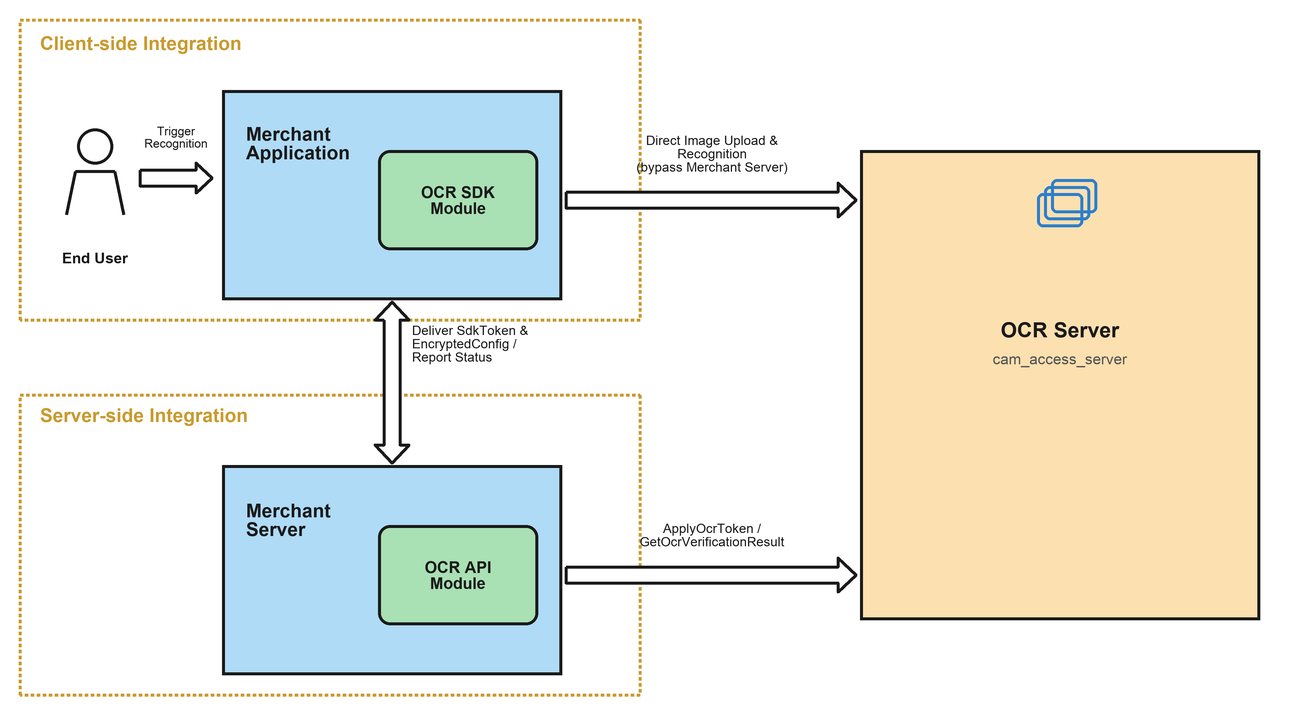
Overall Interaction Process
The following figure shows the overall interaction logic between the merchant and cam_access_server. The roles in the figure are described as follows:
User: Mobile App user
Merchant App: The customer App that integrates the OCR on-device SDK for Android and iOS. This section is intentionally left blank. For details, see the on-device SDK integration documentation.
Merchant Server: The customer backend service.
OCR Server: cam_access_server, the backend service for OCR recognition.
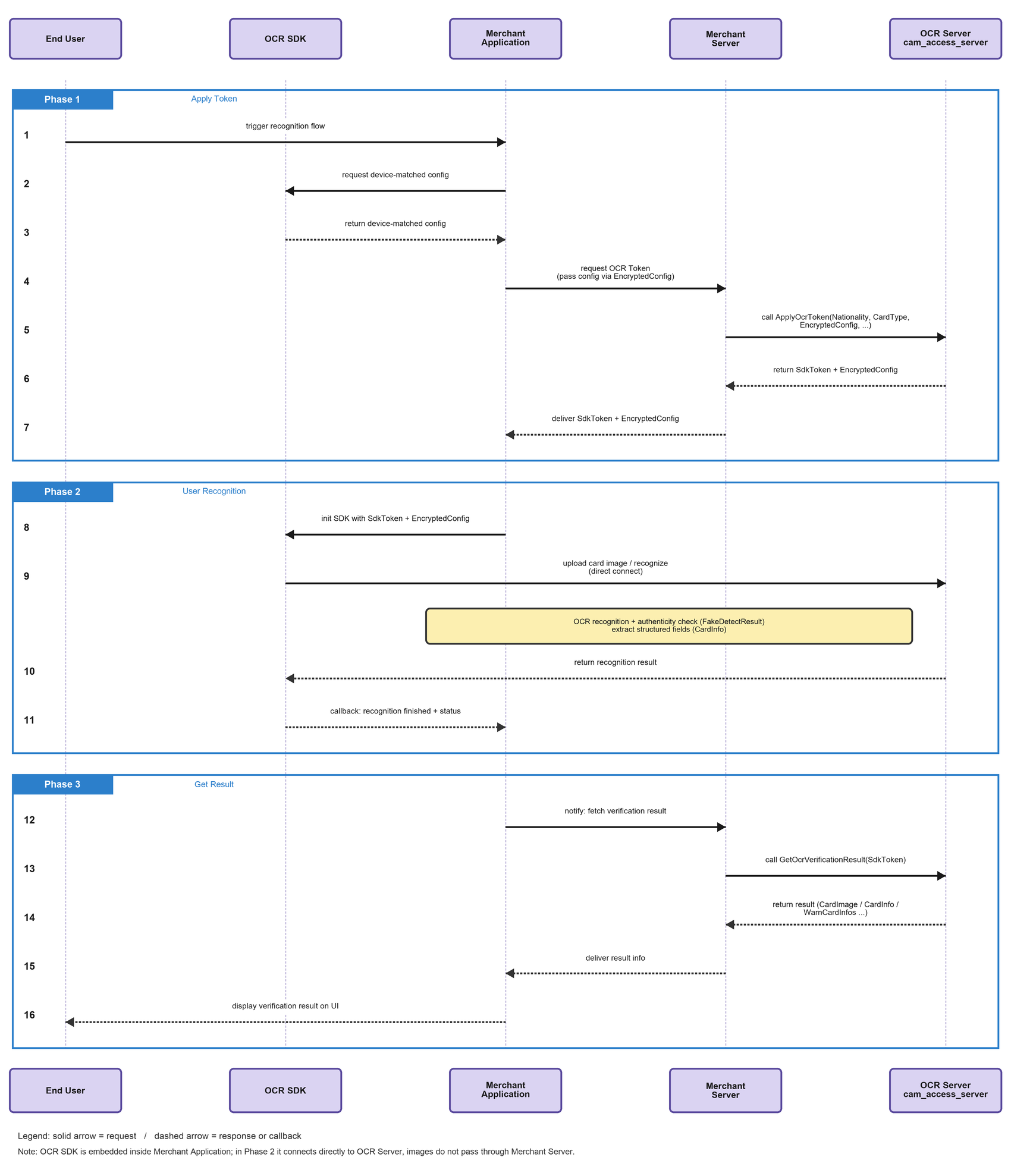
The recommended interaction process is detailed as follows:
Phase 1: Applying for an Identification Token
1. The user-side business triggers the ID recognition process.
2. The Merchant App sends a request to the Merchant Server, notifying it that an ID recognition needs to be initiated.
3. The Merchant Server passes the relevant parameters to call the ApplyOcrToken API. For details, see step 1 of server-side integration.
4. After receiving the request, the OCR Server generates the SdkToken and the encrypted on-device configuration (EncryptedConfig) for this recognition process, and returns them to the Merchant Server.
5. The Merchant Server saves the SdkToken and delivers the SdkToken and EncryptedConfig to the Merchant App for on-device SDK initialization.
Phase 2: Performing User Identification
Note: This phase involves the specific integration methods of the client-side SDK (initialization, launching the capture interface, identification result callbacks, and so on). Refer to the corresponding mobile SDK integration documentation. This document does not elaborate on these details.
1. The Merchant App initializes the on-device OCR SDK with the SdkToken and EncryptedConfig.
2. The user completes document capture in the App as prompted. The on-device SDK directly connects to the OCR Server to perform recognition, and the image is not forwarded through the Merchant Server.
3. After recognition is completed (or the retry limit is reached), the on-device SDK notifies the Merchant App that the current recognition process has ended.
Phase 3: Obtaining Identification Results
1. The Merchant App notifies the Merchant Server to obtain the recognition result.
2. The Merchant Server passes the relevant parameters to call the GetOcrVerificationResult API. For details, see step 2 of server-side integration.
3. After receiving the request, the OCR Server returns the detailed information of this recognition process, including the document image, structured fields, and alarm codes, to the Merchant Server.
4. The Merchant Server returns the result information to the Merchant App, which then proceeds with subsequent business processes based on the result.
Supported Certificate Types
When calling ApplyOcrToken, you need to pass the
Nationality (country/region code) and CardType (card type code) parameters to specify the document to be recognized. The currently supported combinations are as follows (the server will continuously add new card types, which take effect without requiring an upgrade by the business party):Nationality | Country/Region | CardType | Certificate Description |
CHN | Chinese mainland | ID_CARD,PERMIT | Resident identity card, mainland resident travel permit to Hong Kong and Macao (two-way permit) |
HKG | Hong Kong (China) | ID_CARD | Hong Kong (China) identity card |
MAC | Macao (China) | ID_CARD | Macao (China) identity card |
HKG / MAC / TWN | Hong Kong (China), Macao (China), and Taiwan (China) | MAINLAND_PERMIT,HMT_RESIDENT_PERMIT | Mainland travel permit for Hong Kong, Macao, and Taiwan residents (home return permit/Taiwan compatriot permit), residence permit for Hong Kong, Macao, and Taiwan residents |
THA | Thailand | ID_CARD,THA_PINK_CARD | Thai national ID card, Thai pink card |
IDN | Indonesia | ID_CARD | Indonesian identity card |
MYS | Malaysia | ID_CARD | Malaysian identity card |
SGP | Singapore | ID_CARD | Singapore identity card |
PHL | Philippines | PHL_UMID,PHL_VOTE_ID,PHL_TIN_ID,PHL_SSS_ID,DRIVING_LICENSE | UMID, voter's card, tax identification card, SSS social security card, driver's license |
Any country/region | - | PASSPORT | International passport |
Server-Side Integration
Calling ApplyOcrToken to Apply for an Identification Token (Phase 1)
Call the ApplyOcrToken API and pass in the document information to be recognized to obtain the SdkToken and the encrypted on-device configuration (EncryptedConfig). This corresponds to step 3 in the sequence diagram.
Nationality: the country/region code of the document. This field is required. For valid values, see Supported Document Types.
CardType: the card type code. This field is required. For valid values, see Supported Document Types.
ReturnHeadImage: whether to additionally return the portrait image extracted from the document. The default value is false.
RetryLimit: the maximum number of OCR calls (retries) allowed for this Token. If this parameter is not passed, the system default value is used.
OcrModeType: the recognition mode. If this parameter is not passed, the default value is
OCR_DETECT_AUTO (automatic capture detection). Valid values:OCR_DETECT_AUTO: automatically detects the capture mode. This is the default mode.OCR_DETECT_AUTO_MANUAL: allows manual capture as a fallback if automatic capture detection fails.OCR_DETECT_AUTO_MULTI: multi-frame authentication mode. This mode is supported only for certain document types, such as Hong Kong (China) identity cards. For other document types, this value is ignored.SdkVersion: the SDK version. Valid values:
BASIC (default) and ENHANCED (enhanced edition).AllowUploadPhoto: whether to allow the on-device application to select an image from the album instead of capturing one in real time. If this parameter is not passed, the system default value is used. This switch does not take effect in multi-frame authentication mode.
AutoTimeout: the timeout duration for automatic on-device capture, in milliseconds. If this parameter is not passed, the system default value (30000) is used.
CropIdCard: whether to crop the recognized document image. This parameter takes effect only when Nationality=CHN and CardType=ID_CARD. If this parameter is not passed, the default value is false.
If the call succeeds, the following information is returned:
SdkToken: the unique identifier of this recognition process. Keep it safe for subsequent retrieval of results.
EncryptedConfig: the encrypted on-device configuration string. It must be passed as is to the on-device SDK for initialization, and the business party does not need to parse it.
RetryLimit: the maximum number of retries that ultimately takes effect on the server.
API Call Code Example
import com.tencentcloudapi.common.Credential;import com.tencentcloudapi.common.profile.ClientProfile;import com.tencentcloudapi.common.profile.HttpProfile;import com.tencentcloudapi.common.exception.TencentCloudSDKException;import com.tencentcloudapi.ocr.v20181119.OcrClient;import com.tencentcloudapi.ocr.v20181119.models.*;public class ApplyOcrToken {public static void main(String[] args) {try {// Instantiate an authentication object. Input parameters need to include secretId and secretKey of the Tencent Cloud account. Keep the confidentiality of the key pair.// The key can be obtained at https://console.tencentcloud.com/cam/capi.Credential cred = new Credential(System.getenv("TENCENTCLOUD_SECRET_ID"),System.getenv("TENCENTCLOUD_SECRET_KEY"));// Instantiate an HTTP option (optional). Skip it if there are no special requirements.HttpProfile httpProfile = new HttpProfile();httpProfile.setEndpoint("ocr.tencentcloudapi.com");// Instantiate a client option (optional). Skip it if there are no special requirements.ClientProfile clientProfile = new ClientProfile();clientProfile.setHttpProfile(httpProfile);// Instantiate the client object that requests the product. clientProfile is optional.OcrClient client = new OcrClient(cred, "ap-singapore", clientProfile);// Instantiate a request object. Each API will correspond to a request object.ApplyOcrTokenRequest req = new ApplyOcrTokenRequest();req.setNationality("HKG");req.setCardType("ID_CARD");req.setReturnHeadImage(true);// The returned resp is an instance of ApplyOcrTokenResponse, corresponding to the request object.ApplyOcrTokenResponse resp = client.ApplyOcrToken(req);// Output a string packet in JSON format.System.out.println(ApplyOcrTokenResponse.toJsonString(resp));String sdkToken = resp.getSdkToken();String encryptedConfig = resp.getEncryptedConfig();System.out.printf("SdkToken: %s, EncryptedConfig: %s", sdkToken, encryptedConfig);} catch (TencentCloudSDKException e) {System.out.println(e.toString());}}}
Calling GetOcrVerificationResult to Obtain Identification Results (Phase 3)
After the recognition process ends, the Merchant App notifies the Merchant Server to obtain the result of this recognition. The Merchant Server then calls the GetOcrVerificationResult API and returns the final result to the frontend page. This corresponds to step 9 in the sequence diagram.
The final result of this recognition is determined by the
ResultCode field returned by this API. If ResultCode is Success, the recognition is considered successful. Otherwise, the recognition is considered failed. For details, see Common Error Codes.
SdkToken: the SdkToken generated by the ApplyOcrToken API. It is the unique identifier of the current recognition process and is required.
If the call succeeds, the following information is returned:
Status: the processing status of the current recognition process, which can be
PROCESSING or COMPLETE.ResultCode / ErrorMessage: the recognition result code and the corresponding description.
ResultCode=Success indicates that the recognition is successful.RetryLimit: the remaining number of retries available for this Token.
CardImage / CardImageBack: the download URLs of the recognized front/back images of the document.
HeadImage / HeadImageBack: the download URLs of the extracted portrait images. To obtain these URLs, ReturnHeadImage=true must be passed in the ApplyOcrToken phase.
WarnCardInfos: the list of document warning codes, such as reflection, missing borders, and photocopies.
FakeDetectResult: the document authentication result.
0 indicates that the authentication capability is not enabled. 1 indicates suspected forgery, such as recapture, photocopy, or PS. 2 indicates other exceptions.CardInfo: the structured recognition fields of the document, returned as a JSON string. The specific fields vary by document type.
API Call Code Example
import com.tencentcloudapi.common.Credential;import com.tencentcloudapi.common.profile.ClientProfile;import com.tencentcloudapi.common.profile.HttpProfile;import com.tencentcloudapi.common.exception.TencentCloudSDKException;import com.tencentcloudapi.ocr.v20181119.OcrClient;import com.tencentcloudapi.ocr.v20181119.models.*;public class GetOcrVerificationResult {public static void main(String[] args) {try {// Instantiate an authentication object. Input parameters need to include secretId and secretKey of the Tencent Cloud account. Keep the confidentiality of the key pair.// The key can be obtained at https://console.tencentcloud.com/cam/capi.Credential cred = new Credential(System.getenv("TENCENTCLOUD_SECRET_ID"),System.getenv("TENCENTCLOUD_SECRET_KEY"));// Instantiate an HTTP option (optional). Skip it if there are no special requirements.HttpProfile httpProfile = new HttpProfile();httpProfile.setEndpoint("ocr.tencentcloudapi.com");// Instantiate a client option (optional). Skip it if there are no special requirements.ClientProfile clientProfile = new ClientProfile();clientProfile.setHttpProfile(httpProfile);// Instantiate the client object that requests the product. clientProfile is optional.OcrClient client = new OcrClient(cred, "ap-singapore", clientProfile);// Instantiate a request object. Each API will correspond to a request object.GetOcrVerificationResultRequest req = new GetOcrVerificationResultRequest();req.setSdkToken("xxx"); // Enter the SdkToken returned in the ApplyOcrToken phase.// The returned resp is an instance of GetOcrVerificationResultResponse, corresponding to the request object.GetOcrVerificationResultResponse resp = client.GetOcrVerificationResult(req);// Output a string packet in JSON format.System.out.println(GetOcrVerificationResultResponse.toJsonString(resp));String status = resp.getStatus();String resultCode = resp.getResultCode();String cardInfo = resp.getCardInfo();if ("COMPLETE".equals(status) && "Success".equals(resultCode)) {// Recognition passed.System.out.println("Success");System.out.printf("CardInfo:%s", cardInfo);} else {// Recognition failed or not yet completed.System.out.printf("Status: %s, ResultCode: %s\\n", status, resultCode);}} catch (TencentCloudSDKException e) {System.out.println(e.toString());}}}
Common Error Codes
Error Code | Description |
InvalidParameterValue.InvalidParameterValueLimit | Invalid request parameter value |
InvalidParameterValue.UnsupportedCard | Unsupported country/document type combination |
AuthFailure.SignatureExpire | The SdkToken is invalid or has expired. Call ApplyOcrToken again. |
LimitExceeded.TokenRetryExhausted | The OCR call quota for this SdkToken has been exhausted. Apply for a new Token. |
FailedOperation.ResultNotReady | Recognition is not complete yet. Retry GetOcrVerificationResult later. |
RequestLimitExceeded | The request frequency exceeds the limit. Reduce the call frequency and try again. |
FailedOperation.UnknownError | An unknown error occurred within the service. Try again. |
Android Client-Side Integration
Environment Dependencies
The current Android OCR SDK supports API 19 (Android 4.4) and later.
Integration Steps
1. Add OcrSDK-public-v2.0.0.1-release.aar, OcrSDK-common-model-v1.0.0-release.aar, and the common libraries tencent-ai-sdk-aicamera-1.0.18-release.aar, tencent-ai-sdk-common-1.1.27-release.aar, tencent-ai-sdk-network-1.0.2.12-release.aar, and tencent-ai-sdk-risk-oversea-1.0.0.2-release.aar to the libs directory of your project.
2. Add the following configuration to the build.gradle file of your project:
dependencies {// Depend on the aar of Tencent Cloud OcrSDK.implementation files('libs/OcrSDK-common-model-v1.0.0-release.aar')implementation files('libs/OcrSDK-public-v2.0.0.1-release.aar')implementation files('libs/tencent-ai-sdk-aicamera-1.0.18-release.aar')implementation files('libs/tencent-ai-sdk-common-1.1.28-release.aar')implementation files("libs/tencent-ai-sdk-network-1.0.2.12-release.aar")implementation files("libs/tencent-ai-sdk-risk-oversea-1.0.0.2-release.aar")// Dependencies required by the OCR SDK to return entity objects.implementation 'com.google.code.gson:gson:2.8.9'}
3. You also need to declare the required permissions in the AndroidManifest.xml file:
<!--Camera permission--><uses-feature android:name="android.hardware.camera" /><uses-permissionandroid:name="android.permission.CAMERA"android:required="true" /><!--File storage permission [optional]--><uses-permission android:name="android.permission.READ_EXTERNAL_STORAGE" /><uses-permission android:name="android.permission.WRITE_EXTERNAL_STORAGE" /><!--Permission to obtain the network connection status--><uses-permission android:name="android.permission.ACCESS_NETWORK_STATE" /><!--Network access permission--><uses-permission android:name="android.permission.INTERNET" />
For users who need to support Android 6.0 and later, in addition to declaring the above permissions in the AndroidManifest.xml file, you also need to request them dynamically in code.
Token Mode Integration Example
// Step 1: Initialize in the onCreate method of the Application or business page (only once).OcrOverseasCloudKit.getInstance().init(getApplicationContext());// Step 2: Before requesting the sdkToken or serverParamInfo from the business backend,// First, use createMetaData() to synchronously collect device and application metadata (encrypted inside the SDK), and submit it together with the application request.// This field remains consistent with the server-side protocol so that the backend can pass it through when calling the cloud CreateOCRToken API for risk control and parameter validation.String metaData = OcrOverseasCloudKit.getInstance().createMetaData();// TODO: Submit metaData as a request parameter (for example, with the field name metaData) to the business backend. For more information, see app-public.// Implementation of TokenApiHelper#applyToken: body.put("metaData", OcrOverseasCloudKit.getInstance().createMetaData())// Step 3: Obtain the sdkToken / serverParamInfo from the business backend.String sdkToken = "..."; // Issued by the business backend.String serverParamInfo = "..."; // Issued by the business backend as an encrypted string.// Step 4: Construct the startup configuration.OcrCloudConfig config = new OcrCloudConfig();config.setSdkToken(sdkToken);config.setServerParamInfo(serverParamInfo);config.setLanguageStyle(LanguageStyle.SIMPLIFIED_CHINESE);config.setShowPrivacyPolicyDialog(true);// Optional: Customize the UI.CustomConfigUi customConfigUi = new CustomConfigUi();customConfigUi.setShowTitleBar(true);config.setCustomConfigUi(customConfigUi);// Step 5: Start recognition.OcrOverseasCloudKit.getInstance().startCloudOcr(activity, config,new IOcrCloudResultListener() {@Overridepublic void onSuccess(OcrCloudResult result) {// After recognition is complete, the business party can use result.getSdkToken() to pull the structured result from the server.if (result.getStatus() == OcrCloudStatus.SUCCESS) {String token = result.getSdkToken();// TODO: Notify the business backend to pull the recognition result.}}@Overridepublic void onFailed(OcrCloudError error) {// Error handling: error.getErrorCode() / error.getErrorMsg()}});// Step 6: Release resources at an appropriate time (for example, in the onDestroy method of the business page).OcrOverseasCloudKit.getInstance().release();
Configuring Obfuscation Rules
If your app has enabled obfuscation, add the following sections to your obfuscation file to ensure the SDK works properly.
# Keep the custom OcrSDKKit class and its members from being obfuscated.-keep class com.tencent.ocr.sdk.** {*;}# Keep third-party jar packages from being obfuscated.-keep class com.tencent.youtu.** {*;}# Do not obfuscate public library related content.-keep class com.tencent.cloud.** {*;}
FAQs
1. If the integrator uses the AndResGuard obfuscation tool, add the obfuscation configuration:
// for OCR SDK"R.string.ocr_*","R.string.rst_*","R.string.net_*","R.string.msg_*",
2. If the Invoke-customs are only supported starting with Android O (--min-api 26) error occurs after the OCR SDK is integrated, add the following configuration to the build.gradle file:
// java 8 is supported.compileOptions {sourceCompatibility JavaVersion.VERSION_1_8targetCompatibility JavaVersion.VERSION_1_8}
3. If you use the AutoSize component together with the landscape mode of OCR, page elements may have abnormal sizes in landscape mode. This is mainly because AutoSize uses the width and height baseline in portrait mode by default. You can register the following callback in the Application to adapt the baseline to both landscape and portrait modes:
/*** A method for AutoSize to adapt to landscape and portrait orientations, which can be registered in the Application.* For example, with design_width_in_dp set to 360 and design_height_in_dp set to 640 (you can modify these values as needed).* <meta-data* android:name="design_width_in_dp"* android:value="360"/>* <meta-data* android:name="design_height_in_dp"* android:value="640"/>** DESIGN_WIDTH_DP = 360;* DESIGN_WIDTH_DP = 640;*/public static void addAutoSizeListener() {AutoSizeConfig.getInstance().setOnAdaptListener(new onAdaptListener() {@Overridepublic void onAdaptBefore(Object target, Activity activity) {Context context = activity;int[] currentSize = ScreenUtils.getScreenSize(context);// Set the current screen size.AutoSizeConfig.getInstance().setScreenWidth(currentSize[0]);AutoSizeConfig.getInstance().setScreenHeight(currentSize[1]);// Get the screen orientation of the current Activity.int orientation = activity.getResources().getConfiguration().orientation;// If the screen is in landscape orientation, adjust the corresponding screen baseline.if (orientation == Configuration.ORIENTATION_LANDSCAPE) {AutoSizeConfig.getInstance().setDesignWidthInDp(DESIGN_HEIGHT_DP);AutoSizeConfig.getInstance().setDesignHeightInDp(DESIGN_WIDTH_DP);} else {// If the screen is in portrait orientation, adjust the corresponding screen baseline.AutoSizeConfig.getInstance().setDesignWidthInDp(DESIGN_WIDTH_DP);AutoSizeConfig.getInstance().setDesignHeightInDp(DESIGN_HEIGHT_DP);}}@Overridepublic void onAdaptAfter(Object target, Activity activity) {}});}
iOS Client-Side Integration
Introduction to iOS OCR SDK
The SDK includes the following framework libraries and resource files:
OcrOverseasSDKKit.xcframework - OCR SDK package
TXYRiskModuleSDK.xcframework - Risk control module package
OcrModel.bundle - OCR model file
OcrSDK.bundle - OCR resource file
Environment Dependencies
The current iOS OCR SDK version supports iOS 15.0 and later.
Use Xcode 27 or later for development and integration.
Supports the ARM64 architecture on real devices and simulators.
Integration Steps
1. Add both the OCR Framework and bundle files to your project.
├── OcrOverseasSDKKit.xcframework├── TXYRiskModuleSDK.xcframework// Resource files├── OcrModel.bundle└── OcrSDK.bundle
2. Add compilation options.
Set the Embed value for OcrOverseasSDKKit.xcframework and TXYRiskModuleSDK.xcframework in General > Frameworks, Libraries, and Embedded Content to Embed & Sign.
Add -ObjC to Other Linker Flags.
3. Permission Settings
The OCR SDK requires camera permission. Add the corresponding permission declaration in
Info.plist:<key>Privacy - Camera Usage Description</key><string>OCR recognition requires access to your camera for identification purposes.</string>
SDK API Reference
The SDK uses the sdkToken to connect the business process. The host App first requests the
sdkToken from its own server, and then passes the token to the SDK to start recognition. After recognition is complete, the host App uses the token to pull the final recognition result from the server. The key always remains on the server and is never delivered to the client.
Step 1: Obtaining a Token (Server-Side)
The host App server calls the Tencent Cloud OCR API to request the
sdkToken, and then delivers the sdkToken and the encrypted parameter serverParamInfo to the client. When the sdkToken is obtained, you can specify whether to enable the Basic or Enhanced edition by setting the SdkVersion parameter:
Basic edition: Set the
SdkVersion value to BASIC.Enhanced edition: Set the corresponding
SdkVersion value to ENHANCED. This edition enables the RCE capability.
Pass metaData as a parameter to the API for requesting a Token:
NSString *metaData = [OcrOverseasCloudKit createMetaData];
Step 2: Initializing the SDK
#import <OcrOverseasSDKKit/OcrOverseasCloudKit.h>// Initialize at an appropriate time (such as viewDidLoad)[[OcrOverseasCloudKit sharedInstance] initWithViewController:self];
Step 3: Constructing Configuration and Starting Recognition
#import <OcrOverseasSDKKit/OcrOverseasCloudKit.h>#import <OcrOverseasSDKKit/OcrCloudConfig.h>#import <OcrOverseasSDKKit/OcrOverseasCustomConfigUI.h>#import <OcrOverseasSDKKit/OcrCloudResult.h>#import <OcrOverseasSDKKit/OcrCloudError.h>OcrCloudConfig *cloudConfig = [[OcrCloudConfig alloc] init];// Business Token issued by the server.cloudConfig.sdkToken = @"sdkToken obtained from the server";// Encrypted parameter issued by the server.cloudConfig.serverParamInfo = @"serverParamInfo obtained from the server";// Optional: Customize the UI configuration.OcrOverseasCustomConfigUI.h *customUI = [[OcrOverseasCustomConfigUI.h alloc] init];customUI.isShowTips = YES;cloudConfig.customConfigUI = customUI;[[OcrOverseasCloudKit sharedInstance] startCloudOcr:cloudConfigwithSucceedBlock:^(OcrCloudResult *result) {// After SDK collection is complete, use result.sdkToken to pull the recognition result from the server.NSString *token = result.sdkToken;NSLog(@"Collection successful, token: %@", token);// Step 4: Use the token to request the final recognition result from the server.} withFailedBlock:^(OcrCloudError *error) {NSLog(@"Recognition failed, errorCode: %ld, errorMsg: %@", (long)error.errorCode, error.errorMsg);NSLog(@"token: %@", error.sdkToken);}];
Step 4: Obtaining Recognition Results (Server-Side)
After the SDK successfully returns a callback, the host App uses the
sdkToken to call the server API to pull the final recognition result. The recognition result is returned by the server and does not pass through the client SDK.
Common mistakes
1. If a crash occurs when OCR is started: Check whether Embed for OcrOverseasSDKKit.xcframework is set to Embed & Sign.
2. Simulator runtime error (M1 and later machines): Add arm64 to Excluded Architectures in Build Settings.
Help and Support
Was this page helpful?
You can also Contact sales or Submit a Ticket for help.
Help us improve! Rate your documentation experience in 5 mins.
Feedback