Protecting SDK Network Requests from Tampering
Download
Focus Mode
Font Size
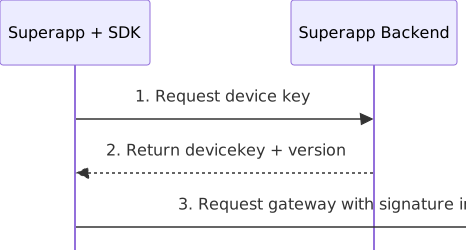
Signature verification protects the integrity of network requests sent by the SDK. The SDK uses a device key provided by your superapp to compute an HMAC-SHA256 signature for each request and attaches the signature to the request. The Superapp as a Service gateway then verifies the signature to detect tampered parameters and replayed requests.
Overall process
Integration guide
Android
Integration steps
1. Implement the device key method
In your
MiniAppProxy implementation class, override getDeviceKey. This class typically extends BaseMiniAppProxyImpl and is registered with the @ProxyService annotation.@Overridepublic boolean getDeviceKey(DeviceKeyRequest request, DeviceKeyCallback callback) {// Implement this in your superapp: request a device key the superapp server, then return the result through the callback.}
Return values
Return value | Description | SDK behavior |
true | Signature verification is enabled, and your superapp fetches the device key for the SDK. | The SDK waits for the callback. After the key is available, the SDK signs requests. |
false | Signature verification is disabled. | The SDK discards the callback, sends requests without signatures, and does not call this method again. |
Implementation requirements
returns
true , you must invoke the callback exactly once on every code path, including success, server errors, and local exceptions. If the callback isn't invoked within the timeout period, the SDK treats the attempt as failed. Requests are still sent.Run the network request asynchronously in your superapp and invoke the callback when it completes. Don't block this method while waiting for a network response.
You can invoke the callback from any thread.
This method may be called multiple times, for example during key rotation. Make sure your implementation handles repeated calls.
2. Request a device key from the superapp server
The SDK provides the following parameters in
DeviceKeyRequest for you to build the request.Parameter | Source | Description |
uuid | request.uuid | The unique device identifier. The SDK generates and persists this value, and all processes share the same value. |
appId | request.appId | The superapp ID assigned by the server. |
customId | request.customId | The tenant ID. |
sdkVersion | request.sdkVersion | The SDK version. |
The superapp server response must contain the following fields.
Field | Type | Description |
deviceKey | String | The device key, as a 64-character lowercase hexadecimal string (32 bytes). |
version | int | The key version, used for key rotation. |
windowSize | int | The signature time window, in seconds. Currently fixed at 300. |
algorithm | String | The signature algorithm. Currently fixed at HMAC-SHA256 |
allowPersist | Boolean | Specifies whether the SDK can store the key on the device. If false , the SDK keeps the key in memory only. |
3. Return the result
Wrap the server response in a
DeviceKey object and return it through the callback :callback.onResult(new DeviceKey(deviceKey, // The device key, as a 64-character lowercase hex string.version, // The key version.windowSize, // The time window, in seconds. Currently 300.algorithm, // The signature algorithm. Currently "HMAC-SHA256".allowPersist), // Specifies whether the SDK can store the key on the device.errorCode, errorMessage);
How the SDK handles the result
Result | SDK behavior |
errorCode == 0 ,deviceKey is not empty | Signature verification is enabled. |
errorCode == 0,deviceKey is empty or missing | The SDK treats this as a valid fetch. The current request is sent without a signature, and any cached key is not affected. |
errorCode != 0 | The fetch failed. The SDK continues to sign requests with the most recently fetched key. If no key is available, the SDK sends requests without signatures, so your services aren't interrupted. |
Conventions and constraints
Item | Convention |
Key format | A 64-character lowercase hexadecimal string (32 bytes). Keys in any other format cause signing to fail. |
Signature algorithm | HMAC-SHA256 |
Time window | Currently 300 seconds |
Key version | Identified by version . When the key version expires, the SDK discards the local key and requests a new one from your superapp. |
Key caching | After a successful fetch, the SDK caches and reuses the key. If allowPersist = false , the key is held in memory only, and the SDK requests a new one from your superapp the next time the superapp starts. |
Fetch failure | The SDK falls back to the cached key. If no key is cached, the SDK sends requests without signatures, and service availability isn't affected. |
FAQs
1. Does skipping this integration affect mini program features?
No. If you return
false, or keep the default implementation (which returns false), signature verification is disabled. Mini programs work as usual, but requests aren't protected against tampering. The tenant configuration on the Super App as a Service determines whether signature verification is enforced.2. How often is the device key method called?
After a successful fetch, the SDK caches and reuses the key. Typically, the key is fetched only once per tenant and superapp within a process. The SDK fetches it again only when the key is rotated (the Super App as a Service server returns error code 1075), or when persistence isn't allowed and the process restarts.
3: How should I set
allowPersist ?If your superapp has security or compliance requirements that prohibit storing keys on disk, set it to
false. The key is then held in memory only and is fetched again from your superapp after the process restarts. Otherwise, set it to true to reduce calls to your key endpoint.4. Does my superapp need to retry when the key request fails?
No. Return the error code through the callback. The SDK continues with the cached key. If no key is cached, requests are sent without signatures.
Do I need to distinguish between the main process and mini program processes?
No. The device key is always fetched in the main process, so your implementation doesn't need to handle process differences.
iOS
Prerequisites
To implement signature verification, create a class that conforms to the TMFMiniAppSDKDelegate protocol and register it as the SDK delegate. For detailed configuration, see the Introduction. Superapp as a Service must have enabled the signature verification capability (gateway-side verification), and the superapp backend must be able to issue a DeviceKey.
Integration steps
Implement the following optional method in the delegate class that conforms to the TMFMiniAppSDKDelegate protocol:
// The superapp reuses the login backend to obtain the anti-tampering DeviceKey for the SDK.- (void)fetchAntiTamperDeviceKeyWithParams:(NSDictionary *)paramscompletionHandler:(void(^)(NSDictionary * _Nullable result,NSError * _Nullable error))completionHandler;
The SDK calls back this method during the first request or when the DeviceKey expires (the gateway returns 1075). The superapp is responsible for obtaining and returning the DeviceKey.
Fields in params passed by the SDK:
Field | Description |
uuid | The device UUID (36 characters) generated and persisted by the SDK. |
appId | The appKey configured for the current SDK. |
platform | Fixed to "ios". |
sdkVersion | The current SDK version number. |
The superapp reuses the same backend service used for login to request the DeviceKey, and returns it in the agreed format. The fields are as follows:
Field | Description |
deviceKey | 64-character hex string. (Required. If it is empty and no error occurs, it is considered that signature is not enabled in this scenario.) |
version | The key version number. (Optional) |
windowSize | Time window length in seconds. (Optional. Default: 300) |
algorithm | Fixed to "HMAC-SHA256". (Optional) |
Integration sample
- (void)fetchAntiTamperDeviceKeyWithParams:(NSDictionary *)paramscompletionHandler:(void (^)(NSDictionary * _Nullable, NSError * _Nullable))completionHandler {NSString *url = [NSString stringWithFormat:@"%@api/v1/device/key", self.serverBaseURL];NSDictionary *body = @{@"uuid": params[@"uuid"] ?: @"",@"appId": params[@"appId"] ?: @"",@"platform": params[@"platform"] ?: @"ios",@"sdkVersion": params[@"sdkVersion"] ?: @"",@"deviceAttestation": @"",};// Reuse the same network encapsulation for login[self.networkManager POST:url parameters:body completion:^(NSDictionary *json, NSError *error) {if (error) { completionHandler(nil, error); return; }if ([json[@"code"] integerValue] == 0 && [json[@"data"][@"deviceKey"] length] > 0) {completionHandler(json[@"data"], nil); // Pass through data (including deviceKey/version/windowSize)} else {completionHandler(nil, [NSError errorWithDomain:@"DeviceKey"code:[json[@"code"] integerValue]userInfo:@{NSLocalizedDescriptionKey: json[@"message"] ?: @"error"}]);}}];}
Note
Callback timeout: The completionHandler must be called back within 15 seconds. Otherwise, the SDK treats it as a failure to avoid suspending the request chain.
Signature scope: Only POST and PUT requests are signed. GET and DELETE requests do not require signatures (the gateway allows them directly).
Downgrade policy: If an empty deviceKey is returned (without an error) or this delegate is not implemented, the SDK determines that signature is not enabled in this scenario, and will not repeatedly call back the superapp for subsequent requests.
Thread safety: The callback thread is not guaranteed to be the main thread. Ensure thread safety during processing.
Server-side integration
Before you begin
Contact the Super App as a Service backend team to obtain the following information.
Item | Description |
Tenant ID (customId) | The unique identifier of a tenant, for example T0000EXAMPLE000000X. It must exactly match the tenant ID in SDK requests. |
Tenant key (TenantKey) | Generated by the Super App as a Service and delivered through a secure channel. A 64-character lowercase hex string (32 bytes). Each tenant has its own key. |
Key version (version) | A positive integer that maps one-to-one to a TenantKey. The value is 1 for initial provisioning. |
Integration steps
Step 1. Configure the tenant key
The superapp must store the TenantKey and its version for each tenant. In multi-tenant deployments, every customId must use its own TenantKey. Keys must not be shared across tenants.
The following example shows one possible configuration. You can adapt the format to your own framework, as long as keys are stored per tenant and the version number is preserved.
{"deviceKey": {"tenantKeys": {"T04914TJ0911724TSAK": {"current": { "key": "<64-character lowercase hex>", "version": 1 },"previous": { "key": "", "version": 0, "expireAt": 0 }}}}}
Field | Description |
current.key | The TenantKey currently in effect. A 64-character lowercase hex string. |
current.version | The current key version. A positive integer. |
previous | The previous key version. Keep it only during key rotation, and leave the fields empty at all other times. |
Validate the following at startup: At least one tenant is configured; every TenantKey is valid hex and decodes to 32 bytes; every version number is a positive integer. If validation fails, the service must fail to start. It must not expose any API while the keys are not ready.
Step 2. Implement the device key issuance endpoint
The superapp defines the endpoint path and the authentication method. The SDK places no constraints on either. The following definition is recommended.
Item | Value |
Request method | POST |
Path | /api/v1/device/key. If your deployment uses a context path, the full path is {context}/api/v1/device/key. |
Content-Type | application/json |
Protocol | HTTPS |
Authorization | No user token is required. Protect the endpoint with per-IP rate limiting. |
The superapp assembles the parameters provided by the SDK into the request body.
Parameter | Type | Required | Description |
uuid | String | Yes | The unique device identifier. A 36-character string in 8-4-4-4-12 format, generated and persisted by the SDK. |
appId | String | Yes | The appid assigned by the Super App as a Service. |
customId | String | Yes | The tenant ID, used to select the corresponding TenantKey. |
sdkVersion | String | No | The SDK version. |
platform | String | No | The platform identifier. Either Android or iOS. |
deviceAttestation | String | No | Reserved for device attestation data. Not used in the current version. |
{"uuid": "550e8400-e29b-41d4-a716-446655440000","appId": "app-hh5wgi3l1q","customId": "T04914TJ0911724TSAK","platform": "android","sdkVersion": "2.3.9","deviceAttestation": ""}
Parameter validation rules:
Item | Rules | Action on failure |
Request body | Must be valid JSON and must contain all required fields. | If validation fails, return a parameter error. |
uuid | Must be 36 characters long and match ^[0-9a-fA-F]{8}-[0-9a-fA-F]{4}-[0-9a-fA-F]{4}-[0-9a-fA-F]{4}-[0-9a-fA-F]{12}$. | If validation fails, return a parameter error. |
appId | Must not be empty. | If validation fails, return a parameter error. |
customId | Must not be empty, and the tenant must exist in your configuration. | If the field is missing, return a parameter error. If the tenant is not configured, return a failure. Never fall back to the key of another tenant. |
Step 3. Derive the device key
Use the customId to locate the current TenantKey of the corresponding tenant, and derive the DeviceKey as follows.
DeviceKey = HMAC-SHA256( key = TenantKey (32-byte raw value), message = "tcmpp:device:" + appId + ":" + uuid )
Key point | Description |
key | Decode the TenantKey from hex into 32 bytes first. Do not use the hex string directly. |
messages | A UTF-8 string. Use the original appId and uuid values from the request. Do not change their case, and do not remove hyphens. |
Output | 32 bytes, encoded as a 64-character lowercase hex string. |
The case of uuid must exactly match the TC-Uuid that the SDK sends to the gateway. Otherwise, signature verification fails at the gateway (error code 1071).
Reference implementation (Java):
byte[] tenantKey = hexToBytes(tenantKeyHex); // 32 bytesString info = "tcmpp:device:" + appId + ":" + uuid;Mac mac = Mac.getInstance("HmacSHA256");mac.init(new SecretKeySpec(tenantKey, "HmacSHA256"));String deviceKey = bytesToHexLower(mac.doFinal(info.getBytes(StandardCharsets.UTF_8)));
Reference implementation (Go):
mac := hmac.New(sha256.New, tenantKey) // tenantKey is 32 bytesmac.Write([]byte("tcmpp:device:" + appId + ":" + uuid))deviceKey := hex.EncodeToString(mac.Sum(nil))
Step 4. Return the result
The superapp server response must contain the following fields.
Field | Type | Description |
deviceKey | String | The device key, as a 64-character lowercase hexadecimal string (32 bytes). |
version | int | The key version, that is, the version of the TenantKey used for this derivation. It is used for key rotation. |
windowSize | int | The size of the signing time window, in seconds. The value is currently fixed at 300. |
algorithm | String | The signing algorithm. The value is currently fixed at HMAC-SHA256. |
allowPersist | Boolean | Optional. Whether the SDK is allowed to persist the key locally. If false, the key is held in memory only. If the field is not returned, the default is true. |
Example of a successful response:
{"returnCode": "0","returnMessage": "OK","requestId": "e1d137d70b0e4433ba068c4c2c4ee1da","data": {"deviceKey": "b8bab3bf5232930a01695f894f5f85848ba0048a172bd3b168c6ec0dbd6ac399","version": 1,"windowSize": 300,"algorithm": "HMAC-SHA256"}}
Example of a failed response:
{"returnCode": "400001","returnMessage": "Invalid parameter","requestId": "a17888625dd34fcba59a6ad790d45c0d","data": null}
Description of the outer fields:
Field | Type | Description |
returnCode | String | "0" indicates success. Any other value indicates failure. |
returnMessage | String | A description of the result. |
requestId | String | The request tracing ID, which helps with troubleshooting. |
data | Object | The fields described in the preceding list on success, and null on failure. |
The superapp determines success by whether returnCode is "0", and then reads data. The following error codes are recommended. You can define the values yourself.
returnCode | Description | Superapp and SDK behavior |
0 | Success | The superapp returns the key, and the SDK caches and uses it. |
400001 | Parameter error | The superapp returns a failure, and the SDK continues with the cached key. |
500001 | System error, including the tenant not being configured | The superapp returns a failure, and the SDK continues with the cached key. |
429 | Rate limit triggered | The superapp returns a failure, and the SDK continues with the cached key. |
5. Rate limiting
Item | Recommendation |
Scope | Client IP |
Window | 1 hour |
Threshold | 180,000 requests per IP per hour for reference. Adjust it to your own business scale. |
Response when the limit is exceeded | 429 |
Rate limit store failure | Allow requests through. A failure in the rate limiting component must not make the endpoint unavailable as a whole. |
Conventions and constraints
Item | Convention |
Key format | The deviceKey is a 64-character lowercase hex string (32 bytes). An invalid format causes signing to fail. |
Signature algorithm | HMAC-SHA256 |
Time window | Currently agreed at 300 seconds. |
Tenant isolation | The TenantKey is selected by customId. For a tenant that is not configured, return a failure directly. Never fall back to another tenant. |
Version consistency | The returned version must match the version that the Super App as a Service has registered on the gateway, and the DeviceKey must be derived from the TenantKey of that version. Otherwise, the gateway returns 1075. |
Key confidentiality | The TenantKey must not be issued to clients, and must not be committed to a code repository. Printing the TenantKey or the DeviceKey in logs is prohibited. For troubleshooting, log only customId, appId, uuid, and version. |
Transport security | The endpoint must use HTTPS. The DeviceKey is in plaintext in the response. |
Repeated calls | The endpoint is called again when the key is rotated or when the client cache is lost. Your implementation must support repeated calls, and the result must be idempotent: the same input returns the same key. |
Service availability | Endpoint failures do not affect business requests. The SDK falls back to a cached key, or sends requests without a signature. |
FAQs
1: Does it affect mini program features if the server does not implement this endpoint?
There is no impact when signing is not enabled. Mini programs work normally, and only request tamper protection is missing. However, if the Super App as a Service has already enabled mandatory verification for the tenant and the SDK version meets the requirement, the gateway rejects requests for which no key was obtained (error code 1070). Complete the server endpoint and pass integration testing first, and then contact the Super App as a Service team to enable mandatory verification.
2: How often is the device key endpoint called?
After a key is obtained successfully, it is cached and reused on the SDK side. It is typically obtained once per process for each tenant and superapp. The key is obtained again only when it is rotated (the gateway returns 1075) or when persistence is not allowed (after a process restart). The load on the endpoint is therefore very low.
3. How should I set allowPersist?
For superapps that have security and compliance requirements on persisting keys to disk, set it to false. The key is then kept in memory only, and is requested from the server again after a process restart. When there is no special requirement, omit the field or set it to true to reduce the number of endpoint calls.
4: Can multiple tenants share one TenantKey?
No. The TenantKey of each tenant is generated independently by the Super App as a Service, and the gateway verifies signatures per tenant. Sharing causes signature verification to fail for the other tenants.
5: How does the SDK handle a failed endpoint request?
The SDK continues to sign with the cached key. When there is no cache, requests are sent without a signature, and business requests are not interrupted.
6: How do I troubleshoot error code 1071 (signature mismatch)?
Check the following in order: whether the TenantKey matches the one delivered by the Super App as a Service; whether the original appId and uuid values, including their case, are used for derivation; whether the TenantKey is decoded from hex into 32 bytes before derivation; and whether your derivation function produces the same result as the self-test case above.
7: How do I troubleshoot error code 1075 (key version expired)?
This is usually because the returned version does not match the version registered on the gateway. Confirm the current version on the gateway side with the Super App as a Service, and check that the version number and the key configured in the superapp correspond to each other.
8: The endpoint returns a system error indicating that the tenant key is not configured.
Check whether the customId exists in the tenant configuration, and check the case-sensitivity rules used to compare tenant IDs in the configuration. If your configuration framework changes the case of keys, handle it consistently when storing and looking up. Also check that the brackets in the configuration JSON are paired, and that multiple tenant nodes are siblings at the same level rather than nested inside the previous tenant.
9: Do I need to implement the GET /api/v1/tenant/version query endpoint?
No. This endpoint is only used by O&M to view tenant key versions. Neither the SDK nor the gateway depends on it. If you do implement it, it must require authentication and must be restricted to internal network access.
Error codes
ThSignature-related error codes returned by the Super App as a Service server-side access layer:
Error code | Description | Recommended action |
1070 | Signature header missing or malformed | If this occurs frequently, investigate key issuance and signing configuration. |
1071 | Signature mismatch (the request content was tampered with, or the key is wrong) | If this occurs frequently, investigate key issuance and signing configuration. |
1072 | Timestamp outside the allowed clock skew (skew > 600s) | Check the device system time. |
1073 | Duplicate nonce (replayed request) | This should not occur under normal conditions. |
1074 | Tenant not registered | Contact the Super App as a Service team to confirm the tenant configuration. |
1075 | Key version expired | The SDK obtains a key again automatically. No handling is required on the superapp side. |
1076 | Device revoked | This is a device management policy on the Super App as a Service server side. Contact the Super App as a Service team to confirm. |
Help and Support
Was this page helpful?
You can also Contact sales or Submit a Ticket for help.
Help us improve! Rate your documentation experience in 5 mins.
Feedback