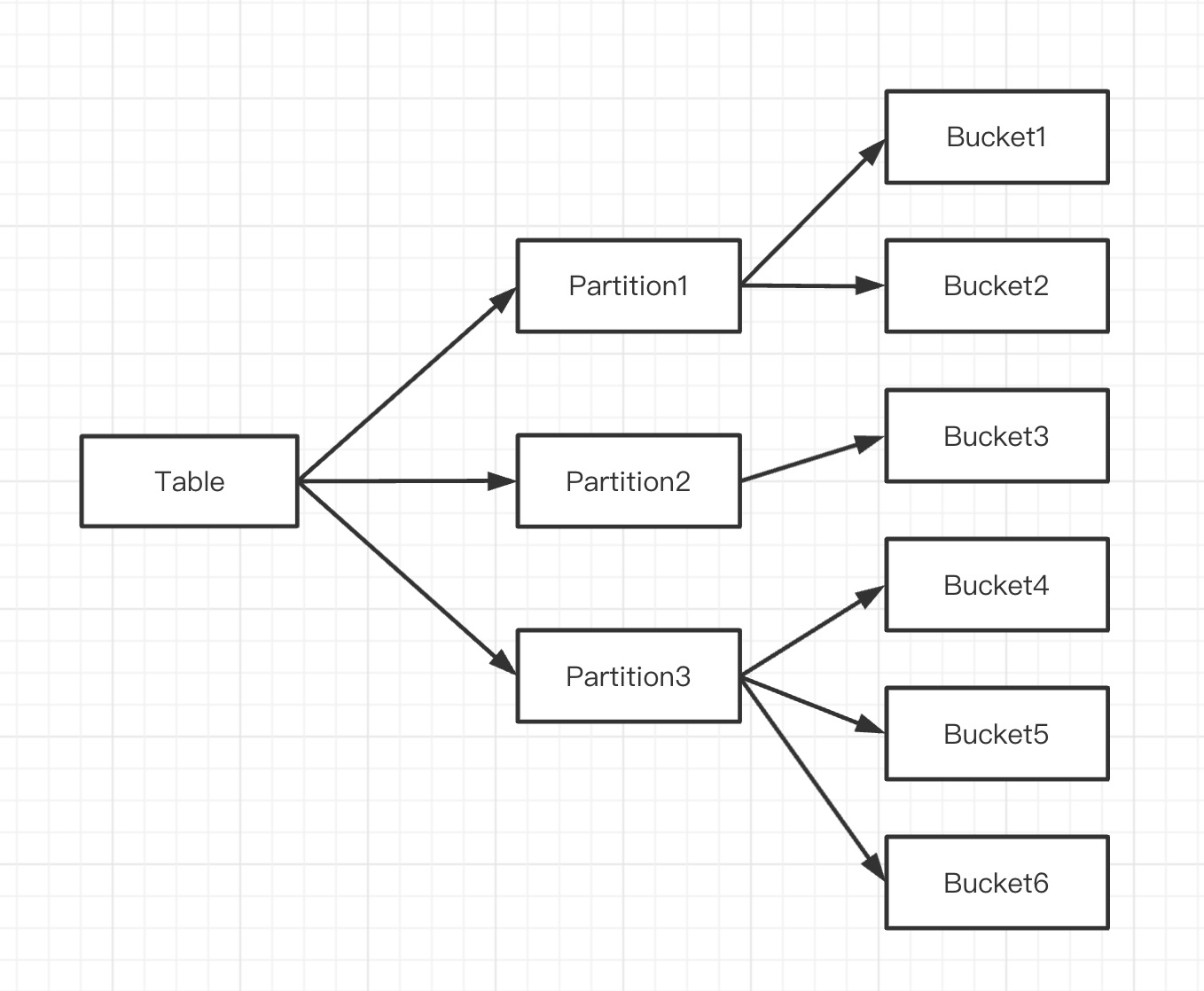
Doris divides data into two layers of structure, namely partition and bucket. As shown in the following:
Each bucket file is a tablet which is the smallest logical cell of data division. Each tablet contains several data rows. There is no data intersection between tablets which are independently stored physically.
A tablet belongs only to one partition. Correspondingly, multiple tablets logically belong to different Partitions. And one partition contains several tablets. It is independent physically because tablet is independently stored physically. Tablet is the minimum physical storage cell for data transfer and replication.
Replica
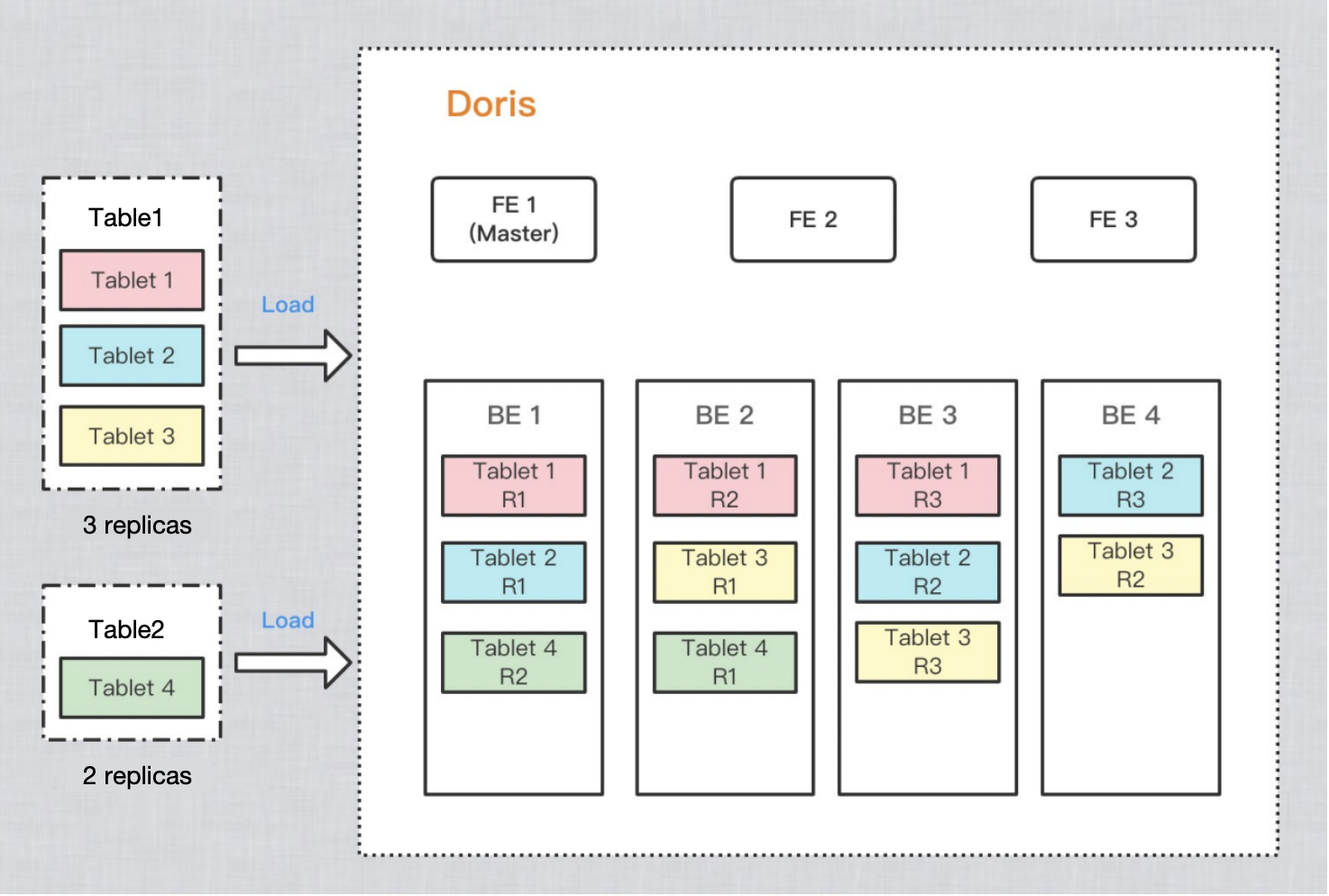
To improve data reliability and computing performance, Doris copies each table multiple times for storage. Each copy of the data is called a replica. Doris performs replica storage with tablets as the basic cell. Each tablet has 3 replicas by default. You can set the number of replicas in PROPERTIES when creating a table:
PROPERTIES
(
"replication_num"="3"
);
In the example diagram below, two tables are imported into Doris. Table 1 is stored with 3 replicas after import, and Table 2 is stored with 2 replicas after import.
About Replica
The number of replicas of each tablet is 3 by default, and it is recommended to keep the default configuration. In the table creation statement, the number of tablet replicas in all partitions is specified. However, when a new partition is added, the number of replicas of the tablets in the new partition can be individually specified.
The maximum number of replicas depends on the number of independent IPs of the BE service deployed in the cluster (not the number of BEs). The principle of replica distribution in Doris is: the replica of the same tablet is not allowed to be distributed on the same physical machine, and the physical machine is recognized by IP. Therefore, even if 3 or more BE instances are deployed on the same physical machine, if these BEs have the same IP, the number of replicas can only be set to 1.
The number of replicas can be modified at runtime.
It is strongly recommended to keep the number of replicas as an odd number.
Doris Cloud Load Balancer Strategy
It can be set in tablet_rebalance_type configuration item in the master node of FE. The value can be BeLoad, and Partition. If the type parsing fails, BeLoad is used by default.
BeLoad: Perform cloud load balancing according to the storage load of the BE nodes in the cluster, migrating replicas from high load BE nodes to low load nodes.
Partition: Balance the number of replicas of partitions on each node, migrating replicas from BE nodes with a high number of replicas to nodes with a low number of replicas, without considering disk usage.
Horizontal scaling up/down will trigger the entire Doris cluster to perform replica migration with Cloud Load Balancer, which consumes large amounts of CPU and IO resources. Until the Cloud Load Balancer is completed, the system's query/write performance is heavily impacted, and thus should be handled with caution.
Best Practice
Viewing the Data Distribution Information of the Data Table
Create a table
CREATETABLE`example_tbl`(
`user_id`varchar(128)NOTNULLCOMMENT'User ID',
`date`dateNOTNULLCOMMENT'Data influx date and time'
Create a test table with 3 replicas, 2 partitions, with 2 buckets per partition.
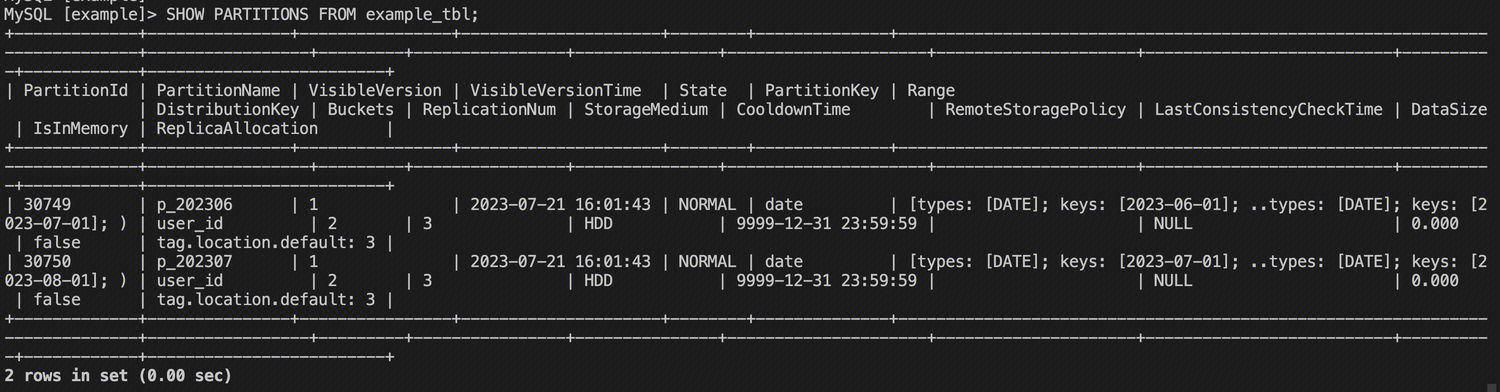
Viewing All Partition Information of the Table
SHOW PARTITIONS FROM example_tbl;
You can see the specific information about the two Partitions in the table.
Viewing All Tablet Information of the Table
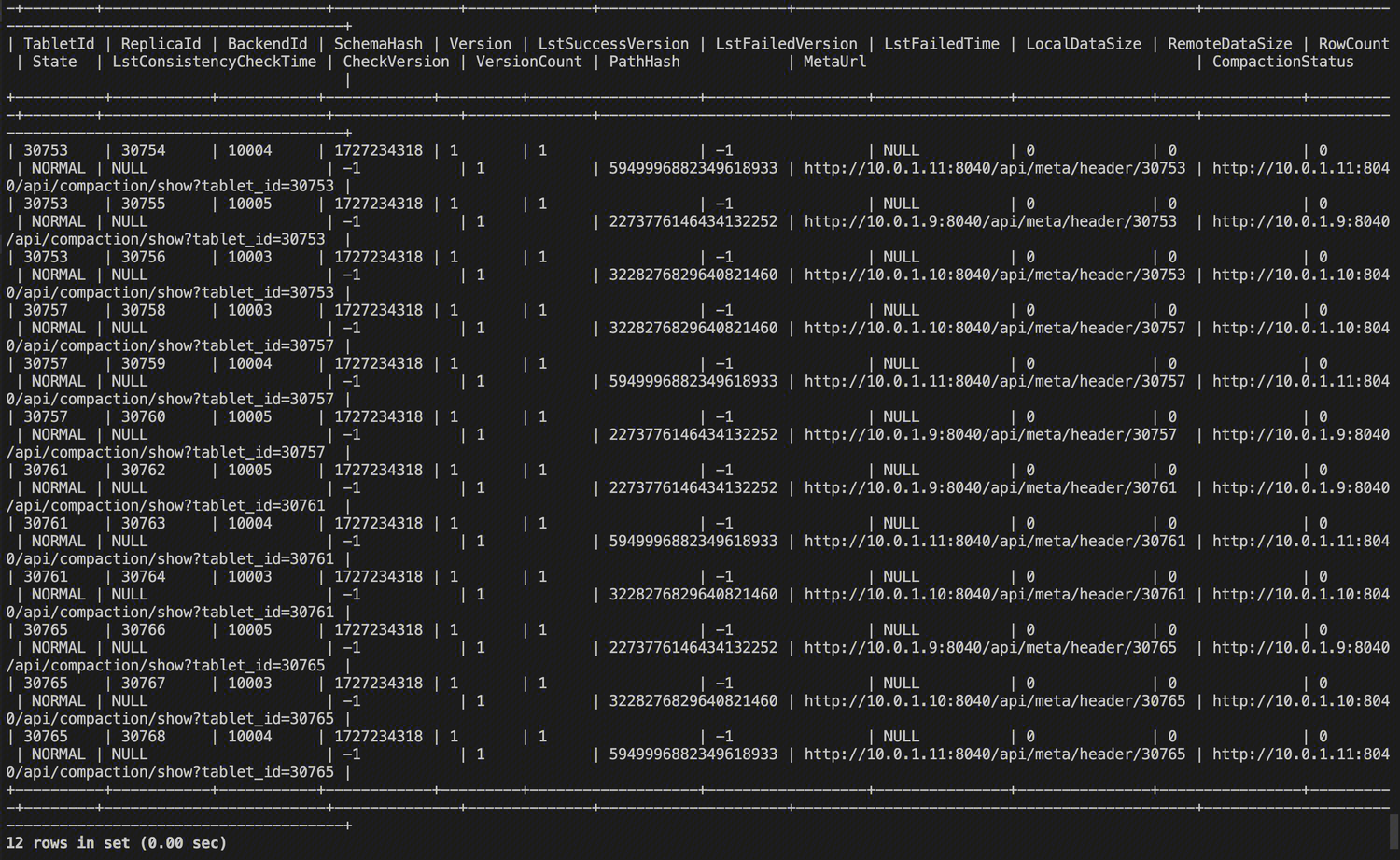
SHOW TABLETS FROM example_tbl;
You can see that there are currently 2 2 3 = 12 Tablets. Through the TabletId and ReplicaId, you can see that the ReplicaId is unique, and one TabletId corresponds to 3 ReplicaId, i.e., 3 replicas.
The specific meaning of each column in the tablet information is as follows:
Column Name
Field Description
TabletId
Tablet ID
ReplicaId
Replica ID of Tablet
BackendId
ID of BE Node Where the Tablet Resides
SchemaHash
Hash value of the table's schema used to ensure schema consistency
Version
Version
LstSuccessVersion
The data version of the last successful task scheduling
LstFailedVersion
The data version of the last unsuccessful task scheduling
LstFailedTime
The failure time of last task scheduling
LocalDataSize
Local data size
RemoteDataSize
Data size accessed from remote node
RowCount
Row number in the replica
State
The current status of the replica
LstConsistencyCheckTime
The last check time of tablet replica consistency
CheckVersion
The data version of the last tablet replica consistency check
VersionCount
Number of data versions in the Tablet
PathHash
Hash value of the tablet storage path
MetaUrl
URL for viewing the tablet meta information
CompactionStatus
URL for viewing the tablet compaction information
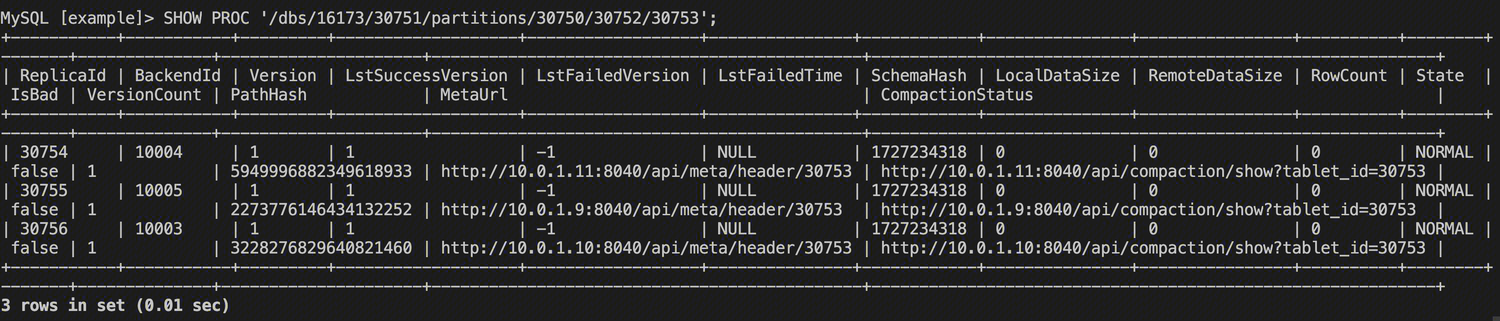
Viewing Detailed Tablet Information
SHOW TABLET {TabletId};
You can see some information about this tablet. Note the DetailCmd field, which executes specific commands.
You can see detailed information about all the replicas of this tablet.
Viewing Health Status of Tablet
Viewing the Statuses of All Tablets in the Database
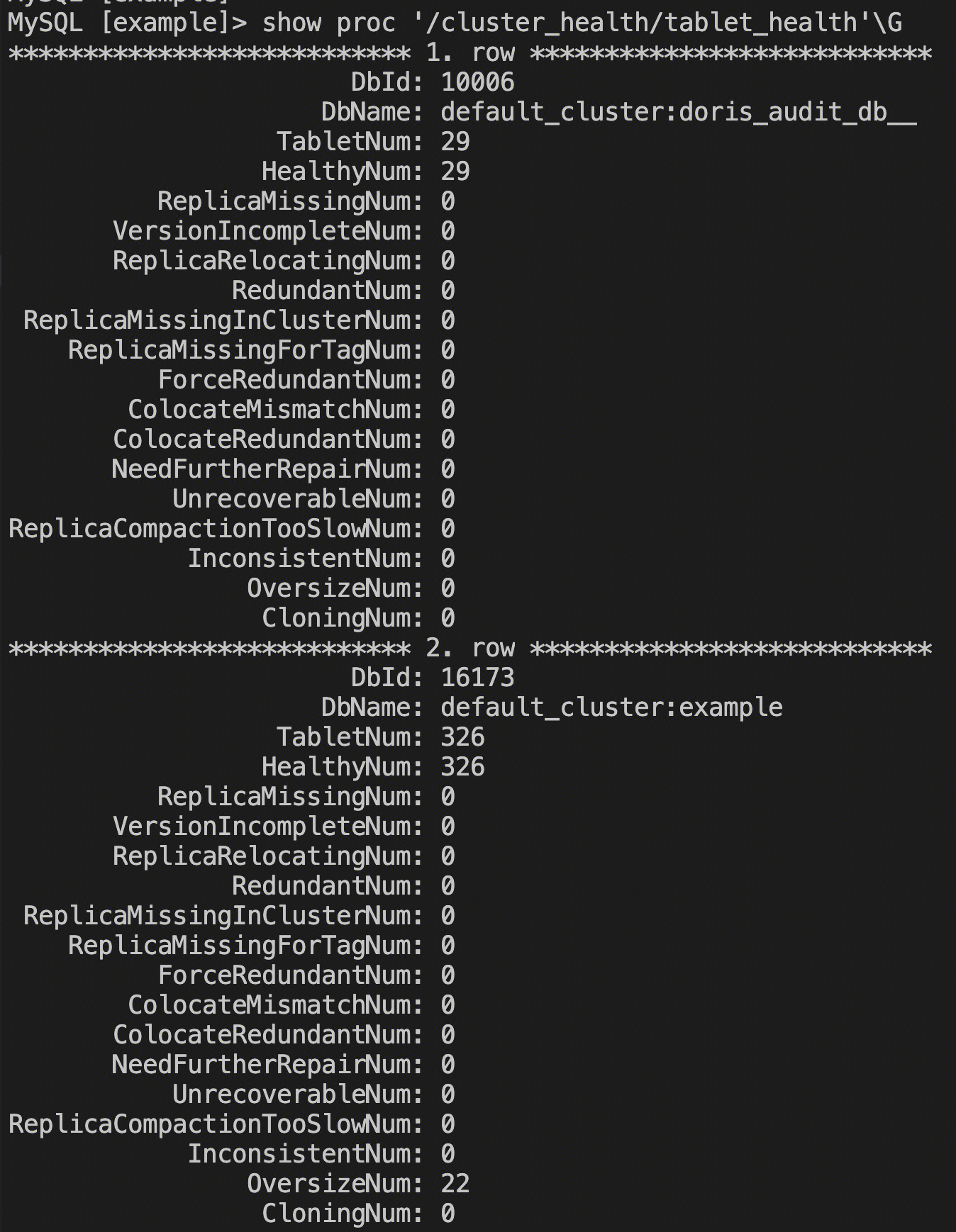
SHOWPROC'/cluster_health/tablet_health'\\G
Mainly check if TabletNum and HealthyNum are equal. When the db is healthy, these two values are expected to be equal.
This shows that there are 22 tablets in the 'example' database that have exceeded the expected size.
Viewing the Specific Status of Tablets in the Database
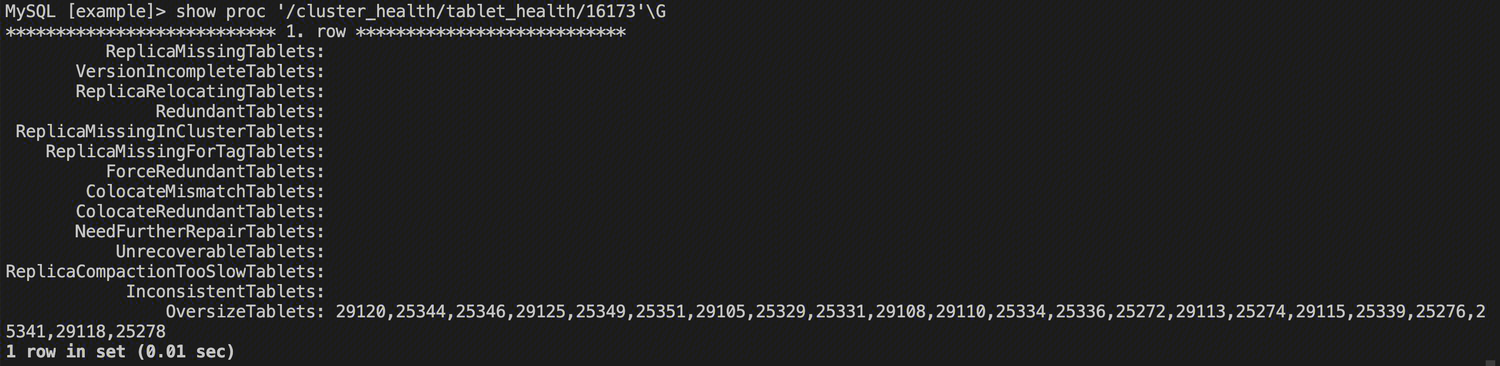
SHOWPROC'/cluster_health/tablet_health/{DbId}'\\G
This shows all the problem Tablets by their TabletId. After knowing the TabletId, you can view the specific Tablet information using the SHOW TABLTE statement shown above before further processing.