Billing Overview
Unduh
Mode fokus
Ukuran font
The Billing Overview is a core Admin page that consolidates the subscription status and resource usage of the current workspace. On this page, administrators can easily view the subscription edition, validity period, remaining envelope quantity, and team member quotas. When resources are about to run out or the subscription is nearing expiration, they can directly initiate renewal, top-up, or upgrade operations. This page serves as the primary entry point for daily operations to check account health and plan resource procurement. Administrators are advised to review it regularly to prevent resource exhaustion or subscription expiry from affecting the normal use of the e-signature service.
Entry
Log in to the Tencent eSign Management Console. In the top navigation bar, select Admin. Click the Billing Overview menu item under the group. The full content of the billing overview is then displayed on the right side of the page.
Feature Introduction
The Billing Overview page consists of two main sections, arranged from top to bottom.
The Workspace Subscription Info Card is located at the top.
The Application Key Resource List is located at the bottom.
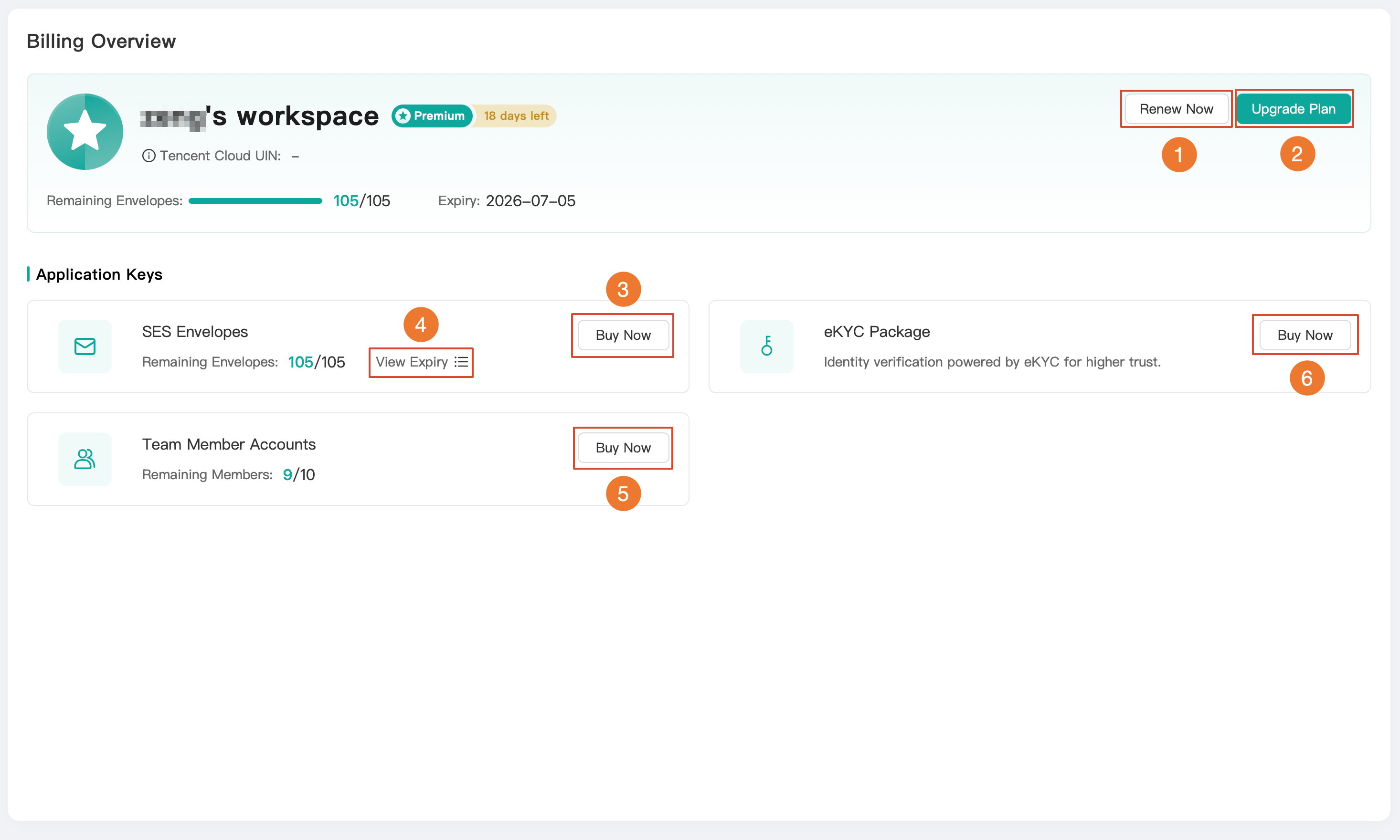
No. | Operation Entry | Feature Description |
1 | Renew Now | Renew the current workspace subscription to extend the service expiration date. |
2 | Upgrade Plan | Upgrade the current subscription to a higher edition to obtain more benefits and quotas. |
3 | Buy Now (SES Envelope) | Top up SMS/email envelope resources to replenish the remaining envelope quantity. |
4 | View Expiry | View the validity period details of SES envelope resources. 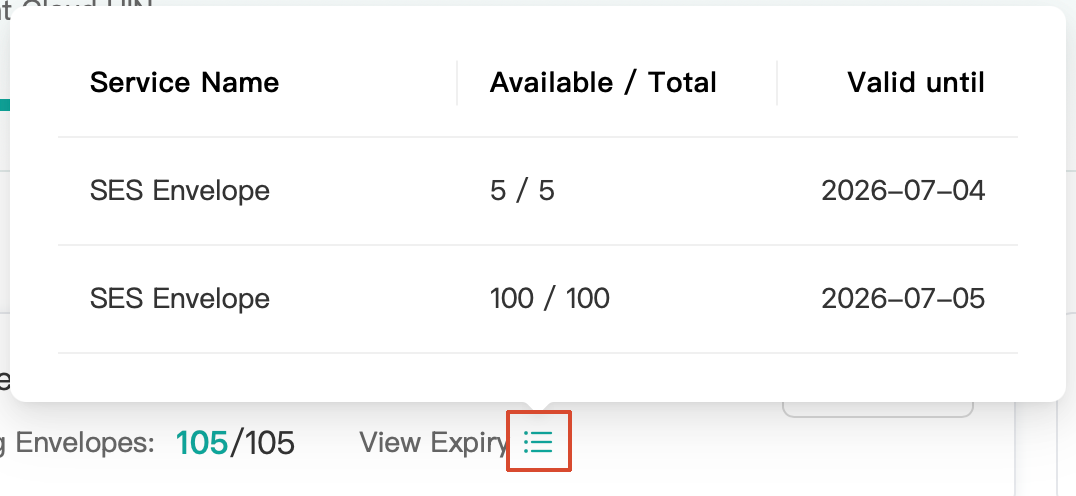 |
5 | Buy Now (Team Member Account) | Renew or scale out team member seats. |
6 | Buy Now | Purchase an electronic identity verification package to enhance the trust level of identity verification. |
Note:
Clicking Renew Now, Upgrade Plan, or Buy Now redirects you to the purchase page.
If you do not have a Tencent Cloud account, you need to register one on this page for purchase. For the registration process, refer to Register Tencent Cloud.
Workspace Subscription Information Card

Workspace Name: The name of the current workspace.
Subscription Edition: The currently subscribed edition is displayed as a Tag. Different editions correspond to different features and quotas. If you need more features or quotas, you can click Upgrade Plan in the upper-right corner of the info card to select a higher-edition subscription.
Days Remaining: Displays the number of days left before the subscription expires. It is recommended to renew promptly when the expiration date is approaching. You can click Renew Now in the upper-right corner of the info card to extend the validity period.
Tencent Cloud UIN: The unique identifier of the Tencent Cloud account associated with this workspace. It displays as "—" when no account is associated.
Remaining Envelope: The remaining envelope resource is displayed as a progress bar and in the format of "Used/Total".
Expiration Date: The service end date of the subscription.
Application Key Resource List

The Application Keys area lists the manageable resources of the current workspace in card format, with each card displaying the resource name, current usage, and corresponding operation buttons.
SES Envelopes: An envelope resource used for sending SMS / email notifications. The card displays the Remaining Envelope Count (for example, 105/105) and provides an entry to View Validity Period, making it easy to understand the resource's expiration time.
Click Buy Now: This recharges the envelope resource and replenishes the remaining quantity.
Click View Expiry: This allows you to view the validity period details for each batch of envelopes.
Team Member Accounts: This is used to manage team member seat quotas. The card displays the Remaining Members (for example, 9/10), which indicates the number of currently available seats versus the total seats. Click Renew to renew or scale up member seats, allowing for more team members.
Note:
"Remaining Members 9/10" indicates a total of 10 seats, with 1 used and 9 remaining. When the remaining seats reach 0, you cannot add new members and must first renew or scale up.
eKYC Package: A value-added resource used to enhance signing trust through electronic identity verification. The card provides an entry to Buy Now. Click Buy Now to purchase an electronic identity verification package and strengthen identity verification capabilities.
Bantuan dan Dukungan
Apakah halaman ini membantu?
Anda juga dapat Menghubungi Penjualan atau Mengirimkan Tiket untuk meminta bantuan.
masukan