Research Efficiency Metrics
ダウンロード
フォーカスモード
フォントサイズ
CodeBuddy supports the measurement and statistics of user usage within an enterprise. This helps enterprise managers observe efficiency improvement results and optimize their efficiency enhancement plans. The R&D efficiency measurement feature provides the following capabilities:
R&D Efficiency Dashboard: It aggregates and analyzes enterprise-wide usage data, suitable for measuring the overall R&D efficiency of an organization.
Member Data: View the data of each enterprise member, suitable for detailed evaluation and specific analysis.
Research Efficiency Dashboard
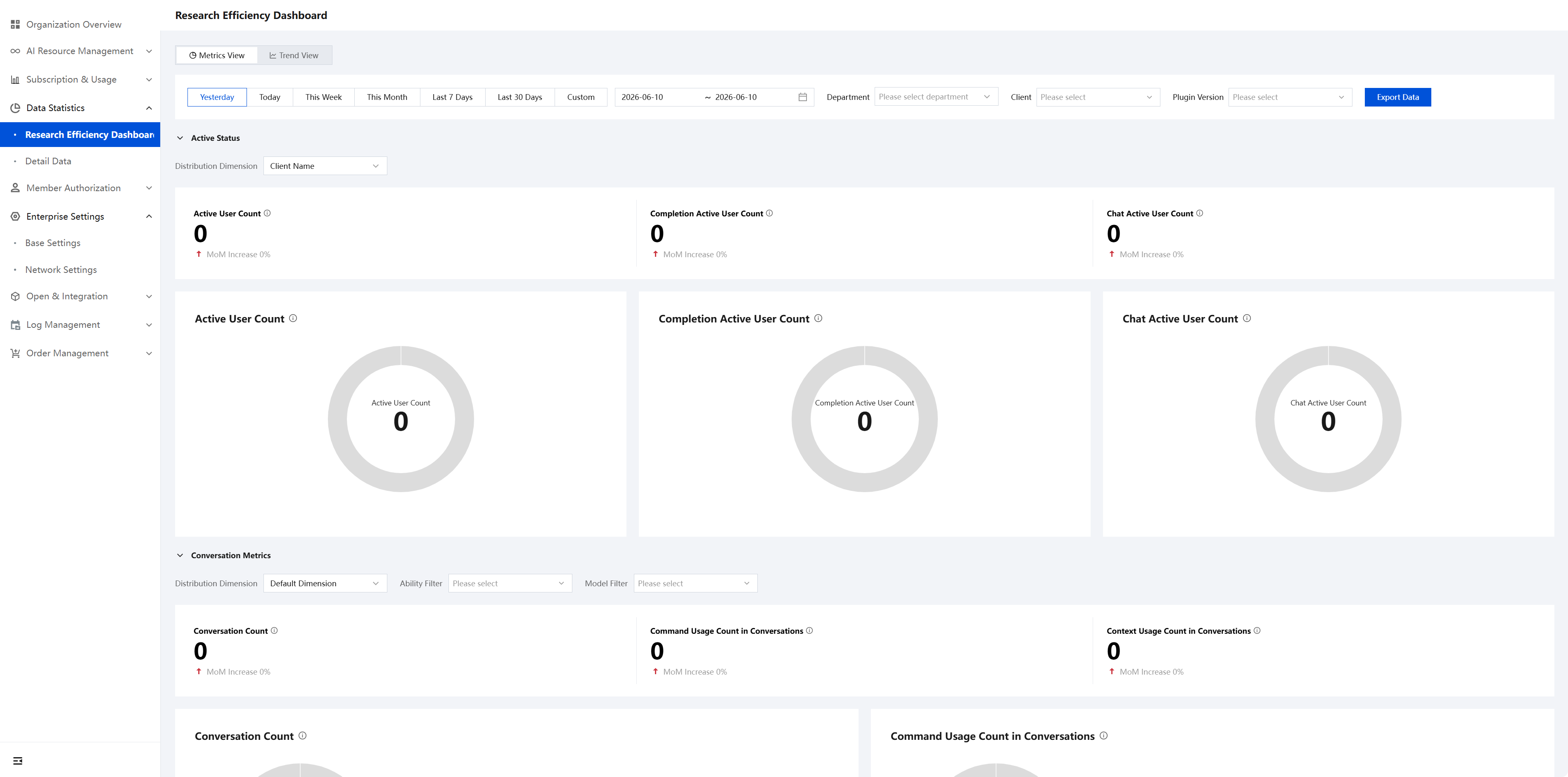
Go to the Admin Console and choose Data Statistics > R&D Efficiency Dashboard. You will notice that the current R&D Efficiency Dashboard has been fully upgraded. It supports viewing the updated metric data, while historical data requires switching to the old dashboard. The dashboard supports switching between two view modes: the Metric View and the Trend View. Each view contains four categories of metric parameters: Activity Status, Conversation Metrics, Completion Metrics, and Code Generation Metrics. Furthermore, the Completion Metrics support display and analysis by programming language. The overall panel is clear, and each metric also has a detailed explanation of its calculation method.
Metric View
Activity Status
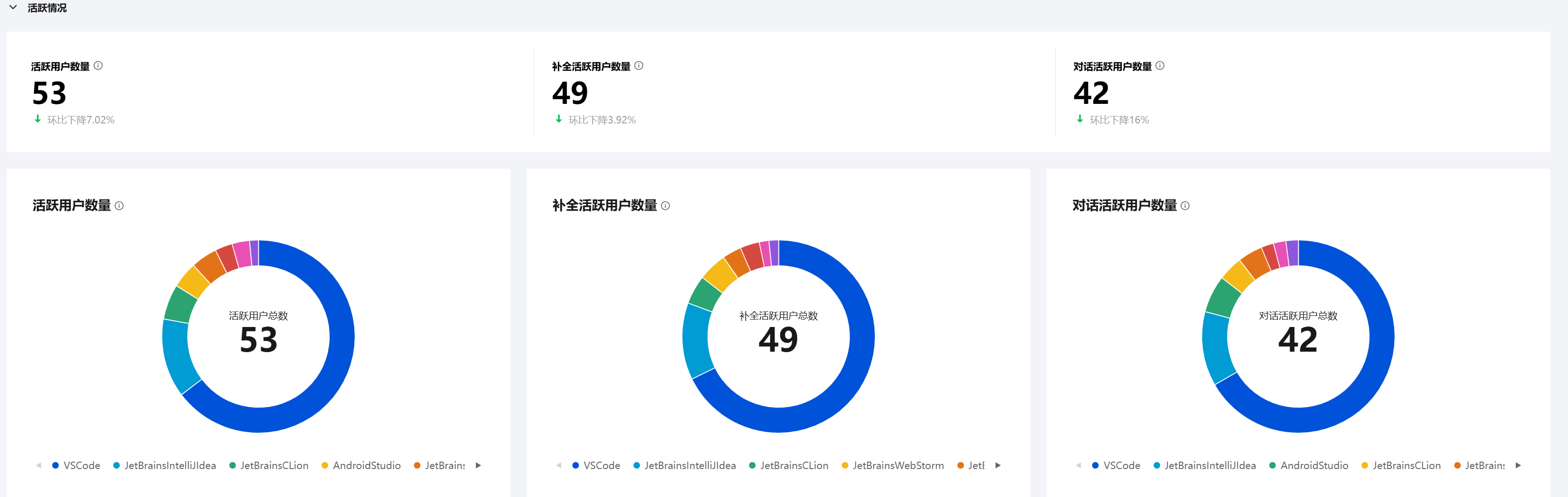
The Activity Status category includes three metrics: Active User Count, Completion Active User Count, and Conversation Active User Count. Each metric is displayed in both text and card formats. Furthermore, the proportion of active users for each IDE can be clearly viewed.
Conversation Metrics
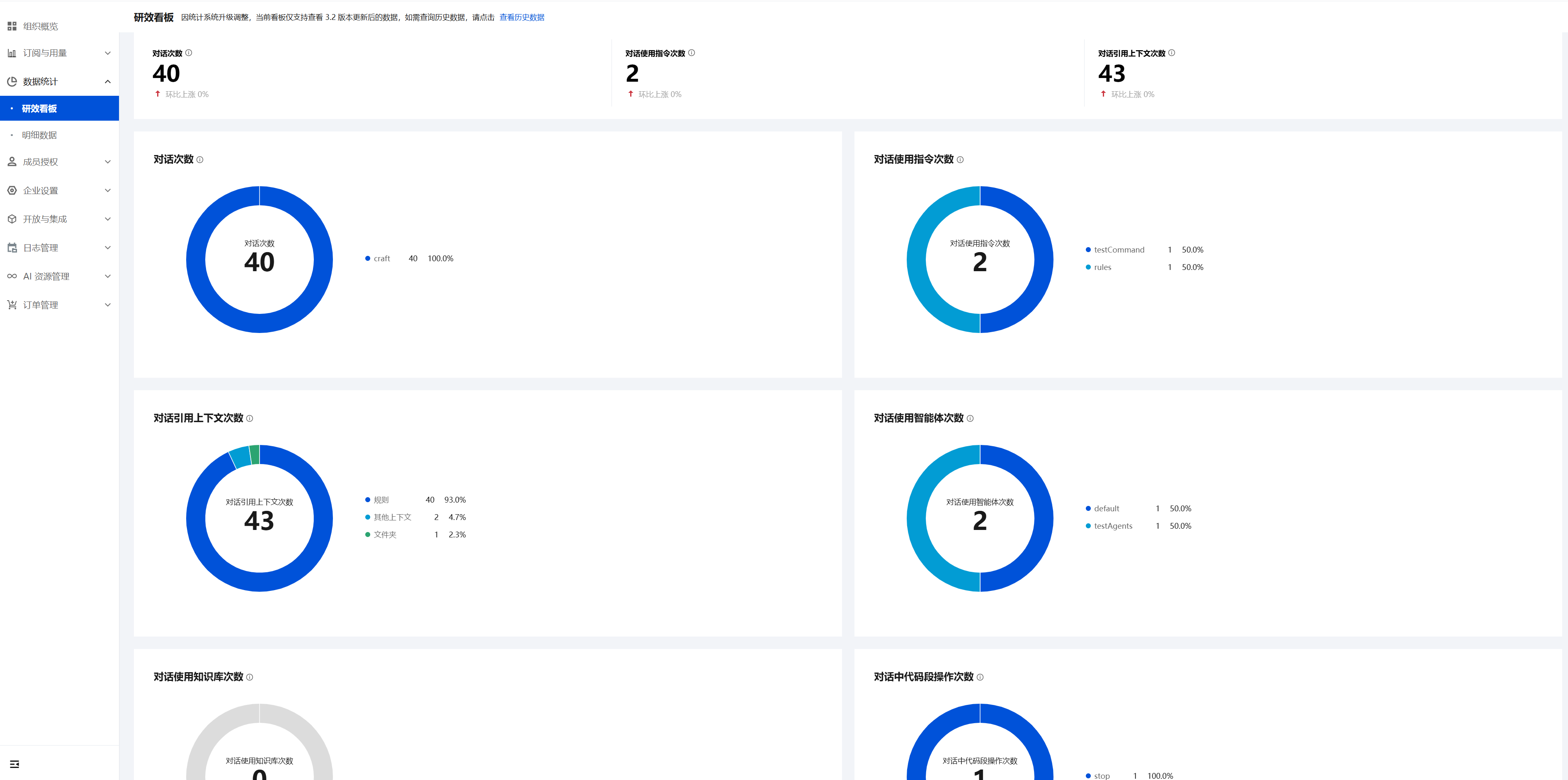
The Conversation Metrics category includes six metrics: Conversation Count, Conversation Command Usage Count, Conversation Context Reference Count, Conversation Agent Usage Count, Conversation Knowledge Base Usage Count, and Conversation Code Block Operation Count. Basically, each metric is displayed in both text and card formats.
Completion Metrics
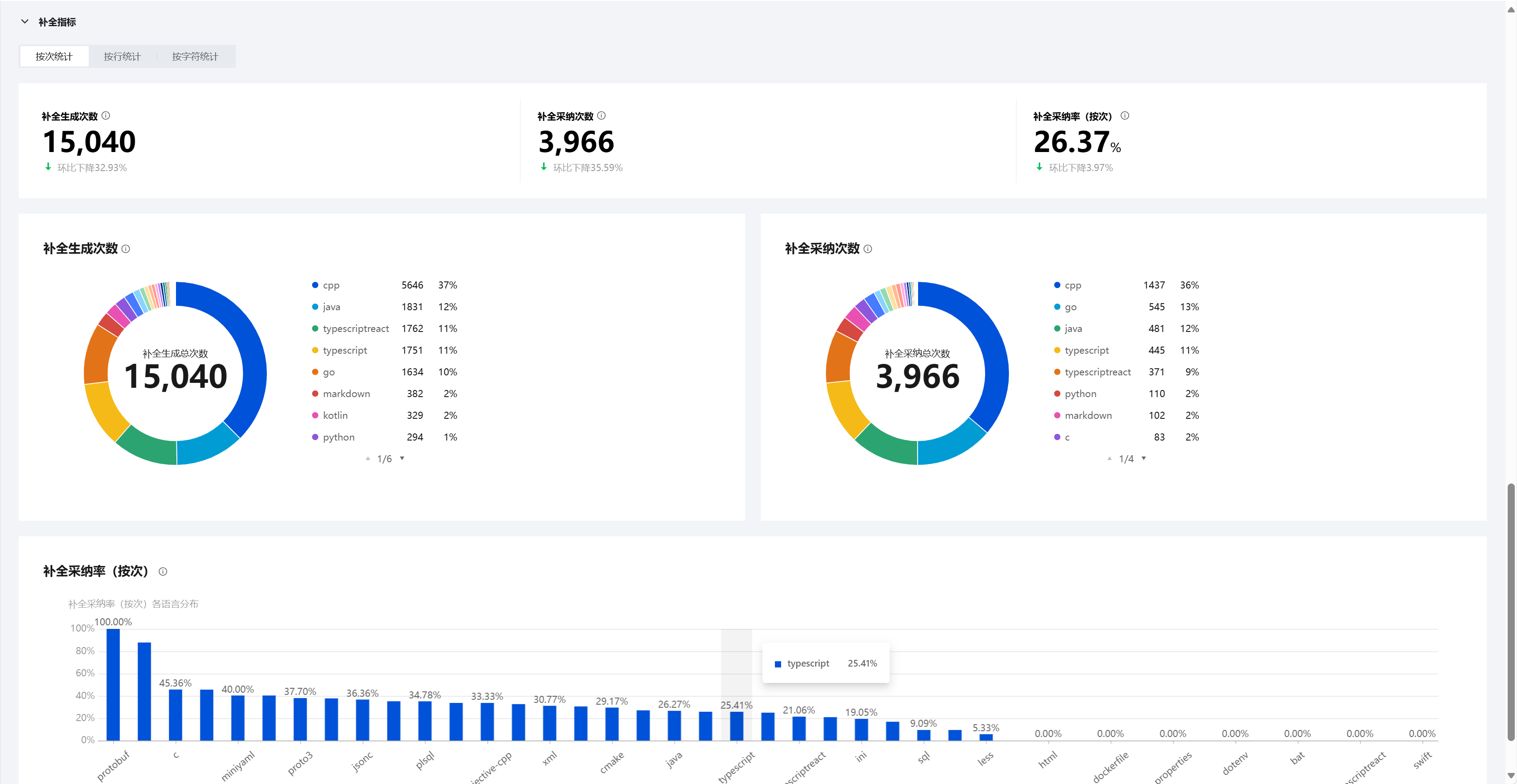
Within the Completion Metrics category, statistics are grouped into three distinct measurement methods: by number of times, by line, and by character. Each measurement method includes corresponding metrics. Every metric supports display by programming language, helping you conduct in-depth analysis.
Code Generation Metrics
Within the Completion Metrics category, statistics are grouped into two distinct measurement methods: by line and by character. Each measurement method includes corresponding metrics. Every metric supports display by programming language, code generation method, client name, client version, or plugin version, helping you conduct in-depth analysis.
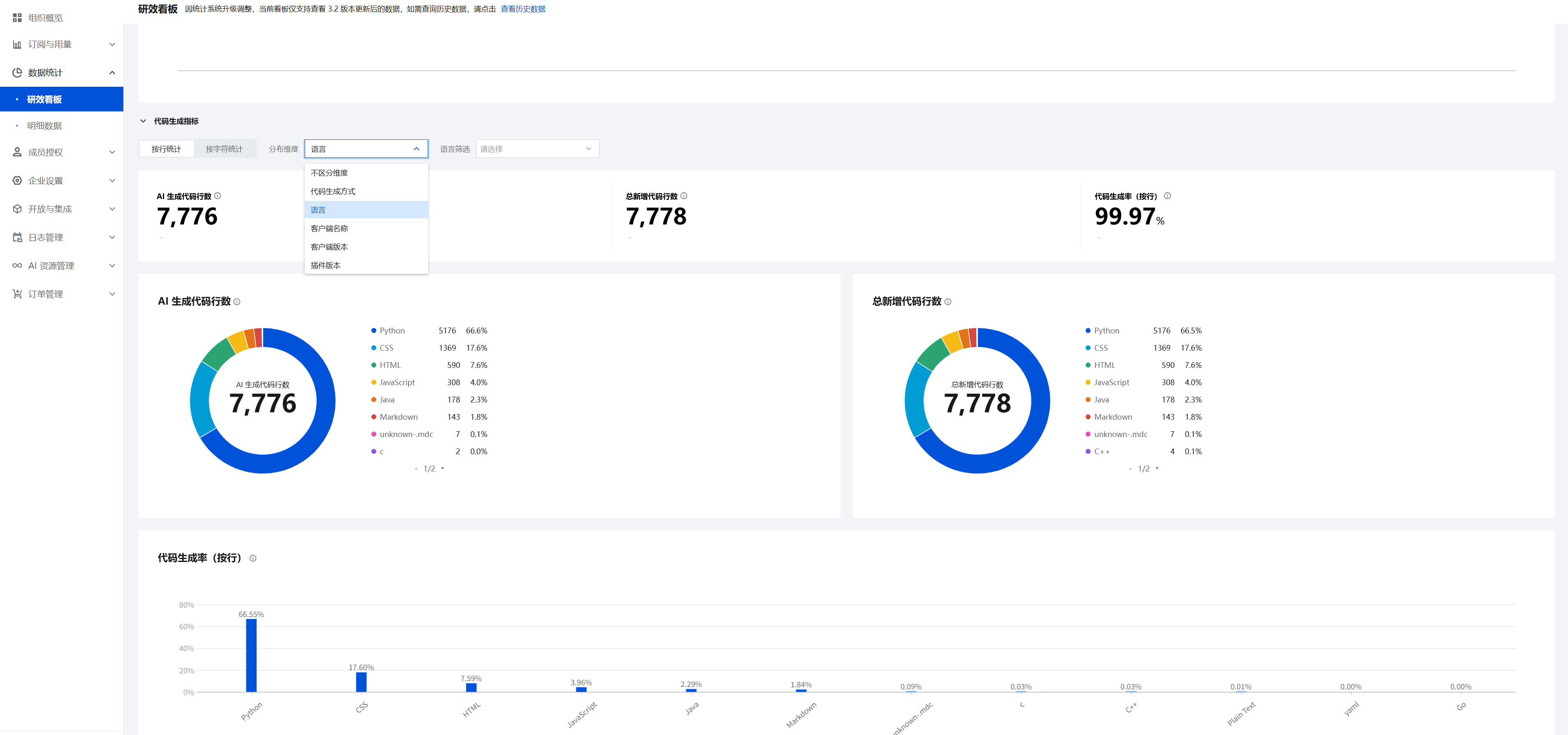
As an enterprise manager, the concept you are most concerned with is "how much code the coding assistant has helped the enterprise generate." This concept is quantified by the coding assistant and is referred to as the Code Generation Rate. The following section explains the calculation logic of this metric.
The Code Generation Rate can be calculated by line or by character, depending on the measurement method used.
Calculate by line
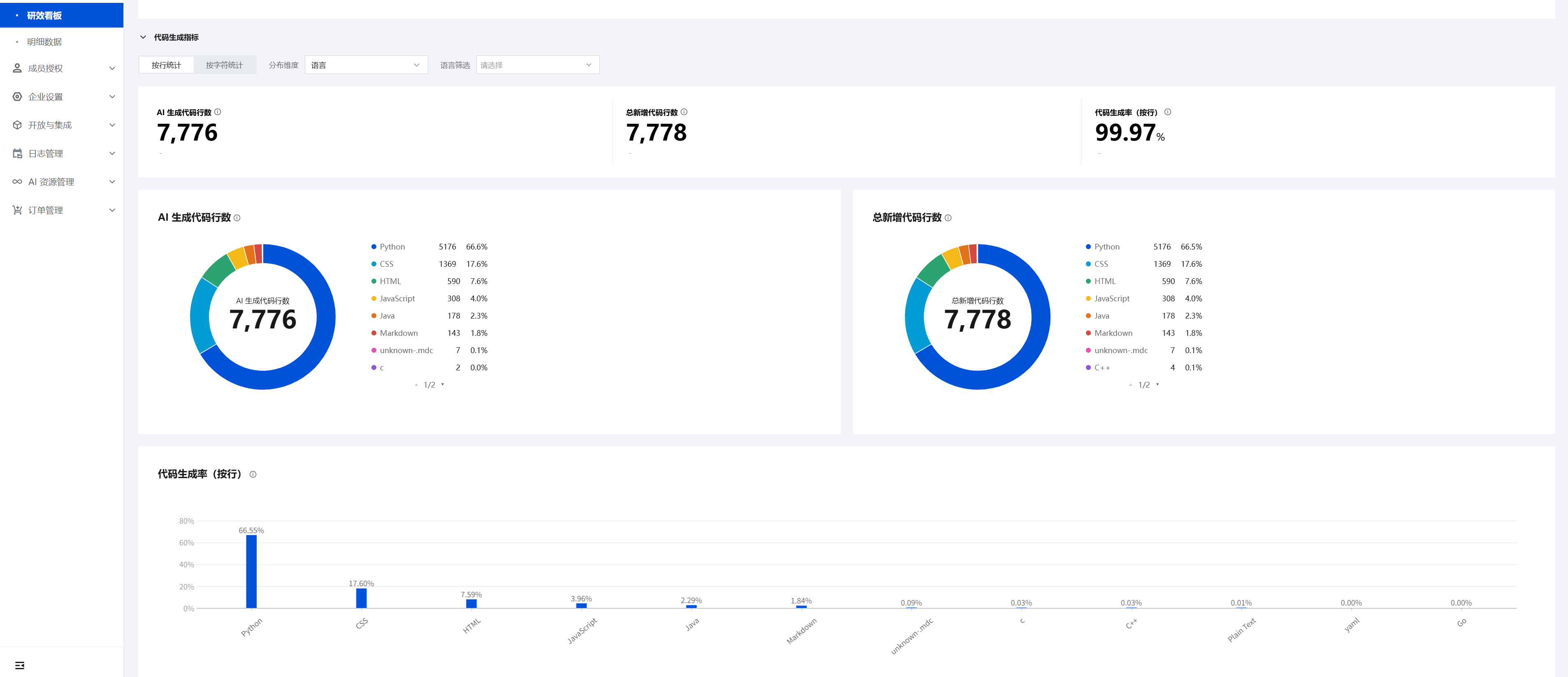
The Code Generation Rate (by line) = (AI-generated code lines / Total new code lines) × 100%. For example, if the Code Generation Rate (by line) = 20%, it means that within the statistical period, 20 out of every 100 lines of code were generated by the coding assistant.
Calculate by character
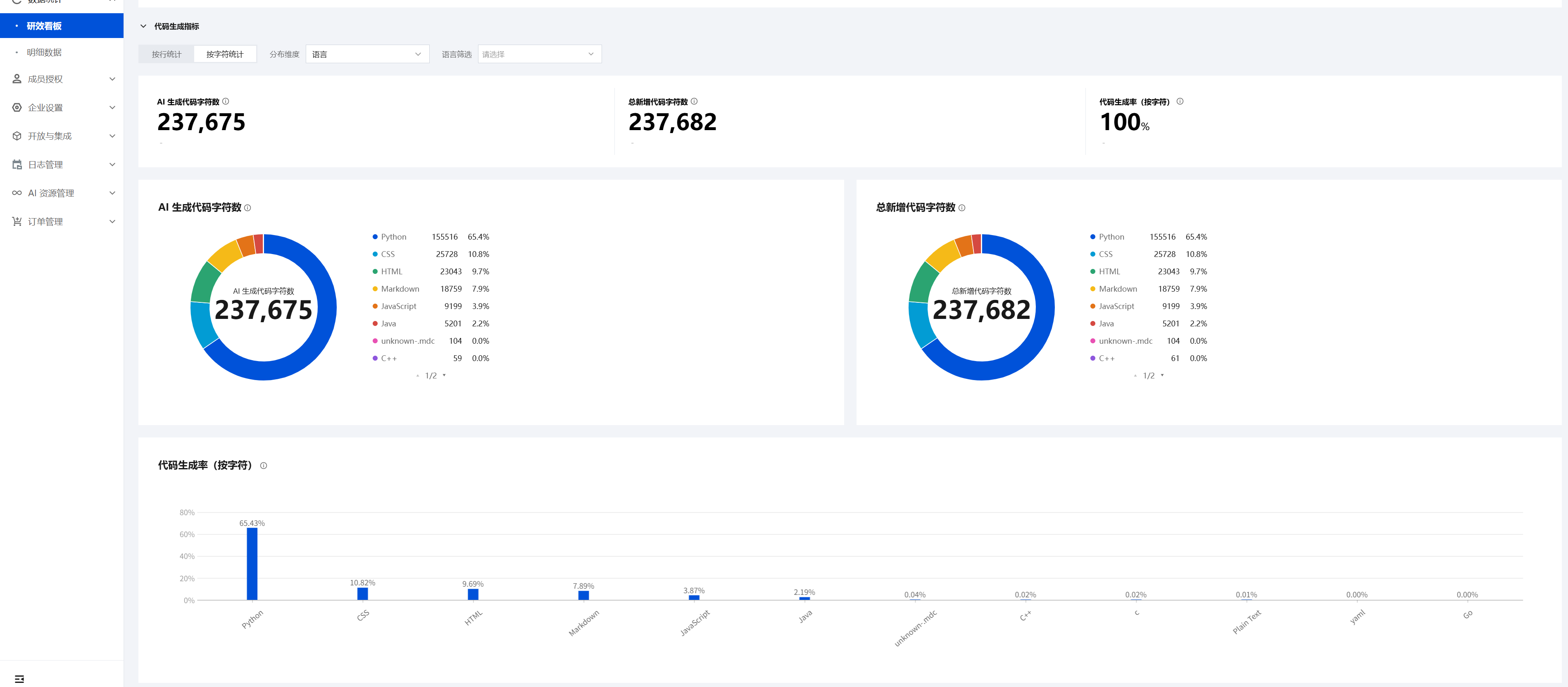
The Code Generation Rate (by character) = (AI-generated code characters / Total new code characters) × 100%. For example, if the Code Generation Rate (by character) = 20%, it means that within the statistical period, 20 out of every 100 characters generated were produced by the coding assistant.
The Code Generation Rate enables enterprises to quantify the impact of the coding assistant on their R&D efficiency. This, in turn, allows them to measure the return on investment in this area, achieving quantifiable and observable outcomes.
Trend View
In the Trend View, most metrics correspond one-to-one with those in the Metrics View.
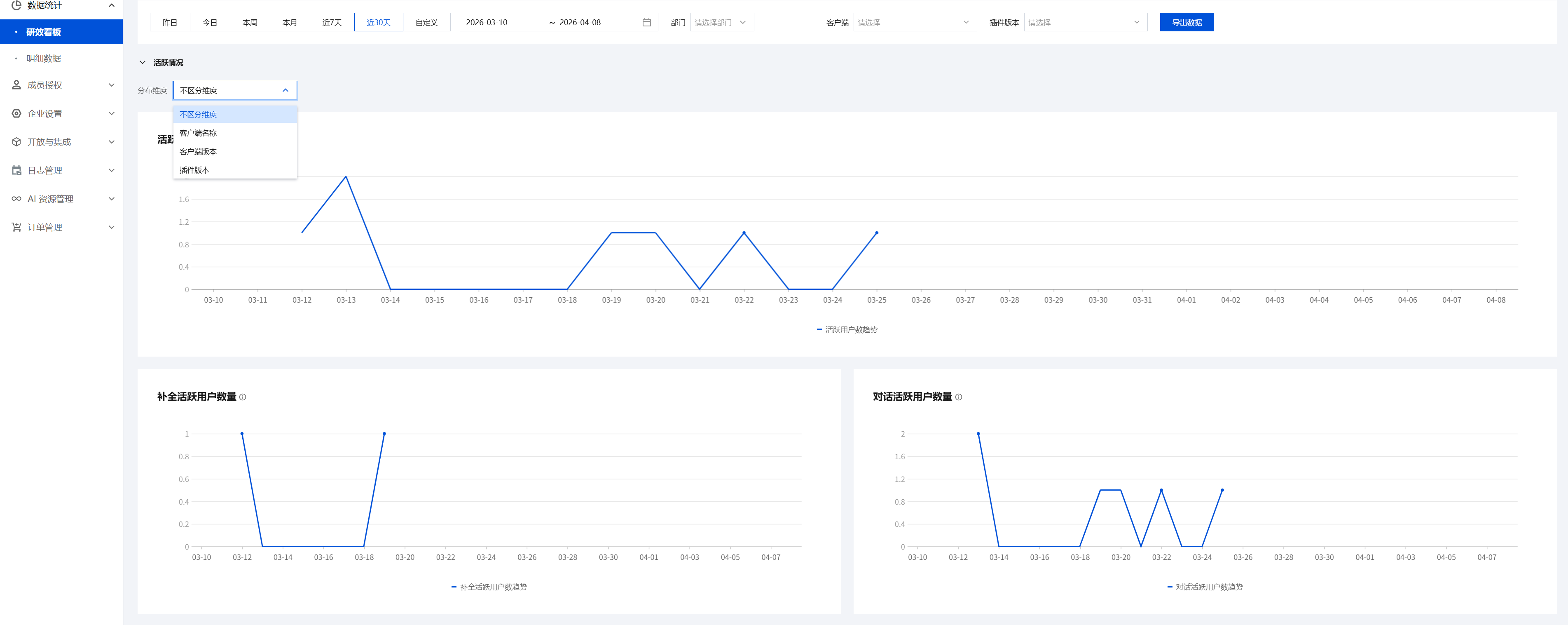
Activity Status
The Activity Status category includes three metrics: Active User Quantity, Completion Active User Quantity, and Conversation Active User Quantity. Each metric can be clearly displayed by various IDEs. For example, you can view and analyze the trend lines of active user quantities for each IDE in the current month.
Conversation Metrics
The Conversation Metrics category includes six metrics: Conversation Count, Conversation Command Usage Count, Conversation Context Reference Count, Conversation Agent Usage Count, Conversation Knowledge Base Usage Count, and Conversation Code Block Operation Count. You can view the specific usage quantities for these conversation metrics. For example, you can view and analyze the trend lines for each conversation metric in the current month.
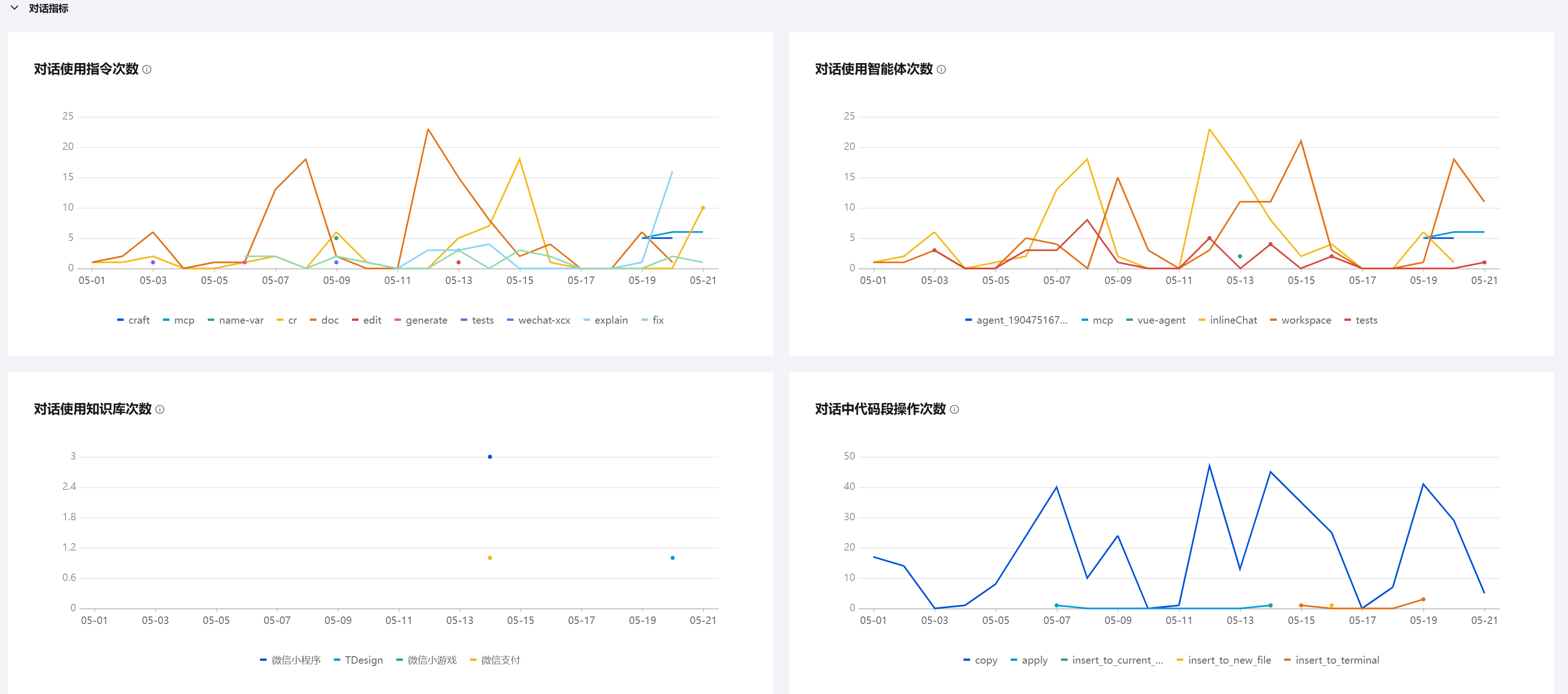
Completion Metrics
Within the Completion Metrics category, statistics are also grouped into three distinct measurement methods: by count, by line, and by character. Each measurement method includes corresponding metrics. Every metric supports clear display by programming language. For example, you can view and analyze the trend lines for different languages under each metric.
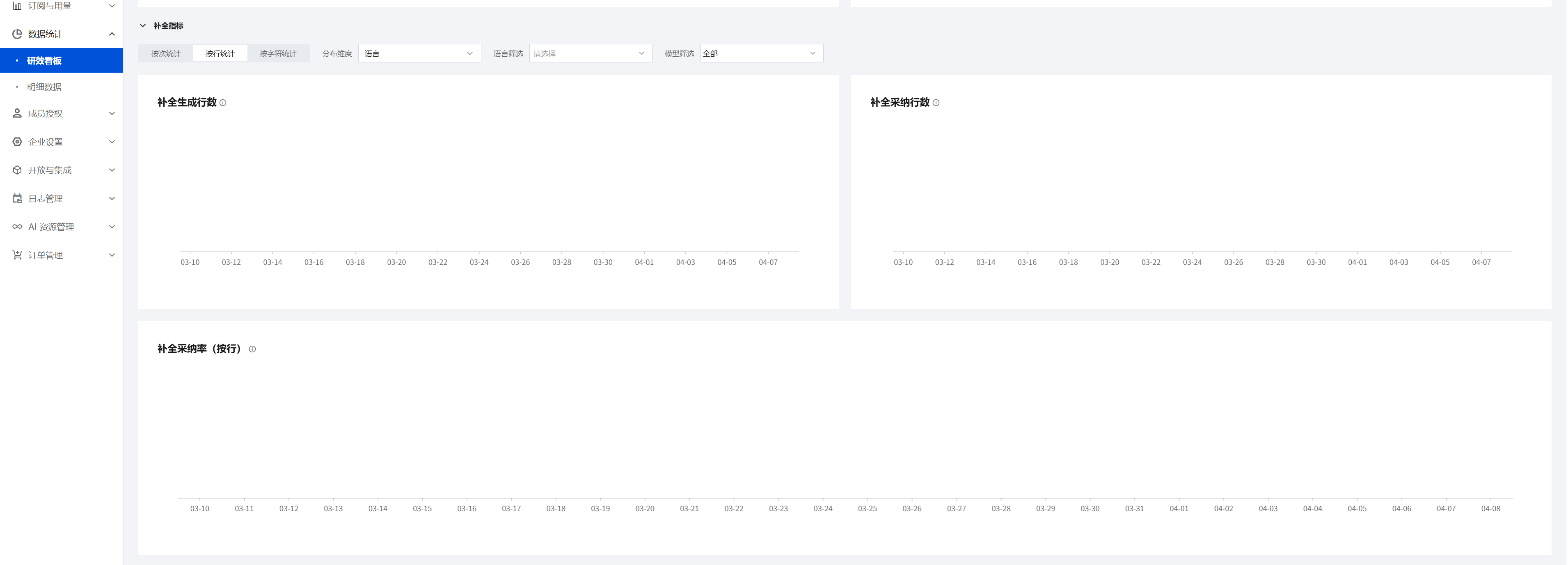
Code Generation Metrics
Within the Code Generation Metrics category, statistics are grouped into two distinct measurement methods: by line and by character. Each measurement method includes corresponding metrics. Every metric supports display by programming language. For example, you can view and analyze the trend lines for different languages under each metric.
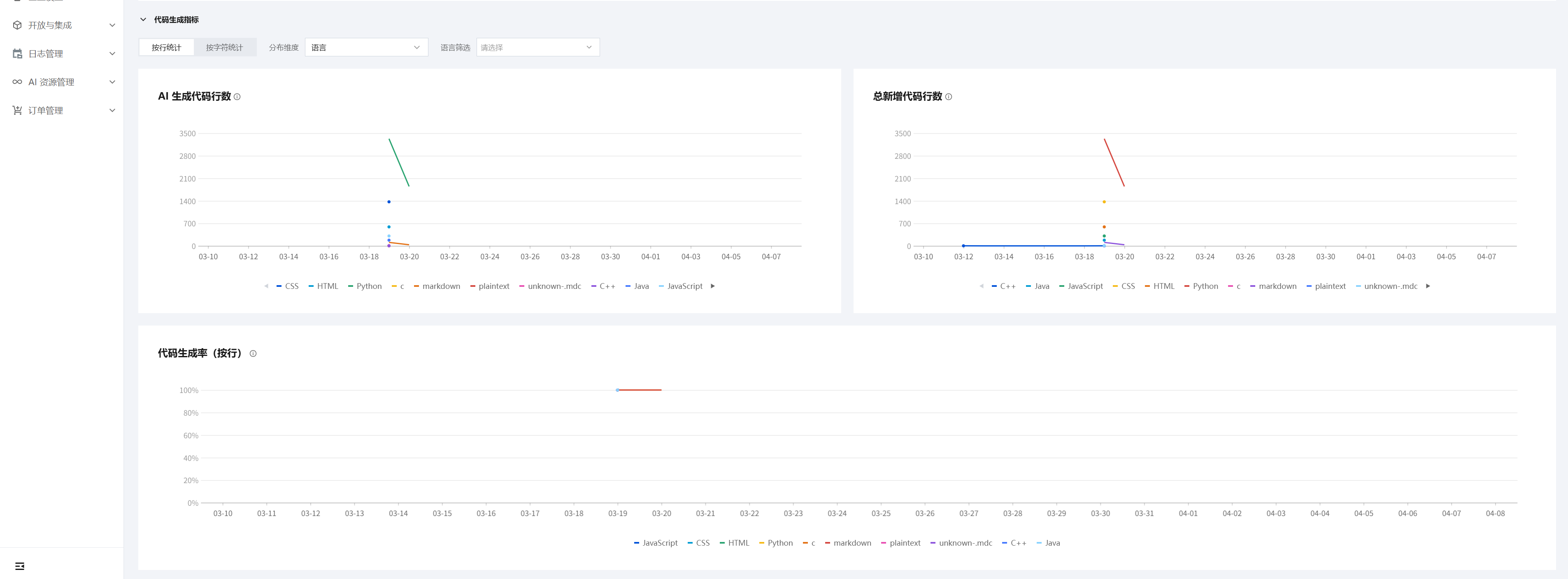
Metric Description
The following is a description of each metric:
Metric Name | Metric Definition (Within the Statistical Period) |
Active User Quantity | Number of users who have used completion or chat |
Completion Active User Quantity | Number of users who have used completion |
Chat Active User Quantity | Number of users who have used chat |
Chat Quantity | Total number of chat sessions used |
Chat Slash Command Quantity | Number of slash commands used during chat |
Chat Context Reference Count | Number of times context is referenced via @ during chat. The types of context added include files and folders, and Diff files. Changes, knowledge bases, terminal commands, and other content |
Chat Agent Usage Quantity | Number of times agents are used during chat, for example, "@workspace" |
Chat Knowledge Base Usage Quantity | Number of times knowledge bases are used during chat, for example, "#Vue" |
Chat Code Snippet Operation Quantity | Number of operations performed on code snippets returned during chat |
Completion Generated Count/Line/Character Count | Total number of times/lines/characters for triggered completions |
Completion Acceptance quantity/Line/Character quantity | Total number of times/lines/characters for accepted completions |
Completion Acceptance Rate (By Count) | Number of accepted completions / Number of completions triggered |
Completion Acceptance Rate (By Line) | Number of lines accepted for completions / Number of lines for completions triggered |
Completion Acceptance Rate (By Character) | Number of characters accepted for completions / Number of characters for completions triggered |
AI-Generated Code Character Quantity | Code generated by AI, with generation methods including code completion, Craft, Ask (insert code and other operations), and Inline-Chat (inline chat). |
Total New Code Character Quantity | Total new code, including code manually written by users and code generated by AI |
Code Generation Rate (By Line) | AI-Generated Code Lines / Total New Code Lines |
Code Generation Rate (By Character) | AI-Generated Code Characters / Total New Code Characters |
Note:
For the total number of new lines or new characters: This includes user manual typing and accepted completions. If the code is copied or imported, it must be limited to within 5 lines. Exceeding 5 lines is considered a substantial manual input and is excluded from the statistics.
For newly added code (including code and comments from user manual typing and accepted completions), the additions are counted in the statistics, while deletions are not. For example: if 10 lines of code are added and then deleted, the number of new lines remains 10.
For completion quantity: The quantity is recorded in the statistics whenever a user triggers code completion, regardless of whether the user subsequently accepts or rejects the suggestion. This quantity is unaffected by any follow-up actions. The same rule applies to completion line quantity and completion character quantity.
The difference between completion quantity/line quantity/character quantity and accepted completion quantity/line quantity/character quantity: For the latter (accepted completions), the user must perform an accept action (for example, pressing tab) for it to be counted in the statistics. For the former, it is counted regardless of whether an accept action is performed.
For comments: Comments generated by completions, as well as accepted completions, are all counted in the metric statistics.
Filtering by Statistical Time Dimension and Data Export
The dashboard supports filtering by statistical time dimension. Additionally, it supports exporting data for all metrics.

Member Details
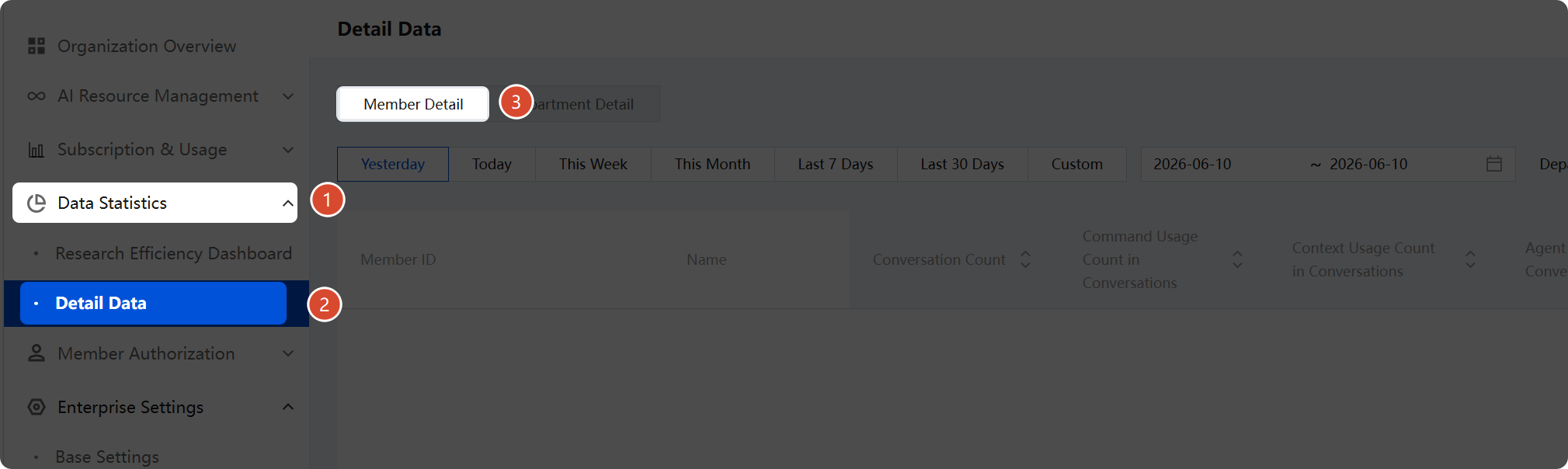
The dashboard supports statistics for various metrics, including conversation quantity, conversation command usage quantity, conversation context reference quantity, conversation agent usage quantity, conversation knowledge base usage quantity, post-conversation operation quantity, completion generation quantity, accepted completion quantity, accepted completion rate (by count), completion generation line quantity, accepted completion line quantity, accepted completion rate (by line), completion generation character quantity, accepted completion character quantity, accepted completion rate (by character), AI-generated code line quantity, total new code line quantity, code generation rate (by line), AI-generated code character quantity, total new code character quantity, and code generation rate (by character).
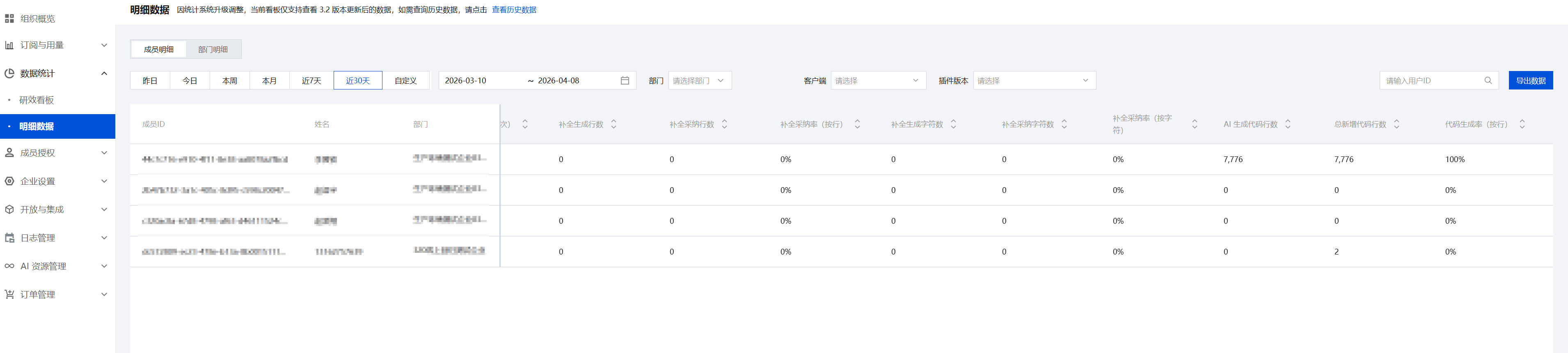
The dashboard supports filtering by statistical time dimension.

It supports filtering data by User Name or ID, and also supports one-click Data Export to export data as an Excel file.

Department Details

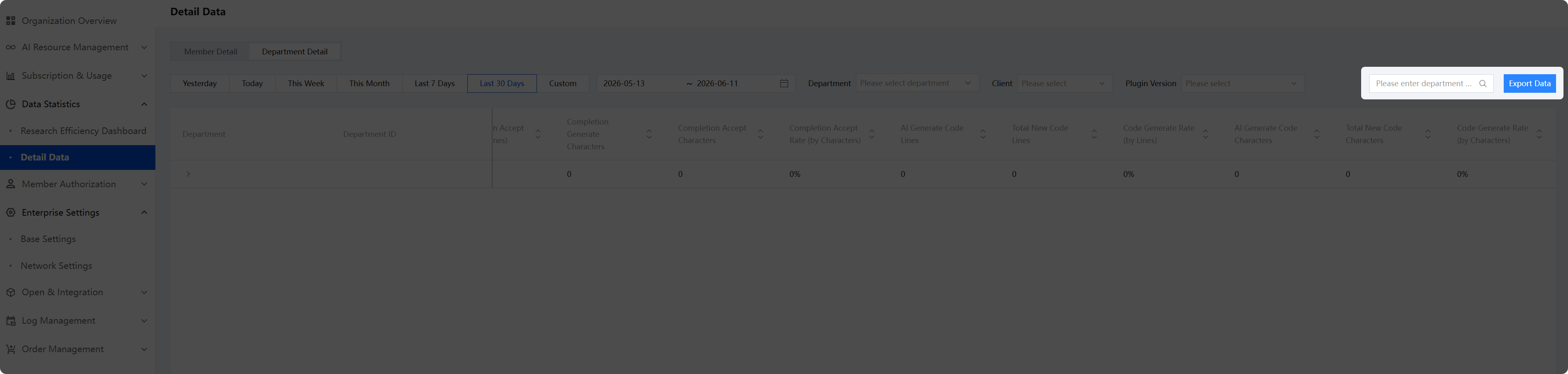
The dashboard supports statistics for various metrics, including conversation quantity, conversation command usage quantity, conversation context reference quantity, conversation agent usage quantity, conversation knowledge base usage quantity, post-conversation operation quantity, completion generation quantity, accepted completion quantity, accepted completion rate (by count), completion generation line quantity, accepted completion line quantity, accepted completion rate (by line), completion generation character quantity, accepted completion character quantity, accepted completion rate (by character), AI-generated code line quantity, total new code line quantity, code generation rate (by line), AI-generated code character quantity, total new code character quantity, and code generation rate (by character).
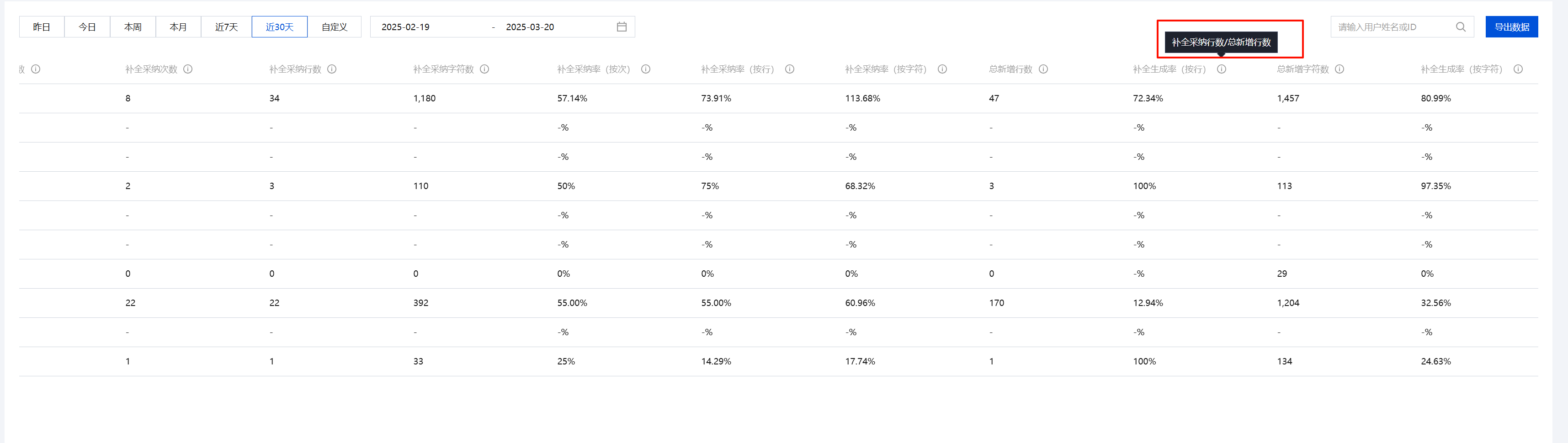
The dashboard supports filtering by statistical time dimension.
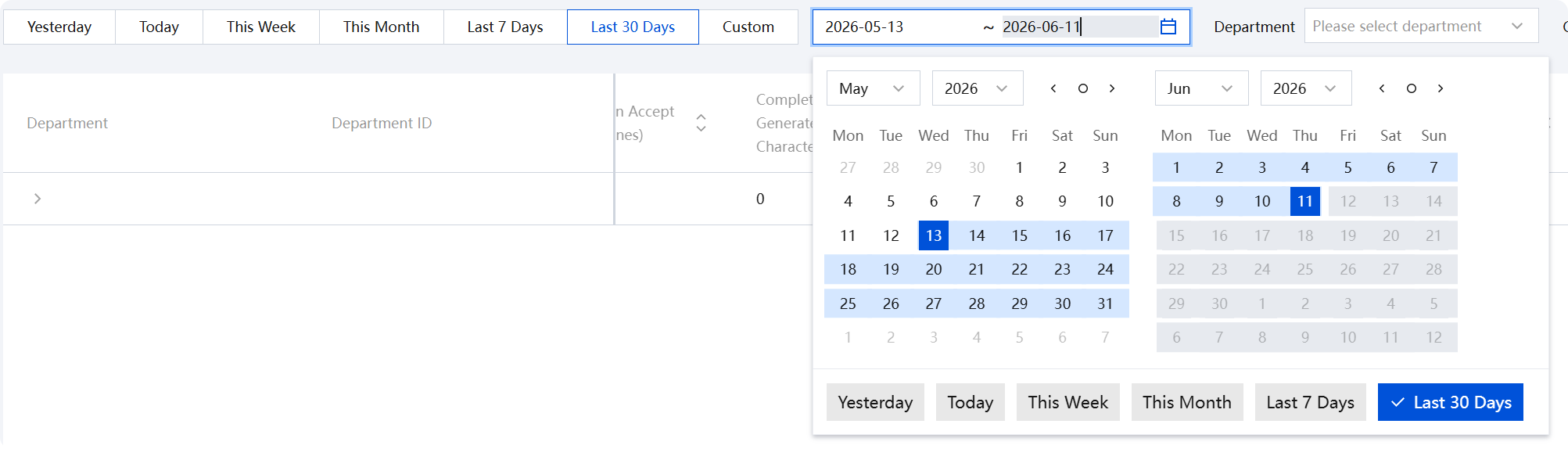
It supports filtering data by Department Name or Department ID, and also supports one-click Data Export to export data as an Excel file.
Note:
For exported user data, empty content primarily exists in metrics such as conversation quantity, accepted completion quantity, and accepted completion rate. Explanation: During the statistical period, if a user triggers a completion but does not accept it, or if a user never initiates a conversation, metrics like the accepted completion rate or conversation quantity are calculated as empty.
The synchronization of R&D efficiency metrics takes 15 minutes. Therefore, if other data displays abnormal values, you can wait for the 15-minute synchronization period before verifying the data.
フィードバック