Index configuration is a prerequisite for log search and analysis using CLS. Logs can only be searched and analyzed after the index is enabled. Different indexing rules yield different search and analysis results. This section details the rules and principles of index configuration.
Feature Introduction
The core feature of index configuration is to perform tokenization on raw logs, enabling fast and efficient log search based on specific search conditions. Additionally, enabling statistics for specific fields during index configuration facilitates statistical analysis of logs using SQL.
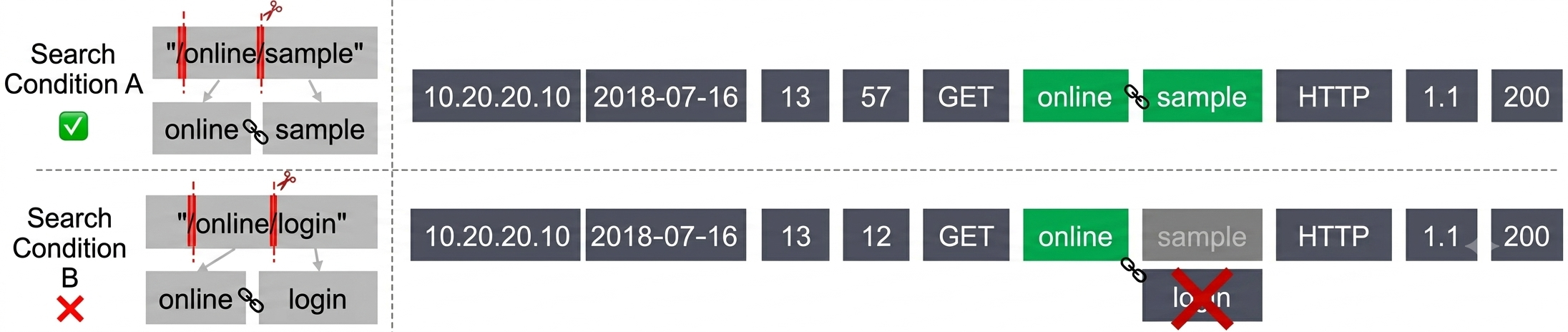
When searching a lengthy log entry, typically only a portion of its content is used as the search condition. For example, you may need to search the complete log that includes sample as follows:
Since the full log text is long and contains content beyond sample, which does not exactly match the search condition, you cannot use sample directly for searching. To meet this search condition, the full log text needs to be split into multiple segments. Each segment is called a "token", and this process is called "tokenization".
For example, the example log mentioned above would be split using symbols as delimiters. Whenever any symbol within the range @&()='",;:<>[]{}/ \\n\\t\\r\\\\ appears, the log is split, resulting in the following tokens:
When the search condition is sample, if the preceding tokenized log contains sample, it is considered to meet the search condition.
The search conditions themselves are also tokenized, as shown by the following two search conditions:
Search Condition A: "/online/sample"
Double quotation marks indicate that the log needs to contain both tokens simultaneously, and the two tokens should be in the exact sequence to meet the search conditions.
The example log mentioned above contains both online and sample, and the tokens appear in the exact order specified by the search condition; therefore, it matches the condition.
Search Condition B: "/online/login"
The example log mentioned above does not contain login, and does not meet the search condition.
CLS includes the following two types of indices:
Category
Description
Full-text index
Tokenizes the complete log content into multiple tokens for indexing. Searches, specifically full-text searches, are conducted directly using keywords. For example, using the keyword error will retrieve all logs containing the term "error."
Key-value index
Tokenizes the raw log into multiple tokens based on fields (that is, key:value pairs) for indexing. Searches, specifically key-value searches, are conducted using these key-value pairs. For example, you can use level:error AND timeCost:>1000 to locate logs where the log level (level) is "error" and the processing time (timeCost) exceeds 1,000 ms.
Some logs also contain special metadata fields. These fields are configured for indexing in the same manner as regular fields.
Note:
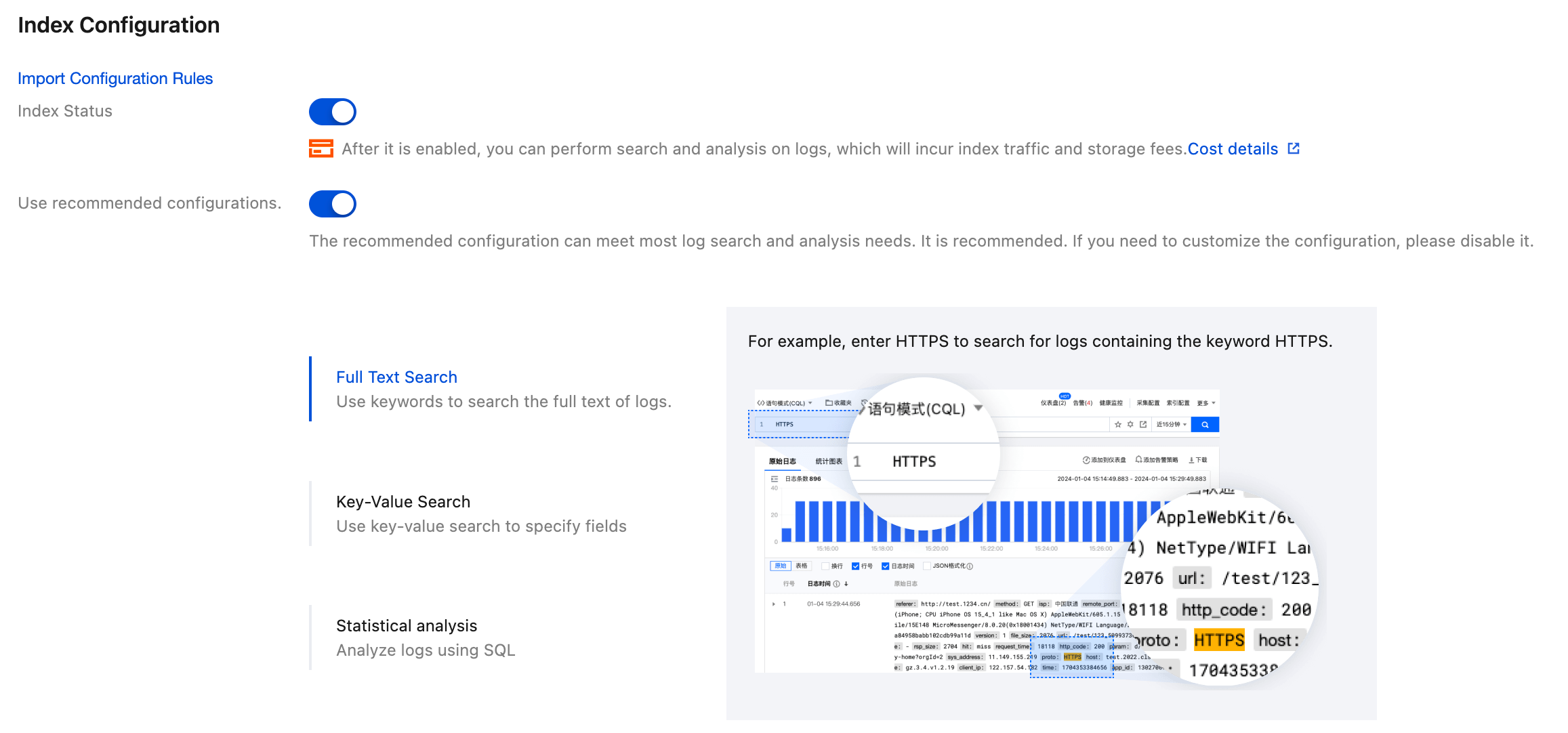
Index configuration is relatively complex. It is recommended to use the suggested configuration provided in the Operation Steps, which meets most usage requirements.
The collected log data cannot be searched when indexing is disabled. There is approximately a one-minute delay from the time the index is enabled until it supports log search and analysis.
Indexing rule changes (including adding, modifying, and deleting fields, and adjusting delimiter configurations) apply only to newly written logs. Existing data is not updated.
Fields beginning with an underscore are reserved for system use. If your log contains a field that starts with an underscore, the @ symbol will be prefixed to the field after indexing is enabled.
STANDARD_IA storage only supports full-text indexing and does not support key-value indexing.
Full-text index
Configuration Item
Capability Description
Full-Text Delimiter
The set of characters used for tokenizing raw logs supports only English symbols. The default delimiters in the console are: @&?|#()='",;:<>[]{}/ \\n\\t\\r\\\\.
Case Sensitivity
Determines whether search operations are case-sensitive. For example, if a log entry contains "Error" and case sensitivity is enabled, searching for "error" will not return this log entry.
Allow Chinese Characters
This feature can be enabled when logs contain Chinese characters and the Chinese characters need to be searched. For example, if the original text of a log is in Chinese, and this feature is disabled, you cannot query the log by using a Chinese keyword contained in the original text. The query can be successful only if you use the exact raw log text to query the log. However, if you enable this feature, you can query the log by using a Chinese keyword contained in the raw log text.
Key-value index
Configuration Item
Capability Description
Overall Configuration
Case Sensitivity
Whether case sensitivity is applied during search. For example, if the log is "level:Error," and case sensitivity is enabled, using level:error will not retrieve this log.
Auto Configure
Whether to enable automatic key-value index configuration. Once enabled, fields in logs are automatically added to the key-value index, including any new fields that appear subsequently. For field addition rules, see Automatic Configuration.
Field configuration
Field Name
Field name in structured logs. A maximum of 300 fields can be added to the key-value index of a single log topic.
Letters, digits, and special characters (except for *\\",) are supported. The name cannot start with _ (except for the __CONTENT__ field).
When the field type does not include json, you cannot include both parent and child fields, such as a and a.b.
Field Alias
Use an alias instead of the original field name for search and analysis. For example, add an alias ip for the __SOURCE__ field.
An alias can only contain letters, digits, and underscores, and must start with a letter.
Only CQL syntax is supported. Lucene syntax is not supported.
Field Type
Data type of a field, including text, long, double, and json.
The text and json types support fuzzy search using wildcards but do not support range comparison.
The long and double types support range comparison but do not support fuzzy search.
When you use the json type, you can add child fields. Child fields can be set to the text, long, or double type, or you can continue using the json type to add deeper-level fields.
Note:
The json type is currently supported only for some users or log topics. To use this feature, please contact us to enable the feature allowlist.
When the json type exists in the index configuration, a field name in the a.b format strictly represents the log field name as the string a.b, and no longer represents the child field b of the a object.
Delimiter
Set of characters used to segment field values. Only English symbols are supported. The default delimiter in the console is @&?|#()='",;:<>[]{}/ \\n\\t\\r\\\\.
Allow Chinese Characters
This feature can be enabled when logs contain Chinese characters and the Chinese characters need to be searched. For example, if the original text of a log is in Chinese, and this feature is disabled, you cannot query the log by using a Chinese keyword contained in the original text. The query can be successful only if you use the exact raw log text to query the log. However, if you enable this feature, you can query the log by using a Chinese keyword contained in the
raw log text.
Enable Statistics
Once enabled, this field can be used in SQL for statistical analysis. For text fields, if the value is too long, only the first 32,766 characters will participate in statistical operations.
Enabling statistics will not incur extra fees, and it is recommended to enable it.
Note:
When full-text index is enabled, the key-value index does not generate any additional indexing traffic or storage fees. It is recommended to enable the key-value index for as many fields as possible to obtain a better search and analysis experience.
To meet the most basic log search requirements, CLS automatically creates key-value indexing for some built-in reserved fields in logs. This does not generate index traffic or incur additional fees. The details are as follows:
Built-in Reserved Field
Description
Key-Value Index Configuration
__FILENAME__
File name from which the log was collected. You can use this field to search logs under a specific file. For example: __FILENAME__:"/var/log/access.log" searches the logs in //var/log/access.log.
text type, no delimiters, not allow Chinese characters, and statistics enabled.
__SOURCE__
Source IP address from which the log was collected. You can use this field to search logs from a specific server. For example: __SOURCE__:192.168.10.10 searches the logs from server 192.168.10.10.
text type, no delimiters, not allow Chinese characters, and statistics enabled.
__HOSTNAME__
Hostname of the server from which the log originated. You can use this field to search logs from a specific server. For example:
__HOSTNAME__:localhost searches the logs from server localhost.
Note: LogListener version 2.7.4 or later is required to collect this field.
text type, no delimiters, not allow Chinese characters, and statistics enabled.
__TIMESTAMP__
Log timestamp (Unix timestamp in milliseconds). When searching logs by time range, this time will be automatically used for the search, and you do not need to specify it in the search statement. Displayed as "Log Time" in the console.
long type; statistics enabled.
__INDEX_STATUS__
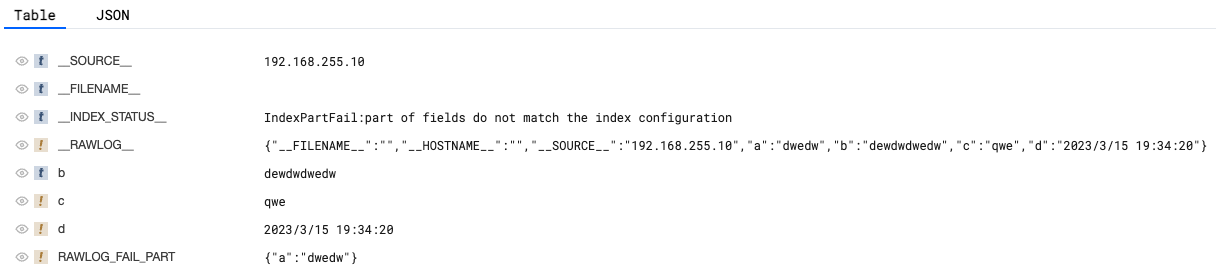
When the value is not empty, it indicates that an exception occurred during the creation of the index for the current log. The raw logs are stored in __RAWLOG__, and __INDEX_STATUS__ contains the reason for the index creation exception.
You can use __INDEX_STATUS__:* to query all logs with index creation exceptions.
text type, no delimiters, not allow Chinese characters, and statistics enabled.
Automatic Configuration
After you enable the Auto Configure switch, fields within logs, including newly added fields, will be automatically added to the key-value indexing.
If a field is added, the field type will be automatically determined based on the field value. The field type will be set to text, long, or double, and the following configuration will be used. If the following configuration does not meet usage requirements (for example, if the field type is incorrect), it can be manually modified on the added field.
Field Type
Delimiter
Chinese Characters
Enable Statistics
text
@&?|#()='",;:<>[]{}/ \\n\\t\\r\\\\
Include
Enabled
long
Not involved
Not involved
Enabled
double
Not involved
Not involved
Enabled
Note:
Log field names can only contain letters, numbers, underscores, and the characters -./@, and cannot start with an underscore. Fields that do not comply with this rule will not be added to the key-value indexing.
When a log field is a json string, the json is not parsed by default. To add child fields from the json to the key-value indexing, manually add any child field. Subsequently, the sibling fields of that child field will be automatically added to the key-value indexing. Alternatively, you can change the field type to json. This will automatically add the current json field and its child (first-level) fields to the key-value indexing.
Note:
The json type is currently supported only for some users or log topics. To use this feature, please contact us to enable the feature allowlist.
A sample raw log that has 3 fields is shown as follows:
The automatically added key-value indexing is as follows:
Field Name
Field Type
Delimiter
Allow Chinese Characters
Enable Statistics
key1
text
@&?|#()='",;:<>[]{}/ \\n\\t\\r\\\\
Include
Enabled
key2
long
Not involved
Not involved
Enabled
key3
text
@&?|#()='",;:<>[]{}/ \\n\\t\\r\\\\
Include
Enabled
If you manually change the field key3 to key3.ip, the fields url and detail, which are at the same level as ip, will be automatically added to the key-value indexing:
Field Name
Field Type
Delimiter
Allow Chinese Characters
Enable Statistics
key1
text
@&?|#()='",;:<>[]{}/ \\n\\t\\r\\\\
Include
Enabled
key2
long
Not involved
Not involved
Enabled
key3.ip
text
@&?|#()='",;:<>[]{}/ \\n\\t\\r\\\\
Include
Enabled
key3.url
text
@&?|#()='",;:<>[]{}/ \\n\\t\\r\\\\
Include
Enabled
key3.detail
text
@&?|#()='",;:<>[]{}/ \\n\\t\\r\\\\
Include
Enabled
Advanced Settings
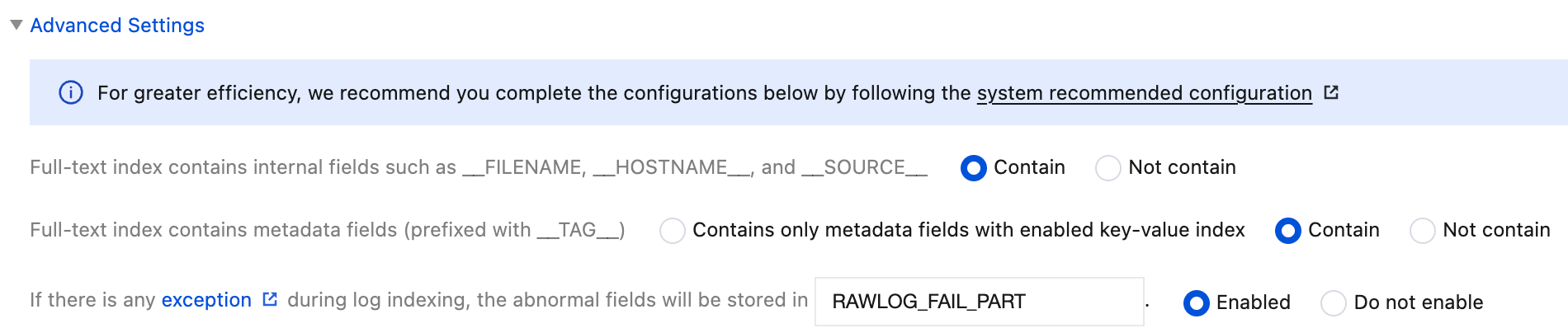
To meet certain special use cases, the index configuration provides the following advanced settings. In actual usage, it is recommended to adopt the recommended configuration. When you create a new index configuration through the console, the recommended configuration will also be used by default.
Configuration Item
Description
Recommended Configuration
Full-text index contains internal fields
Include: The full-text index includes the three built-in fields: __FILENAME__, __HOSTNAME__, and __SOURCE__, supporting both full-text search and key-value search. For example: "/var/log/access.log", __FILENAME__:"/var/log/access.log".
Exclude: The full-text index does not include these three built-in fields, and only key-value search can be used. For example: __FILENAME__:"/var/log/access.log".
Include
Full-text index contains metadata fields
Include: Full-text index contains all metadata fields (fields prefixed with __TAG__), and relevant log fields can be retrieved directly by full-text retrieval, such as ap-beijing.
Exclude: The full-text index does not contain any metadata fields, and relevant log fields can only be retrieved by key-value retrieval, such as __TAG__.region:ap-beijing. Infrequent access log topics do not support key-value retrieval, and these fields cannot be retrieved at this time.
Only include metadata fields with key-value index enabled: The full-text index includes metadata fields that have key-value index enabled, but excludes metadata fields without key-value index enabled. This option is not available for infrequent access log topics.
Include
Storage rule for log index creation exceptions
If an exception occurs during log index creation, CLS stores the raw logs in __RAWLOG__ to prevent log loss. If only some fields fail to be indexed, the failed parts can be stored in a specified field (default is RAWLOG_FAIL_PART). For details, see What does it mean when an exception occurs during index creation.
2. In the left sidebar, select Log Topic to go to the Log Topic List page.
3. Click the ID/name of the log topic for which you want to configure the index to go to the Log Topic Management page.
4. Select Index Configuration and then click Edit to go to the Edit Index Configuration page. For descriptions of the configuration items, see Full-Text Index and Key-Value Indexing.
Note:
When you enable index configuration for the first time, it is recommended to
use the recommended configurations to automatically configure the index.
STANDARD_IA topics only support full-text indexing.
2. In the left sidebar, select Log Topic to go to the Log Topic List page.
3. Click the ID/name of the log topic for which you want to configure the index to go to the Log Topic Management page.
4. Select the Index Configuration tab and then click Import Configuration Rules.
5. In the dialog box, select the log topic index configuration you want to import and click OK to populate the index configuration of the current log topic with the selected configuration.
6. After confirming that the information is correct, click OK to save the index configuration for the current log topic.
What Does "Index Creation Exception" Mean? What Are __RAWLOG__ and __INDEX_STATUS__?
During log index creation, if the raw log format is abnormal or the index configuration does not match the raw logs, it may cause
index creation exceptions
for the logs. In such cases, to ensure that logs are not lost, CLS stores the raw logs in __RAWLOG__ as a fallback exception handling method. __INDEX_STATUS__ indicates the reason for the index creation exception.
__RAWLOG__ only supports full-text search (full-text index needs to be enabled) and does not support key-value search, key-value indexing, or statistical analysis.
__INDEX_STATUS__ supports both full-text search and key-value search. Using __INDEX_STATUS__:* will allow you to query all logs with index creation exceptions.
Note:
For logs with exceptions, even if full-text index is enabled, the index traffic, index storage, and associated fees will be calculated based on the raw log text. No additional fees will be incurred.
There are two types of index creation exceptions:
1. If no fields in the logs are successfully indexed according to the index configuration, the logs will only contain the __RAWLOG__ field, and only full-text search can be used.
2. Some fields in the logs are not successfully indexed, while others are. In this case, the logs contain both the __RAWLOG__ field and the fields that have been successfully indexed.
In Index Configuration - Advanced Settings, you can also store the abnormal fields in a specified field (default is RAWLOG_FAIL_PART, which supports key-value indexing and statistical analysis).
CLS continuously optimizes the compatibility of the index configuration with raw logs to avoid these types of exceptions. As the product iterates and evolves, the specific exception handling rules may change.