数据安全性提升
ダウンロード
フォーカスモード
フォントサイズ
简介
本文介绍如何通过 COS SDK 提供的传输加密、存储加密、完整性校验、权限策略控制方式增强从终端到云端的数据安全性。
功能说明
在数字化时代,数据安全的重要性毋庸置疑。无论是用户隐私信息,还是业务核心资产,一旦在传输或存储过程中遭到泄露、篡改或非法访问,都可能导致业务异常甚至引发更大的损失。
COS SDK 通过增强传输协议安全性、CRC64下载校验、MD5上传校验、COS 服务端加密、临时密钥权限控制等能力,构建端到端全链路防护体系,为您的数据安全保驾护航。
提升方式
方式一:端到端加密,从传输到存储的全链路保护
1. 传输安全
HTTPS 双向认证,又称为双向 TLS 认证或客户端认证,是一种安全通信协议,其中服务器和客户端都需要验证对方的身份。在标准 HTTPS 中,主要是服务器向客户端证明自己的身份(通过服务器证书),从而建立起一个安全的、加密的通信通道。双向认证在此基础上更进一步,要求客户端也提供证书,由服务端验证客户端的身份。这种方式常用于需要高度安全的系统,以确保通信双方都是可信任的。
我们在 COS 默认的标准 HTTPS 基础上,新增了服务端对客户端证书校验的支持,确保只有合法终端可接入 COS 服务,有效杜绝中间人攻击。详细操作步骤如下:
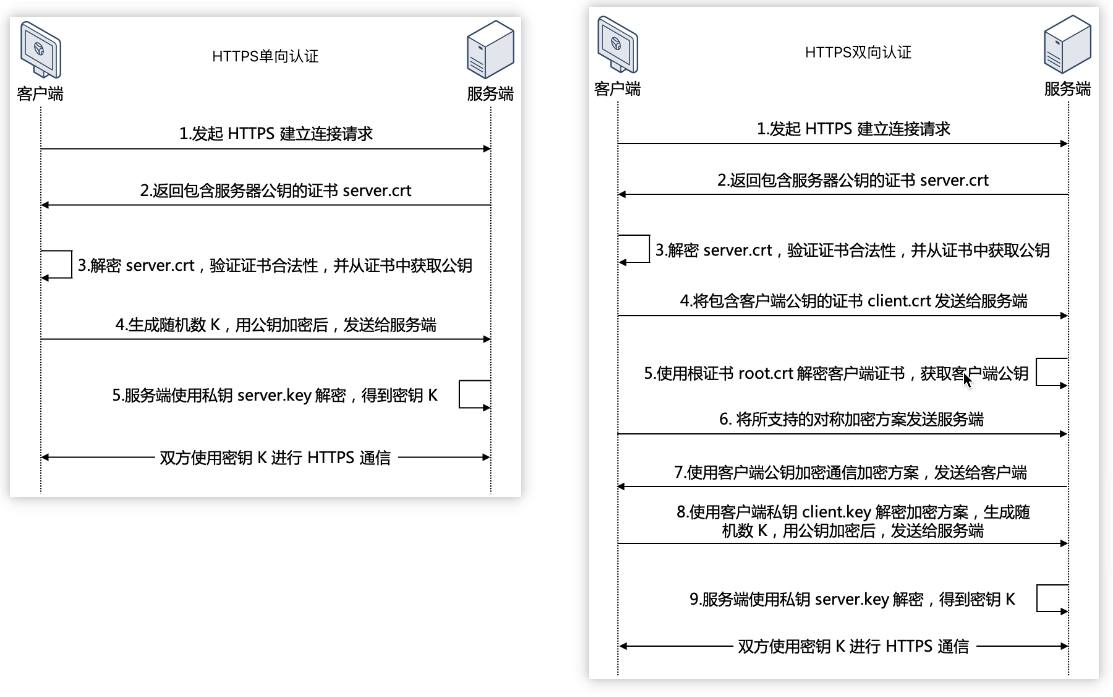
步骤1:准备支持双向验证的接入服务端
以 Nginx 为例,开启双向认证,配置请参见下图。其他平台开启双向认证的方法请参考对应平台的具体文档。
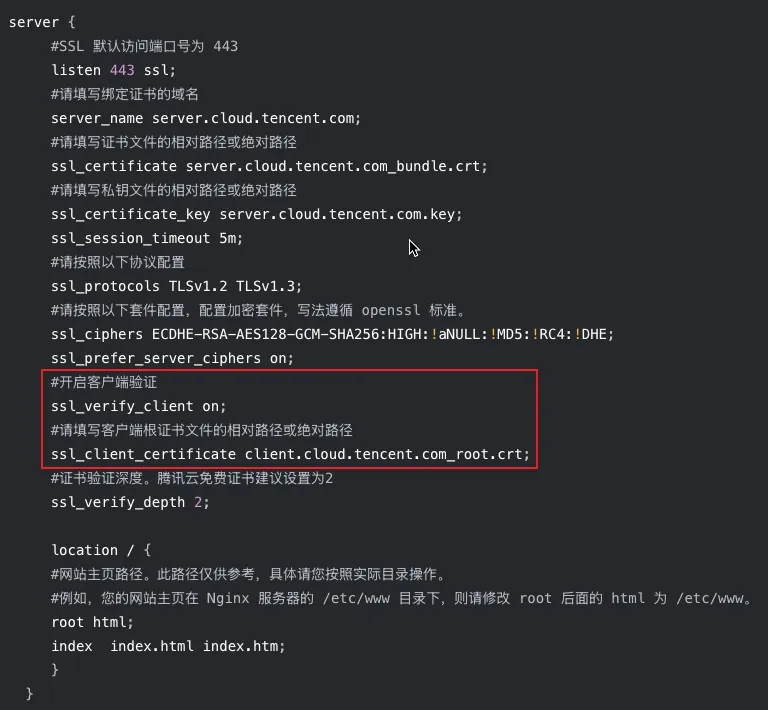
步骤2:在 COS SDK 中配置客户端支持双向认证
注意:
COS iOS SDK 版本需要大于等于6.4.8,COS Android SDK 版本需要大于等于5.9.35。
// 存储桶所在地域简称,例如广州地区是 ap-guangzhouString region = "COS_REGION" ;// tls 客户端证书字节数组, 需要为 BKS 格式byte[] certificateBytes;// BKS 文件的密码,如果你的 BKS 文件没有密码,请传入 nullString password = "123456";// 配置了双向认证的服务端 hostString dualCheckHost = "dual-check.myEdgeOne.com";CosXmlServiceConfig cosXmlServiceConfig = new CosXmlServiceConfig.Builder().isHttps(true).setRegion(region).setHost(dualCheckHost)// 设置 tls 客户端证书.setClientCertificate(certificateBytes, password).builder();CosXmlService cosXmlService = new CosXmlService(context, cosXmlServiceConfig,credentialProvider);
QCloudServiceConfiguration* configuration = [QCloudServiceConfiguration new];QCloudCOSXMLEndPoint* endpoint = [[QCloudCOSXMLEndPoint alloc] init];// 替换为用户的 region,已创建桶归属的 region 可以在控制台查看,https://console.tencentcloud.com/cos5/bucket// COS 支持的所有 region 列表参见 https://www.tencentcloud.com/document/product/436/6224?from_cn_redirect=1endpoint.regionName = @"COS_REGION";// 使用 HTTPSendpoint.useHTTPS = true;configuration.endpoint = endpoint;// 配置客户端 p12证书。NSString *path = [[NSBundle mainBundle] pathForResource:@"client" ofType:@"p12"];NSData *p12Data = [NSData dataWithContentsOfFile:path];configuration.clientCertificateData = p12Data;// 配置证书密码configuration.password = @"123456";// 初始化 COS 服务示例[QCloudCOSXMLService registerDefaultCOSXMLWithConfiguration:configuration];[QCloudCOSTransferMangerService registerDefaultCOSTransferMangerWithConfiguration:configuration];
2. 存储安全
服务端加密(SSE-COS/SSE-KMS/SSE-C),在数据写入数据中心内的磁盘之前,支持在对象级别上应用数据加密的保护策略,并在访问数据时自动解密。加密和解密这一操作过程都是在服务端完成,这种服务端加密功能可以有效保护静态数据。详情请参见 Android 服务端加密、iOS 服务端加密。
// 准备 TransferManagerTransferConfig transferConfig = new TransferConfig.Builder().build();TransferManager transferManager = new TransferManager(cosXmlService,transferConfig);// 使用 COS 托管加密密钥的服务端加密(SSE-COS)保护数据PutObjectRequest putObjectRequestCos = new PutObjectRequest(bucket, cosPath, srcPath);putObjectRequestCos.setCOSServerSideEncryption();COSXMLUploadTask cosxmlUploadTaskCos = transferManager.upload(putObjectRequestCos, uploadId);// 设置使用客户提供的用户主密钥的服务端加密(SSE-KMS)保护数据String customKey = "用户主密钥 CMK";String encryptContext = "加密上下文";PutObjectRequest putObjectRequestKms = new PutObjectRequest(bucket, cosPath, srcPath);try {putObjectRequestKms.setCOSServerSideEncryptionWithKMS(customKey, encryptContext);} catch (CosXmlClientException e) {e.printStackTrace();}COSXMLUploadTask cosxmlUploadTaskKms = transferManager.upload(putObjectRequestKms, uploadId);// 设置使用客户提供的加密密钥的服务端加密(SSE-C)保护数据String customKeyC = "服务端加密密钥";PutObjectRequest putObjectRequestC = new PutObjectRequest(bucket, cosPath, srcPath);try {putObjectRequestC.setCOSServerSideEncryptionWithCustomerKey(customKey);} catch (CosXmlClientException e) {e.printStackTrace();}// 上传对象COSXMLUploadTask cosxmlUploadTaskC = transferManager.upload(putObjectRequestC, uploadId);
// 1、使用 COS 托管加密密钥的服务端加密(SSE-COS)保护数据QCloudCOSXMLUploadObjectRequest *request = [QCloudCOSXMLUploadObjectRequest new];[request setCOSServerSideEncyption];// 2、使用客户提供的加密密钥的服务端加密(SSE-C)保护数据QCloudCOSXMLUploadObjectRequest *request = [QCloudCOSXMLUploadObjectRequest new];NSString *customKey = @"123456qwertyuioplkjhgfdsazxcvbnm";[request setCOSServerSideEncyptionWithCustomerKey:customKey];//3、使用 KMS 托管加密密钥的服务端加密(SSE-KMS)保护数据QCloudCOSXMLUploadObjectRequest *request = [QCloudCOSXMLUploadObjectRequest new];NSString *customKey = @"123456qwertyuioplkjhgfdsazxcvbnm";NSString *arrJsonStr = @"{\\"key\\":\\"value\\"}";[request setCOSServerSideEncyptionWithKMSCustomKey:customKey jsonStr:arrJsonStr];
方式二:数据完整性保障,上传下载双校验机制
1. MD5上传校验
客户端在上传对象时自动计算并携带对象的 MD5值,通过 Content-MD5 Request Header 传给服务端,COS 服务端接收后实时校验一致性,防止传输过程中因网络丢包、劫持等原因导致的数据篡改或损坏。如果 MD5值校验不一致,则会上传失败并在失败回调中给出 400 Bad Request 的异常。详情请参见 Android 上传对象、iOS 上传对象。
// 初始化 TransferManagerTransferConfig transferConfig = new TransferConfig.Builder().build();TransferManager transferManager = new TransferManager(cosXmlService,transferConfig);// 上传对象String srcPath = new File(context.getCacheDir(), "exampleobject.txt").toString(); //本地文件的绝对路径COSXMLUploadTask cosxmlUploadTask = transferManager.upload("examplebucket-1250000000", "exampleobject.txt",srcPath, null);
QCloudCOSXMLUploadObjectRequest* put = [QCloudCOSXMLUploadObjectRequest new];NSURL* url = [NSURL fileURLWithPath:@"文件的URL"];// 存储桶名称,由 BucketName-Appid 组成,可以在 COS 控制台查看 https://console.tencentcloud.com/cos5/bucketput.bucket = @"examplebucket-1250000000";// 对象键,是对象在 COS 上的完整路径,如果带目录的话,格式为 "video/xxx/movie.mp4"put.object = @"exampleobject";// 需要上传的对象内容。可以传入 NSData*或者 NSURL*类型的变量put.body = url;// 监听上传进度[put setSendProcessBlock:^(int64_t bytesSent,int64_t totalBytesSent,int64_t totalBytesExpectedToSend) {// bytesSent 本次要发送的字节数(一个大文件可能要分多次发送)// totalBytesSent 已发送的字节数// totalBytesExpectedToSend 本次上传要发送的总字节数(即一个文件大小)}];// 监听上传结果[put setFinishBlock:^(QCloudUploadObjectResult *result, NSError *error) {// 在上传结果 result.location 中获取已上传文件的下载链接NSString * fileUrl = result.location;// 获取文件 crc64NSString * crc64 = [[result __originHTTPURLResponse__].allHeaderFields valueForKey:@"x-cos-hash-crc64ecma"];}];[put setInitMultipleUploadFinishBlock:^(QCloudInitiateMultipartUploadResult *multipleUploadInitResult,QCloudCOSXMLUploadObjectResumeData resumeData) {// 在初始化分块上传完成以后会回调该 block,在这里可以获取 resumeData,uploadidNSString* uploadId = multipleUploadInitResult.uploadId;}];[[QCloudCOSTransferMangerService defaultCOSTransferManager] UploadObject:put];
2. CRC64下载校验
客户端从 COS 下载对象时,通过校验返回的 CRC64值与本地计算值是否一致,确保下载内容完整无误,避免因网络抖动或存储介质故障引发的数据错误。
COS SDK 新版本中高级下载方法默认开启 crc64校验:
校验过程为异步分段校验,减少大对象 crc64校验造成的耗时。
校验失败后会重试三次,重试后还是失败则会下载失败并在失败回调中给出 crc64校验失败的异常。
续传时会先校验本地已下载的对象是否符合 crc64校验结果,如果不一致则重新下载,以免全部下载完才发现不一致。
// 初始化 TransferManagerTransferConfig transferConfig = new TransferConfig.Builder().build();TransferManager transferManager = new TransferManager(cosXmlService,transferConfig);COSXMLDownloadTask cosxmlDownloadTask =transferManager.download(context,"examplebucket-1250000000", "exampleobject.txt", context.getExternalCacheDir().toString(), "exampleobject.txt");
QCloudCOSXMLDownloadObjectRequest * request = [QCloudCOSXMLDownloadObjectRequest new];// 存储桶名称,由 BucketName-Appid 组成,可以在 COS 控制台查看 https://console.tencentcloud.com/cos5/bucketrequest.bucket = @"examplebucket-1250000000";// 对象键,是对象在 COS 上的完整路径,如果带目录的话,格式为 "video/xxx/movie.mp4"request.object = @"exampleobject";// 设置下载的路径 URL,如果设置了,对象将会被下载到指定路径中request.downloadingURL = [NSURL fileURLWithPath:@"Local File Path"];// 本地已下载的对象大小,如果是从头开始下载,请不要设置request.localCacheDownloadOffset = 100;// 监听下载结果[request setFinishBlock:^(id outputObject, NSError *error) {// outputObject 包含所有的响应 http 头部NSDictionary* info = (NSDictionary *) outputObject;// 若未指定下载路径,则通过下面方式获取下载的 NSData 数据。NSData * data = [outputObject __originHTTPResponseData__];}];// 监听下载进度[request setDownProcessBlock:^(int64_t bytesDownload,int64_t totalBytesDownload,int64_t totalBytesExpectedToDownload) {// bytesDownload 新增字节数// totalBytesDownload 本次下载接收的总字节数// totalBytesExpectedToDownload 本次下载的目标字节数}];[[QCloudCOSTransferMangerService defaultCOSTransferManager] DownloadObject:request];
方式三:临时密钥权限控制,精细化权限管控
1. 最小权限原则
注意:
当您在授权的时候,建议严格遵循最小权限,限定用户执行受限的操作(例如授权 action:GetObject),访问受限的资源(例如授权 resource:examplebucket-1250000000/exampleobject.txt)。 为避免授予过大的权限,导致预期外的越权操作,引起数据安全风险。我们强烈建议您尽量避免授予用户访问所有资源(例如 resource:*),或者进行所有操作(例如 action:*)的权限。详情请参见 最小权限原则说明。
我们强烈建议您不要将存储桶设置为公有读写,这样安全风险很高。
潜在的数据安全风险举例如下:
数据泄露:授予用户下载指定资源,例如下载 examplebucket-1250000000/data/config.json 和 examplebucket-1250000000/video/,但如果在权限策略中配置了 examplebucket-1250000000/*,将导致该存储桶下的所有对象均被允许下载,出现越权操作行为,导致预期外的数据被泄漏。
数据被覆盖写:授予用户上传资源权限,例如上传 examplebucket-1250000000/data/config.json 和 examplebucket-1250000000/video/,但如果在权限策略中配置了 examplebucket-1250000000/*,将导致该存储桶下的所有对象均被允许上传,出现越权操作行为,导致预期外的对象被覆盖。防范该风险,除了遵循最小权限原则,您可以通过 版本控制 来保留数据的所有历史版本以便追溯。
权限泄露:授予用户列出存储桶的对象列表 cos:GetBucket,但如果在权限策略中配置了 cos:*,将导致该存储桶的所有操作均被允许,包括对存储桶再授权、删除对象和删除存储桶,您的数据将存在巨大风险。
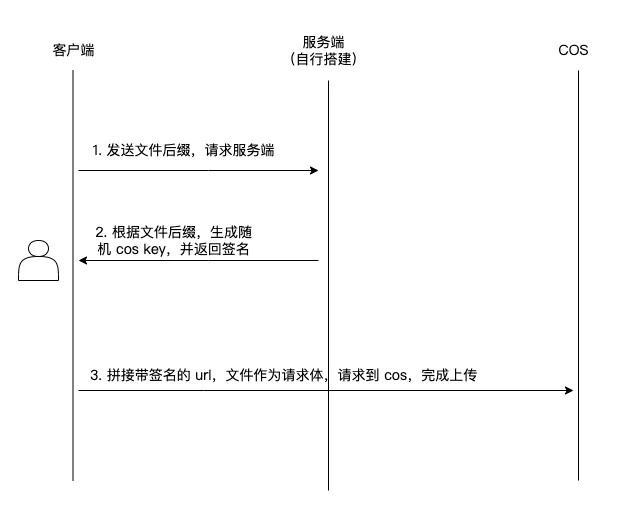
2. 服务端生成 Cos Key
在 Web 或客户端上传场景中,如果对象名由客户端指定,可能存在对象被覆盖上传的风险。
要防止对象被覆盖的关键措施是服务端决定上传路径。
3. 上传限制策略
通过临时密钥的 policy 策略,可对上传行为进行多重约束。
限制上传对象的大小
场景1:对于 PutObject 上传,通过在 sts 临时密钥 policy 里的 condition 中设置 numeric_less_than_equal 条件来实现。
condition: {// 限制上传对象必须小于 5MB'numeric_less_than_equal': {'cos:content-length': 5 * 1024 * 1024},}
场景2:对于 PostObject 上传,通过在签名 policy 的 conditions 中设置 content-length-range 条件来实现。
var policy = JSON.stringify({...conditions: [['content-length-range', 1, 5 * 1024 * 1024], // 可限制上传对象大小范围比如1 - 5MB],});
限制上传对象的类型
场景1:对于 PutObject 上传,通过在 sts 临时密钥 policy 里的 condition 中设置 string_like 条件来实现。
condition: {// 限制上传对象 content-type 必须为图片类型'string_like': {'cos:content-type': 'image/*'}}
场景2:对于 PostObject 上传,通过在签名 policy 的 conditions 中设置 $Content-Type 条件来实现。
var policy = JSON.stringify({...conditions: [// 限制上传对象 content-type 必须为图片类型['starts-with', '$Content-Type', 'image/*'],],});
4. 实践教程
针对上述临时密钥最小权限、服务端生成 Cos Key、上传限制策略的功能,我们提供了各语言的实践教程,可参见 Android 上传对象实践教程、iOS 上传对象实践教程、JavaScript 上传对象实践教程,包括服务端生成权限控制的临时密钥和客户端使用临时密钥进行上传的示例代码。
实践建议
为最大化发挥安全能力,建议开发者参考以下实践:
1. 启用 HTTPS 双向认证:针对敏感业务场景(例如金融、医疗、车机),建议开启 HTTPS 双向认证,并定期轮换客户端证书。
2. 密钥生命周期管理:若使用 SSE-KMS 自定义加密,建议通过 腾讯云密钥管理系统(KMS)定期轮换密钥,并严格控制访问权限。
3. 临时密钥权限控制:按照我们推荐的最小权限原则以及防覆盖、条件限制等操作控制好对象的访问权限。
フィードバック