The long-term memory feature is central to delivering a personalized conversation experience. It essentially gives the application a “brain,” capable of remembering. By continuously tracking and accurately storing key information about the end user — such as their basic profile (age, gender, etc.) and important memory points (such as events at specific times and locations) — the application can recall this information in later interactions. This allows it to respond in ways that feel more personal and relevant, significantly enhancing the user experience.
Feature Description
Uniqueness of Long-Term Memory
The uniqueness of long-term memory is defined by two core elements: end users and applications. This means each end user has an independent and unique memory within each application. This separation ensures that user information is not mixed across different applications, maintaining accuracy and relevance.
Note:
End User A in Application 1 has memory A1, End User A in Application 2 has memory A2, End User B in Application 1 has memory B1, A1, A2, and B1 are all independent and do not interfere with one another.
Components of Long-Term Memory
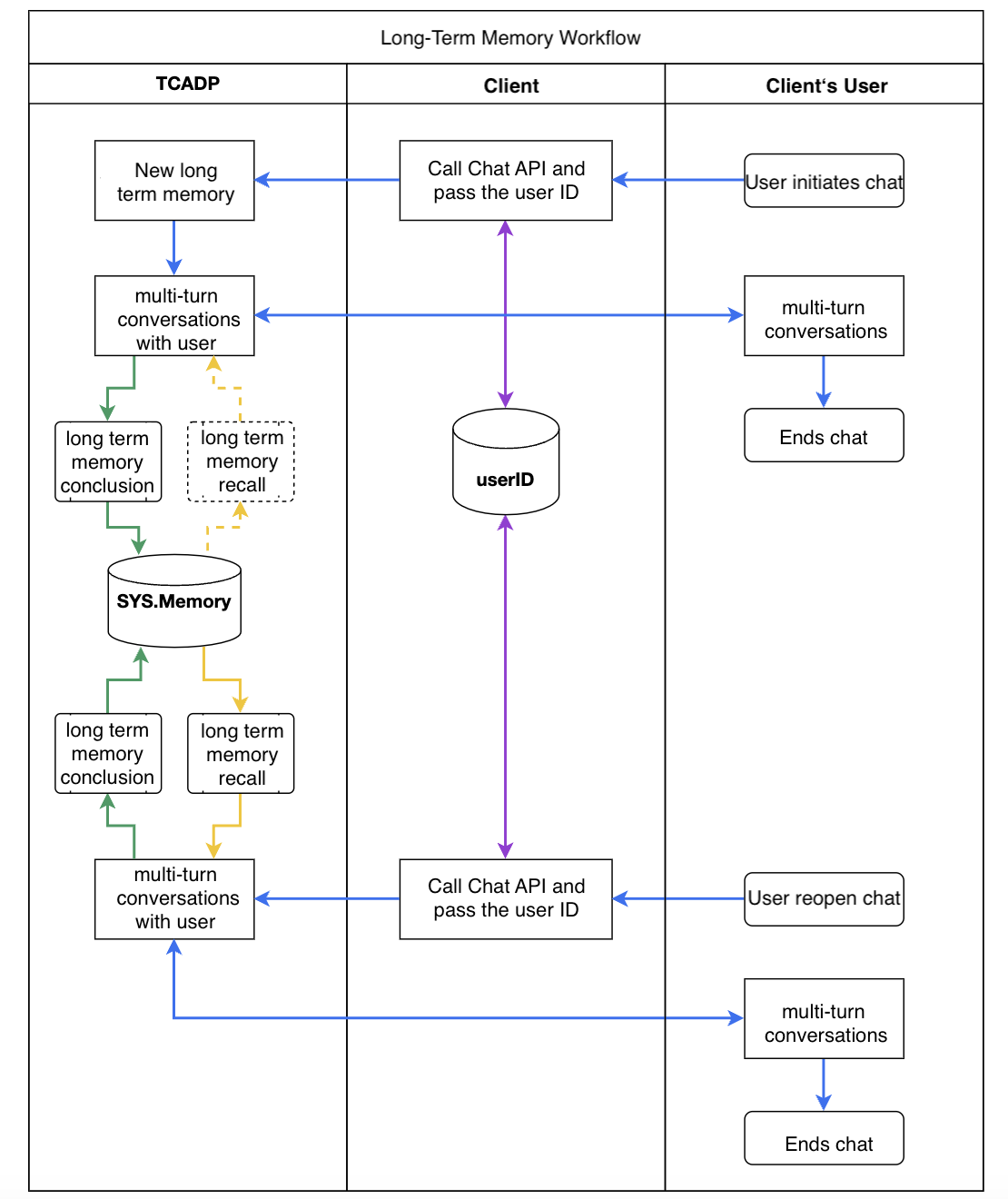
Long-term memory consists of two key steps: "Long-Term Memory Summary" and "Long-Term Memory Recall".
When a new user starts a conversation for the first time, the system creates a unique long-term memory based on the user ID and application ID, and stores it in SYS.Memory.
During multi-turn conversations, the system calls the "Long-Term Memory Summarization" module to automatically summarize memory content from the dialogue history.
Timeliness of Summarization: After every round of dialogue, the summarization module runs, extracts memory content, and updates SYS.Memory content.
In new conversations, the system calls the "Long-Term Memory Recall" module to retrieve the user’s memory content, helping the model understand the user profile and important memory points for personalized interaction.
Example: If the memory states “the user is a vegetarian,” then when recommending nearby restaurants, the system will prioritize vegetarian options.
The cycle of "Long-Term Memory Summarization" and "Long-Term Memory Recall" repeats continuously.
A diagram of the long-term memory process is shown below.
Long-term memory content is persistently stored in the System Variable SYS.Memory. During the execution of Agents and workflows, this system variable is read-only and cannot be modified.
The storage duration of long-term memory is configurable. Users can customize the retention period based on actual needs. Applications requiring long-term retention of user data (e.g., financial services) may set a longer period, while temporary tool-type applications may set a shorter period to optimize resource usage.
Feature Configuration
The long-term memory feature is located under the Application - Variable and Memory menu. For configuration details, please see Application Overview.