Package (Prepaid)
Download
Focus Mode
Font Size
Package Introduction
RUM offers packages at different prices to meet various reporting needs. You can purchase different packages to offset the reporting volume of corresponding business systems. Compared with the pay-as-you-go billing method, packages offer higher discounts. Packages are sold by reporting region and are currently available in three regions: Guangzhou, Singapore, and Silicon Valley. Package prices vary by region, and you can purchase them based on your needs.
Package Pricing
Package Reported Volume | Guangzhou | Singapore | Silicon Valley | Validity period |
100 million
data reports | USD 400 | USD 650 | USD 650 | 180 days |
300 million
data reports | USD 1,100 | USD 1,800 | USD 1,800 | 180 days |
500 million
data reports | USD 1,800 | USD 2,800 | USD 2,800 | 180 days |
1 billion
data reports | USD 3,200 | USD 4,600 | USD 4,600 | 180 days |
2.5 billion
data reports | USD 7,200 | USD 9,500 | USD 9,500 | 180 days |
10 billion
data reports | USD 25,800 | USD 32,000 | USD 32,000 | 360 days |
Note:
Package prices are bound to the reporting region. Before purchasing, confirm that the selected region matches the reporting region of your business system.
Purchase Notes
Effective Time & Rules:
It takes effect immediately after purchase. If the purchased business system has reporting, the free tier of 500,000 data reports per day no longer applies to that business system.
The package takes effect only for the specific business system it is purchased for. For other pay-as-you-go business systems, the free tier of 500,000 data reports per day remains in effect.
If the remaining quota of a package is not fully used when it expires, the quota will be reset to zero.
Overage Billing Rules:
During the validity period of the package, if your quota is used up, the excess usage will be billed on a pay-as-you-go basis.
Deduction Rules:
A purchased package can only be used to offset the reporting volume of the current business system and cannot be used to offset the reporting volume of other business systems.
A business system can purchase multiple packages. The reporting volume of these packages is accumulated, but overlapping periods are not counted. When the validity periods of packages overlap, the package with the earlier expiration date will be deducted first.
Package Validity Period
A package takes effect immediately after purchase. Packages can be purchased in a stacked manner, which increases the reporting volume. If you purchase an additional package within the validity period of an existing one, the validity period still follows the immediate effect rule after purchase, and overlapping periods are not accumulated.
Assume that you purchased a package at 10:00:00 on December 1, 2022, with a reporting volume of 100 million entries and a validity period of 180 days. The package is valid from 10:00:00 on December 1, 2022 - 10:00:00 on May 30, 2023.
Effective Time and Deduction Rules for Package Stacking
Package 1: Assume that you purchased a package for business system A at 10:00:00 on December 1, 2022, with a reporting volume of 100 million data reports and a validity period of 180 days. Package 1 is valid from 10:00:00 on December 1, 2022 - 10:00:00 on May 30, 2023.
Package 2: Assume that you repurchased a package for business system A at 10:00:00 on December 10, 2022, with a reporting volume of 300 million data reports and a validity period of 180 days. Package 2 will be valid from 10:00:00 on December 10, 2022 - 10:00:00 on June 8, 2023, and its quota will not be accumulated due to overlapping validity periods with Package 1.
The system will first deduct the reporting quota of Package 1 until it is exhausted, and then deduct the reporting quota of Package 2.
Refund Instruction
Because Tencent Cloud incurs costs and reserves corresponding resources once you make a purchase, RUM does not support refunds. If you have any questions, you can submit a ticket to contact us.
How to Purchase a Package
1. Log in to RUM > Application Management > Business Systems.
2. Click Create Business System to go to the business system settings page.
3. On the page, select Package as the billing mode, and select the corresponding region, plan package, and other information.
To ensure continuous deduction of plan packages, you can enable Auto Renewal for a plan package when purchasing it. After auto-renewal is enabled, the system will automatically purchase a plan package of the same specification when the remaining quota reaches the threshold.
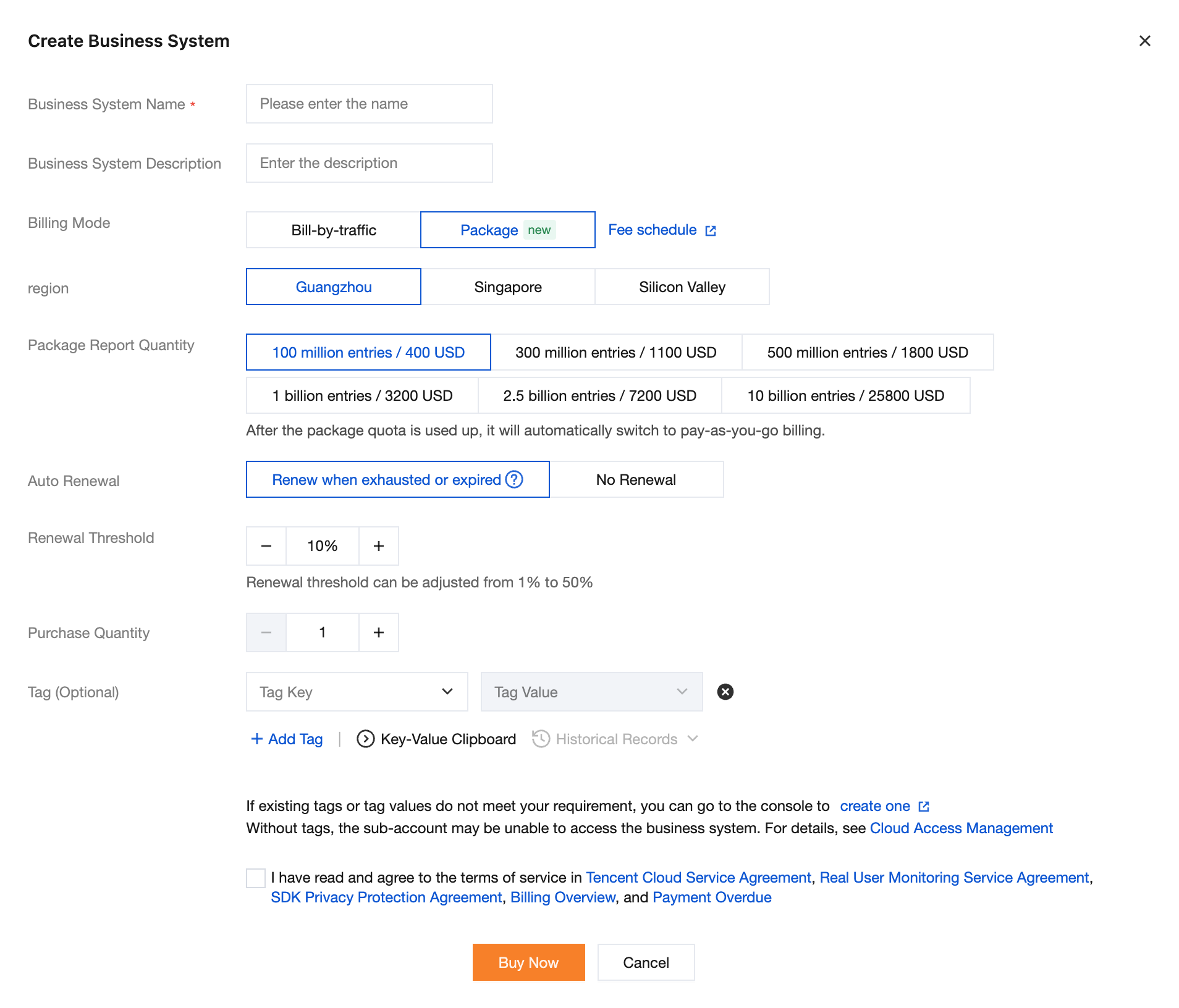
4. After completing the configuration, select the checkbox to agree to the Terms of Service, and then click Buy Now. After confirming that the product information is correct, pay for the order.
Help and Support
Was this page helpful?
You can also Contact sales or Submit a Ticket for help.
Help us improve! Rate your documentation experience in 5 mins.
Feedback