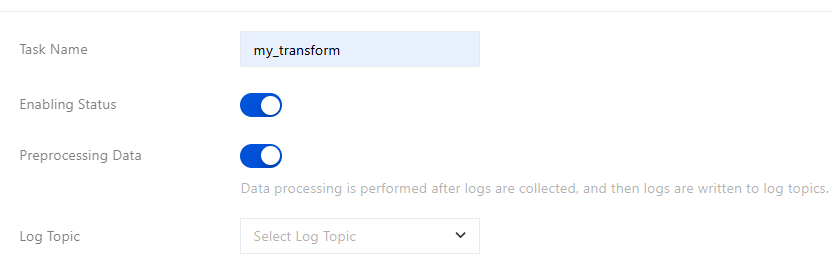
This document introduces how to create a processing task.
Prerequisites
Activated Cloud Log Service (CLS), create a source log topic, and log data has been successfully collected.
Created target log topic. It is advisable to use an empty topic as the target log topic to allow writing of processed data.
Ensure the current operation account has permission to configure data processing tasks. See CLS Access Policy Template.
Operation Steps
1. Log in to the CLS service console, and select Data Processing in the left sidebar.
2. Click Create. Configure basic information:
Preprocessing of Data
Non-Data Preprocessing
The value of preprocessing:
Performing log filtering during preprocessing can effectively reduce log indexing traffic, index storage volume, and log storage volume.
Use Cases for Preprocessing:
Log collection to CLS requires data processing (filtering, structuring) first, then writing to the log topic. For example: a log topic named "test" has collected data using LogListener, now needs to write logs with loglevel="Error" to "test", and other logs are not reported, then a preprocessing task "my_transform" can be created to accomplish this.
Note:
Each log topic can only be configured with one preprocessing task.
Preprocessing does not currently support distributing logs to multiple fixed log topics or dynamic log topics. Therefore, you cannot use the log_output and log_auto_output functions in preprocessing tasks.
If you add/modify the collection configuration, the collected data will change, so the preprocessing statement must be adjusted accordingly.
Preprocessing tasks and non-preprocessing tasks cannot be converted between each other.
Configuration Item:
Configuration Item
Description
Task Name
Name of the data processing task, for example: my_transform.
Enabling Status
Task start/stop, default start.
Preprocessing Data
Turn on the switch.
The feature entry for preprocessing:
Entry 1: Toggle on the Preprocessing Data switch when creating a data processing task.
Entry 2: You can also click Data Processing at the bottom of the Collection Configuration page to enter the preprocessing data editing page.
Log Topic
Specify the log topic to write pre-processing results to.
Associate external data
Add an external data source, which can be used for dimension table join scenarios. Currently, only Tencent Cloud MySQL is supported. See the res_rds_mysql function.
Region: The region where the cloud MySQL instance is located
TencentDB for MySQL instance: Please select in the pull-down menu
Username/Password: Enter your database username/password. Data processing only requires query permissions without requiring edit or delete permissions. For configuration methods, see Modifying Account Permissions for TencentDB for MySQL. Securely store your account credentials and avoid disclosure.
Alias: The alias for your MySQL instance, which you will use as a parameter in res_rds_mysql.
Data processing service log
The operation logs of data processing tasks are stored in the cls_service_log service log topic (free). The alarm feature in the monitoring dashboard for data processing tasks depends on this log topic and is enabled by default.
Upload Processing Failure Logs
When enabled, logs that failed to be processed will write into the target topic. When turned off, this option will drop processing-failed logs.
Field Name in Processing Failure Logs
If you choose to write processing-failed logs to the target log topic, the failure logs will be stored in this field, with the field name defaulting to ETLParseFailure.
Advanced Settings
Add environment variable: Add environment variables for the data processing task runtime.
For example, add a pair of variables with name ENV_MYSQL_INTERVAL and value 300. Then you can use refresh_interval=ENV_MYSQL_INTERVAL in the res_rds_mysql function, and the task will resolve to refresh_interval=300.
Non-preprocessing is mainly used for log distribution scenarios.
Distribute to Fixed log topic usage scenario.
Scenarios for determining the target log topic for distribution. Example: Output logs with loglevel=warning from the source log topic to a log topic named WARNING, output logs with loglevel=error to a log topic named ERROR, and output logs with loglevel=info to a log topic named INFO. Please refer to the log_output function.
Distribute to Dynamic log topic usage scenario.
For scenarios where there are considerable target log topics to distribute or unable to determine. Example: There is one Key (field) named "AppName" in your log. Since business needs, this field continuously adds new values as time passes, and you need to distribute logs according to "AppName". This option is suitable for use. Please refer to the log_auto_output function.
Configuration Item:
Distribute to Fixed Log Topic
Distribute to Dynamic Log Topic
Configuration Item
Description
Task Name
Name of the data processing task, for example: my_transform.
Enabling Status
Task start/stop, default start.
Preprocessing Data
Turn off the switch.
Source Log Topic
Data source for the data processing task.
Associate external data
Add an external data source for dimension table join scenarios. Currently, only Tencent Cloud MySQL is supported. See the res_rds_mysql function.
Region: The region where the cloud MySQL instance is located.
TencentDB for MySQL Instance: Please select in the pull-down menu.
Username/Password: Enter your database username/password. Data processing only requires query permissions without requiring edit or delete permissions. For configuration methods, see Modifying Account Permissions for TencentDB for MySQL. Securely store your account credentials and avoid disclosure.
Alias: The alias for your MySQL instance, which you will use as a parameter in res_rds_mysql.
Processing Time Range
Specify the log scope for data processing.
Note:
Only process data within the log topic's lifecycle.
Target Log Topic
Select fixed log topic:
Log topic: destination bucket for inventory output of data processing, configured as one or multiple.
Target topic ownership: You can select log topics under the current account/other primary accounts.
Current Account
Other Root Accounts
Processed results are written to the log topic of the current account.
Processed results are written to the log topic of another primary account
. For example, when source log topics from Account A are processed and written to Account B's log topic, Account B must configure the access role in CAM (Cloud Access Management). After configuration, Account A enters the role ARN and external ID in the CLS console to enable writing processed results to Account B's log topic. The steps to configure the role are as follows:
1. Create a role. Account B logs in to CAM and goes to the Role Management page.
1.1 Create a new cross-account access policy. Policy name, for example: cross_account. The policy syntax is as follows:
Note:
In the example, authorization follows the principle of least privilege. The resource is configured to only write processed results to Account B's (100012345678) log topic in the Guangzhou region (topic ID ab3456-123a-56bc-d789-abc654321). Please authorize according to the actual situation.
1.2 Create a role, set the role carrier to Tencent Cloud Account, set the cloud account type to Other Root Accounts, enter the ID of account A, such as 100012345678, select Enable Validation, and configure an external ID, such as Hello123.
1.3 Configure the access policy for the role by selecting the pre-configured policy cross_account (example).
1.4 Save the role, for example: A_ds-cross-account_B.
2. Configure the carrier for the role. In the CAM role list, find A_ds-cross-account_B (example), click on the role, select the following: role carrier > manage carrier > add product service > select CLS, and then click update.
It can be seen that the current role has two trusted entities: one is Account A, and the other is cls.cloud.tencent.com (CLS Log Service).
3. Account A logs in to CLS and enters the role ARN and external ID.
The two pieces of information need to be provided by account B:
Account B finds the role A_ds-cross-account_B (example) in the CAM role list. Click to view the role's RoleArn, for example: qcs::cam::uin/10001234567:roleName/A_ds-cross-account_B.
The external ID, such as Hello123, can be seen in the role carrier.
Note:
When entering the Role ARN and External ID, please ensure no extra spaces are included, as this may result in permission validation failure.
Cross-account writes to the target log topic will incur log write traffic fees under Account B. Data processing fees will be billed to Account A.
Target name: For example, in the source log topic, output loglevel=warning logs to Log Topic A, loglevel=error logs to Log Topic B, and loglevel=info logs to Log Topic C. You can configure the target names of Log Topic A, B, and C as warning, error, and info.
Data processing service log
The operation logs of data processing tasks are saved in the cls_service_log service log topic (free of charge). The alarm feature in the data processing task monitoring charts relies on this log topic, which is enabled by default.
Upload Processing Failure Logs
When enabled, logs that failed to be processed will write into the target topic. When turned off, this option will drop processing-failed logs.
Field Name in Processing Failure Logs
If you choose to write processing-failed logs to the target log topic, the failure logs will be stored in this field, with the field name defaulting to ETLParseFailure.
Advanced Settings
Add environment variable: Add environment variables for the data processing task runtime.
For example, add a pair of variables with name ENV_MYSQL_INTERVAL and value 300. Then you can use refresh_interval=ENV_MYSQL_INTERVAL in the res_rds_mysql function, and the task will resolve to refresh_interval=300.
Configuration Item
Description
Task Name
Name of the data processing task, for example: my_transform.
Enabling Status
Task start/stop, default start.
Preprocessing Data
Turn off the switch.
Source Log Topic
Data source for the data processing task.
Associate external data
Add an external data source, which can be used for dimension table join scenarios. Currently, only Tencent Cloud MySQL is supported. See the res_rds_mysql function.
Region: The region where the cloud MySQL instance is located.
TencentDB for MySQL Instance: Please select in the pull-down menu.
Username: Enter your database username.
Password: Enter your database password.
Alias: The alias for your MySQL instance, which you will use as a parameter in res_rds_mysql.
Processing Time Range
Specify the log scope for data processing.
Note:
Only process data within the log topic's lifecycle.
Target Log Topic
Select Dynamic Log Topic. No configuration required for target log topic, it will be automatically generated according to the specified field value.
Overrun handling
When the topic count generated by your data processing task exceeds the product spec, you can choose:
Create a fallback logset and log topic, and write logs to the fallback topic (created when creating a task).
Fallback logset: auto_undertake_logset, single-region single account next.
Fallback topic: auto_undertake_topic_$(data processing task name). For example, if a user creates two data processing tasks etl_A and etl_B, two fallback topics will occur: auto_undertake_topic_etl_A, auto_undertake_topic_etl_B.
Discard log data: Discard logs directly without creating a fallback topic.
Data processing service log
The operation logs of data processing tasks are stored in the cls_service_log service log topic (free). The alarm feature in the monitoring dashboard for data processing tasks depends on this log topic and is enabled by default.
Upload Processing Failure Logs
When enabled, logs that failed to be processed will write into the target topic. When turned off, this option will drop processing-failed logs.
Field Name in Processing Failure Logs
If you choose to write processing-failed logs to the target log topic, the failure logs will be stored in this field, with the field name defaulting to ETLParseFailure.
Advanced Settings
Add environment variable: Add environment variables for the data processing task runtime.
For example, add a pair of variables with name ENV_MYSQL_INTERVAL and value 300. Then you can use refresh_interval=ENV_MYSQL_INTERVAL in the res_rds_mysql function, and the task will resolve to refresh_interval=300.
3. After the configuration is complete, click Next.
4. Edit/debug processing statement. At the bottom left of the webpage, you can see two tags: Raw logs and Test data. At the bottom right is the processing result. You can debug your processing statement by comparing the original/test data with the processing result.
Raw logs: The system automatically loads raw log data, 100 records by default.
Test data: The system randomly loads raw data, which may not meet your debugging needs. You may click Add Test Data on the Original Data tab to add raw logs to test data, then modify these data on the Test Data tab to meet your debugging requirements.
You can choose Statement mode or Interaction mode to write processing statements.
Statement Mode
Interaction Mode
Method 1: Use AI-generated processing statements (recommended)
Click the AI icon in the upper right corner of the raw log to add it to the CLS AI Assistant dialog box. Describe your processing requirements in natural language, such as "Retain logs with Loglevel=Error" or "Structure this log," then click the send icon. The AI Assistant will generate the processing statement, which you can copy to the processing statement edit box. If the AI-generated statement is inaccurate, you can obtain the correct processing statement through multi-round dialogue, as illustrated in the following example.
The content is not standard JSON, and using ext_json throws an error. Please first extract the JSON part from the content, then retrieve the nodes from the JSON.
You may switch to Interaction Mode on the Edit Processing Statement page.
Add visualization function: Click
, select the visualization function category and visualization function name you need to add.
Debug visualization function: Click ▶️ in the top-right corner of the visualization function.
Delete visualization function: Click X in the top-right corner of the visualization function.
Edit visualization function: Click
in the top-right corner of the visualization function.
The currently supported visualization functions are as follows:
Function Category
Visualization Function Name
Application Scenario
Extract Key Value
JSON: Extract fields and field values from JSON nodes
Separator: Extract field values based on the separator. Users are advised to enter the field name.
Regular Expression: Extract field values using regular expressions. User input is required for the field name.
Log Structuring
Log Processing
Filter Logs: Configure conditions for filtering logs (multiple conditions are in an OR relationship). For example, if field A exists or field B does not exist, filter out the log.
Distribute Logs: Configure conditions for distributing logs.
If status="error" and message contains "404", distribute to topic A
If status="running" and message contains "200", distribute to topic B
Retain Logs: Configure conditions for preserving logs.
After writing the DSL processing statement, click Preview or Breakpoint Debug in the top left corner of the page (or ▶️ in the top-right corner of the visualization function in interaction mode) to run and debug the DSL function. The execution result will show on the right. Based on the result, adjust DSL statements until they meet your requirements.
Note:
Statement Mode: Supports all processing functions and recommends using AI to write processing statements.
Interactive Mode: Only supports some functions; see visualization function. When the target log topic is configured as dynamic log topic, interactive mode is not supported.