With AI Transcription and Translation, you can convert each user's audio stream in a room into text in real time, with support for multi-language translation.
Transcription: The Automatic Speech Recognition (STT) engine converts speech into text. The system supports multiple languages, hotword weight configuration, VAD detection, and real-time streaming recognition.
Translation: Translation can be enabled on top of speech transcription. The system translates the transcribed text through the LLM translation engine, outputting both the original transcribed content and the translated result simultaneously. This feature is optional.
Note:
A single application supports up to 100 concurrent tasks by default, with a maximum STT concurrency of 200 across all tasks. If you require higher concurrency, please contact technical support for evaluation. The API timeout is 6 seconds. The API QPS limit is 20. To increase this limit, please contact technical support for evaluation.
Scenario Description
All Users in a Room Speak the Same Language
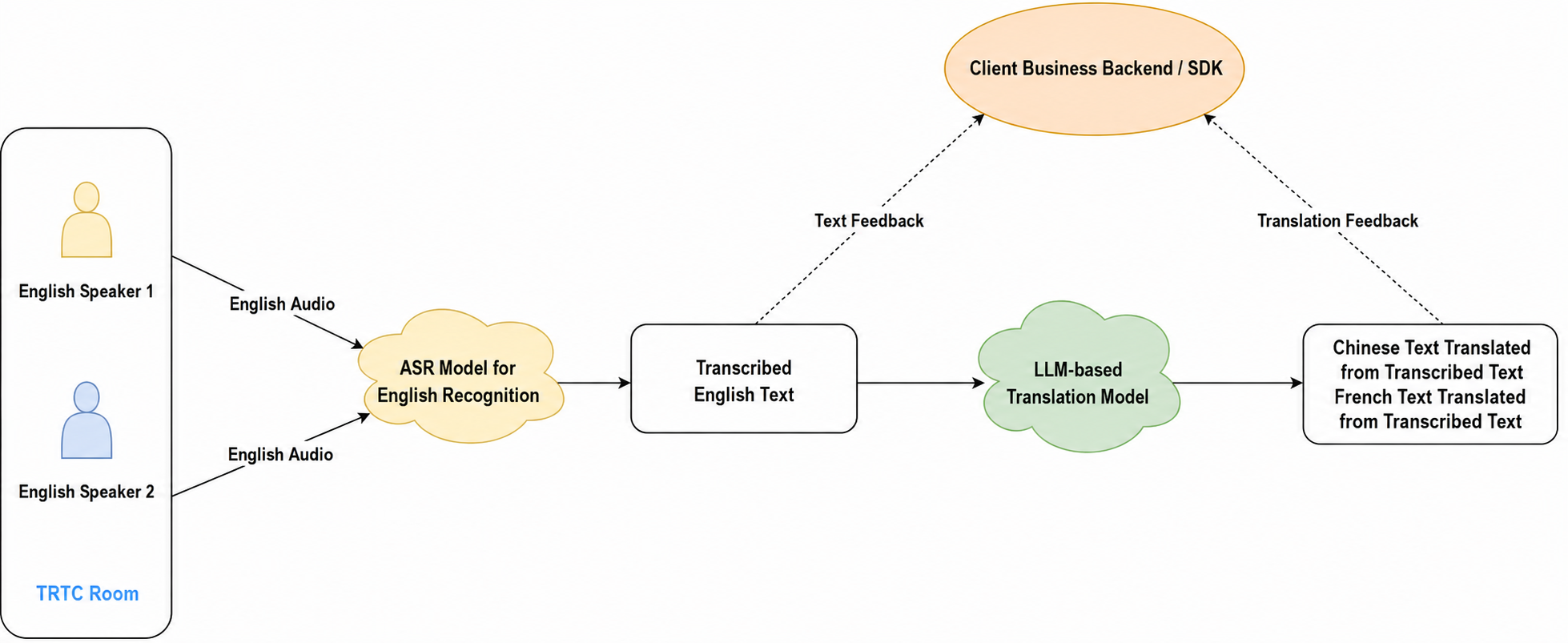
In the TRTC room shown in the diagram, multiple hosts are communicating in English. You can initiate a task to subscribe to all users' English audio streams and select an English STT model to transcribe the audio into English text in real time. Transcription results are returned via callback. Additionally, you can set a target translation language, and the translation model will translate the transcribed English text into the specified language and send the translation results via callback.
Note:
Callback results can be delivered to your business backend/SDK. For integration methods, see Receiving Callback Results.
Users in a Room Speak Different Languages
In the TRTC room shown in the diagram, two hosts are communicating in Chinese and French respectively. Since a single task's STT model only supports recognition of a specific language, you need to initiate the following two tasks:
1. Task 1: Subscribe to Host 1's Chinese audio, select a Chinese STT model for real-time transcription, generate Chinese text, and return it via callback. You can set the translation target language to French, and the system will automatically translate the transcribed text into French, with translation results also returned via callback.
2. Task 2: Subscribe to Host 2's French audio, select a French STT model for real-time transcription, generate French text, and return it via callback. You can set the translation target language to Chinese, and the system will automatically translate the transcribed text into Chinese, with translation results also returned via callback.
Through these two tasks, Host 1 and Host 2 can achieve real-time cross-language communication.
1. Upon first activation, you will receive 10,000 minutes of free minutes for testing.
2. For production use, Speech-to-Text and Real-Time Translation features only support pay-as-you-go billing. For details, see Billing of AI Recognition.
Step 1: Integrate the TRTC SDK
Import the TRTC SDK into your project, join a TRTC room, and enable local microphone audio capture and publishing. For guidance, refer to SDK Download.
Step 2: Initiate a Task via RESTful API
Call the REST API (CreateCloudTranscription) from your server to start a transcription task. Pay special attention to the Task ID (TaskId) parameter; this is the unique identifier for the task, and you need to save it for subsequent API operations on this task. The specific steps to initiate a task are as follows:
1. Set Basic Parameters
You need to specify the basic information for initiating the transcription and translation task, such as your application ID (sdkappid), room information (RoomId), and room type (RoomIdType). All these parameters are required.
2. Set Room Entry and Subscription Parameters
When using the AI Transcription/Translation service, a bot will join the room as a virtual audience member to subscribe to the audio streams that need to be recognized. You need to specify the bot's parameters and the transcription subscription user parameters through TranscriptionParams. The bot parameters include ID (UserId), signature (UserSig), and task idle timeout (MaxIdleTime). You can specify which hosts to transcribe/translate through a whitelist (SubscribeUids), specify which hosts to exclude through a blacklist (UnSubscribeList), and use the SendCustomMode parameter to specify how to receive transcription and translation text.
3. Configure STT Parameters
Select the appropriate STT model engine for your scenario through the Lang parameter in AsrParam to implement speech-to-text.
Note:
The VADSilenceTime parameter in AsrParam is used to configure the VAD silence time for speech recognition.
4. Enable Translation (Optional)
If you need real-time translation of the transcribed text, enable this feature by setting the translation parameters TranslationParam. Specify the target language for translation in the translation parameters. The following target languages are currently supported as output:
Translation Target Language Code
Corresponding Language
"zh"
Chinese
"en"
English
"es"
Spanish
"pt"
Portuguese
"fr"
French
"de"
German
"ru"
Russian
"ar"
Arabic
"ja"
Japanese
"ko"
Korean
"vi"
Vietnamese
"ms"
Malay
"id"
Indonesian
"it"
Italian
"th"
Thai
Note:
Translation configuration is not required. If you only need the speech-to-text feature, you do not need to fill in the translation parameters, and it will not affect the overall AI transcription functionality.
Real-time translation currently supports 15 languages for both source and target: Chinese, English, Spanish, Portuguese, French, German, Russian, Arabic, Japanese, Korean, Vietnamese, Malay, Indonesian, Italian, and Thai. If the preceding STT transcription language is not within this range, the translation feature cannot be enabled. For additional language support, please contact technical support.
Due to variations in context and language differences, AI translation results are intended as supplementary reference and should not be used as the sole professional opinion or conclusion.
Step 3: Receive Transcription and Translation Result Callbacks
Method 1: Receive via Server-Side Callback
The Speech-to-Text service also provides server-side event callbacks for your service to receive real-time conversation messages. See AI Transcription and Translation Callback events.
Method 2: Receive via Client SDK Callback
You can refer to the following code to listen for callbacks from TranscriberStore's reactive data and refresh the UI.
Android
iOS
Add the following dependencies to your build.gradle, then run Gradle Sync.
Each sentence spoken by a user corresponds to a unique segmentId.
speakerUserId
String
The user ID of the speaker.
speakerUserName
String
The nickname of the speaker.
sourceText
String
The speech-to-text result of the user.
translationTexts
[TranslationLanguage: String]
The translated text corresponding to the user's speech text, which can be translated into multiple languages.
timestamp
Int64
The timestamp of the current sentence.
isCompleted
Bool
Whether the current sentence is completed.
Best Practices
Task Creation and Error Handling Best Practices
To ensure high availability of AI transcription and translation, please pay attention to the following points when integrating the RESTful API.
After calling the CreateCloudTranscription request, check the HTTP response. If the request fails, you need to adopt the appropriate retry strategy based on the specific status code. Error codes consist of a "primary error code" and a "secondary error code" combined, for example: InvalidParameter.SdkAppId. See the table below for details:
Error Code
Description
Solution
InvalidParameter.xxxxx
Invalid input parameter.
Please check the parameter values based on the specific error message.
InternalError.xxxxx
Server-side error encountered.
You can retry with the same parameters multiple times until a normal response with a TaskId is returned. It is recommended to use an exponential backoff retry strategy, e.g., retry after 3s for the first attempt, 6s for the second, 12s for the third, and so on.
FailedOperation.RestrictedConcurrency
The number of concurrent transcription tasks has exceeded the reserved backend resources (default is 100).
When calling the CreateCloudTranscription API, the specified UserId/UserSig is the ID for the transcription bot joining the room as a separate user. Please ensure it does not conflict with other users in the TRTC room. Additionally, the room type used by the TRTC client must match the room type specified in the transcription API. For example, if the SDK creates the room with a string room number, the transcription task's room type must also be set to string room number accordingly.
Transcription status query. You can obtain the corresponding task information through the following methods:
Approximately 15 seconds after successfully initiating a CreateCloudTranscription task, call the DescribeCloudTranscription API to query the transcription task information. If the status is Idle, it means the transcription bot is not receiving any upstream audio stream. Please check whether there are hosts publishing audio in the room.
Transcription task information will be sent to you via callback.
API Request Rate Limiting Best Practices
Tencent Cloud API services set rate limits for each user's requests to ensure system stability and fair resource allocation. When a user's request rate exceeds the preset threshold, the system returns a rate limit error. The default QPS for the transcription API is 20 requests/second. You can contact technical support to request an increase. Typically, the ratio between the QPS setting and the reported maximum concurrency is 1:20. For example, for 2,000 concurrent transcription tasks online, the QPS can be increased to 100. The actual requirement should be evaluated based on your business implementation.
If you encounter rate limiting errors, you can try the following methods for quick short-term adjustment:
Reduce the request frequency to within the limit.
Implement a request queue in your business logic.
Add appropriate intervals between requests.
For long-term solutions, you can make the following adjustments:
Implement an exponential backoff retry mechanism, e.g., retry after 3s for the first attempt, 6s for the second, 12s for the third, and so on until successful.
Optimize business logic by having the transcription bot join the room in advance and wait, reducing concurrent API calls.