Purchase Method
ダウンロード
フォーカスモード
フォントサイズ
Tencent Cloud provides two purchase methods for EIPs: console and API. This document describes these two purchase methods in detail.
Console Purchase
1. Log in to the Public IP Address Console.
2. On the public IP address page, select a region at the top, and then click Apply.
3. In the pop-up Apply for EIP dialog box, configure the EIP-related parameters.
Note:
The parameters you need to configure when you apply for an EIP vary according to the account type. If you are unsure of your account type, see Determining Account Type.
[Standard account type]
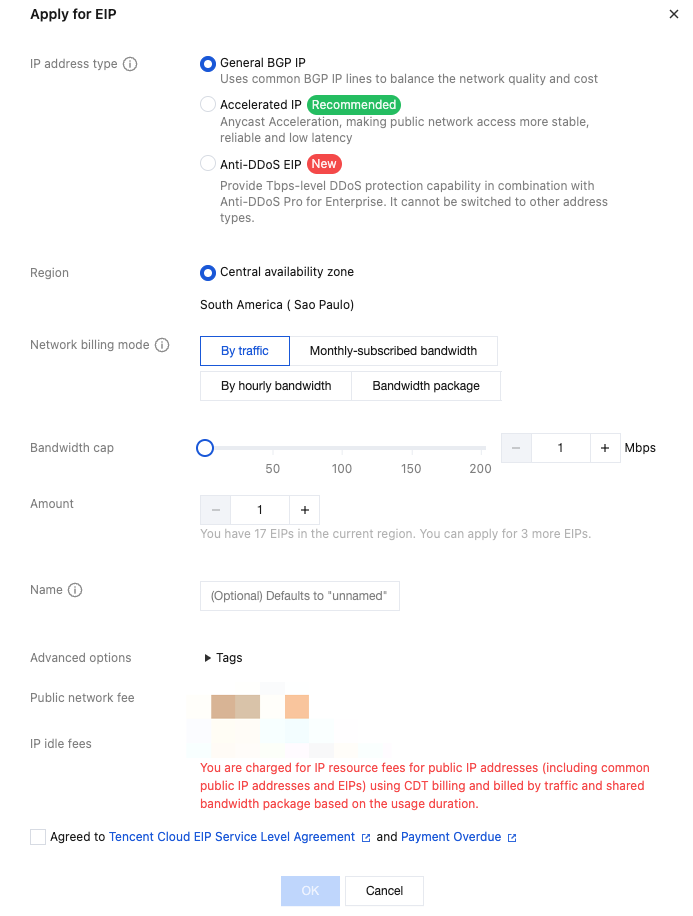
Parameter Name | Description |
IP Address Type | Tencent Cloud supports various types of EIPs, such as general BGP IP addresses, dedicated BGP IP addresses, accelerated IP addresses, Anti-DDoS EIPs, and static single-line IP addresses. For more information, see EIP IP Address Types. General BGP IP addresses: The general BGP IP addresses are used for balancing network quality and cost. Dedicated BGP IP address: A dedicated line that avoids detours through the egress networks of international ISPs and has lower latency. Currently, it is only supported by the standard account type. You need to upgrade the traditional account type to the standard account type to use it. For more information on the upgrade, see Account Type Description. The dedicated BGP IP address is only supported in the Hong Kong (China) and Singapore regions. For more information on the prices, see Billing Overview. Accelerated IP addresses: Anycast is used for acceleration, making public network access more stable and reliable, with lower latency. You need to activate Anycast Internet Acceleration (AIA) to apply for them. Contact your business manager for an application. Static single-line IP addresses: Users can access the public network through a single ISP. The cost is low, and autonomous scheduling is convenient. If you want to experience it, contact your business manager for an application. For support of this feature in different regions, see Use Limits. Anti-DDoS EIP: A cloud-native Anti-DDoS BGP IP address that must be used with the Enterprise Anti-DDoS Package to provide Tbps-level full Anti-DDoS protection. After an Anti-DDoS EIP is bound to your business resources and Anti-DDoS resources respectively, it will have Anti-DDoS protection capabilities. Currently, it is only supported by the standard account type. You need to upgrade the traditional account type to the standard account type to use it. For more information on the upgrade, see Account Type Description. |
Billing Mode | - General BGP IP addresses support billing modes such as billing by traffic, monthly bandwidth subscription, hourly bandwidth subscription, and BWP. For more information, see Public Network Fees. - Accelerated IP addresses, static single-line IP addresses, and Anti-DDoS EIPs only support billing by BWP and do not support other billing modes for now. |
Bandwidth Cap | Set the bandwidth limit as needed and allocate bandwidth resources reasonably. |
Quantity | Select the number of EIPs you apply for as needed and ensure that the total number of EIPs does not exceed the total quota for the product. For more information, see Quota Limits. |
Purchase Duration | This option is only available for EIPs in the monthly bandwidth subscription billing mode. Select the purchase duration for the monthly bandwidth subscription as needed. |
Automatic Renewal | This option is only available for EIPs in the monthly bandwidth subscription billing mode. If it is selected and the account balance is sufficient, the EIPs will be automatically renewed monthly upon expiration. |
Name | EIP instance name, not required. |
Tag | You can add tags here. After adding, you can perform permission management by tags. |
[Traditional account type]
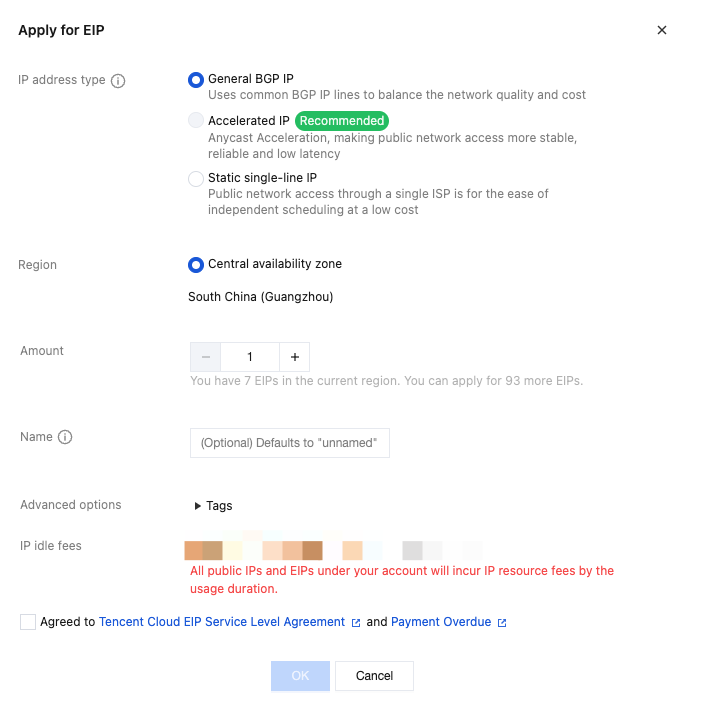
Parameter | Description |
IP Address Type | Tencent Cloud supports various types of EIPs, such as general IP addresses, accelerated IP addresses, and static single-line IP addresses: - General BGP IP addresses: They are used for balancing network quality and cost. - Accelerated IP addresses: They use Anycast Internet Acceleration (AIA) to make public network access more stable, reliable, and low-latency. To apply for an accelerated IP address, you must enable AIA. Contact your business manager to apply. - Static single-line IP addresses: They access the public network through a single network operator, featuring low cost and easy self-scheduling. To try this feature, contact your business manager to apply. For the regional availability of this feature, see Use Limits. |
Quantity | Select the number of EIPs you apply for as needed and ensure that the total number of EIPs does not exceed the total quota for the product. For more information, see Quota Limits. |
Name | EIP instance name, not required. |
Tag | You can add tags here. After adding, you can perform permission management by tags. |
4. After you configure all the parameters, the corresponding fees will be displayed at the bottom of the Apply for EIP dialog box. Please check carefully. After confirming the information, click Confirm to complete the EIP application.
5. Return to the public IP address page. In the EIP instance list, you can view the EIP you just applied for, which is currently in the unbound status.
Note:
It is recommended that you promptly bind cloud resources to unbound EIPs to save IP address resource fees and ensure reasonable utilization of IP address resources. IP address resource fees are billed hourly and are precise down to the second. If the usage duration is less than an hour, the fee will be charged based on the proportion of idle time.
Applying via APIs
フィードバック