Retrieving a Public IP Address
Download
フォーカスモード
フォントサイズ
If you release or return a public IP address (including EIPs and common public IP addresses) by mistake, you can retrieve it in the public IP console. The retrieved public IP address will be an EIP.
Use Limits
The following are the use limits on the retrieval of public IP addresses:
Only public IP addresses of the general BGP IP address line type can be retrieved, and those of other types cannot.
Only public IP addresses that you have used before and that are not currently assigned to other users can be retrieved, and IP addresses of Lighthouses cannot.
Each account can apply for an IP address retrieval up to 3 times per month in a single region.
Including the retrieved EIP, the total number of EIPs should not exceed the total quota for the product. For more information, see Quota Limits.
For the standard account type, a retrieved EIP is billed by traffic by default with a bandwidth cap of 5 Mbps. You can modify the billing mode and bandwidth cap after successful retrieval.
Directions
1. Log in to the public IP address console.
2. At the top of the Public IP page, select the region of the IP address to be retrieved and click Retrieve IP.
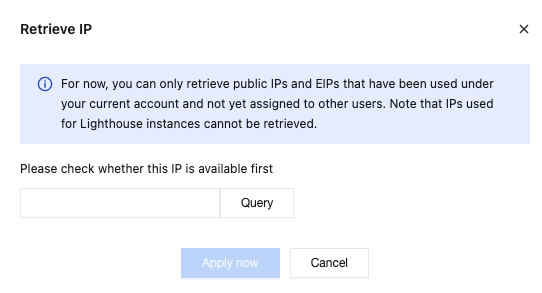
3. In the pop-up Retrieve IP window, enter the public IP address and click Query to check whether you can apply for a retrieval application.
If the page shows that the IP address is available for a retrieval application, click Apply Now.
If the page shows information such as "The IP address has been assigned," it means that the IP resource to be retrieved is already in use and that you cannot apply to retrieve it for now. Please try to apply to retrieve other IP addresses or click Cancel to exit the current feature.
4. On the public IP list page, view the retrieved public IP address (it is an EIP).
Following Steps
フィードバック