Web側直接転送の実践
Download
フォーカスモード
フォントサイズ
概要
このドキュメンテーションでは、SDK に依存せず、簡単なコードでウェブページ(Web 側)で Cloud Object Storage (COS)のバケットに直接ファイルを転送する方法について説明します。
注意:
前提条件
2. バケットの詳細ページに入り、セキュリティ管理タグをクリックします。ドロップダウンリストでクロスドメインアクセス CORS 設定の設定項目を見つけ、ルール追加をクリックします。設定例は下図のとおりです。詳細については、 クロスドメインアクセスの設定 ドキュメンテーションを参照してください。
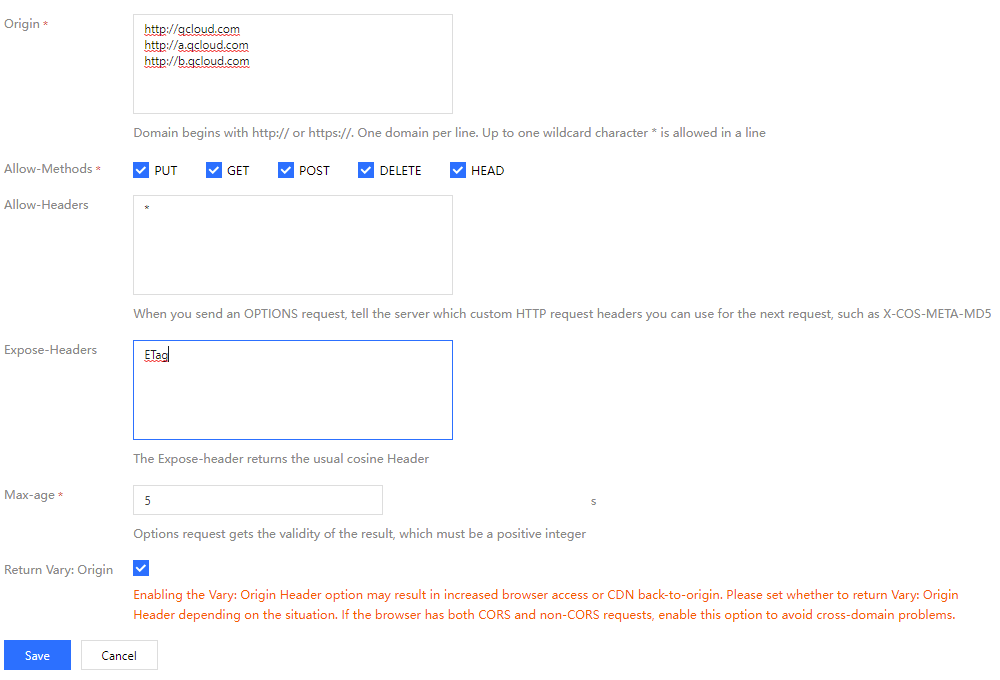
3. アクセス管理コンソールにログインし、プロジェクトの SecretId と SecretKey を取得します。
ソリューション説明
実行手順
1. フロントエンドでファイルを選択し、フロントエンドは拡張子をサービス側に送信します。
2. サービス側は、拡張子に基づいて時間付きのランダムな COS ファイルパスを生成し、対応する署名を計算し、URL とサイン情報をフロントエンドに返します。
3. フロントエンドは PUT または POST リクエストを使用し、ファイルを COS に直接転送します。
ソリューションの利点
権限の安全性:サービス側のサインを使用することで、指定されたファイルパスのアップロードにのみ使用されるように安全な権限範囲を効果的に制限することができます。
パスの安全性:サービス側がランダムな COS ファイルパスを決定することで、既存ファイルの上書きやセキュリティリスクの問題を効果的に回避できます。
実施ステップ
サインを実装するためにサーバーを設定します
注意:
正式に配置する時に、サービス側にウェブサイト自体の権限チェックを追加してください。
サインの計算方法は、ドキュメンテーションリクエストサインを参照してください。
サービス側が Nodejs を使用してサインコードを計算するには、Nodejs の例を参照してください。
Web 側アップロードの例
AJAX PUT を使用してアップロードします
AJAX アップロードには、ブラウザが基本的な HTML5 特性をサポートする必要があります。現在のソリューションでは PUT Object ドキュメンテーションを使用しています。操作ガイドは以下のとおりです。
1. 前提条件 の手順に従って、バケットに関連する設定を準備します。
2.
test.htmlファイルを作成し、以下のコードをtest.htmlファイルにコピーします。3. バックエンドのサインサービスを配置し、
test.html内のサインサービスのアドレスを変更します。4.
test.htmlを Web サーバーの下に置き、ブラウザからそのページにアクセスしてファイルアップロード機能をテストします。<!DOCTYPE html><html lang="en"><head><meta charset="UTF-8" /><title>Ajax Put のアップロード(サービス側がサインを計算する)</title><style>h1,h2 {font-weight: normal;}#msg {margin-top: 10px;}</style></head><body><h1>Ajax Put のアップロード(サービス側がサインを計算する)</h1><input id="fileSelector" type="file" /><input id="submitBtn" type="submit" /><div id="msg"></div><script>(function () {// より多くの文字をエンコードする url encode 形式const camSafeUrlEncode = function (str) {return encodeURIComponent(str).replace(/!/g, '%21').replace(/'/g, '%27').replace(/\\(/g, '%28').replace(/\\)/g, '%29').replace(/\\*/g, '%2A');};// サインを計算しますconst getAuthorization = function (opt, callback) {// 自分のサービス側のアドレスに置き換え、put アップロードのサインを取得します。demo:%!s(<nil>)const url = `http://127.0.0.1:3000/put-sign?ext=${opt.ext}`;const xhr = new XMLHttpRequest();xhr.open('GET', url, true);xhr.onload = function (e) {let credentials;try {const result = JSON.parse(e.target.responseText);credentials = result;} catch (e) {callback('サイン取得エラー');}if (credentials) {// credentials を印刷して正しいかどうかを確認します// console.log(credentials);callback(null, {securityToken: credentials.sessionToken,authorization: credentials.authorization,cosKey: credentials.cosKey,cosHost: credentials.cosHost,});} else {console.error(xhr.responseText);callback('サイン取得エラー');}};xhr.onerror = function (e) {callback('サイン取得エラー');};xhr.send();};// ファイルをアップロードしますconst uploadFile = function (file, callback) {const fileName = file.name;// ファイルの拡張子を取得しますlet ext = '';const lastDotIndex = fileName.lastIndexOf('.');if (lastDotIndex > -1) {// ここでファイルの拡張子を取得し、サービス側が最終的なアップロードパスを生成しますext = fileName.substring(lastDotIndex + 1);}getAuthorization({ ext }, function (err, info) {if (err) {alert(err);return;}const auth = info.authorization;const securityToken = info.securityToken;const Key = info.cosKey;const protocol =location.protocol === 'https:' ? 'https:' : 'http:';const prefix = protocol + '//' + info.cosHost;const url =prefix + '/' + camSafeUrlEncode(Key).replace(/%2F/g, '/');const xhr = new XMLHttpRequest();xhr.open('PUT', url, true);xhr.setRequestHeader('Authorization', auth);securityToken &&xhr.setRequestHeader('x-cos-security-token', securityToken);xhr.upload.onprogress = function (e) {console.log('アップロード進捗 ' +Math.round((e.loaded / e.total) * 10000) / 100 +'%');};xhr.onload = function () {if (/^2\\d\\d$/.test('' + xhr.status)) {const ETag = xhr.getResponseHeader('etag');callback(null, { url: url, ETag: ETag });} else {callback('ファイル ' + Key + ' アップロードに失敗しました。状態コード:' + xhr.status);}};xhr.onerror = function () {callback('ファイル ' + Key + ' アップロードに失敗しました。CORS クロスドメインルールが設定されていないかを確認してください');};xhr.send(file);});};// 監視フォームの提出document.getElementById('submitBtn').onclick = function (e) {const file = document.getElementById('fileSelector').files[0];if (!file) {document.getElementById('msg').innerText = 'アップロードするファイルが選択されていません';return;}file &&uploadFile(file, function (err, data) {console.log(err || data);document.getElementById('msg').innerText = err? err: 'アップロードに成功しました。ETag=' + data.ETag;});};})();</script></body></html>
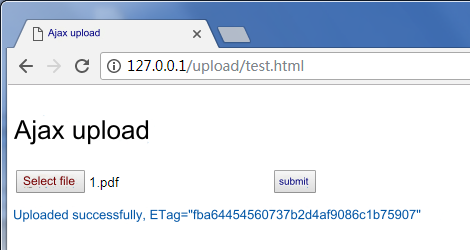
実行効果を下図に示します。
AJAX POST を使用してアップロードします
1. 前提条件 の手順に従い、バケットに関する設定を準備します。
2.
test.htmlファイルを作成し、以下のコードをtest.htmlファイルにコピーします。3. バックエンドのサインサービスを配置し、
test.htmlのサインサービスのアドレスを変更します。4.
test.htmlを Web サーバーの下に置き、ブラウザからページにアクセスすることでファイルアップロード機能をテストします。<!DOCTYPE html><html lang="en"><head><meta charset="UTF-8" /><title>Ajax Post のアップロード(サービス側がサインを計算する)</title><style>h1,h2 {font-weight: normal;}#msg {margin-top: 10px;}</style></head><body><h1>PostObject のアップロード(サービス側がサインを計算する)</h1><input id="fileSelector" type="file" /><input id="submitBtn" type="submit" /><div id="msg"></div><script>(function () {let prefix = '';let Key = '';// より多くの文字をエンコードする url encode 形式const camSafeUrlEncode = function (str) {return encodeURIComponent(str).replace(/!/g, '%21').replace(/'/g, '%27').replace(/\\(/g, '%28').replace(/\\)/g, '%29').replace(/\\*/g, '%2A');};// 権限ポリシーを取得しますconst getAuthorization = function (opt, callback) {// 自分のサーバー側のアドレスに置き換え、post アップロードのサインを取得します。demo:%!s(<nil>)const url = `http://127.0.0.1:3000/post-policy?ext=${opt.ext}`;const xhr = new XMLHttpRequest();xhr.open('GET', url, true);xhr.onload = function (e) {let credentials;try {const result = JSON.parse(e.target.responseText);credentials = result;} catch (e) {callback('サイン取得エラー');}if (credentials) {// credentials を印刷して正しいかどうかを確認します// console.log(credentials);callback(null, {securityToken: credentials.sessionToken,cosKey: credentials.cosKey,cosHost: credentials.cosHost,policy: credentials.policy,qAk: credentials.qAk,qKeyTime: credentials.qKeyTime,qSignAlgorithm: credentials.qSignAlgorithm,qSignature: credentials.qSignature,});} else {console.error(xhr.responseText);callback('サイン取得エラー');}};xhr.send();};// ファイルをアップロードしますconst uploadFile = function (file, callback) {const fileName = file.name;// ファイルの拡張子を取得しますlet ext = '';const lastDotIndex = fileName.lastIndexOf('.');if (lastDotIndex > -1) {// ここでファイルの拡張子を取得し、サービス側が最終的なアップロードパスを生成しますext = fileName.substring(lastDotIndex + 1);}getAuthorization({ ext }, function (err, credentials) {if (err) {alert(err);return;}const protocol =location.protocol === 'https:' ? 'https:' : 'http:';prefix = protocol + '//' + credentials.cosHost;Key = credentials.cosKey;const fd = new FormData();// 現在のディレクトリに空の empty.html を置き、インターフェースがアップロード完了時にジャンプバックできるようにしますfd.append('key', Key);// policy サイン保護形式を使用しますcredentials.securityToken &&fd.append('x-cos-security-token', credentials.securityToken);fd.append('q-sign-algorithm', credentials.qSignAlgorithm);fd.append('q-ak', credentials.qAk);fd.append('q-key-time', credentials.qKeyTime);fd.append('q-signature', credentials.qSignature);fd.append('policy', credentials.policy);// ファイル内容。file フィールドはフォームの最後に配置され、ファイル内容が長すぎてサイン判断や認証に影響を与えることを避けますfd.append('file', file);// xhrconst url = prefix;const xhr = new XMLHttpRequest();xhr.open('POST', url, true);xhr.upload.onprogress = function (e) {console.log('アップロード進捗 ' +Math.round((e.loaded / e.total) * 10000) / 100 +'%');};xhr.onload = function () {if (Math.floor(xhr.status / 100) === 2) {const ETag = xhr.getResponseHeader('etag');callback(null, {url:prefix + '/' + camSafeUrlEncode(Key).replace(/%2F/g, '/'),ETag: ETag,});} else {callback('ファイル ' + Key + ' アップロードに失敗しました。状態コード:' + xhr.status);}};xhr.onerror = function () {callback('ファイル ' + Key + ' アップロードに失敗しました。CORS クロスドメインルールが設定されていないかを確認してください');};xhr.send(fd);});};// 監視フォームの提出document.getElementById('submitBtn').onclick = function (e) {const file = document.getElementById('fileSelector').files[0];if (!file) {document.getElementById('msg').innerText = 'アップロードするファイルが選択されていません';return;}file &&uploadFile(file, function (err, data) {console.log(err || data);document.getElementById('msg').innerText = err? err: 'アップロードに成功しました。ETag=' + data.ETag + 'url=' + data.url;});};})();</script></body></html>
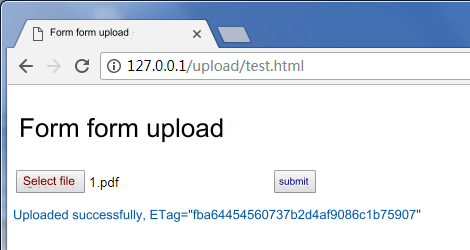
実行効果を下図に示します。
Form でアップロードします
1. 前提条件 の手順に従い、バケットを準備します。
2.
test.htmlファイルを作成し、以下のコードをtest.htmlファイルにコピーします。3. バックエンドのサインサービスを配置し、
test.htmlのサインサービスのアドレスを変更します。4.
test.htmlの同じディレクトリで、アップロードが成功した時にジャンプバックするための空のempty.htmlを作成します。5.
test.htmlとempty.htmlを Web サーバーの下に置き、ブラウザからページにアクセスすることでファイルアップロード機能をテストします。<!DOCTYPE html><html lang="en"><head><meta charset="UTF-8" /><title>Form フォームの簡易アップロード(IE8 対応)(サービス側がサインを計算する)</title><style>h1,h2 {font-weight: normal;}#msg {margin-top: 10px;}</style></head><body><h1>Form フォームの簡易アップロード(IE8 対応)(サービス側がサインを計算する)</h1><div>IE6 までのアップロードに対応し、onprogress はサポートされていません</div><formid="form"target="submitTarget"action=""method="post"enctype="multipart/form-data"accept="*/*"><input id="name" name="name" type="hidden" value="" /><input name="success_action_status" type="hidden" value="200" /><inputid="success_action_redirect"name="success_action_redirect"type="hidden"value=""/><input id="key" name="key" type="hidden" value="" /><input id="policy" name="policy" type="hidden" value="" /><inputid="q-sign-algorithm"name="q-sign-algorithm"type="hidden"value=""/><input id="q-ak" name="q-ak" type="hidden" value="" /><input id="q-key-time" name="q-key-time" type="hidden" value="" /><input id="q-signature" name="q-signature" type="hidden" value="" /><input name="Content-Type" type="hidden" value="" /><inputid="x-cos-security-token"name="x-cos-security-token"type="hidden"value=""/><!-- file フィールドはフォームの最後に配置され、ファイル内容が長すぎてサイン判断や認証に影響を与えることを避けます --><input id="fileSelector" name="file" type="file" /><input id="submitBtn" type="button" value="提出" /></form><iframeid="submitTarget"name="submitTarget"style="display: none"frameborder="0"></iframe><div id="msg"></div><script>(function () {const form = document.getElementById('form');let prefix = '';// より多くの文字をエンコードする url encode 形式const camSafeUrlEncode = function (str) {return encodeURIComponent(str).replace(/!/g, '%21').replace(/'/g, '%27').replace(/\\(/g, '%28').replace(/\\)/g, '%29').replace(/\\*/g, '%2A');};// サインを計算しますconst getAuthorization = function (opt, callback) {// 自分のサーバー側のアドレスに置き換え、post アップロードのサインを取得します。demo:%!s(<nil>)const url = `http://127.0.0.1:3000/post-policy?ext=${opt.ext || ''}`;const xhr = new XMLHttpRequest();xhr.open('GET', url, true);xhr.onload = function (e) {let credentials;try {const result = JSON.parse(e.target.responseText);credentials = result;} catch (e) {callback('サイン取得エラー');}if (credentials) {// credentials を印刷して正しいかどうかを確認します// console.log(credentials);callback(null, {securityToken: credentials.sessionToken,cosKey: credentials.cosKey,cosHost: credentials.cosHost,policy: credentials.policy,qAk: credentials.qAk,qKeyTime: credentials.qKeyTime,qSignAlgorithm: credentials.qSignAlgorithm,qSignature: credentials.qSignature,});} else {console.error(xhr.responseText);callback('サイン取得エラー');}};xhr.send();};// アップロード完了を監視しますlet Key;const submitTarget = document.getElementById('submitTarget');const showMessage = function (err, data) {console.log(err || data);document.getElementById('msg').innerText = err? err: 'アップロードに成功しました。ETag=' + data.ETag;};submitTarget.onload = function () {let search;try {search = submitTarget.contentWindow.location.search.substr(1);} catch (e) {showMessage('ファイル ' + Key + ' アップロードに失敗しました');}if (search) {const items = search.split('&');let i = 0;let arr = [];const data = {};for (i = 0; i < items.length; i++) {arr = items[i].split('=');data[arr[0]] = decodeURIComponent(arr[1] || '');}showMessage(null, {url: prefix + camSafeUrlEncode(Key).replace(/%2F/g, '/'),ETag: data.etag,});} else {}};// アップロードを開始しますdocument.getElementById('submitBtn').onclick = function (e) {const filePath = document.getElementById('fileSelector').value;if (!filePath) {document.getElementById('msg').innerText = 'アップロードするファイルが選択されていません';return;}// ファイルの拡張子を取得しますlet ext = '';const lastDotIndex = filePath.lastIndexOf('.');if (lastDotIndex > -1) {// ここでファイルの拡張子を取得し、サービス側が最終的なアップロードパスを生成しますext = filePath.substring(lastDotIndex + 1);}getAuthorization({ ext }, function (err, AuthData) {if (err) {alert(err);return;}const protocol =location.protocol === 'https:' ? 'https:' : 'http:';prefix = protocol + '//' + AuthData.cosHost;form.action = prefix;Key = AuthData.cosKey;// 現在のディレクトリに空の empty.html を置き、インターフェースがアップロード完了時にジャンプバックできるようにしますdocument.getElementById('success_action_redirect').value =location.href.substr(0, location.href.lastIndexOf('/') + 1) +'empty.html';document.getElementById('key').value = AuthData.cosKey;document.getElementById('policy').value = AuthData.policy;document.getElementById('q-sign-algorithm').value =AuthData.qSignAlgorithm;document.getElementById('q-ak').value = AuthData.qAk;document.getElementById('q-key-time').value = AuthData.qKeyTime;document.getElementById('q-signature').value = AuthData.qSignature;document.getElementById('x-cos-security-token').value =AuthData.securityToken || '';form.submit();});};})();</script></body></html>
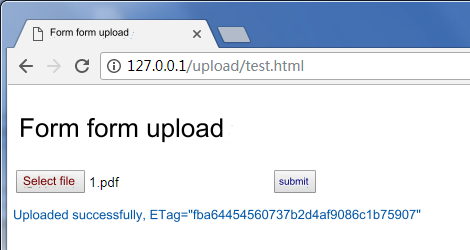
実行効果を下図に示します。
アップロードする時にファイルのタイプとサイズを制限します
フロントエンドでファイルタイプを制限します
上記の AJAX PUT アップロードを参照し、ファイルを選択する時に判断を追加するだけで済みます。 (ファイル拡張子のみを制限できる)
// その他のコードを省略しますdocument.getElementById('submitBtn').onclick = function (e) {const file = document.getElementById('fileSelector').files[0];if (!file) {document.getElementById('msg').innerText = 'アップロードするファイルが選択されていません';return;}// ファイルの拡張子を取得しますconst fileName = file.name;const lastDotIndex = fileName.lastIndexOf('.');const ext = lastDotIndex > -1 ? fileName.substring(lastDotIndex + 1) : '';// 制限したい形式に置き換えてください。例えば、jpg png タイプのファイルのみアップロードできますconst allowExt = ['jpg', 'png'];if (!allowExt.includes(ext)) {alert('jpg、pngファイルのみアップロードできます');return;}file &&uploadFile(file, function (err, data) {console.log(err || data);document.getElementById('msg').innerText = err? err: 'アップロードに成功しました。ETag=' + data.ETag + 'url=' + data.url;});};
フロントエンドでファイルサイズを制限します
上記の AJAX PUT アップロードを参照し、ファイルを選択する時に判断を追加するだけで済みます。
// その他のコードを省略しますdocument.getElementById('submitBtn').onclick = function (e) {const file = document.getElementById('fileSelector').files[0];if (!file) {document.getElementById('msg').innerText = 'アップロードするファイルが選択されていません';return;}const fileSize = file.size;// 制限したいオブジェクトのサイズに置き換えてください。1つのオブジェクトを最大 5GB に制限できます。例えば、アップロードするファイルを 5MB に制限しますif (fileSize > 5 * 1024 * 1024) {alert('選択したファイルが 5MB を超えています。再度選択してください');return;}file &&uploadFile(file, function (err, data) {console.log(err || data);document.getElementById('msg').innerText = err? err: 'アップロードに成功しました。ETag=' + data.ETag + 'url=' + data.url;});};
サービス側のサインの制限
関連ドキュメンテーション
これ以上多くのインターフェース呼び出しニーズがある場合は、以下の JavaScript SDK ドキュメンテーション:
フィードバック