Flutter
下载
聚焦模式
字号
TUIKit 默认实现了文本、图片、语音、视频、文件等基本消息类型的发送和展示,如果这些消息类型满足不了您的需求,您可以新增自定义消息类型。
自定义消息
如果基本消息类型不能满足您的需求,您可以根据实际业务需求自定义消息。
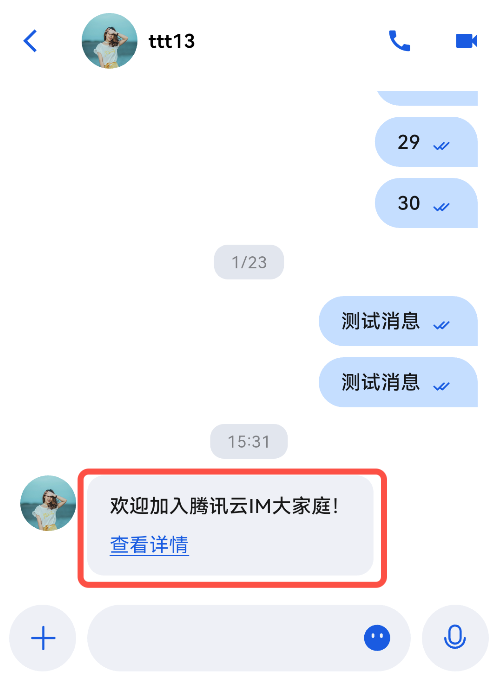
下文以发送一条可跳转至浏览器的超文本作为自定义消息为例,帮助您快速了解实现流程。
如下图所示:
下面我们分步骤讲解使用自定义消息。
展示自定义消息
自定义消息是在
custom_message_widget.dart 中渲染的,消息内容以 String 格式,存储于 customMessage.data 中,建议使用 JSON 格式。展示自定义消息基本逻辑:解析时,将 JSON String 解析成 Map,用于实例化一个预定义的类,以该对象内的数据,渲染自定义消息体。
1. 定义一个类,用于自定义消息解析后的结构。并完成一个 fromJSON 的方法,通过 Map 对其实例化。
以上述包含链接及文本的自定义消息格式举例:
class CustomMessage {String? link;String? text;String? businessID;CustomMessage.fromJSON(Map json) {link = json["link"];text = json["text"];businessID = json["businessID"];}}
2. 在
_buildDefaultCustomMessage 方法中对自定义消息的解析,得到 CustomMessage 数据对象,通过 _buildTextLinkMessage 渲染消息。示例代码如下:
Widget _buildDefaultCustomMessage(BuildContext context,SemanticColorScheme colorsTheme,AtomicLocalizations atomicLocale,) {final customMessageData = message.messageBody?.customMessage;final customContent = ChatUtil.jsonData2Dictionary(customMessageData?.data);// 处理 text_link 类型的自定义消息if (customContent != null) {final customMessage = CustomMessage.fromJSON(customContent);if (customMessage.businessID == 'text_link') {return _buildTextLinkMessage(context, colorsTheme, customMessage);}}}Widget _buildTextLinkMessage(BuildContext context,SemanticColorScheme colorsTheme,CustomMessage customMessage,) {final text = customMessage.text ?? '';final link = customMessage.link ?? '';return Container(constraints: BoxConstraints(maxWidth: maxWidth * 0.7,),padding: const EdgeInsets.fromLTRB(16, 12, 16, 12),decoration: BoxDecoration(color: isSelf ? colorsTheme.buttonColorPrimaryDefault : colorsTheme.bgColorDefault,borderRadius: BorderRadius.circular(12),),child: Column(crossAxisAlignment: CrossAxisAlignment.start,mainAxisSize: MainAxisSize.min,children: [Text(text,style: TextStyle(color: isSelf ? colorsTheme.textColorAntiPrimary : colorsTheme.textColorPrimary,fontSize: 14,fontWeight: FontWeight.w500,),),const SizedBox(height: 8),GestureDetector(onTap: () => _launchUrl(link),child: Text('查看详情',style: TextStyle(color: isSelf ? colorsTheme.textColorAntiPrimary : colorsTheme.buttonColorPrimaryDefault,fontSize: 14,fontWeight: FontWeight.w400,decoration: TextDecoration.underline,decorationColor: isSelf ? colorsTheme.textColorAntiPrimary : colorsTheme.buttonColorPrimaryDefault,),),),],),);}
3. 在
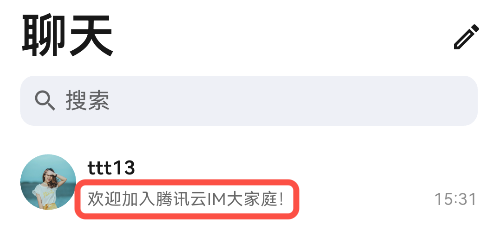
message_utils.dart 中的 getMessageAbstract方法里,对增加的自定义消息类型进行解析,用于生成在会话列表中的文字摘要。示例代码如下:
static String getMessageAbstract(MessageInfo? messageInfo,BuildContext context,{bool showMergedTitle = false}) {switch (messageInfo.messageType) {// 省略其他类型消息// 自定义消息文字摘要case MessageType.custom:final customMessage = messageInfo.messageBody?.customMessage;if (customMessage == null) {return localizations.messageTypeCustom;}// 省略部分代码final customInfo = ChatUtil.jsonData2Dictionary(customMessage.data);if (customInfo != null) {// 省略其他自定义消息解析// 解析增加的自定义消息if (customInfo['businessID'] == 'text_link') {return customInfo['text']?.toString() ?? localizations.messageTypeCustom;}}return localizations.messageTypeCustom;default:return '';}}
效果如下:
发送自定义消息
发送自定义消息基本步骤:创建一条自定义消息,将要发送的内容转成 JSON String 格式放入
data 中,并调用 MessageInputStore 的 sendMessage 接口发送。示例代码如下:
// 创建 MessageInputStore 对象MessageInputStore _messageInputStore = MessageInputStore.create(conversationID: widget.conversationID);// 构造自定义消息final messageInfo = MessageInfo();messageInfo.messageType = MessageType.custom;MessageBody messageBody = MessageBody();messageBody.customMessage = CustomMessageInfo(data: '{"businessID":"text_link","link":"https://www.tencentcloud.com/document/product/269/3794?from_cn_redirect=1","text":"欢迎加入腾讯云IM大家庭!"}',);messageInfo.messageBody = messageBody;// 发送消息await _messageInputStore.sendMessage(message: messageInfo);
文档反馈