Unity
下载
聚焦模式
字号
Chat Unity UIKit 和 UIKit Demo 是基于 Tencent Cloud Chat SDK 实现的游戏场景业务 UI 组件库,目前包含了会话(Conversation) 和聊天 (Chat)组件,收发文字消息、收发表情包消息、自定义表情包等功能,支持 iOS 及 Android 平台。在您的 Unity 项目下引用此 UIKit 可助您快速搭建您的聊天系统。
环境要求
平台 | 版本 |
Unity | 2019.4.15f1 及以上版本。 |
Android | Android Studio 3.5及以上版本,App 要求 Android 4.1及以上版本设备。 |
iOS | Xcode 11.0及以上版本,请确保您的项目已设置有效的开发者签名。 |
前提条件
开通服务
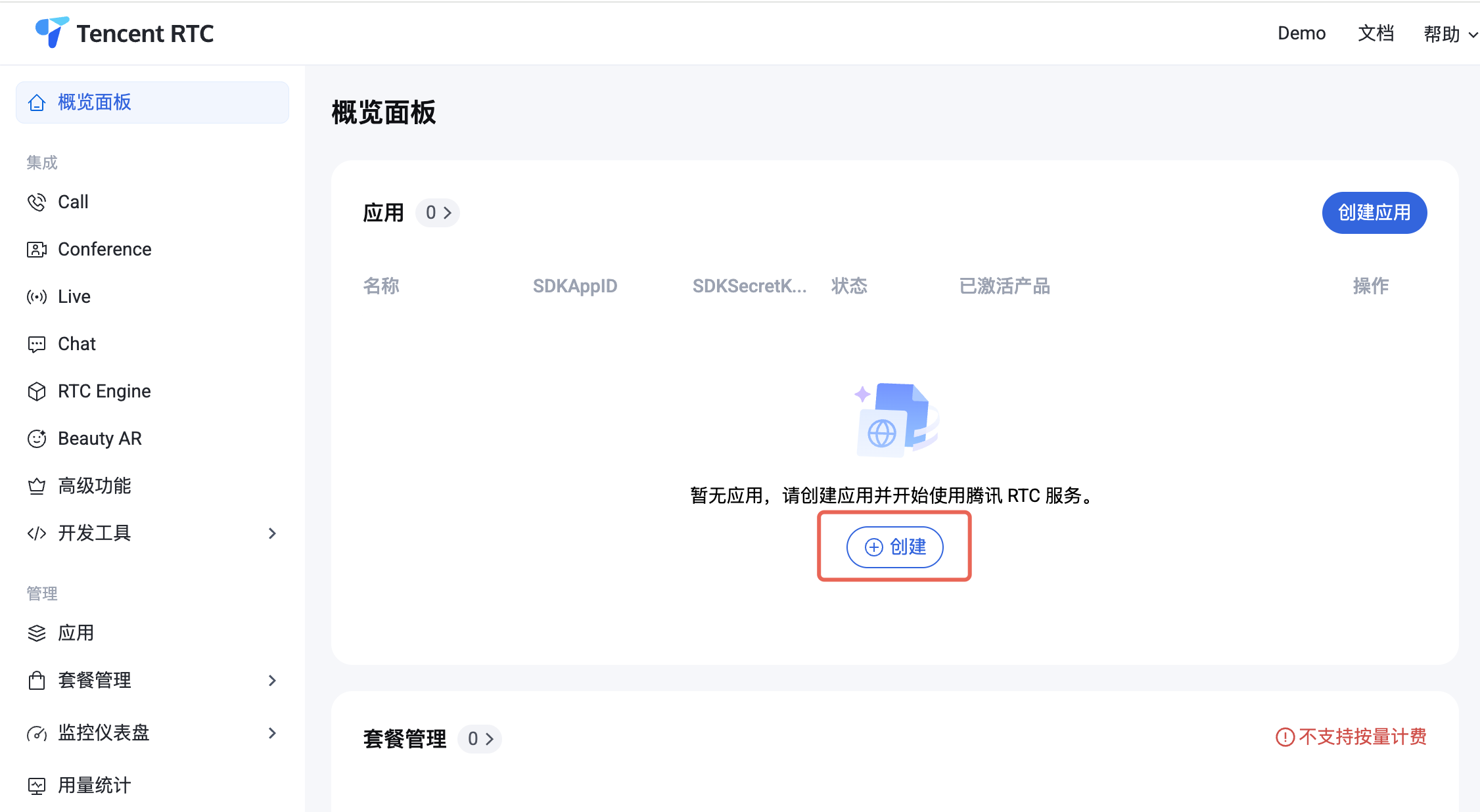
1. 登录 控制台。如果您已有应用,请记录其
SDKAppID 及 SDKSecretKey 并直接跳转到下一节。2. 在概览面板单击创建,开始创建新应用。
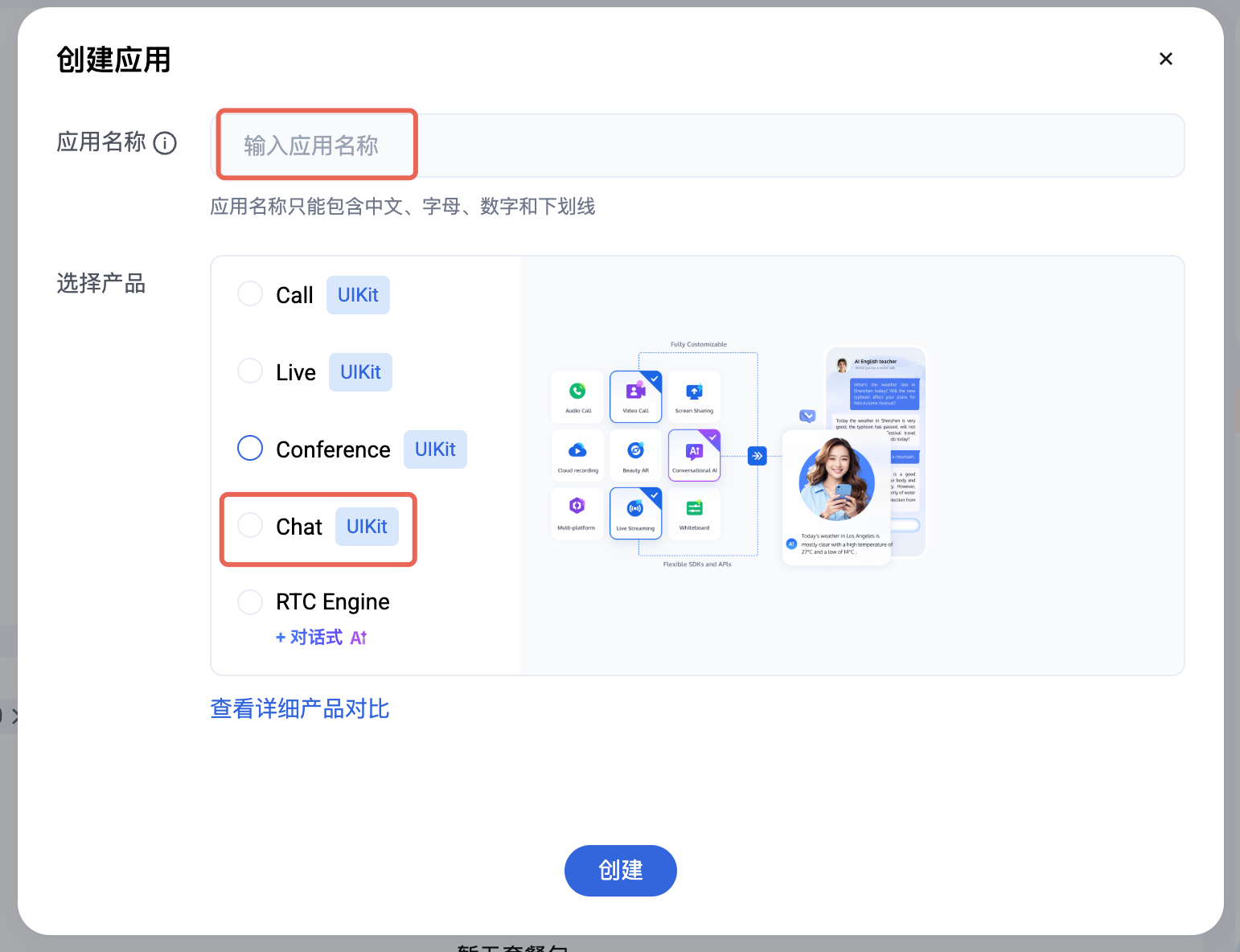
3. 在创建应用弹框中填入应用名称,选择产品为 Chat。
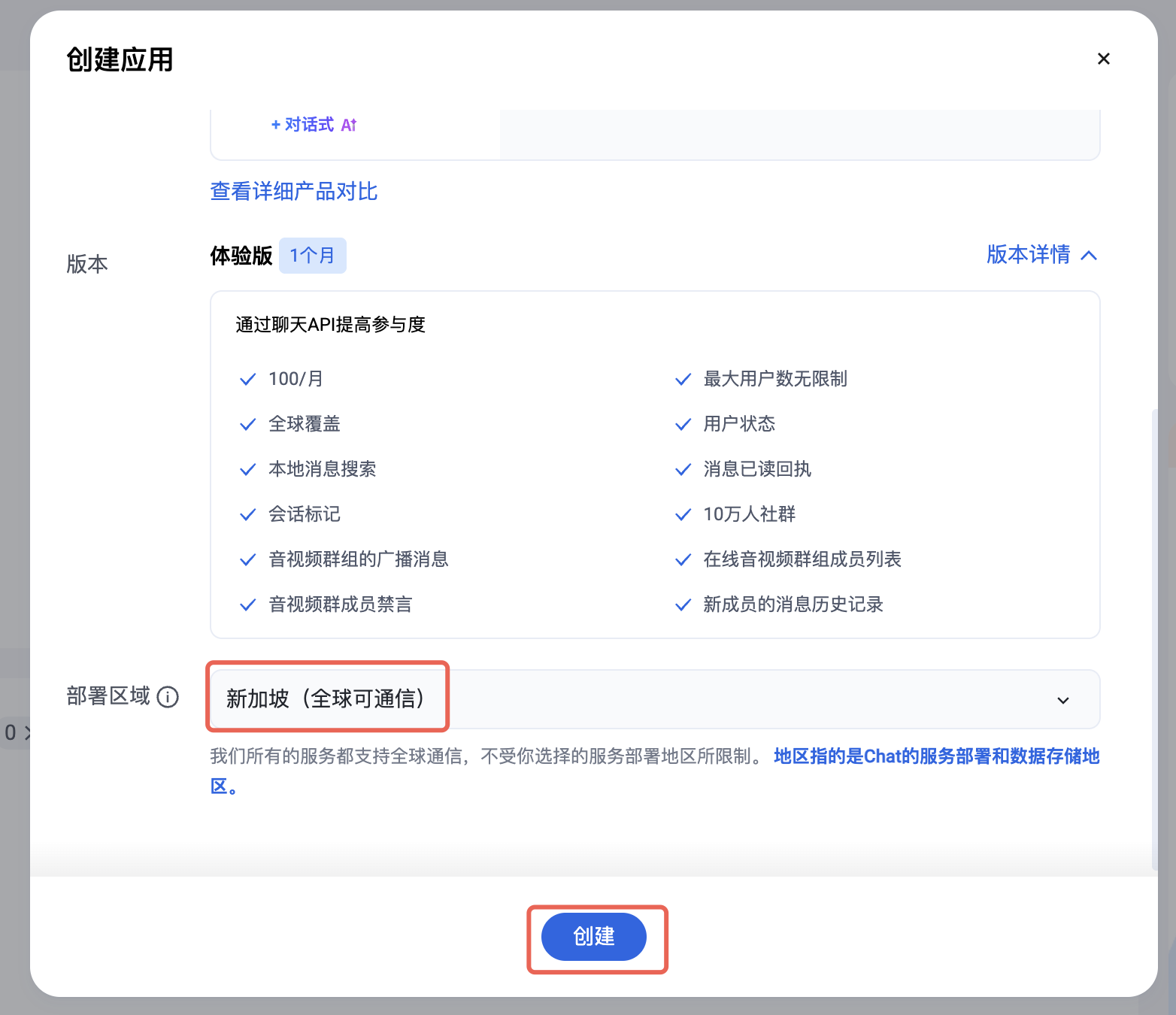
4. 选择完产品后,会显示出部署区域,请按需选择。
5. 创建完成后,可在控制台概览面板查看新建应用的
SDKAppID、SDKSecretKey,后续运行 Demo 时需要用到这两个信息。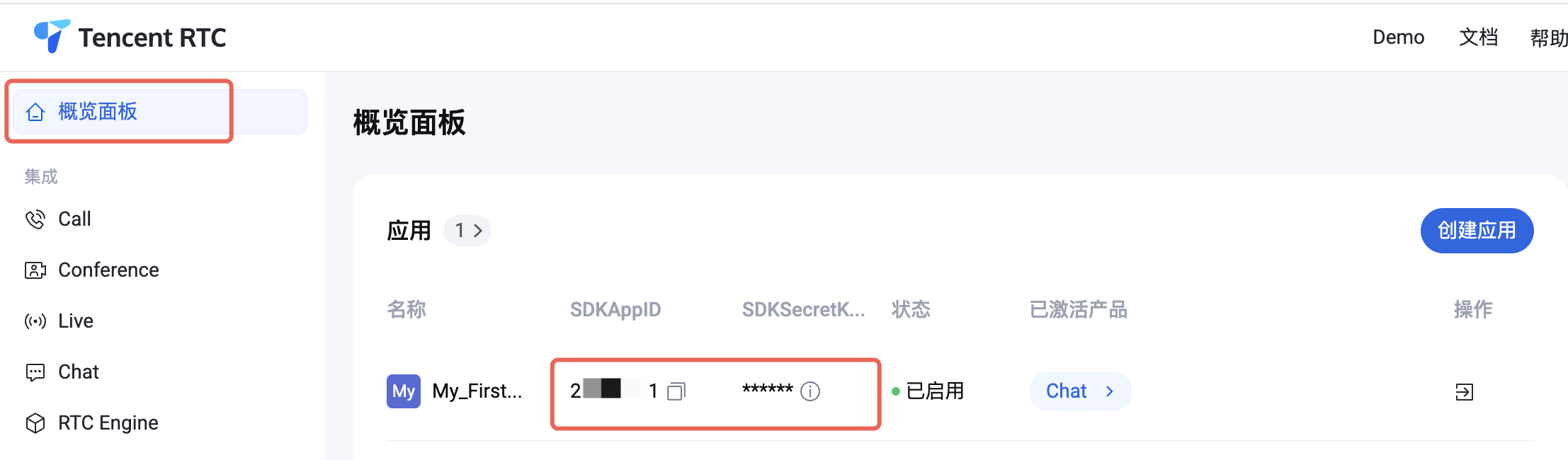
禁止:
请妥善保管 SDKSecretKey,谨防泄露!
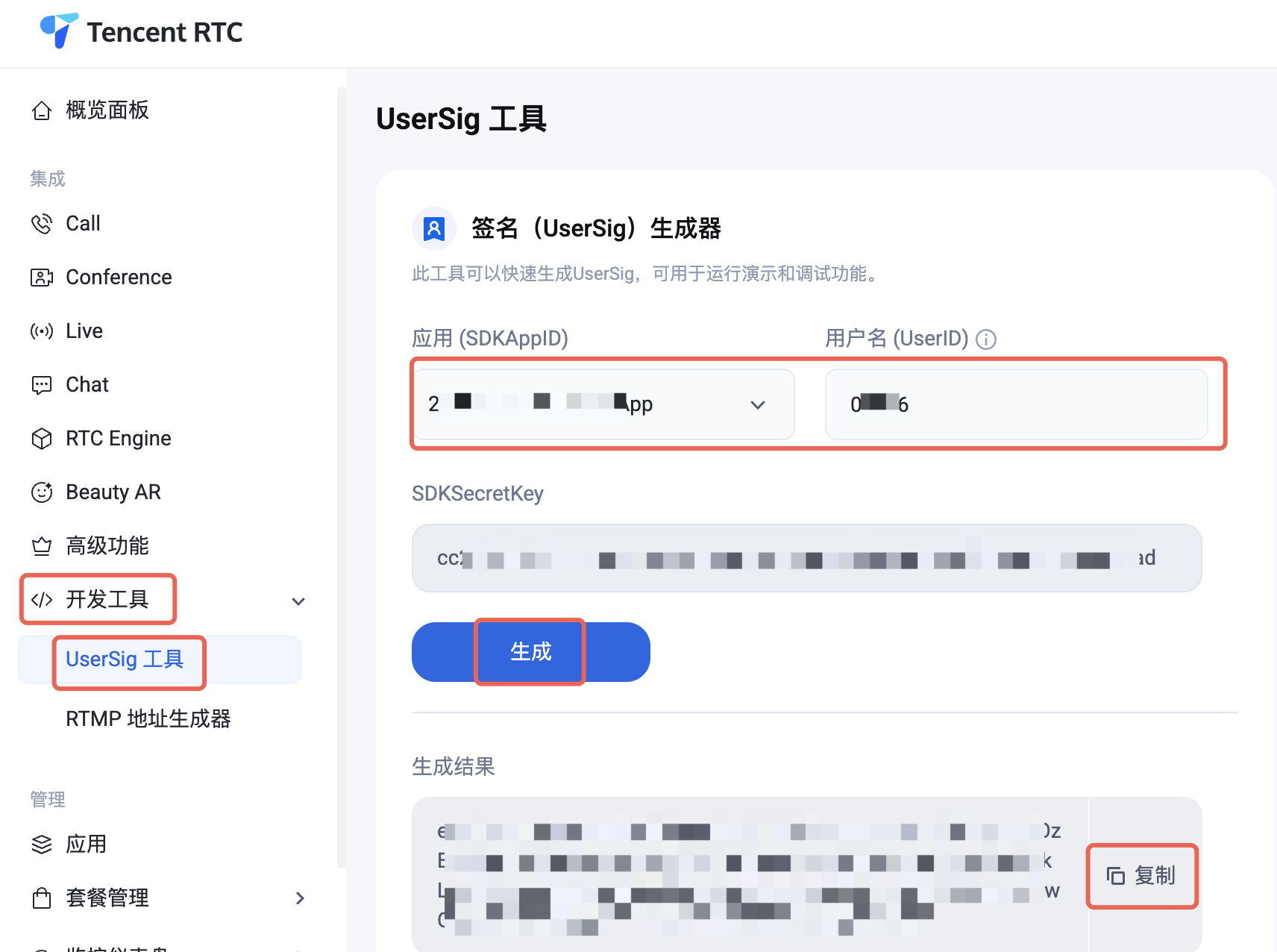
6. 进入 UserSig 工具,选择刚才创建的应用,输入 UserID,会生成对应的 UserSig,复制信息,后续登录会使用到。
如何将 UIKit 导入到项目中
导入 AssetPackage
1. 创建/启动已存在的 Unity 项目。
2. 在 Packages/manifest.json 文件中的 dependencies 下添加:
{"dependencies":{"com.tencent.imsdk.unity":"https://github.com/TencentCloud/chat-sdk-unity.git#unity"}}
3. 下载 UIKit GitHub 目录下的 chat-uikit-unity.unitypackage,并导入资源包。
初始化并登录
初始化并登录 Chat 有两种方式:
方式一:组件外部
整个应用初始化并登录一次即可。需要自行添加相应的事件回调。
方式二:组件内部
通过配置的方式将参数传入组件内部。建议您使用内部登录,UIKit 已帮您绑定了相应的事件回调,包括接收新消息的事件以及会话列表更新的事件。
方式 1: 组件外部
在您创建的 Unity 项目中初始化 Chat,注意 Chat 应用只需初始化一次即可。如果在现有 Chat 项目中集成可跳过该步骤。
public static void Init() {int sdkappid = 0; // 从即时通信 IM 控制台获取应用 SDKAppID。SdkConfig sdkConfig = new SdkConfig();sdkConfig.sdk_config_config_file_path = Application.persistentDataPath + "/TIM-Config";sdkConfig.sdk_config_log_file_path = Application.persistentDataPath + "/TIM-Log"; // 设置本地日志地址TIMResult res = TencentIMSDK.Init(long.Parse(sdkappid), sdkConfig);}public static void Login() {if (userid == "" || user_sig == ""){return;}TIMResult res = TencentIMSDK.Login(userid, user_sig, (int code, string desc, string json_param, string user_data)=>{// 处理登录回调逻辑});
方式 2: 组件内部
您也可以将 SDKAppID、UserSig、UserID 通过配置的方式传入组件内部进行 Chat 的初始化和登录(与 demo 运行方式相同)。
using com.tencent.imsdk.unity.uikit;// demo 登录逻辑如下public static void Init() {Core.SetConfig(sdkappid, userId, sdkUserSig);Core.Init();Core.Login();}// 若直接跑unity demo,推荐通过 Main 页面的手机号/验证码输入框登录。可以保证监听回调等正常运行。// 由于电脑端unity不支持手机号登录,请将 userid输入到手机号输入框,userSig输入到验证码输入框。// Assets/Example/Scripts/Main.csprivate void Login(){// 将之前的Login函数内容注释掉,添加以下内容loginButton.interactable = false;Core.SetConfig(Config.sdkappid, phoneNumber.text, captcha.text);Core.Init();Core.Login(HandleAfterLogin);loginButton.interactable = true;}
使用 Conversation 和 Chat 预制件
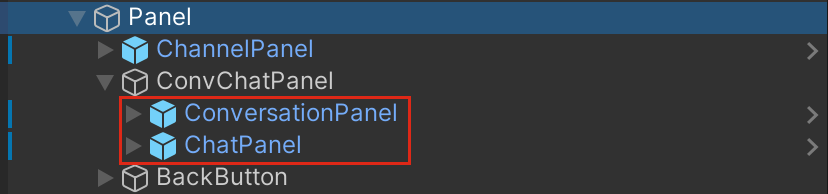
您可将下列预制件放入您的场景中,修改相应样式和布局(layout)。
项目结构
Assets/Example
该目录对应实际项目运行时显示的内容,包含 Scenes 的两个页面,分别对应的代码为
Main.cs(登录界面) 和 Chat.cs(聊天界面)。Chat 里包含单聊、群聊的内容,可以获取到会话(好友)列表并发送文字、表情包消息。Chat 里的内容由
Prefabs 里的组件构成,可以通过修改 Prefabs 修改显示内容和样式。Assets/Prefabs
下列组件可以联合使用(参考 Scenes 的 Chat 页面),也可根据需求将组件单独修改并使用。
ChatPanel
消息历史列表
消息展示区
ConvMessagePanel会话名展示区
ConversationNamePanel历史消息展示区
MessageContentPanel消息输入区
ActionPanel表情包区
OverlayPanel关闭聊天窗口按钮
CloseButton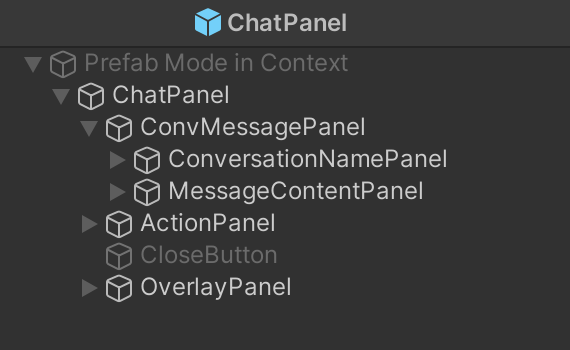
ConversationPanel
会话列表。现主要显示好友的单聊会话。相应代码在
Script/Components/Conversation.cs 里。每个会话的样式在 ConversationItem.prefabs 里。会话列表区
FriendPanel搜索区
SearchPanel会话列表
ConversationListPanel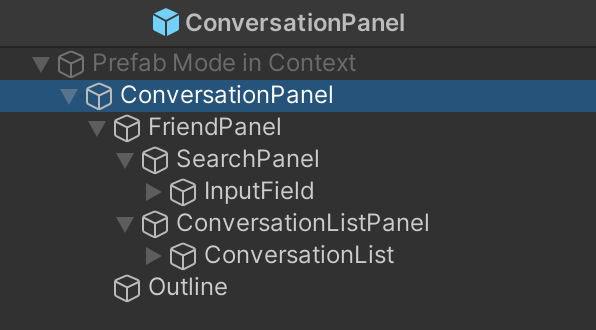
ChannelPanel
频道列表,由4个频道按钮组成,分别为世界、频道、组队、好友。其中前三个频道为群聊频道,好友频道为单聊频道并会显示单聊会话列表。频道按钮的点击事件和样式在
Script/Components/Chat.cs 里。AvatarPanel
会话(ConversationItem)、单条聊天记录(messageItem 等)里的头像样式。包含头像和段位头像。
ConversationItem
会话列表中的会话样式,包含头像(AvatarPanel),会话名称以及段位。
MessageItem、MessageItemSelf
文字消息内容。分别为他人发送文字消息和自己发送文字消息。
头像区
MessageSenderPanel消息区
MessageContentPanel发送者信息区
SenderNamePanel发送者名字
MessageSender发送者段位 Icon 和名称
Icon 和 Text消息体
PanelStickerMessageItem、StickerMessageSelf
表情包消息内容。内容与 MessageItem 相同。
GroupTipItem
群提醒消息内容,为用户进群、退群、admin 消息等。包含群名和消息体。
TimeStamp
历史消息中的时间节点。
StickerItem、MenuItem
分别为表情包和快捷 menu 里的表情包。
如何启动 Demo 项目
初始化登录
将 SDKAppID、UserSig、UserID 通过配置的方式传入组件内部进行 Chat 的初始化和登录。
注意:
整个项目只需要初始化一次。
using com.tencent.imsdk.unity.uikit;// demo 登录逻辑如下public static void Init() {Core.SetConfig(sdkappid, userId, sdkUserSig);Core.Init();Core.Login();// 可传递函数// Core.Login(HandleAfterLogin);}// 若直接跑unity demo,推荐通过 Main页面的手机号/验证码输入框登录。可以保证监听回调等正常运行。// 由于电脑端unity不支持手机号登录,请将 userid输入到手机号输入框,userSig输入到验证码输入框。// Assets/Example/Scripts/Main.csprivate void Login(){// 将之前的Login函数内容注释掉,添加以下内容loginButton.interactable = false;Core.SetConfig(Config.sdkappid, phoneNumber.text, captcha.text);Core.Init();Core.Login(HandleAfterLogin);loginButton.interactable = true;}
初始化登录后直接打开 Chat 页面即可。
频道
demo 中分世界、频道、组队、好友四个频道。其中
好友 频道显示 C2C 会话和已添加的好友的列表,点击某个会话可开始聊天。其他三个频道为群组会话,若需要在该频道发消息则需要先创建群组并将其 ID 添加到项目中。
创建群组
通过 RestAPI 添加
在控制台添加
您也可以通过控制台创建群组。进入控制台中您的 Chat 应用 > 群组管理 > 添加群组。
将群组添加到频道
进入
Assets/Example/Scripts/Config/Config.cs,将创建的群组的群组 ID 填入 communityID(社群),channelID(频道),groupID(组队)。并在登录之后调用
joinGroup 即可实现登录后进入相应群组,并可以在群内发送消息。发送消息
若您已将群组添加到频道中,您可以通过世界、频道、组队频道发送群聊消息。
您也可以在好友频道点击某个单聊会话发送单聊消息。
修改表情包和段位信息
段位
现各个用户段位为随机生成,若您需要使用段位信息,您可以在用户的自定义字段中进行设置。
UserProfileCustemStringInfo teer = new UserProfileCustemStringInfo{user_profile_custom_string_info_key:"段位",user_profile_custom_string_info_value:"teer"}List<UserProfileCustemStringInfo> customArray = new List<UserProfileCustemStringInfo>();customArray.Add(teer);TencentIMSDK.ProfileModifySelfUserProfile(new UserProfileItem{user_profile_item_custom_string_array:customArray;});
并按照段位的名称显示相应的段位图标。
1. 将段位对应的图标或者头像框加载到 Resources 里。(若使用 Url 获取时可忽略这一步)
2. 修改代码中头像框和图标的显示。需要修改的部分为会话列表和消息列表。
3. 会话列表。
4. 在获取会话的函数
completeConvList 中补充获取到的段位信息。最终显示的好友会话信息在 friendProfiles 列表中。5. 在
Conversation.cs 中的 GenerateList(会话列表渲染)中修改渲染的图标和头像。6. 消息列表。
7. 在
Chat.cs 的 RenderMessageForScroll 中获取消息发送者的信息中的段位信息(若需要修改其他显示内容,也可以从这里获取)8. 在
MsgItem.cs 中修改显示的样式等细节内容。表情包
表情包使用
StickerPanel 显示在 Chat.cs 里的 OverlayPanel 中。您可以导入自己的表情包使用。(需要您提前导入自己的表情包)1. 在
Assets/Resources 文件夹内导入所用的表情包图片: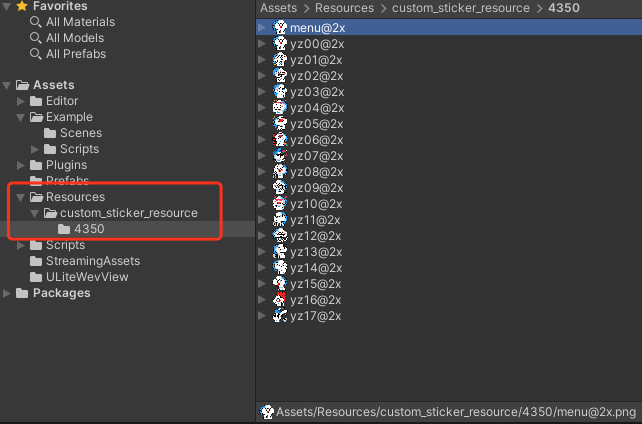
2. 更改图片的
Texture Type 为 Sprite (2D and UI),并根据图片尺寸修改 Pixels Per Unit: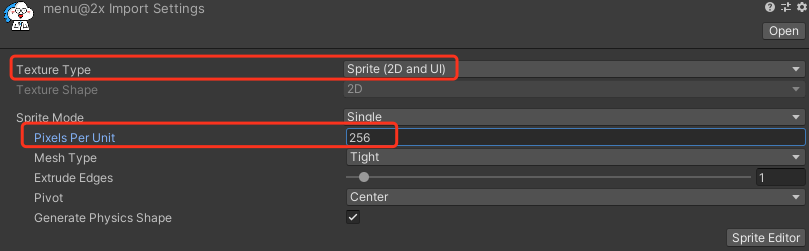
3. 定义相应的表情包数据:
// 生成表情包列表,StickerPackage 为一组表情包List<StickerPackage> stickers = new List<StickerPackage> {new StickerPackage {name = "4350",baseUrl = "custom_sticker_resource/4350", //Resource 文件夹内相对路径menuItem = new StickerItem { // 表情栏表情项目name = "menu@2x",index = 0,},stickerList = new List<StickerItem> { // 表情包项目组new StickerItem { // 具体表情包数据name = "menu@2x",index = 0 // 表情包顺序},}}};
4. 注册表情包给 UIKit:
using com.tencent.imsdk.unity.uikit;Core.SetStickerPackageList(Config.stickers);
语言包
Chat Unity UIKit Demo 提供根据系统语言切换语言系统,现支持简体中文和英语。您可以按照需求增加语言或者修改里面的配置。
1. 语言资料
语言资料放在
Resources/LanguageTxt 里。现在包含 Chinese.txt(简体中文) 和 English.txt(英文)。若需要其他语言,可以添加对应的 txt 文件。2. 该文件的结构如下:
//English.txtKey:Value//Chinese.txtKey:值
注意:
1. Key 应与其他语言的 Key 一致,并与后续的 enum 一致。
2. Value 为 Key 对应的该语言的值。
3. Key 和 Value 之间使用冒号分隔开。
3. 设置语言
4. 设置语言和词条
5. 若你添加了语言,添加相应的语言词汇 txt 文件后在
LanguageDataManager.cs 中的 Language 中添加新的语言,并在 LanguageTextName 中增加对应的词条的 Key。6. 加载语言词条文件
private Dictionary<string,string> EnglishDictionary = new Dictionary<string,string>();LoadLanguageTxt(Language.English);
7. 组件设置(静态修改)
在需要设置的 text 组件中添加
LanguageUIText(Script) component,将需要显示的词的 Key 选中。改显示的 Key 对应 LanguageTextName 中的 enum 和词汇文件里的 Key。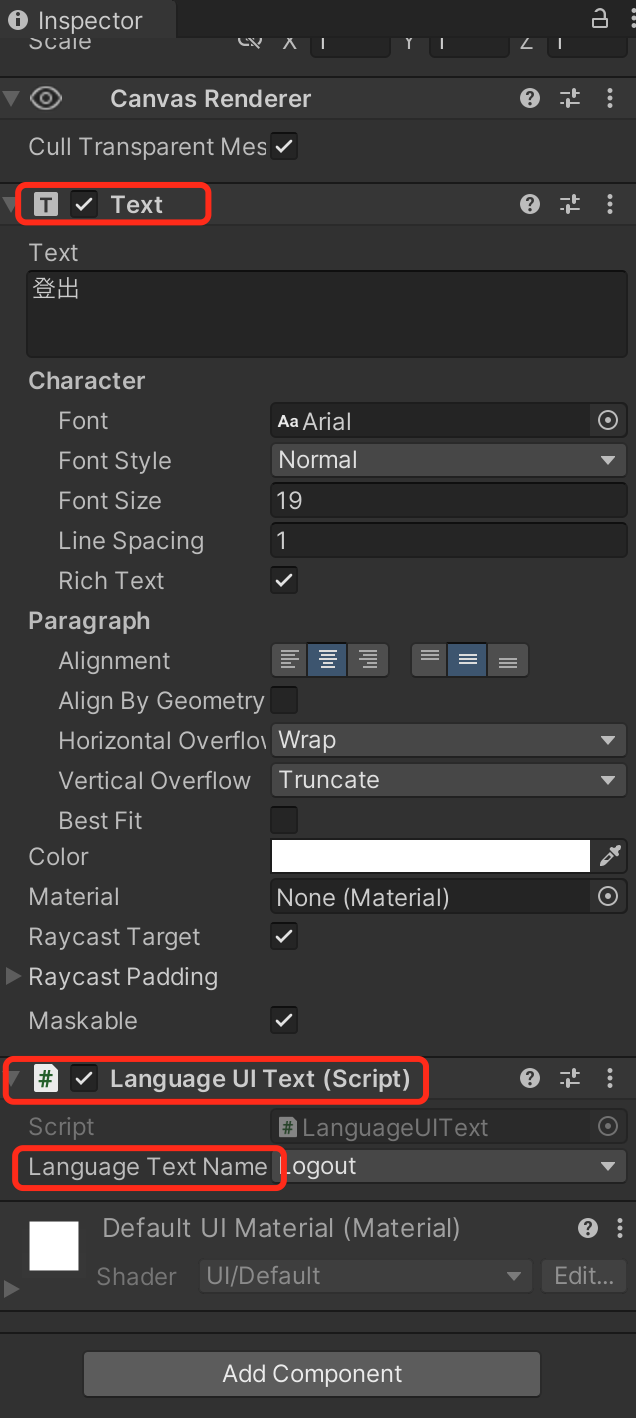
8. 设置语言
若要设置语言,在软件开启时调用
SetCurrentLanguageValue。若要固定语言,可直接在 LanguageDataManager.cs 对 currentLanguage 赋值(可当成默认语言)。该 Demo 根据系统语言判断并赋值。若需要修改的组件不仅为静态组件,则简单的方法为将现在使用的语言保存到 config 中(在 Demo 中保存到了 Core)在代码中判断显示。API 文档
SetConfig
在 Init 前传入 Config 信息,包括
sdkappid, userid 以及 usersig。using com.tencent.imsdk.unity.uikit;Core.SetConfig(sdkappid, userid, usersig);
Init
采用 UIKit 提供的 Init 方法来初始化 SDK,会自动绑定
AddRecvNewMsgCallback 和 SetConvEventCallback 回调。using com.tencent.imsdk.unity.uikit;Core.Init();
SetStickerPackageList
通过
SetStickerPackageList 设定表情包列表。using com.tencent.imsdk.unity.uikit;Core.SetStickerPackageList(Config.stickers);
Login
通过
Login 登录账号,登录完成后执行绑定的回调函数。using com.tencent.imsdk.unity.uikit;Core.Login((params string[] args) => {// 处理Login回调});
SetMessageList
添加某个会话的消息列表,处理后合并到当前会话消息字典里,并触发
OnMsgListChanged 事件。using com.tencent.imsdk.unity.uikit;Core.SetMessageList(currentConvID, newMsgList, isFinished);
SetCurrentConv
设置当前选中的会话,并触发
OnCurrentConvChanged 事件。using com.tencent.imsdk.unity.uikit;Core.SetMessageList(convID, convType);
SetCurrentStickerIndex
设置当前选中的表情包组,并触发
OnCurrentStickerIndexChanged 事件。using com.tencent.imsdk.unity.uikit;Core.SetMessageList(stickerIndex);
Logout
登出,并清空数据。
using com.tencent.imsdk.unity.uikit;Core.Logout((string[] parameters) => {// 处理Logout回调});
TencentIMSDK
Unity TencentIMSDK 提供了基于 Unity 平台的全面的即时通信能力。您可以使用
TencentIMSDK 来获取其他即时通信的相关功能。例如通过 TencentIMSDK 来获取用户资料。using com.tencent.imsdk.unity;// 获取个人资料FriendShipGetProfileListParam param = new FriendShipGetProfileListParam{friendship_getprofilelist_param_identifier_array = new List<string>{"self_userid"}};TIMResult res = TencentIMSDK.ProfileGetUserProfileList(param, (int code, string desc, List<UserProfile> profile, string user_data)=>{// 处理异步逻辑});
常见问题
表情包的使用
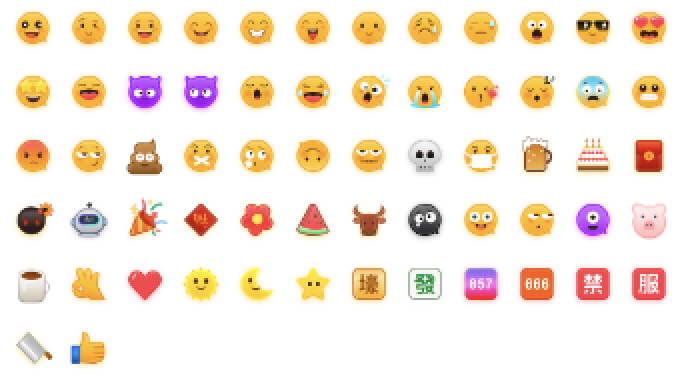
为尊重表情设计版权,Chat Demo/TUIKit 工程中不包含大表情元素切图,正式上线商用前请您替换为自己设计或拥有版权的其他表情包。下图所示默认的小黄脸表情包版权归腾讯云所有,您可以通过升级至 Chat 专业版 Plus 和企业版 免费使用该表情包。
文档反馈