Configuring Akamai NetStorage as an Origin
Download
Focus Mode
Font Size
This document describes how to configure origin authentication for your Akamai NetStorage origin by using the「Origin Authentication」action in the EdgeOne Rules Engine. This helps you achieve a smooth migration from Akamai ChinaCDN to EdgeOne without modifying your origin's authentication logic.
Overview
Akamai NetStorage is a cloud storage service provided by Akamai (similar to AWS S3 or Tencent Cloud COS). It is widely used as an origin for CDN back-to-origin traffic. Akamai NetStorage requires each origin request to carry specific authentication headers. The origin server validates these headers and returns a normal response only after successful verification. Its authentication logic involves complex calculations, including timestamps, random numbers, account IDs, and key signatures.
During migration from Akamai ChinaCDN to EdgeOne, if you continue using Akamai NetStorage as your origin, EdgeOne must be capable of automatically calculating and appending the required authentication headers. The "Origin Authentication" action in the EdgeOne Rules Engine provides a dedicated built-in function for Akamai NetStorage. This function automatically calculates and injects the authentication headers, eliminating the need to modify your origin server and helping you complete the migration smoothly.
Prerequisites
1. You have added a site in the EdgeOne console. For details, see Add a Site.
2. You have configured domain access in EdgeOne Domain Services for domains whose origin is Akamai NetStorage.
3. Obtain the following information from the Akamai NetStorage management console and store it securely:
uploadAccountId: A fixed account ID (for example,
UploadAccountMedia).key: The key used for signature calculation (for example,
123456).version: The authentication encryption format version, which can be
3 or 5.Operation Steps
If your service
www.example.com uses Akamai NetStorage as its origin, you can refer to the following steps.Assume the following field values: use the version 5 (HMAC-SHA256) encryption algorithm, set the account ID to
UploadAccountMedia, the key to your_secret_key, the action to download, the CP Code to 1926792, and the NetStorage origin domain to tencentns01-nsu.akamaihd.net.Step 1: Go to the Rule Engine.
1. Log in to the Tencent Cloud EdgeOne console. In the left-side menu bar, go to Service Overview and click the site that requires configuration under Website Security Acceleration.
2. On the Site Details page, click Site Acceleration > Rules Engine to go to the Rules Engine page.
Step 2: Configuring Matching Conditions
1. On the Rules Engine page, click Create Rule and select Add Blank Rule.
2. On the Rule Editing page, set the match type to HOST equals www.example.com.
Step 3: Adding the "Origin Authentication" Action and Configuring Three Authentication Headers
1. Choose the Operation > Select box, and then select Origin Authentication from the operation list that appears.
2. Select Set Request Header as the type, and then add the following three authentication headers in sequence:
Header 1: X-Akamai-ACS-Auth-Data
Configuration Item | Example (Refer to the Authentication Header Description for details) |
Header name | X-Akamai-ACS-Auth-Data |
Header value | akamai_ns_auth_data(5, "UploadAccountMedia") |
Header 2: X-Akamai-ACS-Auth-Sign
Configuration Item | Example (Refer to the Authentication Header Description for details) |
Header name | X-Akamai-ACS-Auth-Sign |
Header value | akamai_ns_auth_sign(5, "your_secret_key") |
Header 3: X-Akamai-ACS-Action
Configuration Item | Example (Refer to the Authentication Header Description for details) |
Header name | X-Akamai-ACS-Action |
Header value | akamai_ns_auth_action("version=1&action=download") |
Step 4: Adding the "Origin URL Rewrite" Action
For the sign-string parameter in X-Akamai-ACS-Auth-Sign, you need to prepend the CP Code to the URL path. This is implemented by adding a path prefix. A configuration example is as follows:

Step 5: Saving and Publishing the Rule
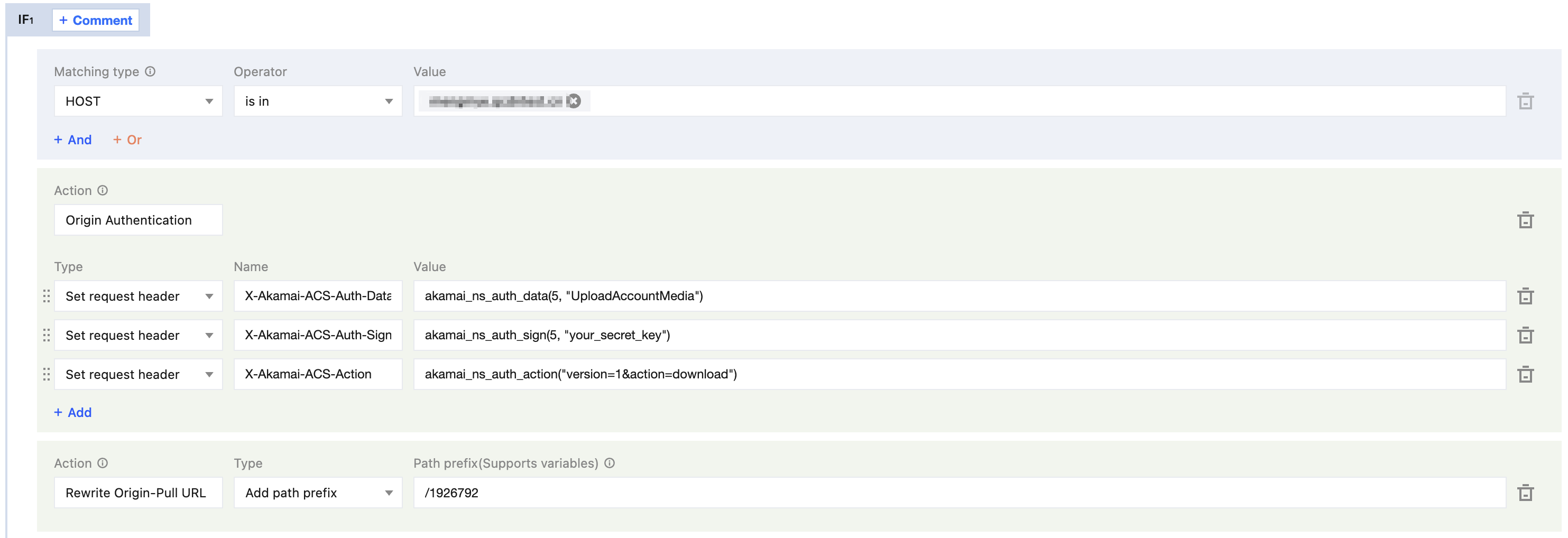
A complete configuration example is provided below. Click Save and Publish. The rule takes effect immediately after it is successfully published.
Authentication Header Specifications
For Akamai NetStorage origin authentication, you must carry the following three request headers simultaneously. The absence of any one of them will cause origin authentication to fail.
X-Akamai-ACS-Auth-Data
This header carries authentication data and is constructed by concatenating the following fields in a fixed format:
[version], [0.0.0.0], [0.0.0.0], [time], [unique-id], [uploadAccountId]
The description of each field is as follows:
Field | Description |
version | The authentication encryption format version, which can be 3 or 5, must match the origin server configuration.Version 3:HMAC-MD5([key], [data] + [sign-string]) Version 5:HMAC-SHA256([key], [data] + [sign-string]) |
0.0.0.0 | A reserved field that must be filled in as 0.0.0.0 and appears twice. |
time | The current decimal timestamp, generated in real time by EdgeOne during origin fetch. |
unique-id | A random number, generated in real time by EdgeOne during origin fetch. |
uploadAccountId | A fixed account ID provided by the customer, for example, UploadAccountMedia. |
Concatenation Example:
5, 0.0.0.0, 0.0.0.0, 1497896370, 3956209820, UploadAccountMedia
In the rule engine, use the built-in function
akamai_ns_auth_data(version, "uploadAccountId") to automatically concatenate and generate the fields mentioned above. This eliminates the need to manually maintain timestamps and random numbers.X-Akamai-ACS-Auth-Sign
This header is a Base64-encoded request signature used to verify request legitimacy. Its encryption algorithm is determined by the version (version 5 corresponds to HMAC-SHA256), and the encrypted content is formed by concatenating the following three parts:
Encrypted Content Composition:
key + data + sign-string
Field | Description |
key | A fixed key provided by the customer, for example, 123456. |
data | The complete value of the X-Akamai-ACS-Auth-Data header. |
sign-string | Formed by concatenating the URL path + a line break + the X-Akamai-ACS-Action header name and its value + another line break. |
sign-string Concatenation Example:
/[CP Code]/[path]/[file.ext]\\nx-akamai-acs-action:version=1&action=upload&md5=0123456789abcdef0123456789abcdef&mtime=1260000000\\n
In the rule engine, use the built-in function
akamai_ns_auth_sign(version, "key") to automatically complete the signature calculation described above and output the Base64-encoded result.X-Akamai-ACS-Action
This header indicates the type of operation requested (such as upload, download, and so on). In the rule engine, use the built-in function
akamai_ns_auth_action("version=xxx&action=xxx") to automatically generate the value for this header.Notes
uploadAccountId and key (the secret key) must be obtained by the customer from the Akamai NetStorage management console. Keep the key secure to prevent leakage.The version parameter must match the configuration of the origin server. Currently, versions 3 and 5 are supported.
The CP Code is specified by adding a path prefix through origin URL rewriting.
Reference
Help and Support
Was this page helpful?
You can also Contact sales or Submit a Ticket for help.
Help us improve! Rate your documentation experience in 5 mins.
Feedback