Advanced Origin Routing
Download
Focus Mode
Font Size
Overview
Advanced Origin Routing is an origin-pull path optimization capability provided by EdgeOne. It is designed for cross-region business scenarios where the origin server is deployed within the Chinese mainland and clients access it through nodes outside the Chinese mainland, or the origin server is deployed outside the Chinese mainland and clients access it through nodes within the Chinese mainland. It supports carrying origin-pull traffic over high-quality origin-pull paths, effectively reducing network latency and packet loss for cross-region origin-pull requests.
This feature is suitable for business scenarios that are sensitive to origin-pull latency, such as cross-border e-commerce, global applications, and global SaaS. It helps you achieve a more stable and faster origin server access experience during cross-region access.
Attention:
This feature is currently in beta testing and is available to Enterprise plan. To use it, please contact us to apply for activation.
Example Scenario
The origin server of an e-commerce service is deployed in Singapore and serves users both inside and outside the Chinese mainland through
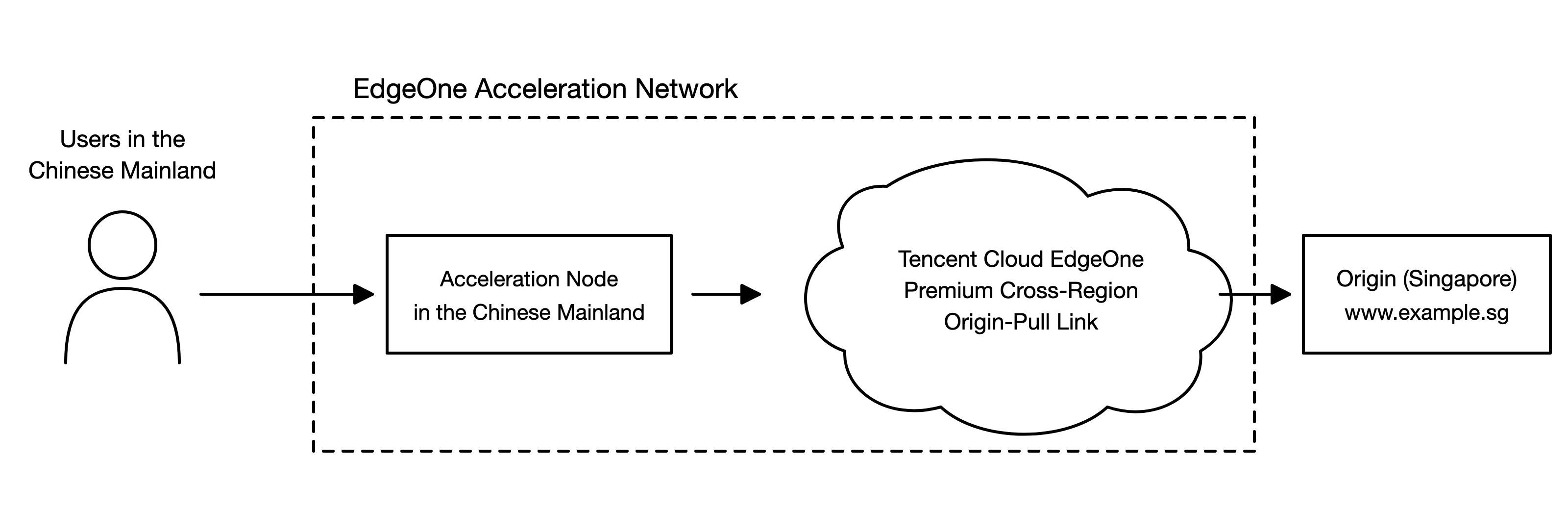
www.example.sg. When users within the Chinese mainland trigger origin-pull requests, the traffic must traverse long distances across regions over the public network, leading to issues such as high latency, jitter, and packet loss.Solution Description
After you enable Advanced Origin Routing, edge nodes prioritize high-quality origin-pull paths for data transfer, ensuring shorter paths and more stable quality. For example, in the example scenario, users within the Chinese mainland connect to the nearest acceleration node within the mainland, and origin-pull traffic travels directly to the origin server deployed in Singapore over high-quality origin-pull paths, effectively reducing origin-pull latency and packet loss while ensuring the stability of the origin-pull path.
User Guide
Prerequisites
Enabling
1. Log in to the Tencent Cloud EdgeOne console, click Site List in the left menu bar, select the site to be configured, and go to the site details page.
2. In the left navigation, click Site Acceleration and go to the Rule Engine page.
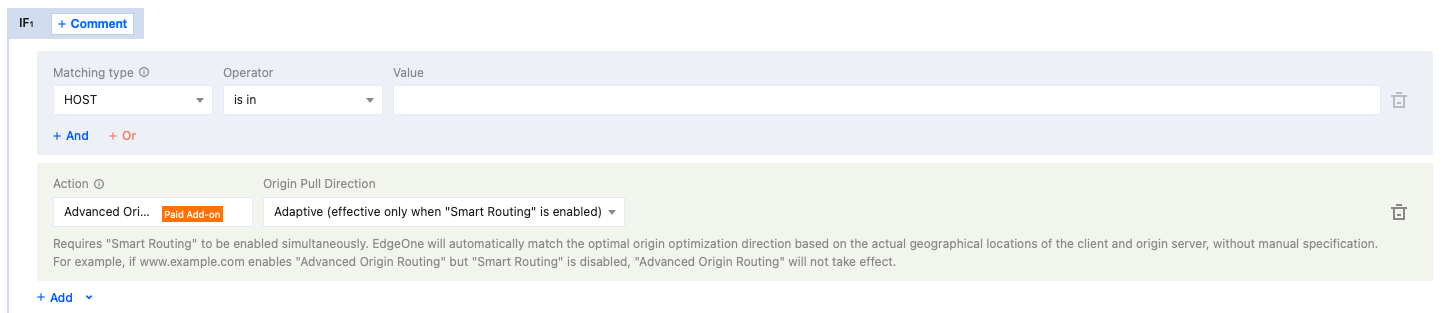
3. Click Add Rule, configure the match conditions based on your business requirements, click Add Operation, select Advanced Origin Routing, and select Adaptive in the origin-pull optimization direction.
Note:
Additional traffic fees will be charged for the Advanced Origin Routing feature. For details, see Cross-MLC-border acceleration traffic fee (Pay-as-You-Go).
When you select Adaptive(effective only when Smart Routing is enabled) as the origin-pull optimization direction , you must also enable Smart Routing for this feature to take effect. EdgeOne automatically matches the optimal origin-pull optimization direction based on the actual geographical locations of the client and the origin server, without manual specification. For example, if
www.example.com enables Advanced Origin Routing but Smart Routing is disabled, Advanced Origin Routing will not take effect, and no Cross-MLC-border acceleration traffic fee will be incurred.4. Click Save and Publish and wait for the configuration to be delivered and take effect.
Verifying the Configuration Takes Effect
After the Advanced Origin Routing configuration is delivered, it affects the actual origin-pull path and incurs Cross-MLC-border acceleration traffic fee. We recommend that you confirm the feature has taken effect and your business is available by using the following methods:
1. Return to the Rule Engine list and confirm that the rule status shows Active.
2. Compare the origin-pull latency and packet loss rate before and after you enable the feature by using real-time logs or other monitoring tools to confirm that cross-region origin-pull quality has improved and stabilized.
3. Check whether Chinese mainland network optimization traffic fees are incurred in Billing Usage to confirm that the feature is activated.
Help and Support
Was this page helpful?
You can also Contact sales or Submit a Ticket for help.
Help us improve! Rate your documentation experience in 5 mins.
Feedback