Enabling Session Affinity
Download
Focus Mode
Font Size
This document describes how to enable and use session Affinity in EdgeOne Edge Inference to preferentially schedule multiple requests from the same session to the same GPU instance, reuse the cached context prefix on the instance, and reduce the time to first token (TTFT) in multi-turn conversation and long-context scenarios.
Introduction
With default stateless routing, multiple requests from the same session may be distributed to different GPU instances. Each round of requests requires recomputing the complete context prefix, which results in higher time to first token (TTFT) and repeated computation costs in long-context scenarios.
After session Affinity is enabled, the client carries a session identifier (sessionId) in the request Header. The platform then preferentially schedules requests with the same sessionId to the same GPU instance, reusing the cached prefix computation results on that instance.
Note:
Session Affinity uses a preferential scheduling policy and is not a forced binding. A single instance has a concurrency limit. When the target instance reaches its concurrency limit, requests may be scheduled to other instances, in which case the cached prefix on the original instance cannot be reused.
Applicable Scenarios
Multi-turn conversation: A scenario where each round of requests, such as those from chatbots and intelligent customer service, carries the complete conversation history.
Long-context follow-up: A scenario where multiple questions are asked based on the same long document, such as document Q&A and code analysis.
Real-time interaction: A scenario that is sensitive to time to first token (TTFT), such as voice conversations and real-time translation.
If your requests are independent of each other and do not carry historical context, enabling session Affinity will not bring any benefits.
Limits
The currently supported source of the session identifier is the HTTP Header. The Header field name can be specified during service configuration.
The Header field name supports only letters, digits, and hyphens, with a length of 1 to 64 characters.
Session Affinity is a preferential scheduling policy and is affected by the concurrency limit of a single instance. It does not guarantee that all requests from the same session are scheduled to the same instance.
Requests that do not carry a session identifier can be called normally and are processed by the platform according to the default policy.
User Guide
Step 1: Creating a Service
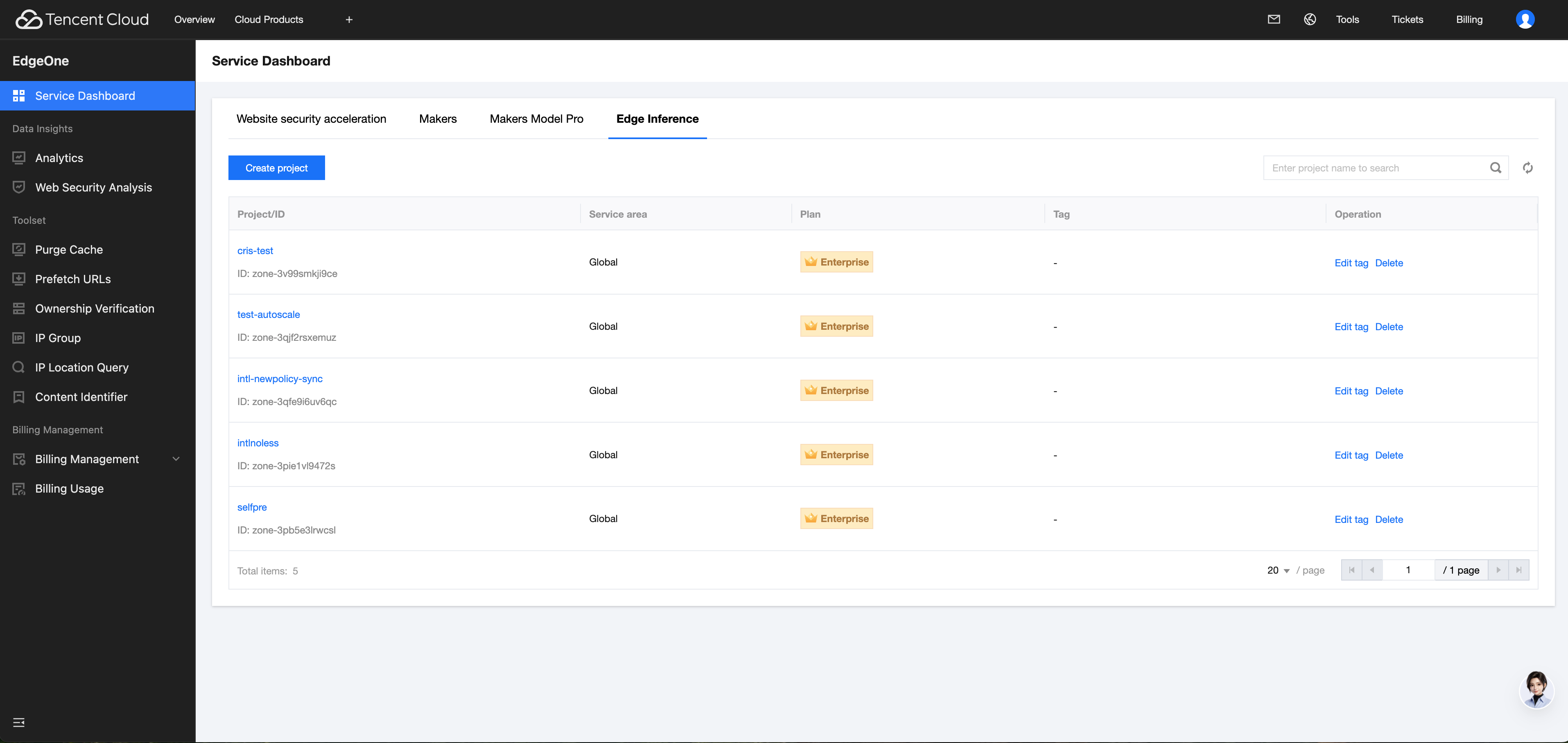
1. Log in to the EdgeOne console. The page will automatically navigate to Edge Inference. Click Create Project or click a specific project name.
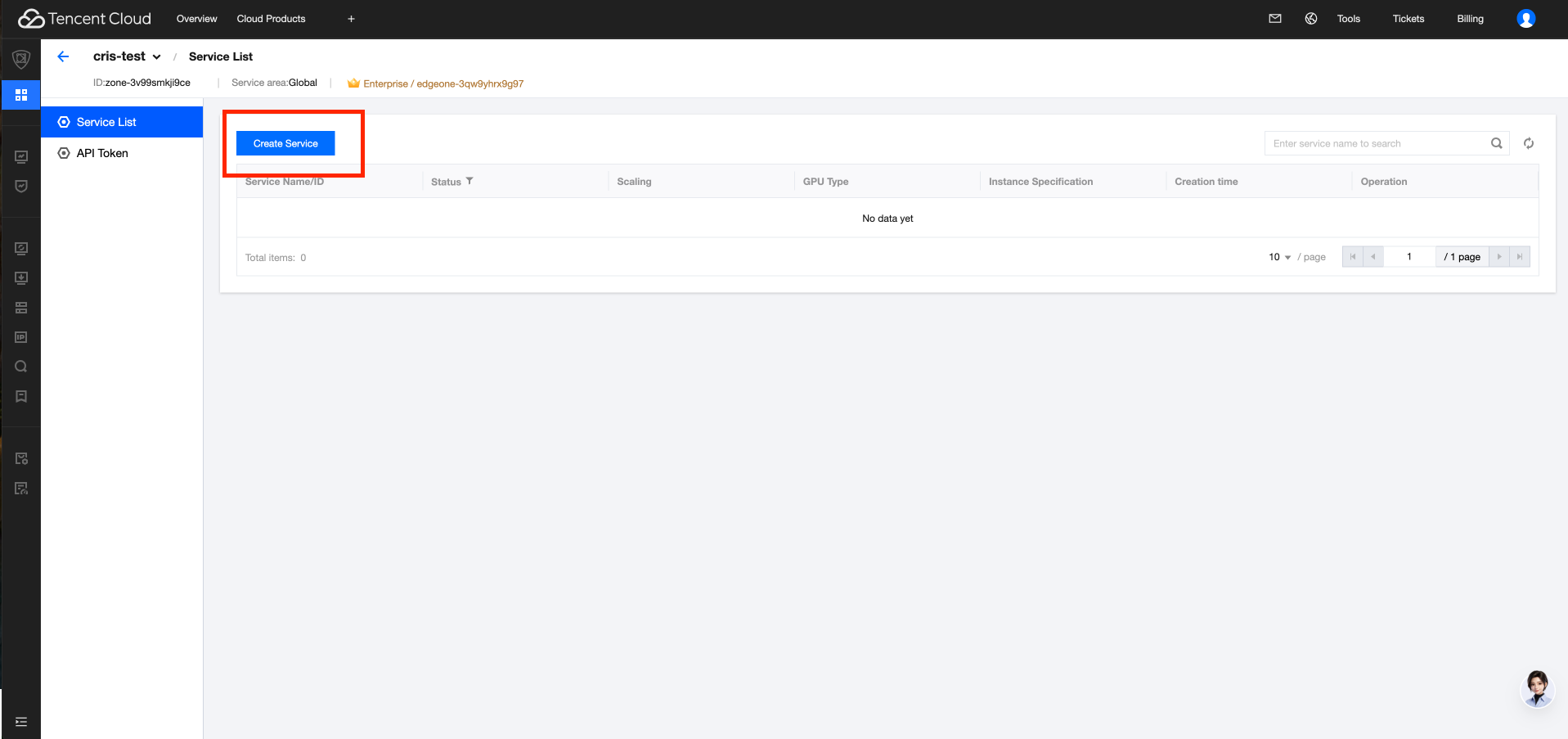
2. On the service list page, click Create Service and complete the basic settings, image settings, and resource settings by following the on-screen instructions.
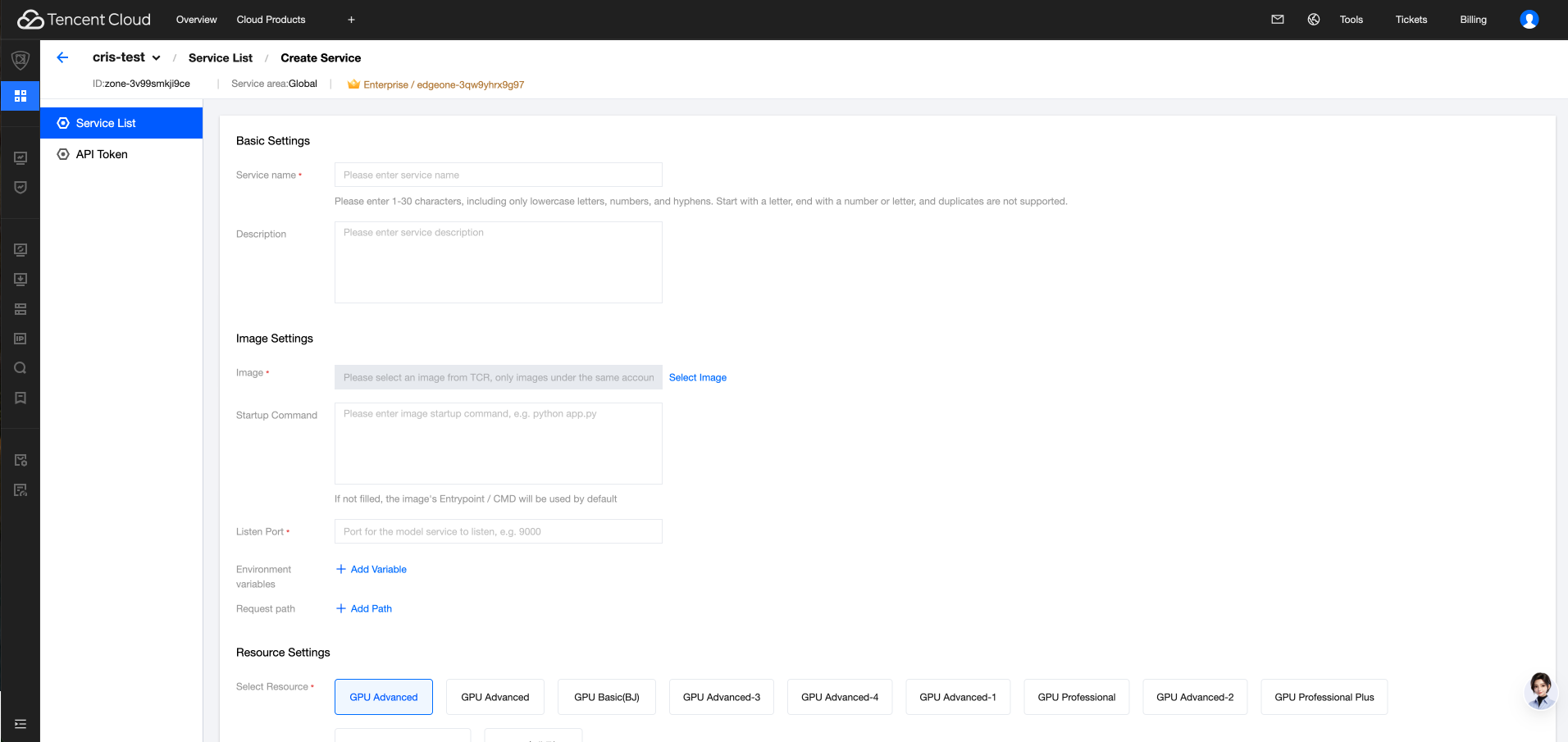
Step 2: Configuring Session Affinity
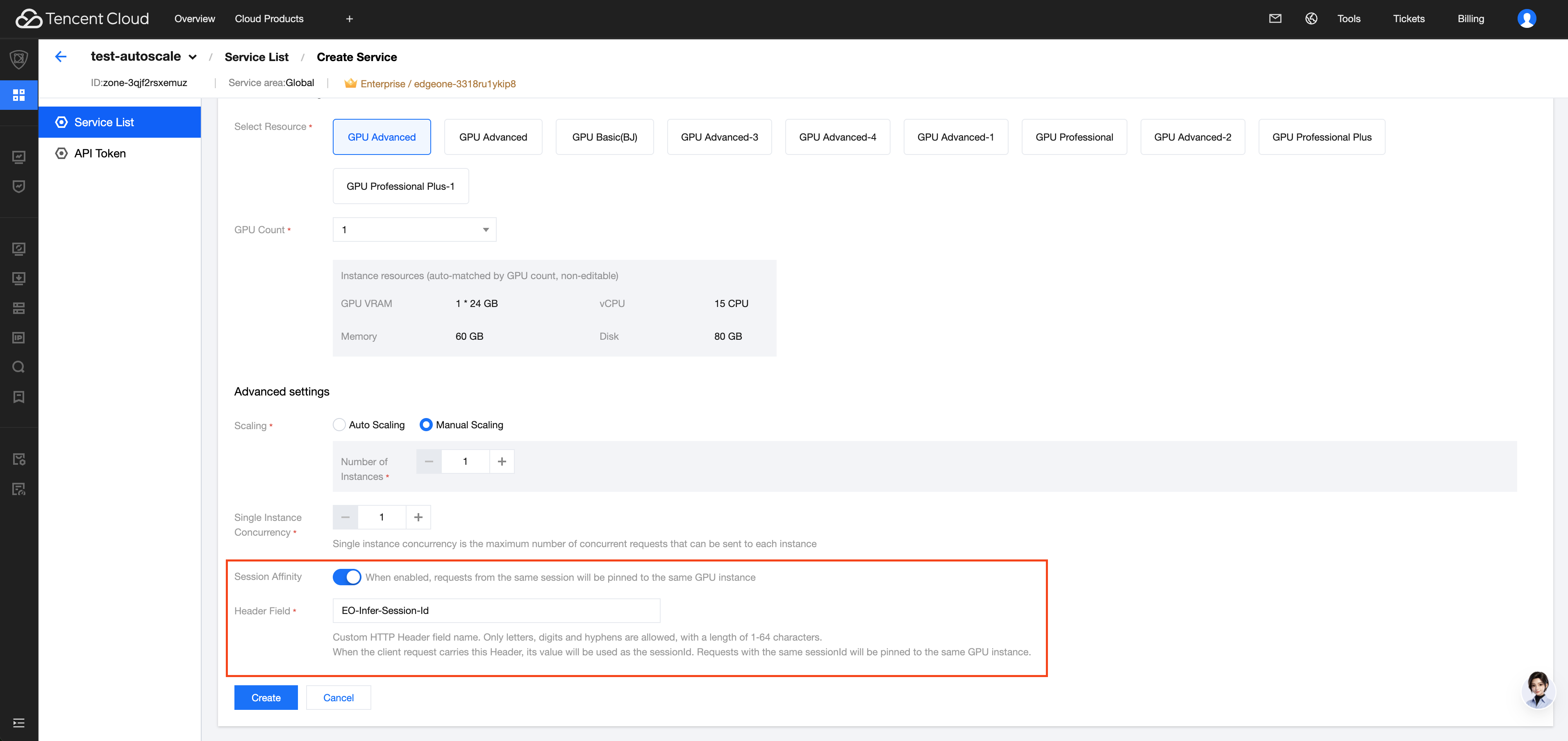
1. Scroll down the page to the Advanced Settings section.
2. Turn on the Session Affinity switch. The Header Field input box will expand below the switch.
3. Enter the Header Field, which is the name of the custom HTTP Header field in client requests used to carry the sessionId. The default value is
EO-Infer-Session-Id and can be modified as needed.4. Click Create.
Step 3: Waiting for Deployment to Complete
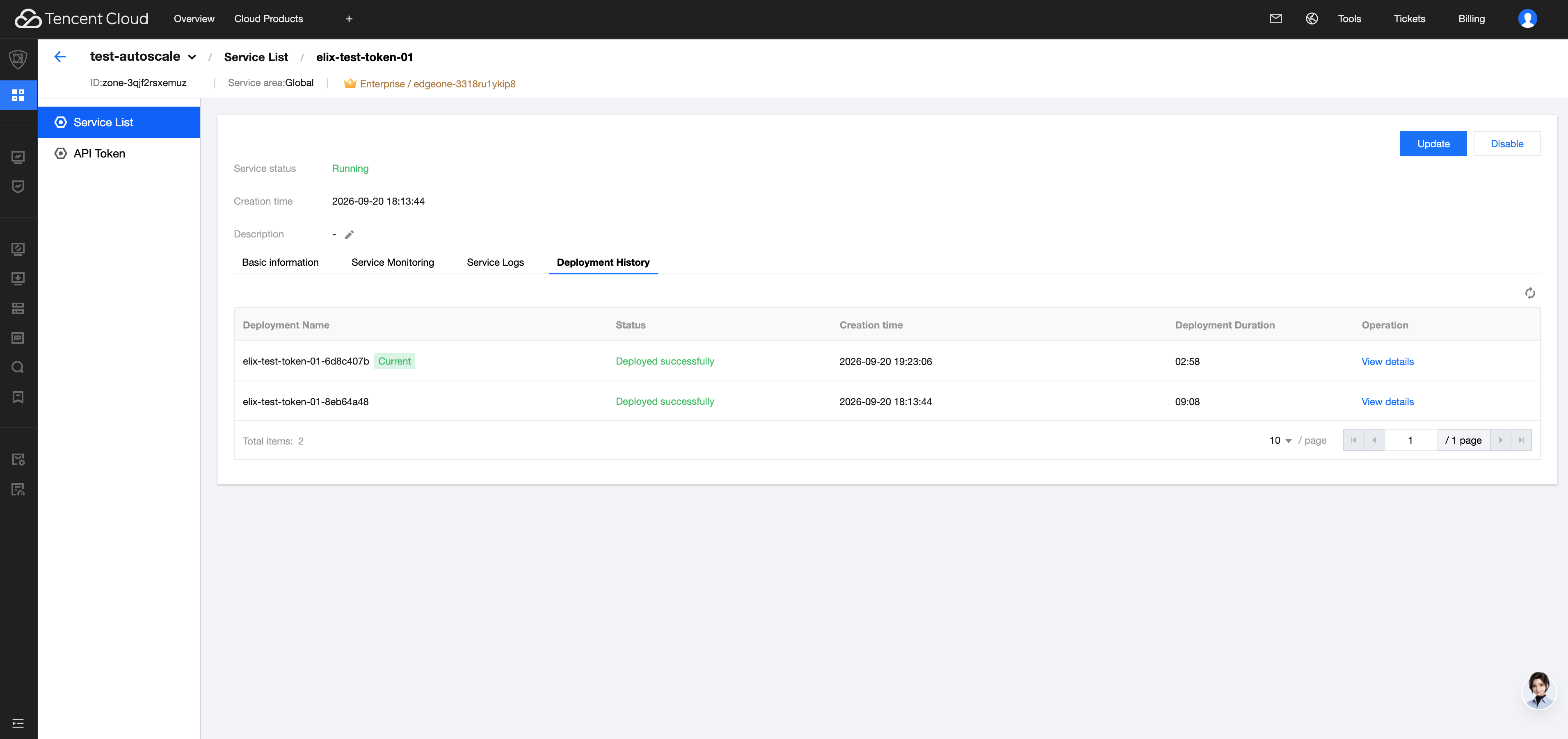
After creation, the service enters the Deploying state. You can view the progress on the Deployment History tab. The configuration takes effect immediately after the service status changes to Running, without requiring an additional service restart. Scenarios such as scale-in draining and failover are automatically handled by the platform.
Calling Methods
After session affinity is enabled, the client carries the Header field configured in Step 2 in the Header of each request, with the value being the unique identifier of the current session (sessionId). All requests in the same session use the same value, while different sessions use different values.
Request Parameter
Parameter | Position | Type | Required | Description |
EO-Infer-Session-Id | Header | string | No | Session identifier, generated by the client and kept consistent within the same session. The field name is subject to the Header field in the service configuration. |
curl example:
curl https://YOUR_SERVICE_URL/v1/chat/completions \\-H "Authorization: Bearer YOUR_API_TOKEN" \\-H "Content-Type: application/json" \\-H "EO-Infer-Session-Id: your-session-001" \\-d '{"model": "your-model","messages": [{"role": "user", "content": "Hello"}],"max_tokens": 256}'
curl https://YOUR_SERVICE_URL/v1/chat/completions \\-H "Authorization: Bearer YOUR_API_TOKEN" \\-H "Content-Type: application/json" \\-H "EO-Infer-Session-Id: your-session-001" \\-d '{"model": "your-model","messages": [{"role": "user", "content": "Hello"},{"role": "assistant", "content": "(Content returned in the previous round)"},{"role": "user", "content": "Content of the follow-up question"}],"max_tokens": 256}'
Replace
YOUR_SERVICE_URL and YOUR_API_TOKEN in the example with the access address and API Token obtained from Basic Information on the service details page.FAQs
Issue | Description |
Whether the Header must be carried in every request after it is enabled | Not required. Requests without this Header can be called normally, and the platform processes them based on the default policy. |
Are requests with the same sessionId always scheduled to the same instance | Not necessarily. Session affinity is a priority scheduling policy. When the concurrency of the target instance reaches its upper limit, requests are scheduled to other instances. |
What are the restrictions on the Header field name | Only letters, digits, and hyphens are supported, with a length of 1 to 64 characters. Otherwise, the validation fails upon saving. |
Can sessionId be defined by the user | Yes. It is generated by the client and must remain consistent within the same session. |
Is a service restart required after the session affinity configuration is modified | No. It takes effect with the current deployment after being saved. Wait until the service status changes to Running. |
Help and Support
Was this page helpful?
You can also Contact sales or Submit a Ticket for help.
Help us improve! Rate your documentation experience in 5 mins.
Feedback