If your service has the following requirements for access:
1. If you need DDoS protection services with guaranteed capacity. For example: financial services, gaming platforms, battle servers, etc.
2. During a large-scale DDoS attack, standard protection level services might change the resolved IP due to traffic redirection, affecting normal client access. If you require continuous session states, including constant DNS resolution IP, maintaining long TCP connections, and HTTP sessions. For example: multiplayer online gaming services, voice services, etc.
3. You need to customize network-layer DDoS protection strategies or network control strategies. For example: discarding traffic from specific regions.
We recommend you subscribe to the DDoS Defender service, which will further provide the following capabilities to help mitigate DDoS attack risks and ensure business stability:
1. Continuous access to the scrubbing center to detect and filter malicious traffic.
2. Guaranteed protection capacity to maintain stable session states during protection.
2. Authorize the EO service to access the Anti-DDoS product. You can complete the authorization during the configuration process on the console. You need to authorize EdgeOne to access your DDoS Defender product via the service role TEO_QCSLinkedRoleInDDoS. EdgeOne will then use this role to perform operations such as creating, deleting, modifying, and querying protection instances, as well as querying and modifying the binding relationships between protection instances and resources.
User Guide
Note:
Customers who onboarded before January 12, 2026, may face some limitations that cannot be configured through the console or API (e.g., purchasing new plans, changing plans, etc.). If you have such needs, please contact after-sales support to submit a ticket for handling.
Scenario 1: Configure DDoS Protection for Domain
Note:
Adjusting the DDoS protection level may impact your service (such as connection resets), with an estimated duration of about 2-3 minutes for the change to take effect. If there is local or ISP DNS caching, the switch may take effect later, depending on the TTL settings of the DNS records used by the clients.
Operation Steps
1. Log in to the Tencent Cloud EdgeOne console, enter Service Overview in the left menu bar, and click the site to be configured under Website Security Acceleration.
2. In the left sidebar, click Domain Name Service > Domain Management.
3. Set the DDoS protection level for domain configuration to advanced protection or ultimate protection. There are three common setting methods:
3.1 Separate domain configuration: suitable for scenarios where individual domain names in a site require DDoS Defender service while most only need standard protection.
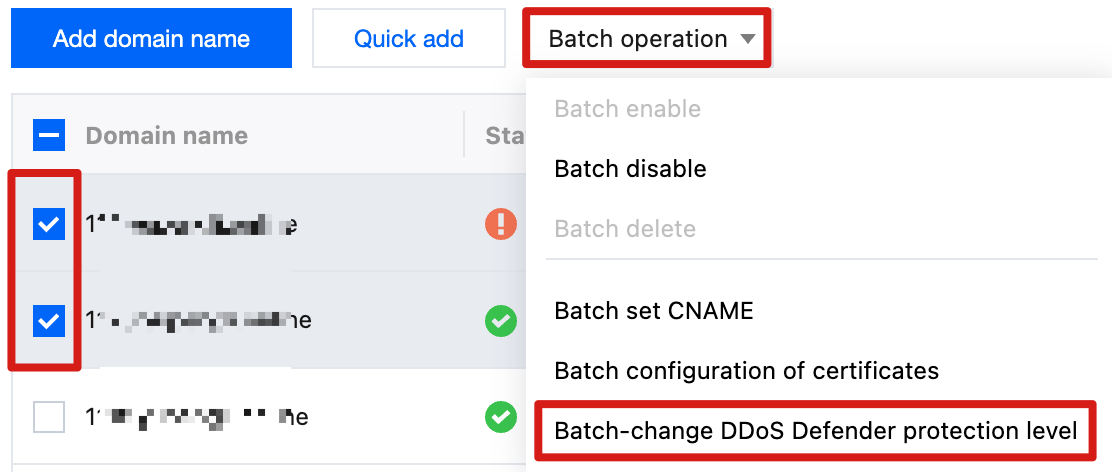
3.2 Batch domain configuration: suitable for scenarios where most domain names in a site require DDoS Defender service.
3.3 Site level configuration: suitable for scenarios where ALL domain names in the entire site require DDoS Defender service and newly added domain names expect to be enabled by default.
Separate Domain Configuration
Batch Domain Configuration
Site Level Configuration
1. Hover over the Extended service column security protection icon, then click the change protection level button in the bubble.
2. In the Change domain DDoS Defender protection level pop-up window, select the target protection level configuration and click confirm to save configuration.
1. In the domain name list, select the domain names to be configured.
3. In the Batch-change DDoS Defender protection level pop-up window, select the target protection level configuration and click confirm to save configuration.
1. At the top of the page, click the edit button for site-level DDoS Defender protection level (including new domains) in the domain configuration card.
2. In the Modify site-level DDoS Defender protection level (including new domains) pop-up window, select the target protection level configuration and click confirm to save configuration.
Note:
Set the DDoS Defender protection level to advanced protection or ultimate protection at the site level. ALL domain names (including newly added domain names) under the site will follow the site-level configuration. Custom configurations for subdomains are no longer supported.
Domain names using shared CNAME cannot modify DDoS Defender protection level individually. If you need to modify it separately, please unbind the domain name from shared CNAME first.
Scenario 2: Configure DDoS Protection for Layer 4 Proxy Instance
Create L4 Proxy Instance
1. Log in to the Tencent Cloud EdgeOne console, enter Service Overview in the left menu bar, and click the site to be configured under Website Security Acceleration.
2. In the left sidebar, click L4 proxy> Layer 4 instance list.
3. On the L4 proxy instance webpage, click Create L4 Proxy Instance.
4. When creating a new L4 proxy instance, select the protection level as advanced protection or ultimate protection in the DDoS protection configuration. For other configuration, see Create L4 proxy instance.
5. Click Create, confirm the related fee in the pop-up window, then click I have read the cost statement and confirm creating the layer-4 proxy instance.
6. After the configuration is delivered, on the layer 4 proxy list page, click L4 proxy configuration in the operation column to enter the L4 proxy configuration page. Add the port information and origin server address that need acceleration, then click Save to enable L4 proxy acceleration.
7. On the layer 4 proxy list page, click security policy configuration in the operation column to enter the security policy configuration page and configure the L3/4 DDoS protection policy.
Modify L4 Proxy Instance
1. Log in to the Tencent Cloud EdgeOne console, enter Service Overview in the left menu bar, and click the site to be configured under Website Security Acceleration.
2. In the left sidebar, click L4 proxy> Layer 4 instance list.
3. On the layer 4 instance list page, in the protect method column, hover over the
icon, then click the change protection level button in the bubble.
4. In the pop-up window for modifying the layer 4 proxy DDoS protection level, select the target DDoS protection level and click Confirm, then wait for it to take effect. Because modifying the DDoS protection level involves changes in underlying resource allocation, you need to wait 5-10 minutes for the deployment to complete before it actually takes effect.
Related Reference
How It Works
After enabling DDoS protection, traffic will be processed according to the following process:
1. When the client resolves a DNS record, it obtains the scrubbing center address.
2. When the client accesses the service, the scrubbing center first scrubs the traffic, automatically identifies and filters network layer DDoS attack traffic. If you have configured the L3/4 DDoS protection policy, it will scrub according to your configured protection policy.
3. Proceed with follow-up module processing.
3.1 If the business is an L4 proxy, the filtered traffic is forwarded by the L4 proxy service with acceleration.
3.2 If the business is a layer-7 domain name, traffic will continue to be handled according to the following steps:
3.2.1 The request continues to transit the Web Security policy for protection.
3.2.2 Requests that pass Web Security module verification will proceed to cache acceleration, origin-pull service and other features. For more information, see sequence to handle requests.