Troubleshooting Linux Instance Issues via VNC and the Rescue Mode
Download
Focus Mode
Font Size
Last updated: 2025-09-08 16:57:09
AI-Translated
Generally, you can troubleshoot most Linux system issues via VNC and rescue mode. This document describes how to troubleshoot the issues such as a failure to log in to a Linux Instance via SSH Key and system failures.
Troubleshooting Tool
Login via VNC is a method of remotely connecting to a CVM through a Web browser. This enables you to directly observe the CVM status, or modify the configuration file in the system. Usually when you cannot remotely log in to the instance via SSH key, you can use this login method.
Rescue mode is generally used when the Linux system cannot be started up normally, or the Linux instance cannot be logged in via VNC. Common usage cases: abnormal fstab configuration, missing key system files, and damaged/missing .lib and .dll files, etc.
Identifying and Fixing Issues
Using VNC to troubleshoot the SSH key login failure
Error description
When I tried to log in to a Linux instance via SSH key, the error message ssh_exchange_identification: Connection closed by remote host is displayed.
Possible cause
The connection reset error in the kex_exchange_identification stage generally means that the ssh-related process has been started, but the configuration may be abnormal, for example, the sshd configuration file permissions have been modified.
Solutions
See Steps to check the sshd process, locate and fix the problem.
Steps
Follow the steps to log in t
o
the Linux instance via VNC:
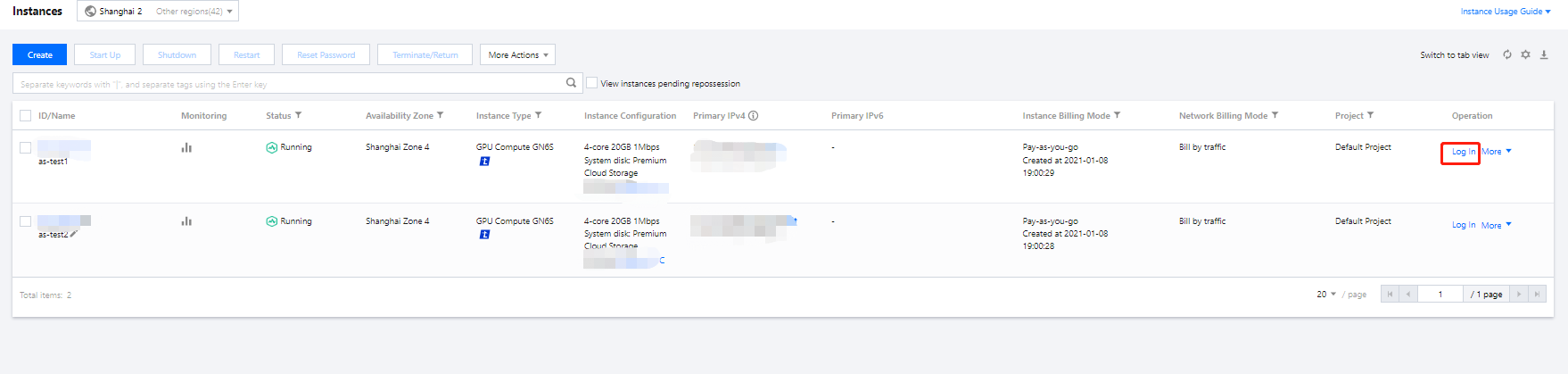
1.1 Log in to the CVM console, find the target Linux CVM, and click Login under the "Operation" column.
1.2 In the Standard login | Linux instance window, click Login via VNC.
1.3 Enter the username after "login" and press Enter, and enter the password after "Password" and press Enter. The login is successful when the following information is displayed.
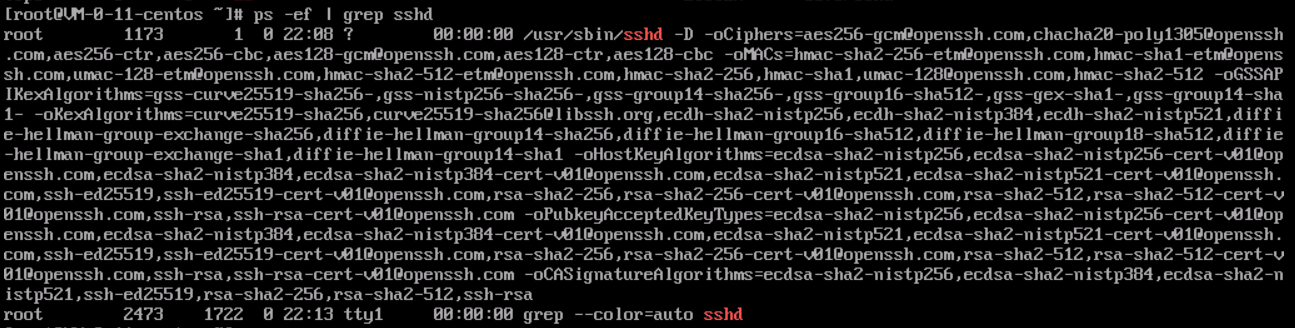
2. Run the following command to check whether the sshd process is running normally.
ps -ef |grep sshd
If the result shown below is returned, the sshd process is normal.
3. Run the following command to view the error cause:
sshd -t
If a message similar to "/var/empty/sshd must be owned by root and not group or world-writable." shown below is returned,
the error can be caused by a /var/empty/sshd/ permission issue.
You can also check the error messages in the /var/log/secure logs to facilitate troubleshooting.
4. Run the following command to view the permission of the /var/empty/sshd directory.
ll -d /var/empty/sshd/
The returned result is shown below. The permission configuration is 777.
5. Run the following command to modify the permissions of the /var/empty/sshd/ file.
Using VNC to troubleshoot Linux system startup failures
Error description
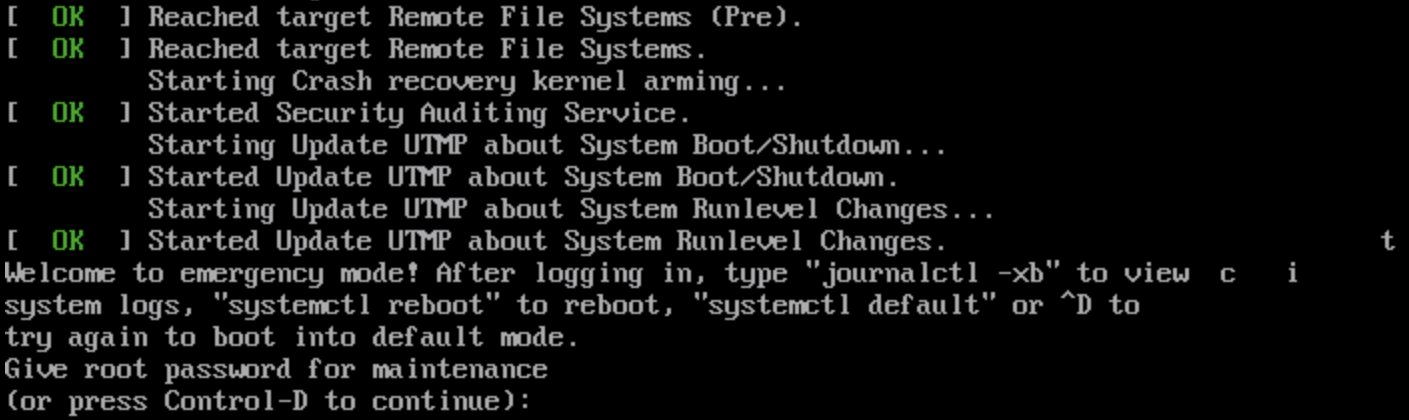
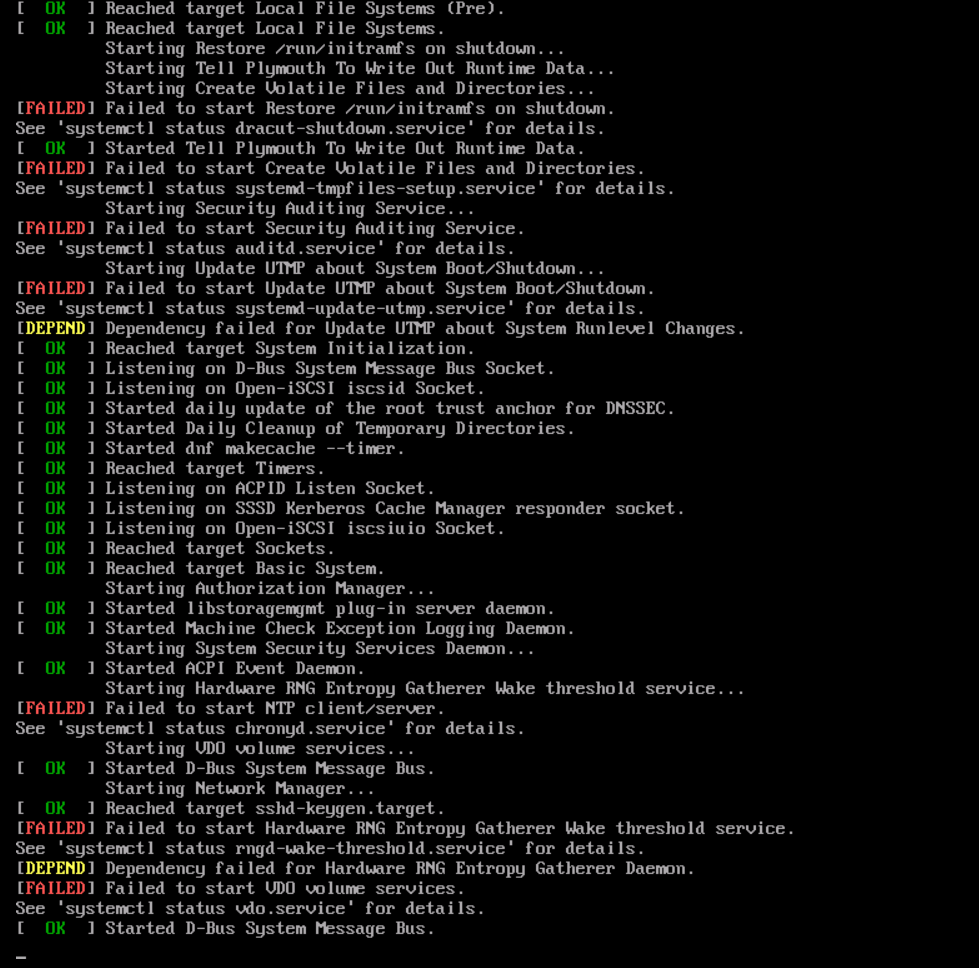
Error: Unable to remotely log in to the Linux CVM via SSH. After logging in to the CVM via VNC, you can check the system start-up failure and view the prompt message "Welcome to emergency mode".
Possible cause
The /etc/fstab is not properly configured.
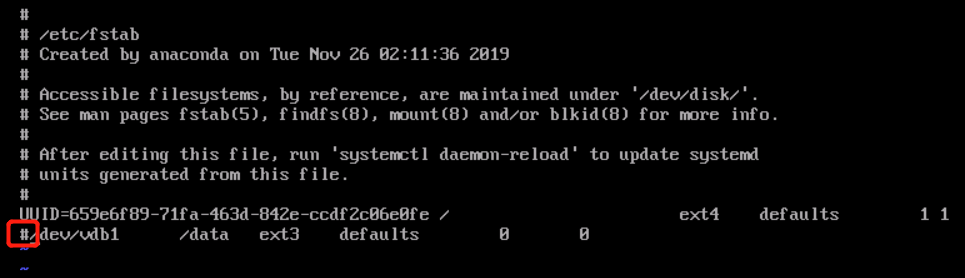
For example, you've configured the auto-attaching of disk based on device name in the /etc/fstab file. If the device name is changed when the CVM restarts, this configuration will cause the system to fail to start up normally.
Solutions
See Steps to repair the /etc/fstab configuration file. Then, restart the CVM to verify the repaired file.
Steps
1. Follow the step to log in to the Linux instance via VNC.
2. After entering the VNC interface, you see the interface shown in Error Description. Enter the root account password (which is not displayed by default) and press Enter to log in to the server.
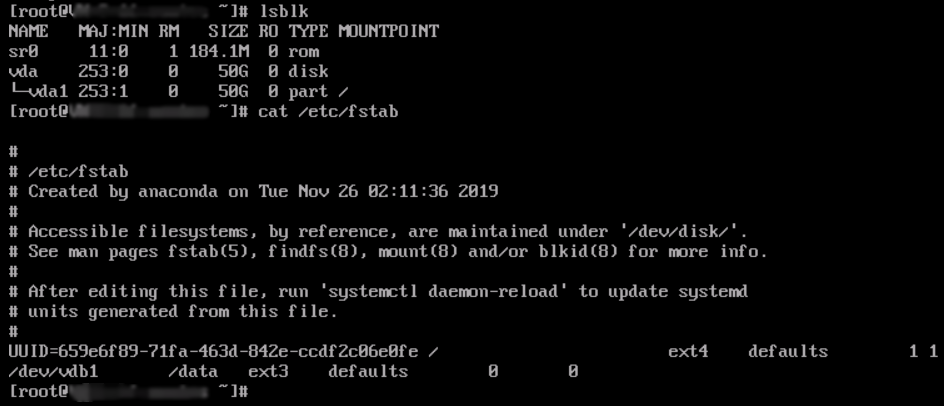
3. After entering the system, run the following command to check whether the drive letter information in the fstab file is correct.
lsblk
If the result shown below is returned, the drive letter in the file is incorrect:
4. Run the following command to back up the fstab file.
cp /etc/fstab /home
5. Run the following command to use VI editor to open the /etc/fstab file.
vi /etc/fstab
6. Press i to enter the edit mode. Move the cursor to the beginning of the error line and enter # to comment out this configuration.
7. Press ESC, enter :wq, and press Enter to save the configuration and exit the editor.
8. Restart the instance in the CVM console. For more information, see Restarting Instances.
9. Check if it can be started and logged in properly.
Using the rescue mode to troubleshoot Linux system startup failures
Error description
The instance cannot be started up normally after the Linux system restarts. There are many FAILED startup failure items in the prompt message.
Possible cause
The key system files such as. .bin and .lib files are missing.
Solutions
See Steps to enter the instance rescue mode through the console to troubleshoot.
Steps
1. Before you enter the rescue mode, we strongly recommend you back up the instance to avoid the impact of maloperations. You can create snapshots to back up cloud disks and create a custom image to back up local system disks.
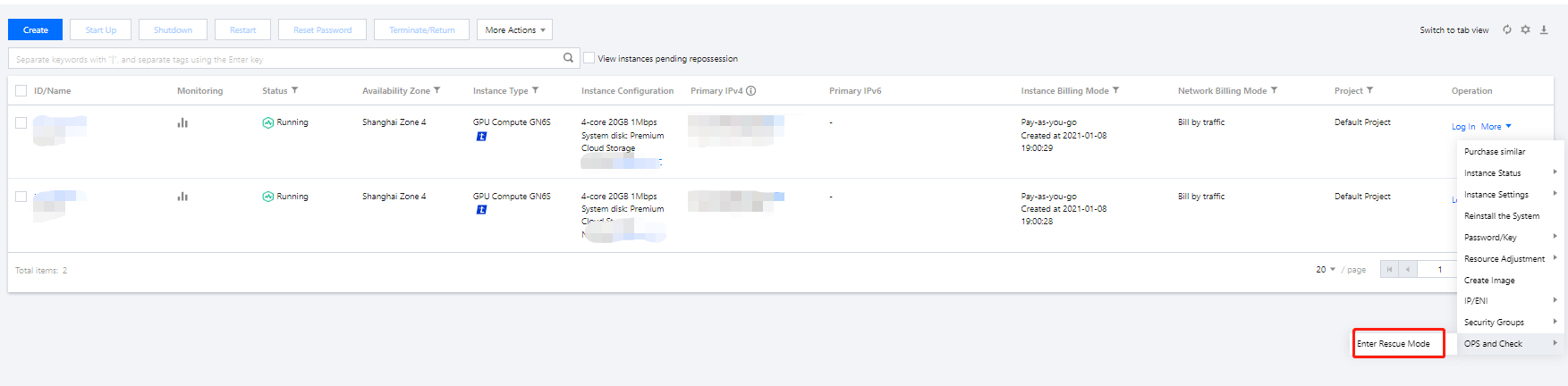
2. Log in to the CVM console. On the "Instances" page, find the target instance, select More > Ops and check > Enter rescue mode.
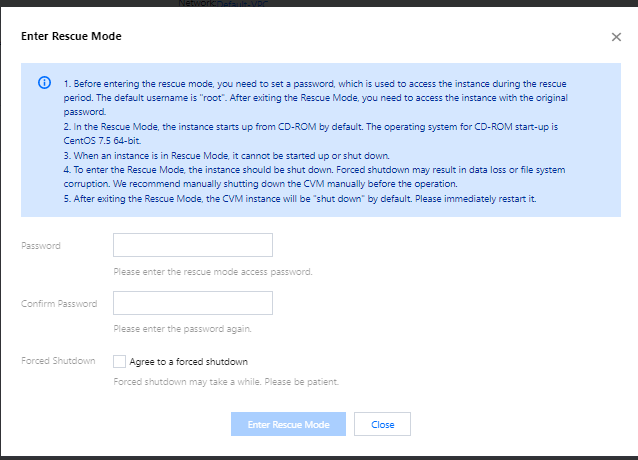
3.
In the pop-up window
, set the instance login password for the rescue mode.
4.
5. Click Enter rescue mode, and the instance status will change to "Entering rescue mode", which typically completes within a few minutes:
The status of instance entered the rescue mode changes to "Rescue mode" with a red exclamation mark.
6. Use the root account and the password set in step 3 to log in to the instance as follows:
7. This document takes login via VNC as an example. After successful login, run the following commands in sequence to mount the root partition of the system disk.
Note:
In rescue mode, the device name of the instance system disk is vda, and its root partition is vda1, which is unmounted by default.
mkdir -p /mnt/vm1
mount /dev/vda1 /mnt/vm1
The returned result is shown below:
8. After successful mounting, you can manipulate the data in the root partition of the original system.
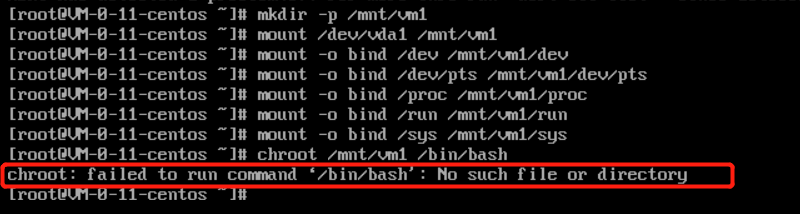
You can also use the mount -o bind command to mount some sub-directories in the original file system and use the chroot command to run commands in the specified root directory. Below are the specific commands:
mount -o bind /dev /mnt/vm1/dev
mount -o bind /dev/pts /mnt/vm1/dev/pts
mount -o bind /proc /mnt/vm1/proc
mount -o bind /run /mnt/vm1/run
mount -o bind /sys /mnt/vm1/sys
chroot /mnt/vm1 /bin/bash
When running the chroot command:
If there is no error message, you can continue to run the cd / command.
If the error message as shown below appears, the root directory cannot be switched normally. In this case, you can run cd /mnt/vm1 to view the root partition data.
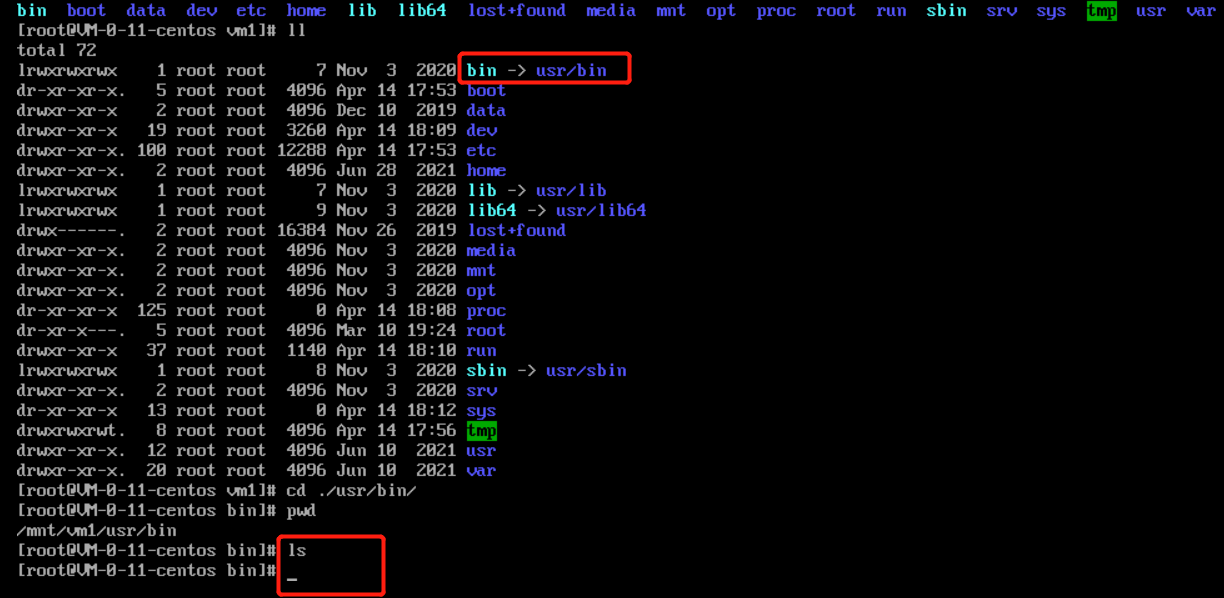
9. Through the command, you can check that all files in the /usr/bin directory in the original system root partition have been deleted.
10. In this case, you can create a normal instance using the same operating system, and run the following commands to compress and remotely copy the files in the /usr/bin directory of the normal system to the abnormal instance.
For the normal instance, run the following commands in sequence:
If the instances have public network IPs, the copy can be performed through the public network; otherwise, the copy is performed through the private network.
The execution result is as shown below:
For the abnormal instance, run the following commands in sequence in the rescue mode:
cd /mnt/vm1/usr/bin/
tar -zxvf bin.tar.gz
chroot /mnt/vm1 /bin/bash
The execution result is as shown below:
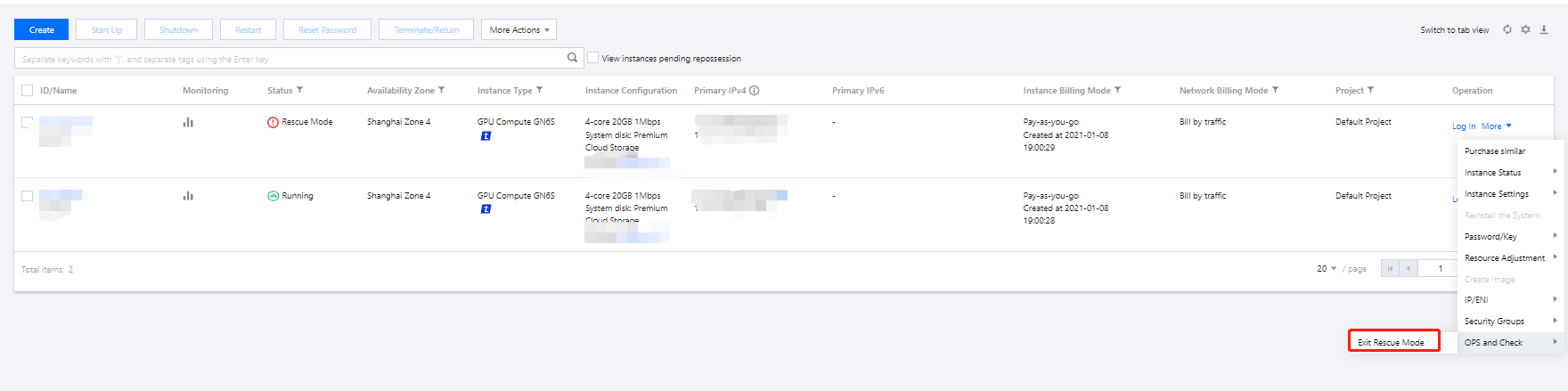
11. After repairing the instance, select More > Ops and check > Exit rescue mode under the Operation column of the target instance.
12. After exiting the rescue mode, the instance is in a shutdown status. Start up the instance to verify the system. As shown below, the system has been restored.