Launch
Download
Focus Mode
Font Size
This article introduces the details of various metrics in the monitoring module and how to view these metrics in the console.
Android
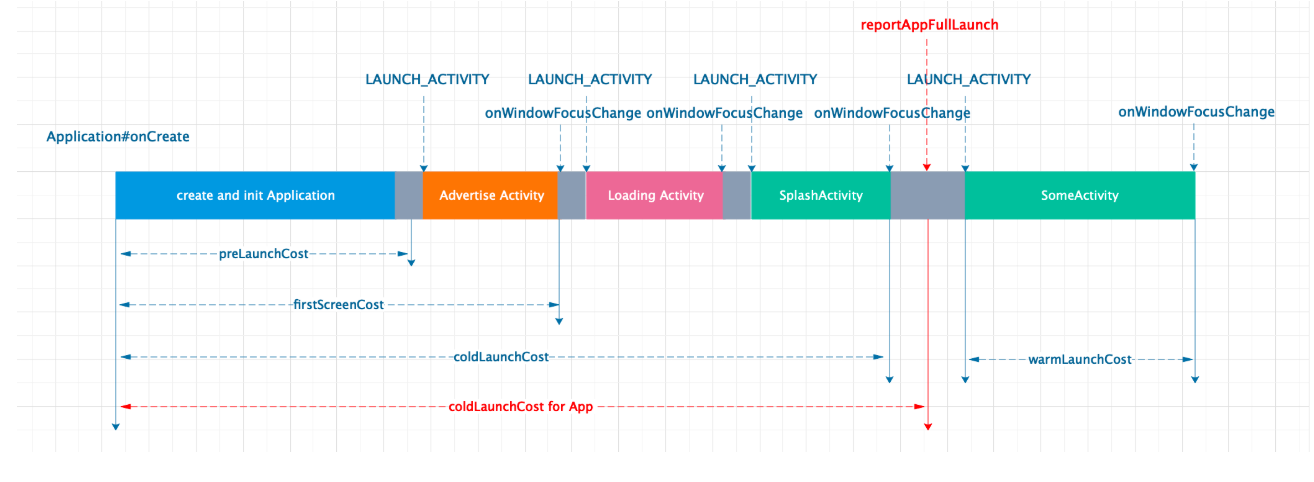
The time consumption per stage of Android launch monitoring is illustrated in the figure below:
Default cold launch
The time from process creation to the completion of the first frame rendering of the initial Activity. It is calculated as follows:
default cold launch time = completion time of the first frame rendering of the initial Activity - process creation time
Cold Launch
"cold_launch": cold launch, which is the elapsed time from application process creation to the first rendering of the launch page, or from process creation to the business-customized launch completion point. To differentiate, the Tag "tag_normal_launch" is used. The calculation method is as follows:
cold launch time = completion time of the first frame rendering of the landing page or business-customized launch completion point - process creation time
The following are several identifiers for cold launch:
"first_launch": a special case within [cold launch], specifically the first [cold launch] after application installation, distinguished by the Tag "tag_first_launch".
"pre_launch": A special case of [Cold Launch], where the process is triggered by non-launch activity events. This phase is called pre-launch. After pre-launch, it directly enters the warm launch phase, distinguished by the Tag "tag_pre_launch". pre_launch and first_launch can coexist.
"normal_launch": A case of [Cold Launch], indicating a normal cold launch, where the process is triggered by launch activity events, distinguished by the Tag "tag_normal_launch". Note that normal_launch is defined relative to pre_launch, meaning normal_launch and pre_launch are mutually exclusive. However, normal_launch and first_launch can coexist.
Summary: The tag_first_launch is used to identify whether a launch is the first launch. The first launch can be either pre_launch or normal_launch.
Warm Launch
"warm_launch": Warm Launch, which is the time from when an Activity is opened to when the page completes its first rendering, under the condition that no active Activity exists. The calculation method is as follows:
Warm launch time = completion time of the first frame rendering of the initial Activity - onCreate time of the initial Activity
iOS
Default cold launch
The time taken from process creation to the first frame UI of the initial VC being displayed on screen. It is calculated as follows:
default cold launch time = first frame UI display time of the initial VC - App process creation time
Cold Launch
The time taken from process creation to the first frame UI display of the initial VC, or from process creation to the business-customized launch completion point. It is calculated as follows:
Cold launch time = first frame UI display time of the initial VC or business-customized launch completion point - App process creation time
App process creation time: Obtain the process launch time from the process's processInfo.
main function execution time: business calls related APIs to actively instrument.
First frame UI display time: Obtain an approximation via the execution time of the first CA::Transaction::commit.
The launch report includes three tracking points (Span) by default.
_RM_Cold_Launch: From process creation to launch completion, consistent with the cold launch metric scope.
_RM_Before_Main: The time from process creation to global variable initialization.
_RM_After_Main: The time from the execution of the main function to the launch completion point.
Note:
Due to the (prewarming) feature introduced in iOS 15, the system preloads certain resources before a user launches the app to improve launch speed. However, this may cause the app launch time data obtained by the platform to appear abnormal, as the prewarming process does not reflect the actual time required for a user-initiated launch. Therefore, to ensure data accuracy, the platform filters out such data. For details about iOS prewarming, refer to About the App Launch sequence.
switching between foreground and background
The application foreground/background switching time refers to the duration from when a user performs an operation (e.g., clicking the icon to bring the app to the foreground or pressing the Home button to send the app to the background) until the application completes the corresponding interface rendering and data processing, reaching an interactive state. The calculation method is as follows:
Foreground/Background Switching Time = applicationBecomeActive - applicationWillEnterForeground
applicationWillEnterForeground: The time when the UIApplicationWillEnterForegroundNotification is received.
applicationBecomeActive: The time when the UIApplicationDidBecomeActiveNotification is received. The foreground/background switching report includes one tracking point (Span) by default.
_RM_App_Resume: Equivalent to foreground/background switching, that is, the time from applicationWillEnterForeground to applicationBecomeActive.
Data analysis
The following content takes iOS app launch time analysis as an example. For Android, you can refer to the content below.
Metric Analysis
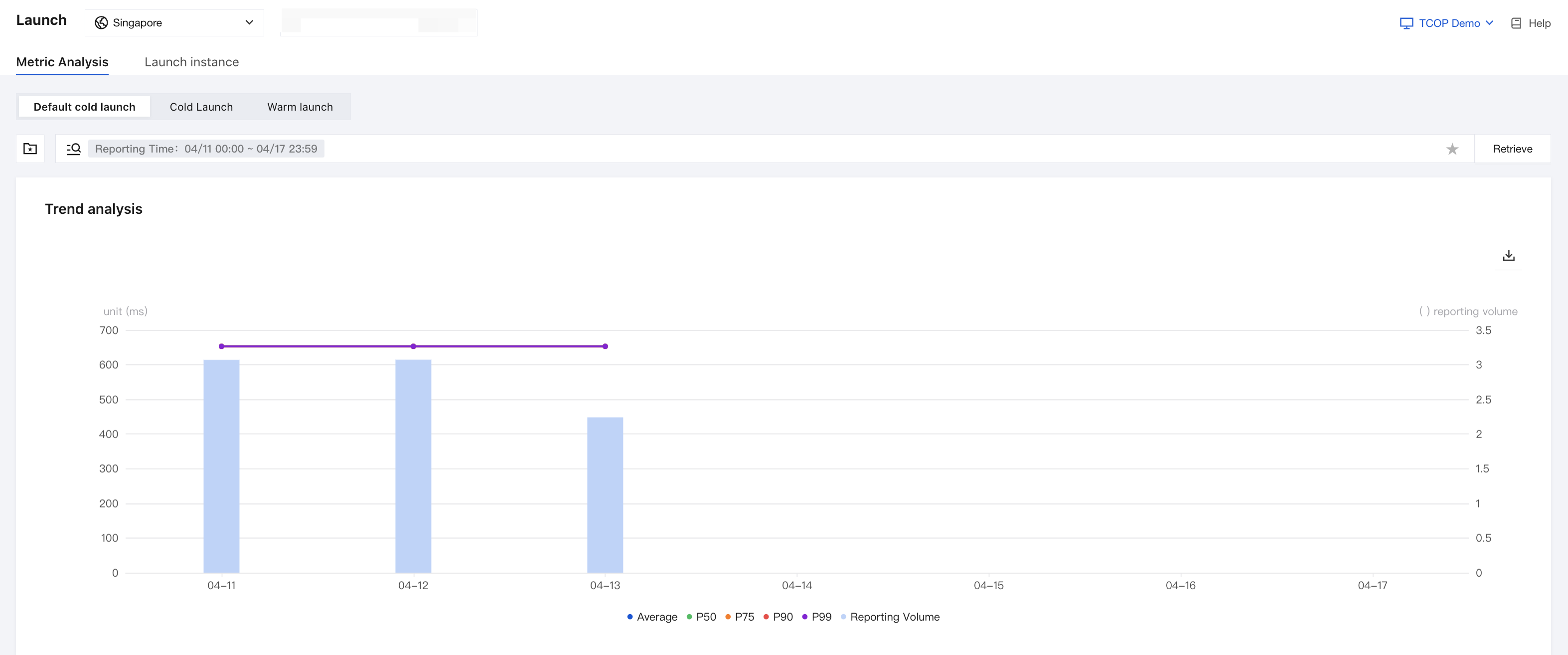
The platform supports viewing and drill-down analysis of metrics such as average, P50, P90, and P99. You can view them on the Launch > Metric Analysis page.
Span Duration Analysis
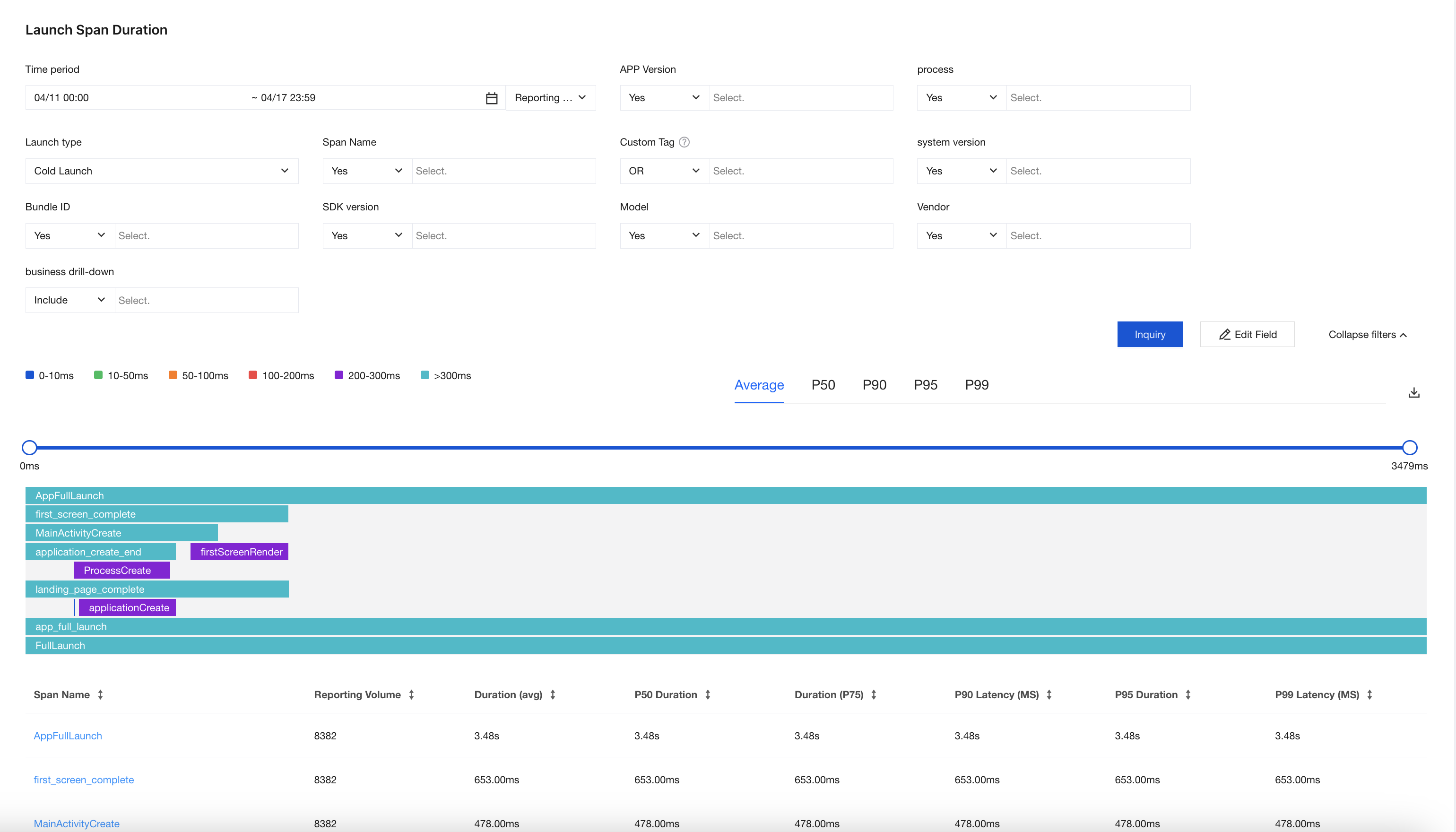
Users can add some Span information via the tracking API in the SDK during the launch phase for monitoring and troubleshooting the launch duration logic.
Query Launch instance
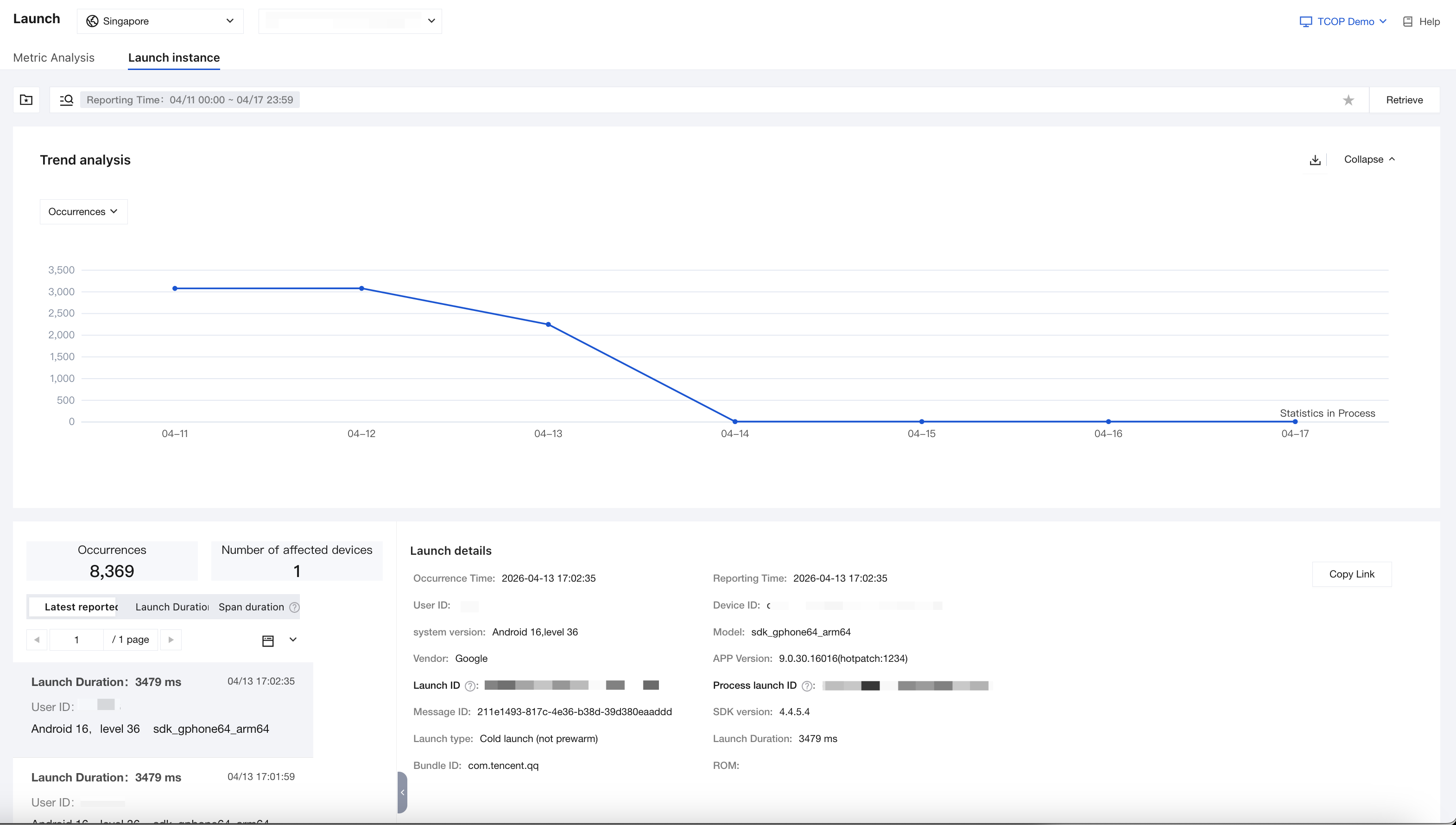
The launch instance dashboard supports searching for specific launch instances through defined filter criteria for detailed time analysis. You can view it on the Launch > Launch instances page.
Help and Support
Was this page helpful?
You can also Contact sales or Submit a Ticket for help.
Help us improve! Rate your documentation experience in 5 mins.
Feedback