This API is used for writing logs to a specified log topic. The system automatically assigns the target partition for writing based on all readable and writable partitions under the current log topic, following a load-balancing principle.
Sample
POST /structuredlog?topic_id=xxxxxxxx-xxxx-xxxx-xxxx HTTP/1.1
Host: <Region>.cls.tencentyun.com
Authorization: <AuthorizationString>
Content-Type: application/x-protobuf
<`LogGroupList` content packaged as a PB file>
Private and public domain names
CLS request domain names divide into private domain names and public domain names:
A private domain name is in the format of ${region}.cls.tencentyun.com, which is only valid for access requests from the same region, that is, CVM or Tencent Cloud services access the CLS service in the same region through the private domain name.
A public domain name is in the format of ${region}.cls.tencentcs.com. After the access source is connected to the internet, the public domain name of CLS can be accessed under normal circumstances.
The region field is the abbreviation for the CLS region. For example, for the Beijing region, enter ap-beijing. For the complete list of regions and their formats, refer to Region List.
ap-beijing - Beijing
ap-shanghai - Shanghai
ap-guangzhou - Guangzhou
ap-chengdu - Chengdu
...
In addition, CLS provides users with the following two different log upload modes:
Uploading compressed logs
Uploading original logs
In this mode, logs are compressed in LZ4 format for collection, and then uploaded for retention. This mode reduces the log upload traffic (write traffic) and saves costs.
Sample
POST /structuredlog?topic_id=xxxxxxxx-xxxx-xxxx-xxxx HTTP/1.1
Host: <Region>.cls.tencentyun.com
Authorization: <AuthorizationString>
Content-Type: application/x-protobuf
x-cls-compress-type:lz4
<`LogGroupList` content packaged as a PB file>
In this mode, logs are uploaded in their original size, which incurs higher log write traffic fees.
Sample
POST /structuredlog?topic_id=xxxxxxxx-xxxx-xxxx-xxxx HTTP/1.1
ID of the target log topic to which data will be uploaded, which can be viewed on the log topic page
logGroupList
message
pb
Yes
The logGroup list, which describes the encapsulated log groups. No more than five
LogGroup description:
Field Name
Required
Description
logs
Yes
A Log array, which is a collection of multiple Logs. A Log represents a single Log entry. The number of Logs in a LogGroup must not exceed 10,000.
contextFlow
No
UID used to maintain context, which does not take effect currently
filename
No
Log filename
source
No
Log source, which is generally the server IP
logTags
No
Tag list of the log
Log description:
Field Name
Required
Description
time
Yes
UNIX timestamp of log time in seconds or milliseconds (recommended)
contents
No
Log content in key-value format. A log can contain multiple key-value pairs.
Content description:
Field Name
Required
Description
key
Yes
Key of a field group in one log, which cannot start with _.
value
Yes
Value of a field in a single log entry. Each value should not exceed 1 MB, and the total size of all values in a LogGroup should not exceed 5 MB.
Note:
The value must be assigned as a string type. If you want the value to be treated as other types, such as long or double, during log search and analysis, you can specify the value type when key-value indexing is configured for this field. For details, see Index Configuration.
LogTag
Field Name
Required
Description
key
Yes
Key of a custom tag
value
Yes
Value corresponding to the custom tag key
Response
Sample response
HTTP/1.1 200 OK
Content-Length: 0
Response headers
No special response headers. Only common headers are used.
2. Extract the protobuf-2.6.1.tar.gz archive to the /usr/local directory, go to that directory, and run the following command:
tar -zxvf protobuf-2.6.1.tar.gz -C /usr/local/ && cd /usr/local/protobuf-2.6.1
3. Start compilation and installation, and configure environment variables. Execute the following commands:
./configure
make && make install
export PATH=$PATH:/usr/local/protobuf-2.6.1/bin
4. After a successful compilation, you can run the following command to check the version. A return of `liprotoc x.x.x` indicates a successful compilation.
protoc --version
2. Create a PB description file
A PB description file is an agreed-on data exchange format for communication. To upload logs, compile the specified protocol format to an API in the target programming language and add the API to the project code. For more information, see protoc.
Create a PB message description file cls.proto based on the PB data format content specified by CLS.
Note:
The PB description file content cannot be modified, and the filename must end with .proto.
The content of cls.proto (PB description file) is as follows:
package cls;
message Log
{
message Content
{
required string key =1; // Key of each field group
required string value =2; // Value of each field group
}
required int64 time=1; // Unix timestamp
repeated Content contents =2; // Multiple `key-value` pairs in one log
optional string contextFlow =2; // This parameter does not take effect currently
optional string filename =3; // Log filename
optional string source=4; // Log source, generally using the server IP address
repeated LogTag logTags =5;
}
message LogGroupList
{
repeated LogGroup logGroupList =1; // Log group list
}
3. Compile and generate the API
This sample uses the proto compiler to generate a C++ file in the same directory as the cls.proto file. Run the following compilation commands:
protoc --cpp_out=./ ./cls.proto
Note:
--cpp_out=./ : This option compiles the code into C++ format and outputs the files to the current directory.
./cls.proto: This refers to the cls.proto description file located in the current directory.
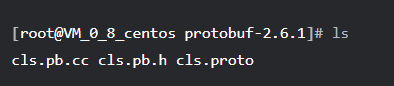
After the compilation succeeds, the code file in the corresponding programming language will be generated. This sample generates the cls.pb.h header file and cls.pb.cc code implementation file.
4. Call
Import the generated cls.pb.h header file into the code and call the API for data format encapsulation.