Backup and Rollback
ダウンロード
フォーカスモード
フォントサイズ
How to Back Up TencentDB for SQL Server
TencentDB for SQL Server provides comprehensive backup capabilities to ensure data security and prevent data loss or corruption. It supports managing and viewing backups on the SQL Server console Backup Management page, including automatic backup, manual backup, data backup, log backup, single-database backup, packaged backup, instance backup, multi-database backup, cross-region backup, custom backup policies, custom backup retention periods from 3 to 7300 days, and custom backup cycles. For details, see Backup Overview.
How to Configure Automatic Backup
You can configure this on the SQL Server console instance's Backup Management page. For details, see Configure Auto Backup.
How to Create a Manual Backup
You can configure this on the SQL Server console instance's Backup Management page. For details, see Create Manual Backup.
How to View and Modify Backup Policies
You can view and modify backup policies on the SQL Server console instance's Backup Management page. For details, see Configure Auto Backup.
How Long Are TencentDB for SQL Server Backups Retained?
TencentDB for SQL Server auto backups are retained for 7 days by default. You can customize the backup retention period, and the validity duration is determined by the retention days you set. For details, see Configure Auto Backup.
Manual backups are retained according to the auto backup retention period when not manually deleted. You can delete them as needed. For details, see Delete Manual Backup.
Can Backups Be Deleted Manually?
Auto backups cannot be manually deleted. You can set a backup retention period, after which backups are automatically deleted.
Manual backups can be manually deleted from the backup list on the SQL Server console. If not manually deleted, they are retained according to the auto backup retention period.
Can Data and Log Backups Be Disabled?
It cannot be disabled. However, you can reduce backup frequency and delete unused manual backup data via the SQL Server console to lower backup space usage.
Why Can't I Initiate a Manual Backup Task?
Please confirm the scheduled time for your auto backup task. If the instance is undergoing its daily auto backup, you cannot initiate a manual backup.
How to Cancel a Backup Task
TencentDB for SQL Server backup tasks cannot be canceled.
Is the Database Available During Backup?
A backup window is a user-defined daily time period for automatic backups, during which TencentDB for SQL Server instances are backed up. Using these periodic backups, TencentDB for SQL Server enables you to restore database instances to backup points within the retention period. During the backup window, your business is not affected, but you cannot perform restart or manual backup operations in the TencentDB for SQL Service management console.
How to Back Up a Single Database in TencentDB for SQL Server
Log in to the SQL Server console. In the instance list, click the instance ID, select the Backup Management page, and click Backup Task Configuration. Set the backup file format to: single-database backup file. This will cause the .bak files of each database in the instance to be uploaded directly to COS for storage without packaging. For details, see Configure Backup Task.
How to Initiate a Backup Task from an Instance in TencentDB for SQL Server
Log in to the SQL Server console. In the instance list, click the instance ID, select the Backup Management page, and click Backup Task Configuration. Set the backup task execution option to: perform backup tasks from the instance. This allows you to adjust the execution instance for the backup task. For details, see Configure Backup Task. Only two-node instances of the 2017/2019/2022/2025 editions support setting the backup task execution instance.
How to Download Backup Files for TencentDB for SQL Server
The TencentDB for SQL Server console provides a list of backup files, and backup files can be downloaded via private and public network addresses.
Log in to the SQL Server console. In the instance list, click the instance ID, select the Backup Management page, and in the backup list, click Download to obtain the file's private and public network download addresses, or directly click Local Download to download. For details, see Download Backup.
Can TencentDB for SQL Server Be Backed Up Using Third-Party Tools?
TencentDB for SQL Server does not support self-backup via third-party tools. For security reasons, the data directory permissions on physical servers cannot be granted. Currently, users can only initiate backups through the console.
Can Backups Beyond the Retention Period Be Downloaded or Restored?
Expired backup sets are automatically deleted and cannot be downloaded or restored.
We recommend that you set a reasonable backup retention period based on your requirements, or download backup files to your local machine via the SQL Server console.
You can also save instance data via manual backup in the console. Manual backups can be manually deleted. If not manually deleted, they are saved according to the retention period policy set during the manual backup.
Note:
Manual backups also consume backup space. Please use backup space reasonably to avoid incurring additional charges.
Can Backups Be Downloaded for Isolated Instances?
You can also download backups from isolated instances.
Pay-as-you-go instances: 24 hours after instance expiration, the instance is isolated and goes to the recycle bin. At this point, restoration and manual backup are disabled, while automatic backup continues to be available. You can download backups via Instance Operations > More. The portion of the instance's backup that exceeds the free quota is still charged until the instance is taken offline.
Are Backup Files Retained After a TencentDB for SQL Server Instance Is Deleted?
After a TencentDB for SQL Server instance is deleted, its corresponding backup files are automatically and completely deleted and will not be retained. To retain your data, ensure that you have completed data backup before deleting the instance.
How Is Backup Storage Billed for TencentDB for SQL Server?
TencentDB for SQL Server provides a certain amount of free backup space per region. The free backup space size equals the sum of the storage space of all primary instances of single-node (formerly Basic Edition), dual-node (formerly HA Edition/Cluster Edition), and multi-node instances in the corresponding region. For pricing of backup space exceeding the free quota, see Backup Space Billing.
What to Do When the Free Backup Storage Quota Is Exceeded?
When the size of your backup files exceeds the free backup space quota, you can increase storage space or reduce backup space usage.
Backup files of an instance occupy backup space. Each TencentDB for SQL Server instance has a certain amount of free backup space quota. Usage exceeding the free quota will incur additional charges.
How to Reduce Backup Storage Costs for TencentDB for SQL Server
Delete unused manual backup data (manual backups can be deleted on the Backup Management page of the instance management section in the SQL Server console).
Reduce the automatic backup frequency for non-core business data (you can adjust the backup cycle and retention period in the console, with a minimum of two backups per week).
Note:
The Restore feature relies on data backups + log backups within the backup cycle and retention period. Reducing the automatic backup frequency and retention period will affect the time range available for restoring instance data. Please weigh your backup configuration accordingly.
Shorten the retention period for data backups and log backups of non-core businesses (a retention period of 7 days is sufficient for most scenarios).
Business Scenario | Backup Retention Period |
Core businesses | 3 days - 7300 days (recommended) |
Non-core and non-data businesses | Recommended: 7 days |
Archiving businesses | Set the data backup retention period to 7 days. Perform manual backups based on actual business needs and delete them promptly after use. |
Testing businesses | Set the data backup retention period to 7 days. Perform manual backups based on actual business needs and delete them promptly after use. |
How to View Backup Storage Usage for TencentDB for SQL Server
Log in to the SQL Server console and select Database Backup to view backup space. This allows you to understand the backup space statistics and trends for all instances across regions under your account, as well as the real-time backup space statistics for individual instances. For details, see View Backup Space.
How to Roll Back a TencentDB for SQL Server Instance
Data backups for TencentDB for SQL Server are retained for 7 days by default. You can customize the backup retention period. The log backup retention period is the same as the data backup retention period. Based on the retention period you set, you can restore instance data to any point in time within that period. For details, see Restore Database.
How to Clone a Database for a TencentDB for SQL Server Instance
TencentDB for SQL Server provides the database clone feature, which supports cloning an existing database to the current instance with one click. When the database is cloned, you must specify a new database name. The cloned database retains the same database account permissions and other related information as the source database. For details, see Clone Database.
What Are the Uses of Downloaded Data Backups and Log Backups?
You can use these backup files to restore data at any time. You can restore data to other cloud databases or to self-built databases. For details, see Cold Backup Migration.
Can Downloaded Backups Be Restored to Another TencentDB for SQL Server Instance?
In the TencentDB for SQL Server console, you can use the cold backup migration feature to restore a database to another SQL Server instance using downloaded backup files. For details, see Cold Backup Migration.
How to Restore a Local Self-Built Database Backup to TencentDB for SQL Server
In the TencentDB for SQL Server console, you can upload backup files by directly uploading them or downloading them from COS. Then, use the cold backup migration feature to restore the self-built database backup to TencentDB for SQL Server. For details, see Cold Backup Migration.
Can TencentDB for SQL Server Be Restored to a Self-Built Database After a Full Backup?
TencentDB for SQL Server supports full backups. After downloading the backup files, you can restore them to your self-built database. For details, see Download Backup.
What Is the Difference Between Direct Backup Upload and COS Download for Cold Backup Migration?
Direct upload backup: Users upload backup files from their local environment to Tencent Cloud COS and then download them to TencentDB for SQL Server for restoration. Additionally, backup files uploaded to Tencent Cloud COS do not occupy your backup storage space. However, they are retained for only 24 hours and are automatically deleted upon expiration.
Download backup from COS: Users download backup files from their own COS to TencentDB for SQL Server for restoration.
Does Uploading Backup Files via Direct Upload in Cold Backup Migration Consume User's Own Backup Storage Space?
Backup files uploaded in backup/recovery scenarios are directly uploaded to Tencent Cloud COS for transit. This process does not occupy your own backup storage space. After a successful upload, the files are retained for 24 hours and are automatically deleted upon expiration.
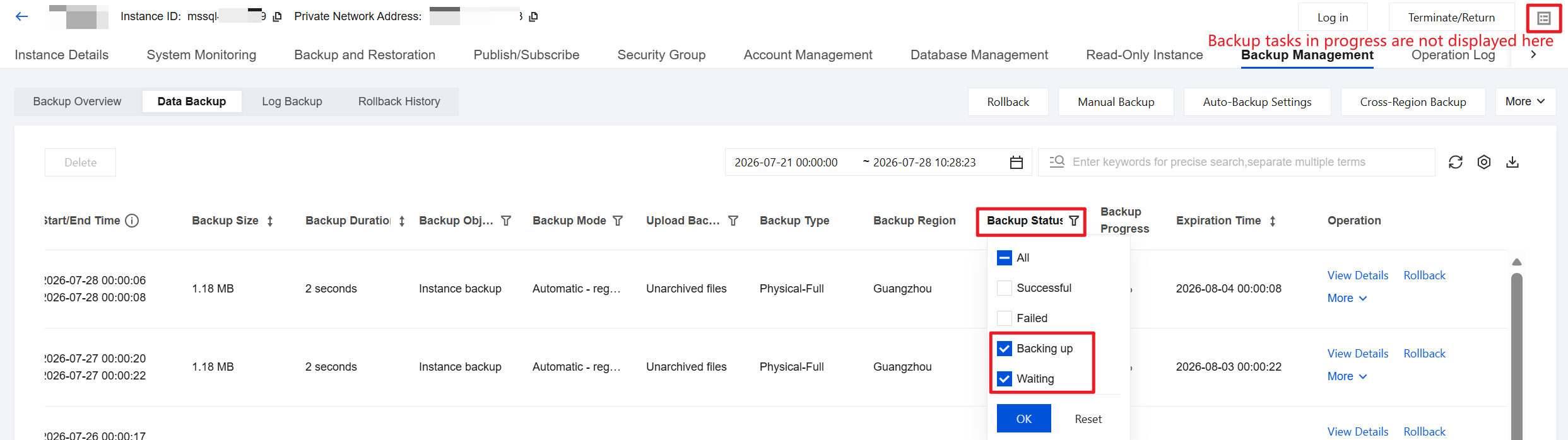
Why Are In-Progress Backup Tasks Not Visible in the Task Window on the Instance Management Page in the New Backup and Rollback Feature?
In the new backup and rollback feature, on the instance management page, backup tasks that are being created are not displayed in the task window in the upper-right corner. Instead, they are displayed in the backup list. You can query backup tasks that are being created and their status by navigating to Backup Management > Data Backup/Log Backup and viewing backups whose Backup Status is "Backing up" or "Waiting".
フィードバック