Renewal Instructions
ダウンロード
フォーカスモード
フォントサイズ
TencentDB for SQL Server supports renewal through the console and the Renewal Management Center.
Renewing on the Console
Batch Renew
1. Log in to SQL Server console, in the instance list, select one or multiple instances that need renewal, and click Renew.

2. In the pop-up renewal dialog, select the renewal duration, and click OK.
3. After confirming the order details, click Confirm Purchase.
4. If your payment is successful, you can continue to view your order or return to the console.
Auto-renewal
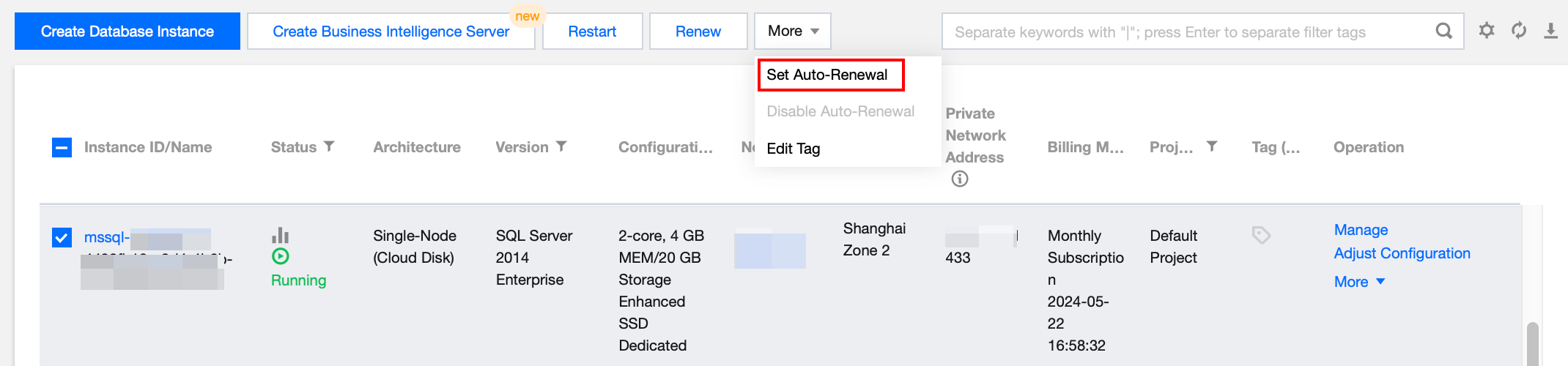
In the Instance List, select one or multiple instances for setting auto-renewal, select More options > Set Auto-Renewal.
Renewal in the Renewal Management Center
On the Renewal Management Page, features such as Batch Renewal, Set to Auto-renew, Unified Expiration Date are provided. For more information, see Renewal Management.
Related APIs
API | Description |
This API is used to query the renewal price of a monthly subscription instance. | |
This API is used to renew instances. | |
This API is used to modify the instance renewal flag. |
フィードバック