TencentDB for SQL Server supports intra-region cross-account backup restoration. This document describes how to get the backup file download URL of an instance under account A and then restore data under account B in the same region.
Note
After getting the backup file download URL of an instance under account A, perform backup restoration under account B. The two accounts need to be in the same region.
This backup restoration mode currently supports backup files in BAK, TAR, and ZIP formats.
To use intra-region cross-account backup restoration, the form of the backup file obtained in the console must be unarchived file.
Currently, the backup file download URL needs to be decoded as detailed below.
Step 1. Obtain the backup file download URL under account A
1. Log in to the TencentDB for SQL Server console with account A, and click an instance ID in the instance list to enter the instance management page.
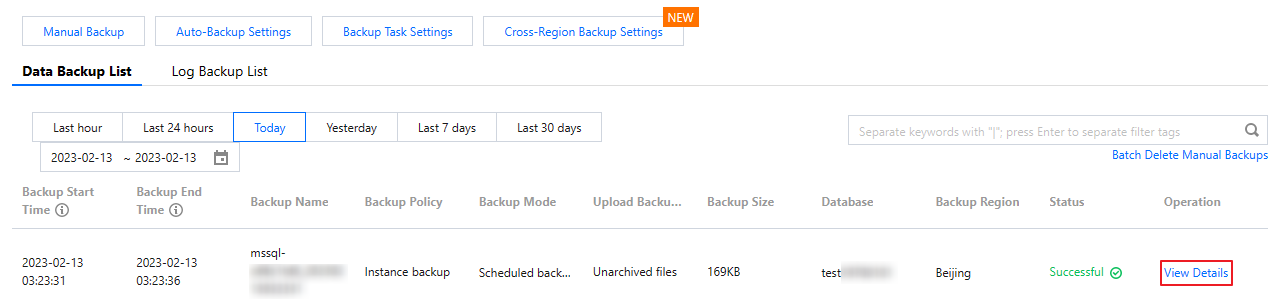
2. On the instance management page, select the Backup Management tab and click View Details in the Operation column of the target unarchived file in the data backup list.
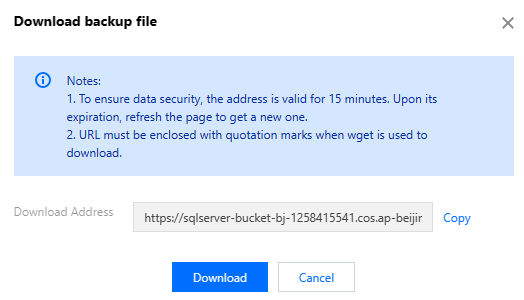
3. Click Download in the pop-up window and copy the download URL.
Step 2. Decode the URL
Click here to decode the copied URL on the page redirected to.
Note:
Only the first part of the download URL needs to be decoded.
Example: Suppose a download URL is:
https://sqlserver-bucket-bj-1258415541.cos.ap-beijing.myqcloud.com/1312368346%2fsqlserver%2fmssql-8e5hjaiq%2fbackup%2fautoed_instance_58013012_AdventureWorksDW2012_2022_12_29023915.bak?**********
You only need to select the URL part that ends with .bak? for decoding. Then, combine the output string with the other part of the URL to get the final URL for cross-account backup restoration.
For the above sample URL, take the following part for decoding:
https://sqlserver-bucket-bj-1258415541.cos.ap-beijing.myqcloud.com/1312368346%2fsqlserver%2fmssql-8e5hjaiq%2fbackup%2fautoed_instance_58013012_AdventureWorksDW2012_2022_12_29023915.bak?
It is decoded to:
https://sqlserver-bucket-bj-1258415541.cos.ap-beijing.myqcloud.com/1312368346/sqlserver/mssql-8e5hjaiq/backup/autoed_instance_58013012_AdventureWorksDW2012_2022_12_29023915.bak?
Then, the final URL for cross-account backup restoration is as follows:
https://sqlserver-bucket-bj-1258415541.cos.ap-beijing.myqcloud.com/1312368346/sqlserver/mssql-8e5hjaiq/backup/autoed_instance_58013012_AdventureWorksDW2012_2022_12_29023915.bak?**********
Step 3. Restore data under account B
Copy the final URL for backup restoration obtained in step 2.
1. Log in to the TencentDB for SQL Server console with account B and click an instance ID in the instance list to enter the instance management page.
2. On the instance management page, select Backup and Restoration > Create.
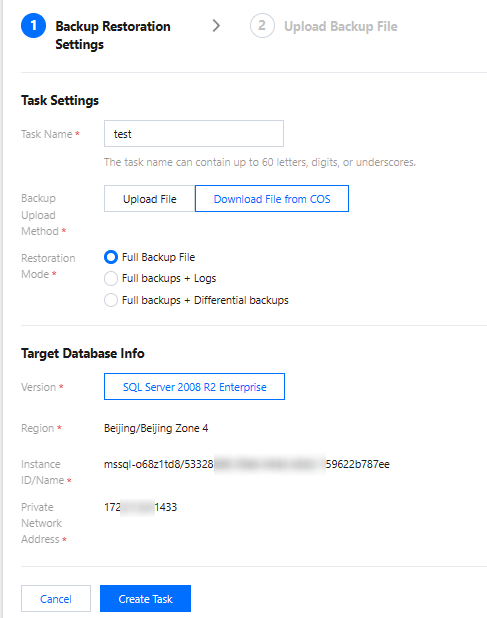
3. In the pop-up window, configure the following items and click Create Task.
Parameter
Description
Task Name
Enter the task name, which can contain up to 60 letters, digits, or underscores.
Backup Upload Method
Select Download File from COS.
Restoration Mode
Select Full Backup File.
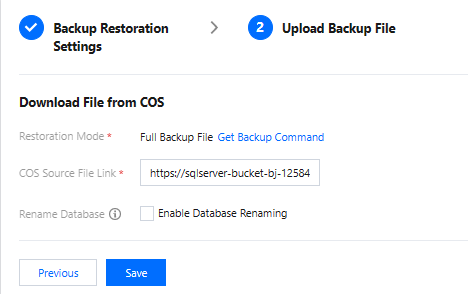
4. In the Upload Backup File window, paste the URL and click Save.
5. Go to the Backup and Restoration tab, find the backup task you just created, and click Start in the Operation column.
6. In the backup and restoration task list, check the migration task status. When it becomes Migration succeeded, the cross-account backup restoration is completed.