Multi-Node
ダウンロード
フォーカスモード
フォントサイズ
TencentDB for SQL Server supports three deployment architectures: single-node, two-node, and multi-node. This document introduces the multi-node architecture.
Background
The one-primary-multiple-replica deployment method significantly enhances the disaster recovery capability of a database and helps improve its continuous operation. This addresses the issue of prolonged business interruption and recovery time that can occur when an HA switch is required due to an instance failure, but the AZ hosting the standby database experiences an IDC-level incident, leaving no other standby database available for the switch. TencentDB for SQL Server provides a one-primary-multiple-replica high-availability disaster recovery deployment method. Based on your actual business needs and cost considerations, you can choose configurations such as one-primary-two-secondary, one-primary-three-secondary, or up to one-primary-five-secondary, and deploy the standby databases across different AZs. This architecture provides greater assurance for your production environment and can withstand various accidental situations, including overall data center failures.
In addition, TencentDB for SQL Server enables read-only capabilities for these replica databases. This means that the replica databases are not merely the standby for databases, they can also be accessed via the read-only address of the replica node after the read-only feature on the replica database is enabled. This helps to offload read requests from the primary node, effectively saving costs associated with read-only instances. Currently, the one-primary-multiple-replica instance architecture of TencentDB for SQL Server supports enabling read-only access for all replica databases.
Application Industry
E-commerce/O2O, finance, gaming, mobile office, data warehouses and data analytics platforms, multi-tenancy SaaS, and more.
Supported Versions
SQL Server 2017,2019,2022,2025 Enterprise.
Architecture
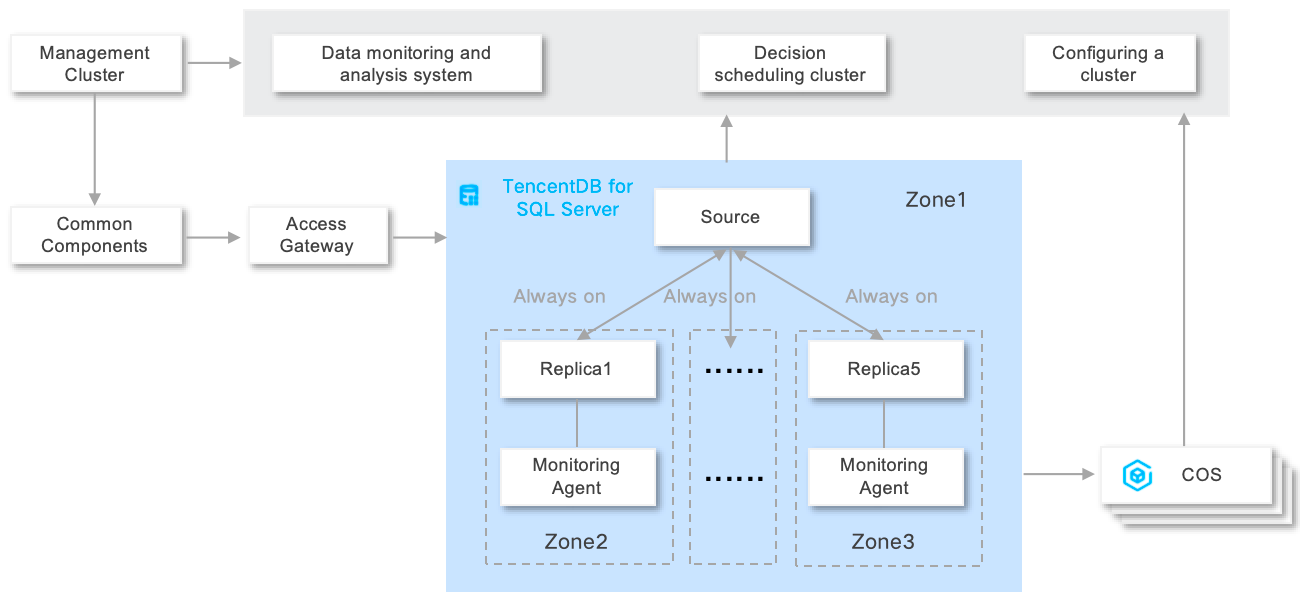
The multi-node architecture adopts the Always On cloud disk architecture design of one-primary-multiple-secondary + compute-storage separation. The primary node provides read/write services, while the secondary nodes provide read-only services and support second-level failover to the primary node. This achieves multi-AZ disaster recovery and elastic scalability. By dynamically adding or removing nodes and adjusting resources on demand, this architecture meets the requirements of high read performance for massive data, frequent scaling, and multi-active disaster recovery. It applies to business scenarios in industries such as finance and government affairs that have high requirements for availability, stability, and disaster recovery capabilities, balancing business flexibility and stability. Its architecture displayed in the console is shown in the following figure.

Architecture Strengths
Compute-storage separation: This architecture decouples resources by leveraging CVM + CBS, enabling independent scaling of compute and storage resources. It breaks the traditional limitations of fixed CPU/memory ratios and disk capacity.
Second-level auto scaling: Node addition, node deletion, and node specification adjustment can be performed on demand, and resources can be allocated in minutes to cope with sudden load increases.
Multi-node redundancy: Two to five secondary nodes in cross-AZ deployment mode are supported. Any secondary node can be automatically switched to the primary node in seconds in case of a primary node failure.
Replica-node read-only: Replica nodes directly provide read services, eliminating the need to purchase additional read-only replicas. This helps reduce the extra resource investment required for read performance scaling.
Architecture Diagram
AZs Supported by Multi-Node Architecture
Region | AZ | Multi-Node Cloud Disk Edition |
Guangzhou ap-guangzhou | Guangzhou Zone 3 ap-guangzhou-3 | ✓ |
| Guangzhou Zone 6 ap-guangzhou-6 | ✓ |
| Guangzhou Zone 7 ap-guangzhou-7 | ✓ |
Shanghai ap-shanghai | Shanghai Zone 2 ap-shanghai-2 | ✓ |
| Shanghai Zone 3 ap-shanghai-3 | ✓ |
| Shanghai Zone 4 ap-shanghai-4 | ✓ |
| Shanghai Zone 5 ap-shanghai-4 | ✓ |
Shanghai Finance ap-shanghai-fsi | Shanghai Finance Zone 3 ap-shanghai-fsi-3 | × |
| Shanghai Finance Zone 4 ap-shanghai-fsi-4 | × |
Nanjing ap-nanjing | Nanjing Zone 1 ap-nanjing-1 | × |
| Nanjing Zone 2 ap-nanjing-2 | × |
Beijing ap-beijing | Beijing Zone 1 ap-beijing-1 | × |
| Beijing Zone 3 ap-beijing-3 | ✓ |
| Beijing Zone 4 ap-beijing-4 | × |
| Beijing Zone 5 ap-beijing-5 | ✓ |
| Beijing Zone 6 ap-beijing-6 | ✓ |
| Beijing Zone 7 ap-beijing-7 | ✓ |
Beijing Finance ap-beijing-fsi | Beijing Finance Zone 1 ap-beijing-fsi-1 | × |
| Beijing Finance Zone 2 ap-beijing-fsi-2 | × |
Chengdu ap-chengdu | Chengdu Zone 1 ap-chengdu-1 | × |
| Chengdu Zone 2 ap-chengdu-2 | × |
Chongqing ap-chongqing | Chongqing Zone 1 ap-chongqing-1 | × |
Hong Kong (China) ap-hongkong | Hong Kong (China) Zone 1 ap-hongkong-1 | × |
| Hong Kong (China) Zone 2 ap-hongkong-2 | × |
| Hong Kong (China) Zone 3 ap-hongkong-3 | × |
フィードバック