Guest Connection(React Native)
ダウンロード
フォーカスモード
フォントサイズ
AtomicXCore offers the
CoGuestState module, purpose-built to handle the entire workflow of audience co-hosting in live streaming scenarios. You can easily enable robust audio/video interactive features between hosts and audience members with just a few method calls—no need to manage complex state synchronization or signaling logic.Core Scenarios
CoGuestState supports the two most common co-hosting scenarios:Audience Members Request to Join: Audience members can actively request to co-host, and the host decides whether to accept or reject each request.
Hosts Invite Audience members to Join: The host can proactively invite any audience member in the live room to join as a co-host.
Implementation Steps
Step 1: Integrate the Components
Step 2: Audience Members Request to Join
Audience Implementation
As an audience member, your main responsibilities are to request to co-host, handle the host’s response, and leave the co-host seat when desired.
1. Request to Co-hosting
When a user taps the "Request to Co-hosting" button in your UI, call the
applyForSeat method.import { useCoGuestState } from 'react-native-tuikit-atomic-x/lib/module/atomic-x/state/CoGuestState';const liveID = 'xxx'; // The liveID of the current live room// Get the CoGuestState instance using liveIDconst { applyForSeat } = useCoGuestState(liveID);// User taps "Request to Co-host"const handleRequestToConnect = () => {applyForSeat({liveID,seatIndex: -1, // Use -1 for random seat assignmenttimeout: 30, // Timeout in seconds (e.g., 30s)});};
2. Handle Host Response
Listen for the
onGuestApplicationResponded event using addCoGuestGuestListener to get the host’s decision.import { useEffect } from 'react';import { useCoGuestState } from 'react-native-tuikit-atomic-x/lib/module/atomic-x/state/CoGuestState';import { useDeviceState } from 'react-native-tuikit-atomic-x/lib/module/atomic-x/state/DeviceState';const liveID = 'xxx'; // The liveID of the current live roomconst { addCoGuestGuestListener, removeCoGuestGuestListener } = useCoGuestState(liveID);const { openLocalMicrophone, openLocalCamera } = useDeviceState(liveID);// Subscribe to event on page initializationconst handleGuestApplicationResponded = (event) => {if (event.isAccept) {console.log('Co-host request accepted');openLocalMicrophone();openLocalCamera({ isFront: true });// Update UI to reflect co-hosting status} else {console.log('Co-host request rejected');// Display a dialog notifying the user of rejection}};useEffect(() => {addCoGuestGuestListener('onGuestApplicationResponded', handleGuestApplicationResponded);return () => {removeCoGuestGuestListener('onGuestApplicationResponded', handleGuestApplicationResponded);};}, []);
3. Leave Co-host Seat
If an audience member wants to exit co-hosting, call the
disconnect method to return to normal audience status.import { useCoGuestState } from 'react-native-tuikit-atomic-x/lib/module/atomic-x/state/CoGuestState';const liveID = 'xxx'; // The liveID of the current live roomconst { disconnect } = useCoGuestState(liveID);// User taps "Leave Co-host Seat"const handleDisconnect = () => {disconnect({liveID,onSuccess: () => { console.log('Left co-host seat successfully'); },onError: (error) => { console.log('Failed to leave co-host seat', error); },});};
4. (Optional) Cancel Request
If the audience wants to withdraw their co-host request before the host responds, call
cancelApplication.import { useCoGuestState } from 'react-native-tuikit-atomic-x/lib/module/atomic-x/state/CoGuestState';const liveID = 'xxx'; // The liveID of the current live roomconst { cancelApplication } = useCoGuestState(liveID);// User taps "Cancel Request" while waitingconst handleCancelRequest = () => {cancelApplication({liveID,onSuccess: () => { console.log('Request cancelled successfully'); },onError: (error) => { console.log('Failed to cancel request', error); },});};
Host Implementation
As a host, your main tasks are to receive co-host requests, display the applicant list, and process requests.
1. Listen for Co-host Requests
Subscribe to the
onGuestApplicationReceived event with CoGuestHostListener to get notified when a new audience request arrives.import { useEffect } from 'react';import { useCoGuestState } from 'react-native-tuikit-atomic-x/lib/module/atomic-x/state/CoGuestState';const liveID = 'xxx'; // The liveID of your current live roomconst { addCoGuestHostListener, removeCoGuestHostListener } = useCoGuestState(liveID);// Subscribe to event on page initializationconst handleGuestApplicationReceived = (event) => {console.log('Received audience co-host request', event);// Update UI, e.g., show notification indicator on request list button};useEffect(() => {addCoGuestHostListener('onGuestApplicationReceived', handleGuestApplicationReceived);return () => {removeCoGuestHostListener('onGuestApplicationReceived', handleGuestApplicationReceived);};}, []);
2. Display Applicant List
CoGuestState provides a real-time list of applicants, which can be used directly in your UI.import { useCoGuestState } from 'react-native-tuikit-atomic-x/lib/module/atomic-x/state/CoGuestState';const liveID = 'xxx'; // The liveID of your current live roomconst { applicants } = useCoGuestState(liveID);// Render your applicant list UI<FlatListdata={applicants || []}keyExtractor={(item) => item.userID}renderItem={({ item }) => (<View><Text>{item.userName}</Text><Text>{item.userID}</Text></View>)}/>
3. Process Co-host Requests
When the host selects an applicant and clicks "Accept" or "Reject", call the appropriate method.
import { useCoGuestState } from 'react-native-tuikit-atomic-x/lib/module/atomic-x/state/CoGuestState';const liveID = 'xxx'; // The liveID of your current live roomconst { acceptApplication, rejectApplication } = useCoGuestState(liveID);// Host clicks "Accept" button for a userconst handleAccept = (userID) => {acceptApplication({liveID,userID,onSuccess: () => { console.log('Accepted co-host request successfully'); },onError: (error) => { console.log('Failed to accept co-host request', error); },});};// Host clicks "Reject" button for a userconst handleReject = (userID) => {rejectApplication({liveID,userID,onSuccess: () => { console.log('Rejected co-host request successfully'); },onError: (error) => { console.log('Failed to reject co-host request', error); },});};
Step 3: Host Invites Audience Members to Join
Host Implementation
1. Invite an Audience Member
When the host selects an audience member and clicks "Invite to Co-host," call the
inviteToSeat method.import { useCoGuestState } from 'react-native-tuikit-atomic-x/lib/module/atomic-x/state/CoGuestState';const liveID = 'xxx'; // The liveID of your current live roomconst { inviteToSeat } = useCoGuestState(liveID);// Host selects an audience member and sends an inviteconst handleInviteToSeat = (inviteeID) => {inviteToSeat({liveID,inviteeID,seatIndex: -1, // Use -1 for random seat assignmenttimeout: 30, // Timeout duration in secondsonSuccess: () => { console.log('Sent co-host invitation to audience'); },onError: (error) => { console.log('Failed to send co-host invitation', error); },});};
2. Listen for Audience Response
Subscribe to the
onHostInvitationResponded event using CoGuestHostListener.import { useEffect } from 'react';import { useCoGuestState } from 'react-native-tuikit-atomic-x/lib/module/atomic-x/state/CoGuestState';const liveID = 'xxx'; // The liveID of your current live roomconst { addCoGuestHostListener, removeCoGuestHostListener } = useCoGuestState(liveID);// Subscribe to event on page initializationconst handleHostInvitationResponded = (event) => {if (event.isAccept) {console.log('Audience accepted your invitation');} else {console.log('Audience rejected your invitation');}};useEffect(() => {addCoGuestHostListener('onHostInvitationResponded', handleHostInvitationResponded);return () => {removeCoGuestHostListener('onHostInvitationResponded', handleHostInvitationResponded);};}, []);
Audience Implementation
1. Receive Host Invitation
Listen for the
onHostInvitationReceived event using addCoGuestGuestListener.import { useEffect } from 'react';import { useCoGuestState } from 'react-native-tuikit-atomic-x/lib/module/atomic-x/state/CoGuestState';import { useLiveListState } from 'react-native-tuikit-atomic-x/lib/module/atomic-x/state/LiveListState';const liveID = 'xxx'; // The liveID of the current live roomconst { addCoGuestGuestListener, removeCoGuestGuestListener } = useCoGuestState(liveID);const { currentLive } = useLiveListState();// Subscribe to event on page initializationconst handleHostInvitationReceived = (event) => {console.log('Received host invitation to co-host', event);const inviterID = currentLive?.liveOwner?.userID || '';// Display a dialog for the user to accept or reject};useEffect(() => {addCoGuestGuestListener('onHostInvitationReceived', handleHostInvitationReceived);return () => {removeCoGuestGuestListener('onHostInvitationReceived', handleHostInvitationReceived);};}, [currentLive]);
2. Respond to Invitation
When the user makes a selection, call the corresponding method.
import { useCoGuestState } from 'react-native-tuikit-atomic-x/lib/module/atomic-x/state/CoGuestState';import { useDeviceState } from 'react-native-tuikit-atomic-x/lib/module/atomic-x/state/DeviceState';import { useLiveListState } from 'react-native-tuikit-atomic-x/lib/module/atomic-x/state/LiveListState';const liveID = 'xxx'; // The liveID of the current live roomconst { acceptInvitation, rejectInvitation } = useCoGuestState(liveID);const { openLocalMicrophone, openLocalCamera } = useDeviceState(liveID);const { currentLive } = useLiveListState();// Get inviterID from currentLiveconst inviterID = currentLive?.liveOwner?.userID || '';// User clicks "Accept"const handleAcceptInvitation = () => {acceptInvitation({liveID,inviterID,onSuccess: () => {console.log('Accepted invitation successfully');openLocalMicrophone();openLocalCamera({ isFront: true });},onError: (error) => { console.log('Failed to accept invitation', error); },});};// User clicks "Reject"const handleRejectInvitation = () => {rejectInvitation({liveID,inviterID,onSuccess: () => { console.log('Rejected invitation successfully'); },onError: (error) => { console.log('Failed to reject invitation', error); },});};
Runtime Effect
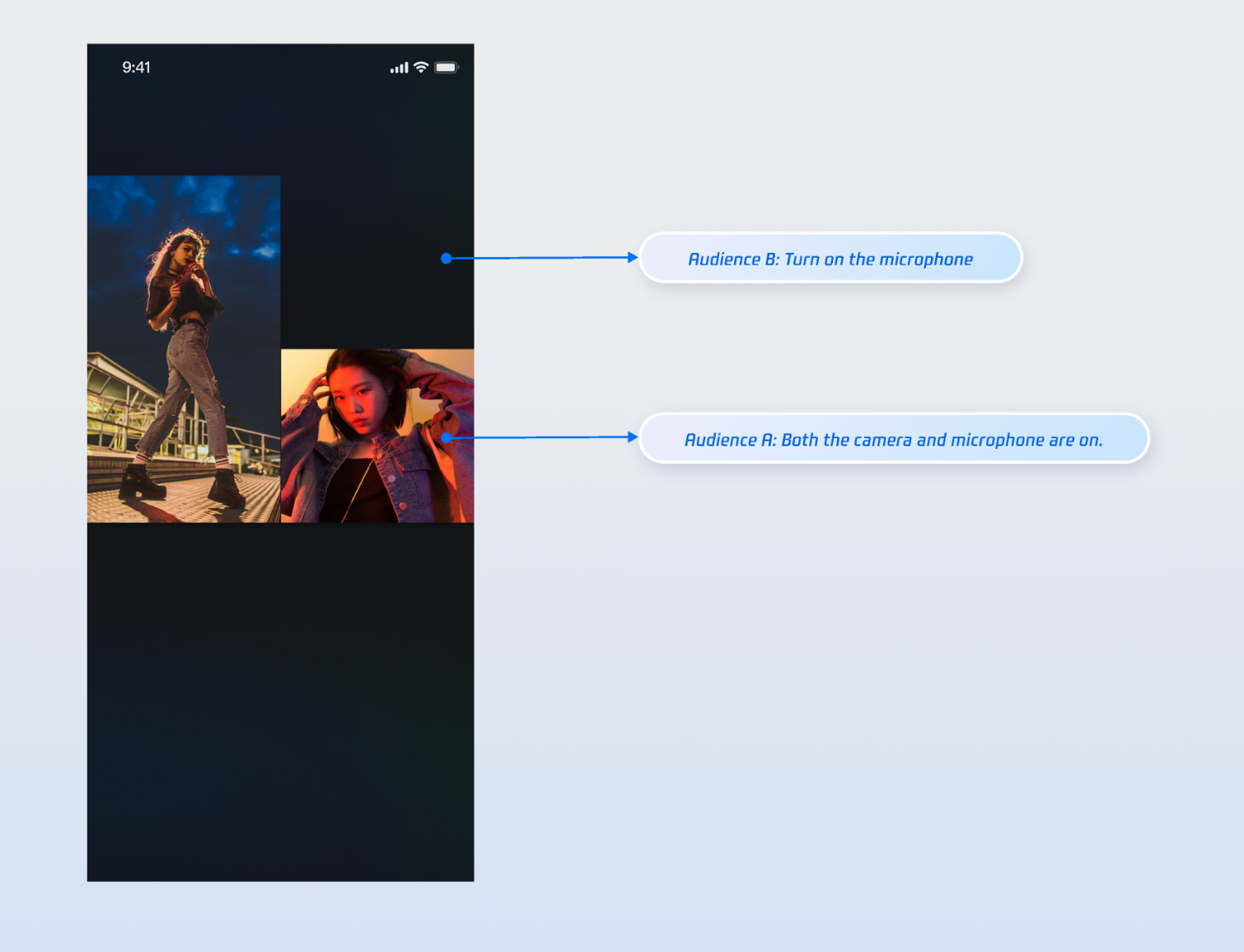
After integrating these features, you can test co-hosting with one host and two audience members. For example, Audience A enables both camera and microphone, while Audience B only enables the microphone. See the runtime effect below. To further customize your UI, refer to the Enhancing UI Details section.
Enhance UI Details
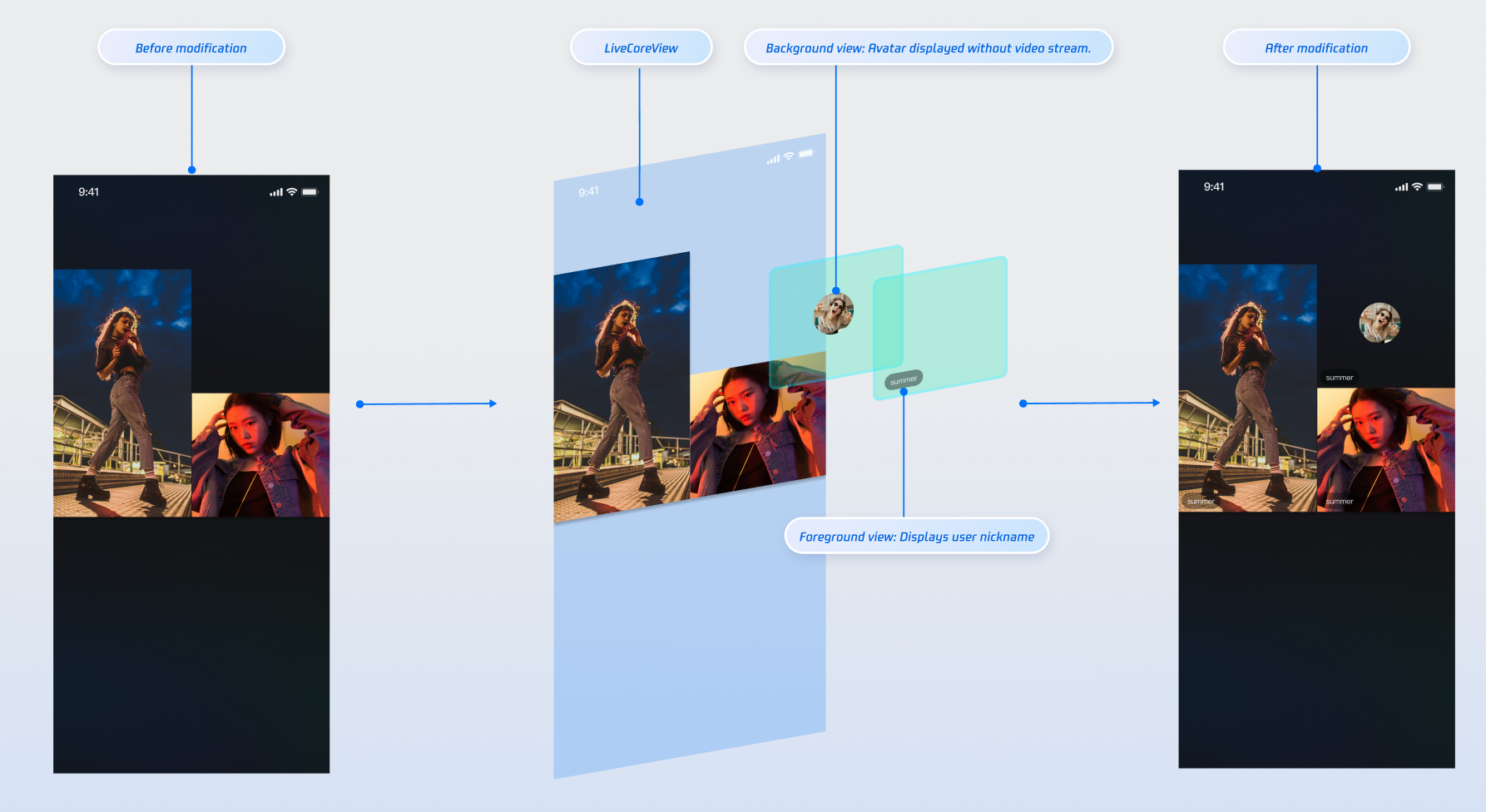
You can enhance the audience co-host video stream with custom overlays to show nicknames, avatars, or placeholder images when the camera is off, providing a more engaging visual experience.
Display Nicknames on Video Streams
Effect
Implementation
Step 1: Creating a Custom UI Overlay Component (ParticipantOverlay.js)
This component acts as a "UI sticker," rendering interface elements based on data without handling the video itself. In your components directory, create a file named ParticipantOverlay.js and add the following code.
Note:
In React Native, region coordinates are calculated based on the canvas dimensions returned by the SDK (server-side canvas). Always use the scaling ratio from canvas.w / canvas.h and the screen width, not fixed design values.
import React, { useMemo } from 'react';import { View, Text, Image, StyleSheet, Dimensions } from 'react-native';const DEFAULT_AVATAR = 'https://liteav-test-1252463788.cos.ap-guangzhou.myqcloud.com/voice_room/voice_room_cover1.png';const { width: SCREEN_WIDTH } = Dimensions.get('window');// Receives seatList and canvas from parent componentexport default function ParticipantOverlay({ seatList, canvas }) {if (!seatList || seatList.length === 0) return null;// Calculate scaling ratio based on canvasconst scale = useMemo(() => {if (!canvas?.w || !canvas?.h) return { scaleX: 1, scaleY: 1 };const displayWidth = SCREEN_WIDTH;const displayHeight = SCREEN_WIDTH * (canvas.h / canvas.w);return {scaleX: displayWidth / canvas.w,scaleY: displayHeight / canvas.h,};}, [canvas]);// Calculate precise position and size for each participant's UI containerconst getParticipantStyle = (participant) => {if (!participant?.region) return {};return {position: 'absolute',left: participant.region.x * scale.scaleX,top: participant.region.y * scale.scaleY,width: participant.region.w * scale.scaleX,height: participant.region.h * scale.scaleY,};};return (// overlay-container<View style={styles.overlayContainer} pointerEvents="none">{/* Iterate seatList to create a UI container for each co-host participant */}{seatList.map((participant) => {if (!participant?.userInfo?.userID) return null;const isCameraOff = participant.userInfo.cameraStatus === 'OFF';return (// participant-ui-container<View key={participant.userInfo.userID} style={getParticipantStyle(participant)}>{/* Conditional rendering: show different UI based on camera status */}{isCameraOff ? (// When camera is off, show avatar and nickname centered<View style={styles.avatarPlaceholder}><Imagestyle={styles.avatarImage}source={{ uri: participant.userInfo.userAvatar || DEFAULT_AVATAR }}/><Text style={styles.avatarName}>{participant.userInfo.userName || participant.userInfo.userID}</Text></View>) : (// When camera is on, show nickname bar at bottom left<View style={styles.nicknameBar}><Text style={styles.nicknameText}>{participant.userInfo.userName || participant.userInfo.userID}</Text></View>)}</View>);})}</View>);}const styles = StyleSheet.create({overlayContainer: {position: 'absolute',top: 0,left: 0,right: 0,bottom: 0,},avatarPlaceholder: {flex: 1,backgroundColor: '#2E323A',justifyContent: 'center',alignItems: 'center',},avatarImage: {width: 60,height: 60,borderRadius: 30,},avatarName: {marginTop: 8,fontSize: 13,color: '#fff',},nicknameBar: {position: 'absolute',left: 6,bottom: 6,backgroundColor: 'rgba(0, 0, 0, 0.5)',paddingHorizontal: 8,paddingVertical: 3,borderRadius: 10,},nicknameText: {color: '#fff',fontSize: 11,},});
Step 2: Integrating Components in the Live Room Page
To overlay your UI on the video stream, modify your live room page as shown below.
import React from 'react';import { StyleSheet, View } from 'react-native';import { LiveCoreView } from 'react-native-tuikit-atomic-x/lib/module/components/LiveCoreView';import { useLiveSeatState } from 'react-native-tuikit-atomic-x/lib/module/atomic-x/state/LiveSeatState';import ParticipantOverlay from '../../components/ParticipantOverlay';export default function YourAnchorScreen({ route, navigation }) {const { liveID } = route.params || {};const { seatList, canvas } = useLiveSeatState(liveID);return (// page-container<View style={styles.pageContainer}>{/* live-container */}<View style={styles.liveContainer}>{/* Video rendering layer */}<LiveCoreViewliveID={liveID}coreViewType="pushView" // Host: pushView, Audience: playViewstyle={styles.videoLayer}/>{/* UI overlay layer */}<ParticipantOverlay seatList={seatList} canvas={canvas} /></View>{/* Additional UI elements, such as the bottom control bar */}{/* <View style={styles.bottomControls}>...</View> */}</View>);}const styles = StyleSheet.create({pageContainer: {flex: 1,backgroundColor: '#000',},liveContainer: {flex: 1,},videoLayer: {flex: 1,},});
API Documentation
For comprehensive details on all public interfaces, properties, and methods for CoGuestState and related classes, refer to the official AtomicXCore API documentation. The States referenced in this guide are:
State | Description | API Documentation |
DeviceState | Controls audio/video devices: microphone (on/off/volume), camera (on/off/switch/quality), screen sharing, and real-time device status. | |
CoGuestState | Manages audience co-hosting: requests, invitations, accept/reject actions, member permissions (microphone/camera), and state sync. | |
LiveSeatState | Manages seat information: seat list and seat order. |
FAQs
Custom nickname/avatar UI misaligned with video window
Issue: After adding the
ParticipantOverlay component as described in "Enhancing UI Details," the nickname bar or avatar placeholder does not align correctly with the video window, causing offset or size mismatches.Cause: Accurate UI placement requires the correct scaling ratio. The ParticipantOverlay component computes each UI element’s position using
participant.region.x * scale.scaleX. If the scaling ratio is wrong, the UI will be misaligned.Solution:
Ensure the canvas is correctly passed:
ParticipantOverlay must receive the canvas object (server-side canvas dimensions) from useLiveSeatState(liveID). The component will calculate the scaling ratio automatically: scaleX = screen width / canvas.w.Ensure canvas data is available: Canvas is reactive data returned asynchronously by the SDK after creating or joining a live room. The layout will recalculate automatically when canvas updates.
Co-hosting feature unresponsive (request/invite/accept/reject all fail)
Issue: After calling
CoGuestState methods such as applyForSeat, acceptApplication, inviteToSeat, etc., no actions occur and callbacks are not received.Cause: All
CoGuestState features are tied to a specific live room. The most frequent issue is an incorrect, null, or mismatched liveID when initializing or invoking CoGuestState.Solution:
Verify
liveID: When using useCoGuestState(liveID) and related methods (e.g., applyForSeat({ liveID, ... })), ensure the liveID matches the actual live room.Keep
liveID consistent: Use the same liveID for all CoGuestState operations throughout the page lifecycle.After successful co-hosting, the other party cannot see my video or hear my audio
Issue: As an audience member, after your co-host request is accepted and you appear in the seat list, your video does not display or your microphone appears off.
Cause: Co-hosting (being added to the seat list) and streaming (activating camera/microphone) are separate actions.
CoGuestState only moves the user onto the seat; it does not automatically enable media devices.Solution: In the callback confirming co-hosting (e.g., when
isAccept is true in onGuestApplicationResponded, or after calling acceptInvitation), manually invoke DeviceState methods to turn on your media devices.フィードバック