Universal Comment Review
Download
フォーカスモード
フォントサイズ
Overview
LiveKit Manager supports two text moderation modes:
Mode | Description | Configuration Value |
Cloud Moderation | Uses the built-in cloud moderation engine of Tencent Cloud IM to automatically block inappropriate messages. | cloud |
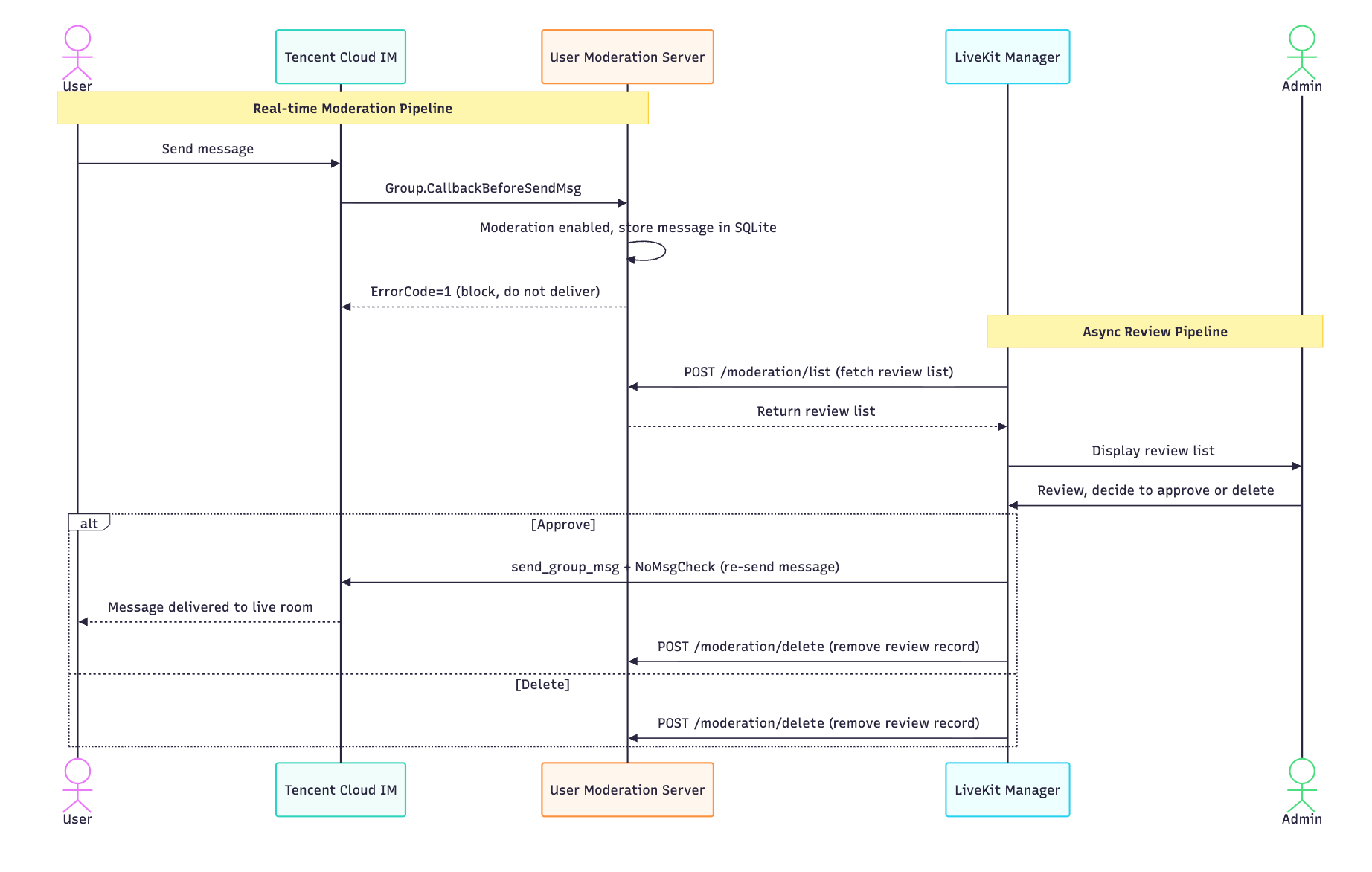
Custom Moderation | Suitable for real-time interactive moderation in live rooms. Uses a pre-send interception mechanism to submit user messages to a online manual review workflow, allowing only approved messages to go to appear in the live room. | custom |
Architecture
Quick Start
Step 1: Quick Validation with Minimal Prototype (Verification Only, Not for Production)
cd packages/custom-moderation-server# # Install dependenciesnpm install# # Copy configuration filecp config/example.env config/.env# # Start (port 9001)npm start
Warning:
This is a minimal prototype, provided in the repository, designed to let you verify"IM Callback → Intercept → Moderation List → Approve"the full chain within minutes.
When going live, please implement and deploy your own moderation server based on the Custom Moderation Server API Specification and configure its address in
CUSTOM_MODERATION_BASE_URL.Step 2: Configure Main Server for Custom Moderation
Edit
packages/server/config/.env:# # Switch to custom moderation modeMODERATION_MODE=custom# # Custom moderation server address (demo server defaults to http://localhost:9001)CUSTOM_MODERATION_BASE_URL=http://localhost:9001# # API Key (optional, demo server has none configured by default, leave empty)# CUSTOM_MODERATION_API_KEY=your_api_key
Step 3: Configure Callbacks in the TRTC Console
1. Go to TRTC Callback Configuration.
2. Under Social Interaction Callback, click Edit next to Social Interaction Callback URL, enter the callback URL (e.g.,
http://your-domain:9001/im-callback), and click OK.3. Under Social Interaction Callback, find Callback Before Sending Messages in Group, enable the toggle, and click Save.
Step 4: Test
# # Simulate IM callback (message intercepted)curl -X POST http://localhost:9001/im-callback \\-H "Content-Type: application/json" \\-d '{"CallbackCommand": "Group.CallbackBeforeSendMsg","GroupId": "test_live_room","From_Account": "user_001","MsgBody": [{"MsgType": "TIMTextElem", "MsgContent": {"Text": "Hello"}}]}'# # View moderation listcurl -X POST http://localhost:9001/moderation/list \\-H "Content-Type: application/json" \\-d '{"Receiver": "test_live_room", "PageNo": 1, "PageSize": 10}'
Custom Moderation Server API Specification
All endpoints are prefixed with
{CUSTOM_MODERATION_BASE_URL}, configured via env.Authentication (Optional)
If
CUSTOM_MODERATION_API_KEY is configured, LiveKit Manager includes the following in all requests:X-Api-Key: {CUSTOM_MODERATION_API_KEY}
Endpoint 1: Full Moderation Toggle
Query Toggle Status
GET /moderation/toggleRequest parameters: None
Response:
{"ActionStatus": "OK","ErrorCode": 0,"Enabled": true}
Set Toggle Status
POST /moderation/toggleRequest body:
{"Enabled": true}
Response:
{"ActionStatus": "OK","ErrorCode": 0,"Enabled": true}
Field Description:
Enabled: true indicates full moderation enabled (all messages intercepted),false indicates disabled (messages delivered normally).Endpoint 2: Moderation Message List
POST /moderation/listRequest body:
{"Receiver": "live_room_id","PageNo": 1,"PageSize": 20}
Field Description:
Field | Type | Required | Description |
Receiver | string | Yes | Live room ID (corresponds to GroupId). |
PageNo | number | Yes | Page number (starting from 1). |
PageSize | number | Yes | Page size (max 100). |
Response (Aligned with Tencent Cloud
DescribeCloudAuditRecordDetailV2.Data array format):{"TotalCount": 100,"RequestId": "req_1234567890","Data": [{"ContentId": "msg_001","From_Account": "user_alice","Content": "Intercepted message content","Time": "2026-06-30 14:30:00.000"}]}
Field Description:
Field | Type | Required | Description |
TotalCount | number | Yes | Total record count (for pagination calculation). |
RequestId | string | No | Request ID. |
Data[].ContentId | string | Yes | Unique message ID(for subsequent Delete/Approve). |
Data[].From_Account | string | Yes | Sender IM account. |
Data[].Content | string | Yes | Message text content. |
Data[].Time | string | Yes | Message timestamp (format YYYY-MM-DD HH:mm:ss.SSS). |
Note:
In custom moderation mode, the
Label (moderation label) field is not needed. The corresponding column will be hidden in the frontend.Endpoint 3: Delete Moderation Records
POST /moderation/deleteRequest body:
{"ContentIds": ["msg_001", "msg_002"]}
Response:
{"ActionStatus": "OK","ErrorCode": 0,"DeletedCount": 2,"RequestId": "req_1234567890"}
Field Description:
Field | Type | Description |
DeletedCount | number | Number of records actually deleted. |
Error Response Format
All endpoints return on error:
{"ActionStatus": "FAIL","ErrorCode": 500,"ErrorInfo": "Error description"}
IM Callback Format
Group.CallbackBeforeSendMsg Callback
Tencent Cloud IM callback before group message delivery; your server must handle this callback.
Request (Tencent Cloud → Your Server)
{"CallbackCommand": "Group.CallbackBeforeSendMsg","GroupId": "live_room_123","Type": "Public","From_Account": "user_456","Operator_Account": "","Random": 123456,"MsgBody": [{"MsgType": "TIMTextElem","MsgContent": {"Text": "Message content sent by user"}}]}
Key fields:
Field | Description |
GroupId | Live room ID. |
From_Account | Sender IM account. |
MsgBody[].MsgContent.Text | Text message content. |
Response (Your Server → Tencent Cloud)
Intercept Message (not delivered to the live room):
{"ActionStatus": "OK","ErrorCode": 1,"ErrorInfo": "Message intercepted for moderation"}
Approve Message (delivered normally):
{"ActionStatus": "OK","ErrorCode": 0,"ErrorInfo": ""}
Note:
ErrorCode of 0 indicates Approve,non- 0 indicates interception. Callback timeout defaults to Approve(ensuring message deliverability).Callback Timeout Fallback
Tencent Cloud IM callback timeout is 2 seconds. If your server does not respond within 2 seconds, IM will automatically approve the message. automatically approve the message.
Recommendations:
Your server's callback handler should perform fast storage operations (e.g., SQLite INSERT), keeping processing time below milliseconds.
Do not perform time-consuming external API calls in the callback handler.
Moderation Message Lifecycle
Approve Flow (handled by LiveKit Manager)
1. Admin clicks Approve.
2. LiveKit Manager calls
send_group_msg (with NoMsgCheck to skip re-moderation) to resend the message as the original user.3. After successful resend, call your server's
POST /moderation/delete delete corresponding record.4. Each message is processed independently: each succeeded message is deleted, failed ones remain in the database.
Delete Flow
1. Admin clicks Delete.
2. LiveKit Manager call your server's
POST /moderation/delete delete corresponding record.Dual-track Moderation Mode Comparison
Feature | Cloud Mode | Custom Mode |
Moderation Data Source | Tencent Cloud DescribeCloudAuditRecordDetailV2 | Custom Database |
Moderation List Fields | id / User ID / Content / Recognition Type / Time | id / User ID / Content / Time |
Action Buttons | Approve / Delete / More(Correction Whitelist) | Approve / Delete |
Full Moderation Toggle | None | Yes |
Delete Implementation | IndexedDB Frontend Marker | Custom Server DELETE |
Approve Implementation | send_group_msg + IndexedDB Marker | send_group_msg + Custom Server DELETE |
Correction Whitelist | Supported | Not Supported |
FAQ
What happens to the live room if my server goes down?
Chat callback timeout (2 seconds), Tencent Cloud IM will automatically approve the message.Messages are not lost. However, new messages will not appear in the moderation list, until your server recovers.
Why doesn't the moderation list have a 'Recognition Type' column?
In Custom moderation mode, moderation logic is controlled by you; there are no 「Porn/Abuse/Ad」predefined tags like "Porn/Abuse/Ad". Moderators see all intercepted messages, decide whether to approve each message.
After approving a message, why are other previously intercepted 「messages from the same user 」still in the list?
Each message is processed independently. Batch approve can select multiple messages to process together.
Can I switch back to Tencent Cloud moderation?
Yes. Change
MODERATION_MODE back to cloud and restart the service. Switching will not lose data — your server data remains intact.How do I implement custom moderation rules (e.g., sensitive word filtering)?
Implement in your server's IM callback handler. Example:
// callback.jsconst db = require('./db'); // // Database module, provides insertMessage etc. APIsconst blockedWords = ['sensitive_word_1', 'sensitive_word_2'];// // Extract text content from MsgBody (assuming only the first text message is processed)const content = req.body.MsgBody[0]?.MsgContent?.Text || '';if (content && blockedWords.some(w => content.includes(w))) {// // Intercept and store message in databasedb.insertMessage({content_id: `msg_${Date.now()}`,group_id: req.body.GroupId,from_account: req.body.From_Account,content: content,msg_body: JSON.stringify(req.body.MsgBody)});res.json({ ActionStatus: 'OK', ErrorCode: 1 });} else {// Approveres.json({ ActionStatus: 'OK', ErrorCode: 0 });}
フィードバック