Editing Tag
Download
Focus Mode
Font Size
This document describes different tag editing methods.
Editing Cluster Tag
1. Log in to the TcaplusDB Console and select Cluster List on the left sidebar.
2. In the cluster list, locate the target cluster and click Edit Tag next to "Operation".
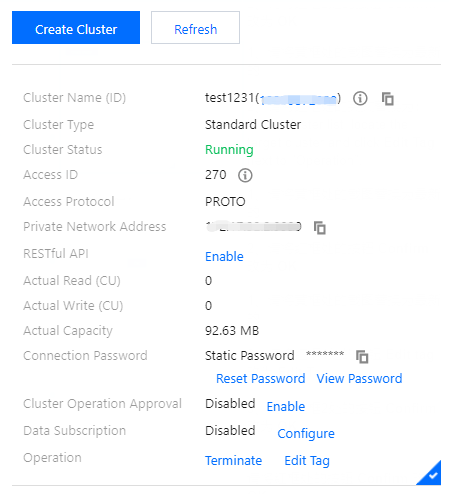
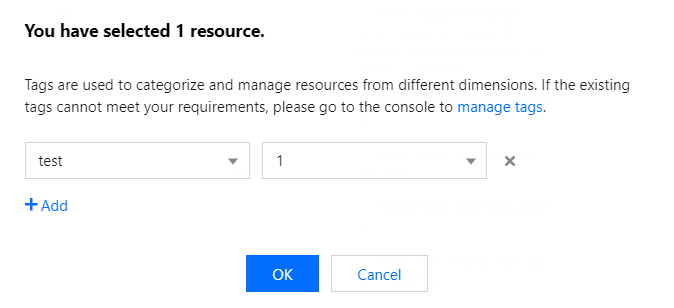
3. In the pop-up dialog box, you can add, modify, or delete a tag. After confirming that everything is correct, click OK.
Editing Table Group Tag
1. Log in to the TcaplusDB Console and select Cluster List on the left sidebar.
2. In the table group list on the right, select More > Edit Tag in the "Operation" column of the target table group.
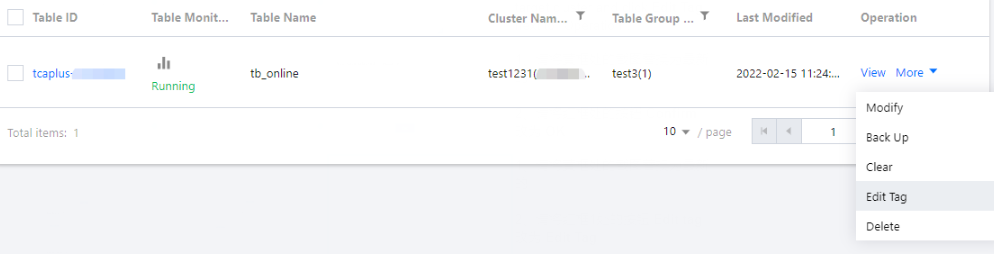
3. In the pop-up dialog box, you can add, modify, or delete a tag. After confirming that everything is correct, click OK.
Editing Tag of One Table
1. Log in to the TcaplusDB Console and select Table List on the left sidebar.
2. In the table list, select More > Edit tag in the "Operation" column of the target table.

3. In the pop-up dialog box, you can add, modify, or delete a tag. After confirming that everything is correct, click OK.
Editing Tag of Multiple Tables
1. Log in to the TcaplusDB Console and select Table List on the left sidebar.
2. In the table list, select the target tables and select Batch Operation > Set tag at the top.
Note:
The selected tables must be in the same cluster.
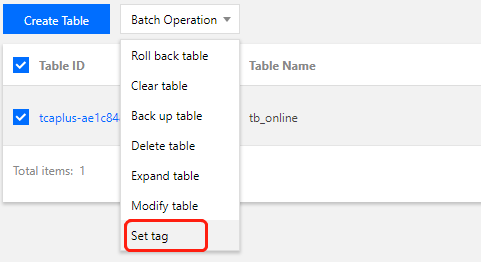
3. In the pop-up dialog box, you can add, modify, or delete a tag. After confirming that everything is correct, click OK.
Help and Support
Was this page helpful?
You can also Contact sales or Submit a Ticket for help.
Help us improve! Rate your documentation experience in 5 mins.
Feedback