Pay-as-you-go Switch to Yearly/Monthly Subscription (5.x)
Download
Focus Mode
Font Size
Scenarios
To make it more convenient for you to use RocketMQ, Tencent Cloud has launched the feature of converting RocketMQ hourly-paid clusters to monthly subscription clusters, supporting the conversion of temporarily used hourly-paid clusters to long-term and stable monthly subscription to save costs.
Note:
Currently, only 5.x clusters support switching billing modes.
Switch Rules
Bills
After the billing mode is changed from pay-as-you-go to yearly/monthly subscription, a new order will be generated. The yearly/monthly subscription mode will take effect immediately after the order payment is completed.
Assume that a user purchased a pay-as-you-go cluster at 14:30:15 on June 28, 2025. Then, the user switched the billing mode from pay-as-you-go to yearly/monthly subscription and paid for one month of cluster fees at 15:50:15 on June 28, 2025. After the user completed the order payment, the yearly/monthly subscription cluster will take effect immediately. On the Cost Center > Bill Details page, three bill records will be generated.
Pay-as-you-go: During the period from 14:00:00 to 15:00:00 on June 28, 2025, fees incurred from 14:30:15 to 15:00:00.
Pay-as-you-go: During the period from 15:00:00 to 16:00:00 on June 28, 2025, fees incurred from 15:00:00 to 15:50:15.
Yearly/monthly subscription: 15:50:15 on June 28, 2025 to 15:50:15 on July 28, 2025.
Conversion Limits
Currently, only 5.x clusters support switching billing modes.
After the billing mode is switched successfully, the cluster will be billed by the new billing mode immediately. The start time of the new billing period for the cluster is the time at which the conversion is successful.
After the billing mode of the cluster is switched, the billing mode of the public network bandwidth will also be automatically switched.
Prerequisites
Only clusters in the Running status support switching the billing mode. Clusters in the Delivering, Adjusting configurations, Isolated, or Abnormal status do not support switching the billing mode.
Operation Steps
1. Log in to the TDMQ for RocketMQ console.
2. In the left sidebar, click Cluster. Then, choose More > Convert to Monthly Subscription in the operation column of the target cluster.
3. In the pop-up window for switching the billing mode from pay-as-you-go to yearly/monthly subscription, set the renewal duration and specify whether to enable auto-renewal based on actual needs.
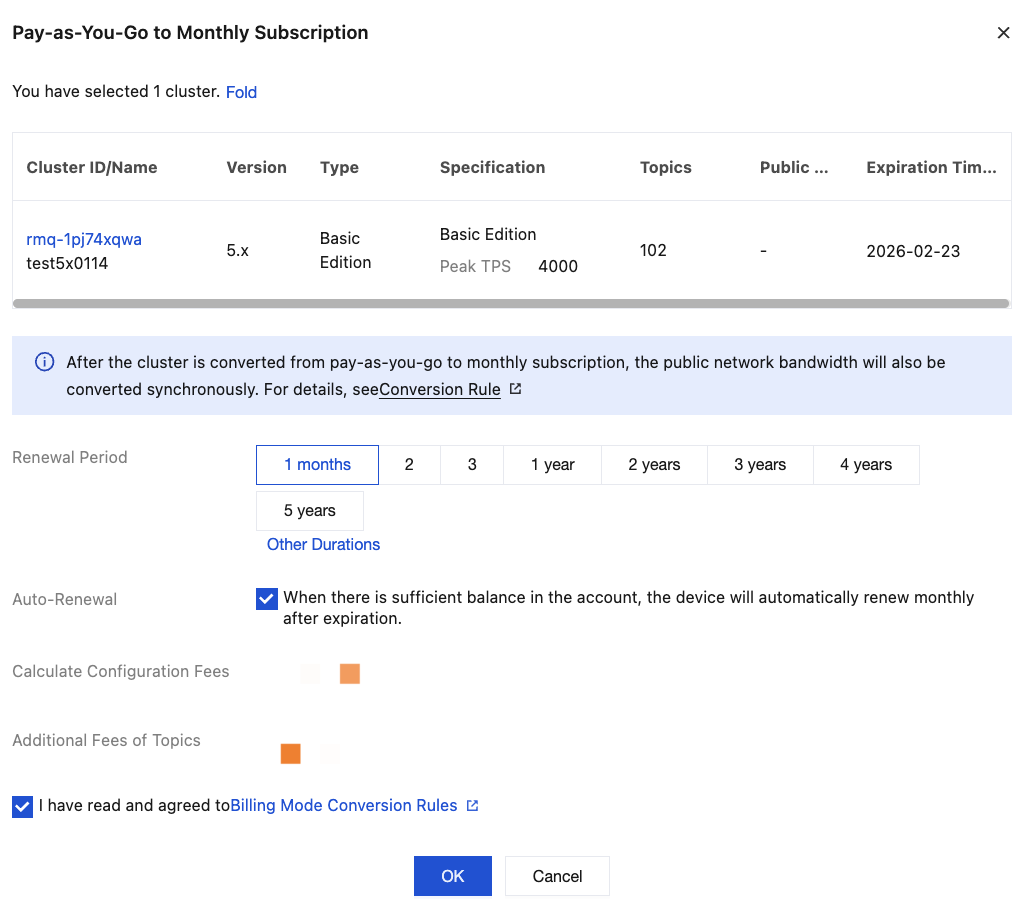
4. Select I have read and agreed to Billing modeConversion Rules, and click OK.
5. Complete the payment as prompted on the page to complete the conversion.
Help and Support
Was this page helpful?
You can also Contact sales or Submit a Ticket for help.
Help us improve! Rate your documentation experience in 5 mins.
Feedback