Inline Chat
Download
Focus Mode
Font Size
Inline Chat embeds an input box directly in the code editor, allowing you to generate code and insert it at the current cursor position by entering requirements or calling commands. This feature greatly enhances code generation capabilities during the coding process.
Features
In-Place Editing: Converse with AI directly in the code editor without switching windows.
Enable Inline Chat
In CodeBuddy IDE, the Inline Chat feature is enabled by default and requires no additional configuration.
Using Inline Chat
How to Trigger
Method | Operation Description |
Menu | After selecting a code block, click the Edit button in the popup menu |
Shortcut | Trigger directly using a keyboard shortcut |
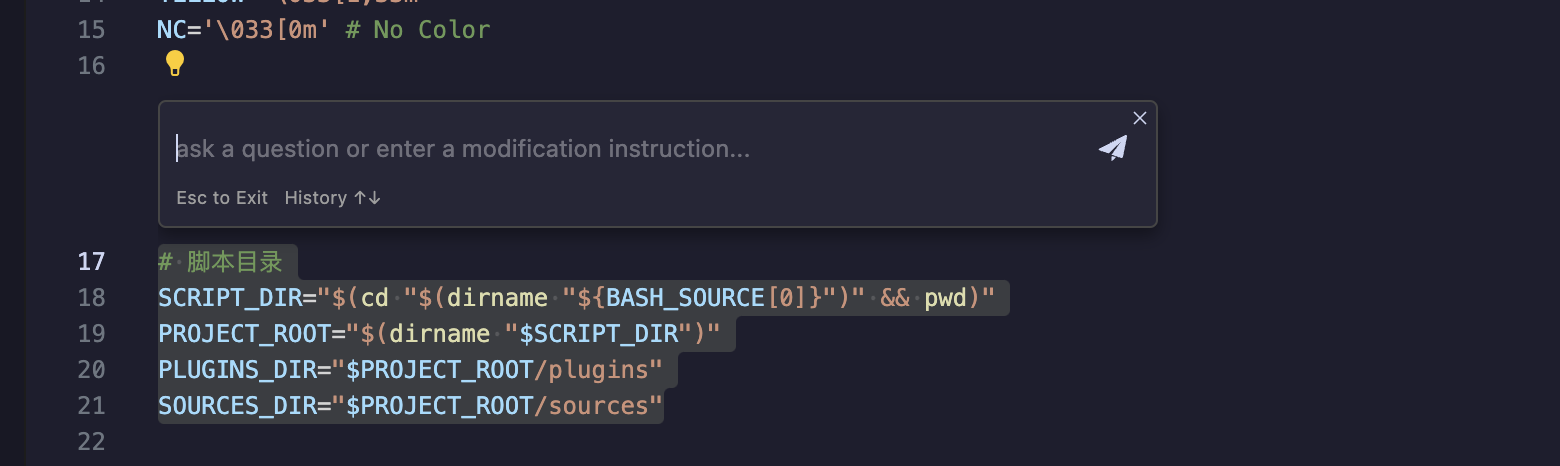
Usage Flow
1. Trigger Input Box: Open Inline Chat via shortcut or menu.
2. Input Requirements: Directly input requirements described in natural language.
3. AI Processing: AI will help you edit the selected code or generate new code.
4. Process Result: Accept/Reject the generated code individually or in batch.
Shortcuts
System | Operation | Description |
Windows | Ctrl + I | Quickly trigger Inline Chat input box |
Mac | Command + I | Quickly trigger Inline Chat input box |
General | Escape | Exit/Close Inline Chat input box |
Typical Scenarios
After triggering Inline Chat, you can input natural language requirements for quick scenarios.
Typical application scenarios include:
Quickly Generate Code Templates: Quickly generate or insert common code templates, such as functions, classes, configurations, etc.
Code Refactoring & Optimization: Refactor, rename, or optimize logic for existing code.
Code Diagnosis & Fix: Real-time code diagnosis and fix suggestions, such as type validation, security checks, etc.
Rapid Requirement Implementation: Quickly realize ideas through natural language when developing new features.
FAQ
Cannot trigger Inline Chat?
Please check the following points:
Check if the shortcut key conflicts with other functions.
Try restarting the IDE.
Generated code does not meet expectations?
Try providing a more detailed requirement description.
You can try multiple times and choose the best result.
How to undo accepted code?
Use the IDE's undo function (
Ctrl + Z / Command + Z) to undo accepted code modifications.
Help and Support
Was this page helpful?
You can also Contact sales or Submit a Ticket for help.
Help us improve! Rate your documentation experience in 5 mins.
Feedback